I've done a search and couldn't find anything that really answered my question so I figured I'd ask.
I have two themes one of which is the "glass onion" theme, featured on lifehacker, and the "totally transparent" theme I found on youtube. What I want to do is take the start menu from the totally transparent theme and put it into the glass onion theme. I downloaded windows style builder but I can't figure it out. It doesn't seem to give me any idea of how to do anything.
Thanks in advance for the help. GW2.
My Computer
Computer Manufacturer/Model Number
Asus G73JH-A2
OS
Windows 7 Ultimate x64
CPU
Intel Core i7 720QM
Memory
8GB factory installed
Graphics Card(s)
ATI Mobility Radeon 5870 W/ Flashed VBIOS to fix GSOD
Screen Resolution
1920x1080
Hard Drives
1 500GB 1 250GB
Keyboard
G15
Mouse
G9x
Internet Speed
Rogers extreme/Bell fibe25 depending on where I am.
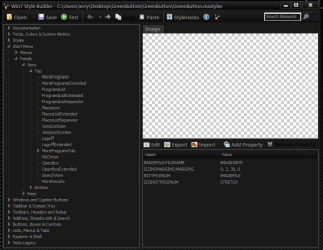
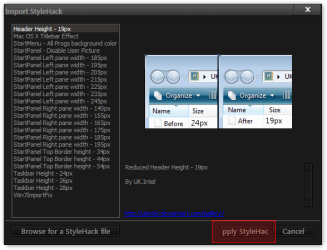
You will need to open the transparent theme .msstyle with WSB & go to Start Menu > Panels > Aero > Top and export the images one at a time and then open up the other theme .msstyle and then import the images. This will get you started.
Then go to this forum and register for free and look at the maps. Virtual Customs • Home • Customize Your Virtual World!
You can make a style hack also.
Open the theme .mssytyle with WSB go to Start Menu > Panels > Aero > Top
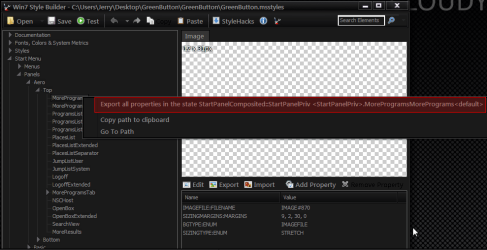
right click one image at a time first one and export all properties and do that for all the images
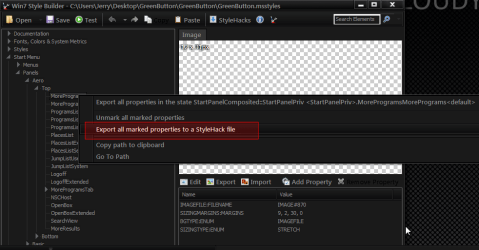
then after you do the last one right click again and export for all properties to a style hack
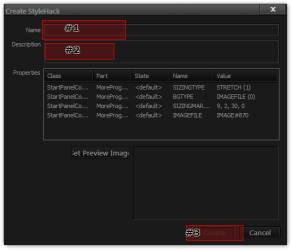
give the style hack a name and description and click create
then load the other theme and go to the style hack button
and find your hack and apply it
Jerry
My Computer
Computer type
Laptop
Computer Manufacturer/Model Number
Sager NP9170
OS
Win 7 Pro x64 / Win 10 Pro
CPU
Intel(R) Core(TM) i7-3630QM CPU @ 2.40GHz
Motherboard
CLEVO P170EM
Memory
12 GB
Graphics Card(s)
(1) Intel(R) HD Graphics 4000 (2) NVIDIA GeForce GTX 675M
Sound Card
(1) Realtek High Definition Audio (2) Intel(R) Display Aud
Monitor(s) Displays
17.3
Screen Resolution
1920x1080
Hard Drives
(1) Samsung 860 EVO 500GB(OS) (1) Samsung 860 EVO 500GB(Data)
Keyboard
Backlite
Antivirus
MSE, Malwarebytes Pro
Browser
Firefox
Other Info
DESKTOP: Custom-built.
OS: Win 10 Pro x64.
CASE: Rosewill R5.
CPU: Intel I5 4670K CPU @ 3.40GHz.
CPU COOLER: Cool Master Hyper 212 EVO.
MOTHERBOARD: Asus Z87-A.
MEMORY: Kingston HyperX 2x4 GB.
GPU: Nvidia Geforce 650 TI.
PSU: Corsair TX750.
DRIVES: (1) Samsung 840 120 GB SSD (2) Western Digital blue 500 GB 7200 RPM.