Combining two hard disks in to a single drive on Window Home Premium

larnall

New member
Local time
5:37 AM
Messages
6
All - I hope you can help. This issue is driving me nuts.

I have a relatively new PC with two hard disks - a smaller 200gb and a larger 1.8TB. The way the machine was configured when I received it was that the smaller disk was designated as the C:. and unsurprisingly has become full. The larger 1.8TB disk is unused. I want to use the empty space on the 1.8TB disk to increase the size of the C:, (in other words I want a single large C: spanning the two physical disks) but try as I might I can't find a way to do it. I have attempted to create a "New Spanned Volume" of the larger disk in Disk Management, but the option is greyed out. I've tried some free download software from CNET, and those applications haven't been able to do it. I've scoured through forums and read a lot of threads, but I can't find anything which solves the problem.

Help?!

L
 

My Computer My Computer

At a glance

Windows 7 Home Premium
OS
Windows 7 Home Premium
Why do you need to put C on 2 different hard drives?

It may be doable with "dynamic" volumes, but it's complicated and generally not recommended--but you may have some particular reason to do this??
 

My Computer My Computer

At a glance

Windows 7 Home Premium SP1, 64-bitIntel Skylake i5-6600K, not overclocked8 GB HyperX DDR4-2666 (2 x 4 GB)none; graphics are integrated on CPU
Computer type
PC/Desktop
Computer Manufacturer/Model Number
Ignatz Special; 4 speed manual gearbox; factory air conditioning; one of one
OS
Windows 7 Home Premium SP1, 64-bit
CPU
Intel Skylake i5-6600K, not overclocked
Motherboard
AsRock Z170M Extreme 4, micro ATX
Memory
8 GB HyperX DDR4-2666 (2 x 4 GB)
Graphics Card(s)
none; graphics are integrated on CPU
Sound Card
onboard: Realtek ALC1150; external: USB Behringer UF0-202
Monitor(s) Displays
Dell S2340M 23 inch IPS
Screen Resolution
1600 x 900
Hard Drives
System: Crucial MX100 series SSD, 128 GB;
Data: Samsung Spinpoint 103SJ, 1 TB;
Backup: WD Caviar Green WD30EZRX-00D8PB0, 3 TB
PSU
Rosewill SilentNight 500 watt fanless, semi-modular
Case
Antec Solo II
Cooling
Noctua NH-U12S; Noctua F12 intake, Noctua S12A exhaust
Keyboard
Microsoft 200 6JH-00001 USB
Mouse
Dell or Microsoft optical wired; USB
Antivirus
Microsoft Security Essentials and Malwarebytes Premium
Browser
Pale Moon
Other Info
All fans PWM; speeds at idle: CPU circa 500 rpm; intake circa 600 rpm; exhaust circa 600 rpm; CPU temps 27 idle and 47 C load in a warm room (27 C/81 F) when running Intel Extreme Tuning Utility stress test.
Why don't you keep the C: drive as your boot drive but move all of your data to the larger drive? Many of us have relatively small SSDs as boot drives, coupled with larger data drives. I personally have a 128G SSD as my boot drive and a 1.5T HDD for a data drive. Works great.
 

My Computer My Computer

At a glance

W10 Pro desktop, W11 laptop, W11 Pro tablet (...3.7Ghz 8700K i7, i7-11800H, i7-1065G716G desktop, 16G laptop, 4G tabletAMD Radeon RX580, RTX 3060, Intel Iris Plus
Computer type
PC/Desktop
Computer Manufacturer/Model Number
Home Built desktop, Dell G15 5511 Gaming laptop,MS Surface Pro 7 tablet
OS
W10 Pro desktop, W11 laptop, W11 Pro tablet (all 64-bit)
CPU
3.7Ghz 8700K i7, i7-11800H, i7-1065G7
Motherboard
ASUS TUF Z370-Pro Gaming in desktop
Memory
16G desktop, 16G laptop, 4G tablet
Graphics Card(s)
AMD Radeon RX580, RTX 3060, Intel Iris Plus
Sound Card
High Definition Audio (Built-in to mobo)
Monitor(s) Displays
Samsung U32J59 32" (2x), 15.6", 12"
Screen Resolution
3840x2160, 3840x2160, 1920x1080, 2160x1440
Hard Drives
500G SSD for OS; 2T, 10T & 15T HDDs for Data on Desktop, 1TB SSD laptop, 128G SSD tablet.
PSU
Corsair CX 750M
Case
Antec 100
Cooling
CM 212+
Keyboard
IBM Model M - used continuously since 1986
Mouse
Microsoft Pro IntelliMouse
Internet Speed
400M down 8M up
Antivirus
Windows Defender
Browser
FireFox
Other Info
Built my first computer (8Mhz 8088cpu, 640K RAM, 20MB HDD, 2 360K floppy drives) in 1985 and have been building them for myself, relatives and friends ever since.
Let's back up here. Something doesn't sound right, so can you fill in your system specs or better yet, post a screenshot of your Disk Management screen? My guess is, they may actually be part of the same drive.

As for spanning, that isn't going to happen without having identical drives...so one way or another, it isn't going to be an option for you. Post the Disk Management screenshot and we'll go from there.
 

My Computer My Computer

At a glance

Windows 7 Ultimate x64 SP1Intel Core i7-260012 GB Patriot Extreme DDR3-1333Nvidia GTX 470
OS
Windows 7 Ultimate x64 SP1
CPU
Intel Core i7-2600
Motherboard
Gigabyte GA-P67A-UD3P-B3
Memory
12 GB Patriot Extreme DDR3-1333
Graphics Card(s)
Nvidia GTX 470
Monitor(s) Displays
Dell UltraSharp 2209WA
Hard Drives
OCZ Agility3 240 GB, WD5001AALS, WD7501AALS
PSU
OCZ ModStream 700W
Case
CoolerMaster HAF 912 Advanced
Cooling
CoolerMaster Hyper 212 Plus
Thanks all for your replies. I may be making this harder than it needs to be. Specs are below. The reason I wanted to run one drive off two disks was that the first disk was full, and I wanted the computer to simply start using the space on the second, much larger disk without having to change the settings of the computer to redirect where it saves, etc. It sounds like in practice the latter may actually be straightforward. So, let me change the question.

My computer has been saving everything (videos, music, downloads, games etc) on to the smaller drive. It's now full. I want it to use the larger drive for these purposes as a default. But changing how my computer behaves seems to be a laborious manual task. I'm assuming there must be a smart way to do this. Can you help? Rig specs follow.

Chillblast Fusion Blackbird 4.6GHz Core i7 2600K, 16GB, Radeon 6990 4GB : Corsair Graphite 600T Midi Tower CaseIntel Core i7 2700K Processor Overclocked to up to 4.9GHz Corsair A70 Ultra Quiet CPU Cooler Asus Sabertooth P67 Motherboard 16GB Corsair PC3-12800 1600MHz DDR3 Memory (4 x 4GB sticks) Chillblast AMD Radeon HD 6990 4096MB Graphics Card 120GB Corsair Solid State Drive 1800GB 7200RPM Hard Disk Samsung Blu-Ray ROM / DVD-RW Combi Drive Corsair TX 850W PSU Onboard High Definition AudioWindows 7 Home Premium 64 bit
 

My Computer My Computer

At a glance

Windows 7 Home Premium
OS
Windows 7 Home Premium
Why don't you keep the C: drive as your boot drive but move all of your data to the larger drive? Many of us have relatively small SSDs as boot drives, coupled with larger data drives. I personally have a 128G SSD as my boot drive and a 1.5T HDD for a data drive. Works great.

Strollin - hi. I think that may be precisely what I need to do. How do you set it up/manage it?

Thanks

L
 

My Computer My Computer

At a glance

Windows 7 Home Premium
OS
Windows 7 Home Premium
Strollin - hi. I think that may be precisely what I need to do. How do you set it up/manage it?

The first step is to post a picture of Windows Disk Management as Deacon requested in post 4 in this thread.

Tentatively, the plan would be for C and System Reserved partitions to be on the 200 GB drive. C would include Windows and all applications, but nothing else.

And the 1.8 TB drive would be nothing but personal data.

But the pic of Disk Management is needed to avoid errors and wrong assumptions.

Your post #5 says you also have a 120 GB Corsair SSD.

So there are actually 3 drives: 120 SSD, 200 HDD, and 1.8 TB HDD???
 

My Computer My Computer

At a glance

Windows 7 Home Premium SP1, 64-bitIntel Skylake i5-6600K, not overclocked8 GB HyperX DDR4-2666 (2 x 4 GB)none; graphics are integrated on CPU
Computer type
PC/Desktop
Computer Manufacturer/Model Number
Ignatz Special; 4 speed manual gearbox; factory air conditioning; one of one
OS
Windows 7 Home Premium SP1, 64-bit
CPU
Intel Skylake i5-6600K, not overclocked
Motherboard
AsRock Z170M Extreme 4, micro ATX
Memory
8 GB HyperX DDR4-2666 (2 x 4 GB)
Graphics Card(s)
none; graphics are integrated on CPU
Sound Card
onboard: Realtek ALC1150; external: USB Behringer UF0-202
Monitor(s) Displays
Dell S2340M 23 inch IPS
Screen Resolution
1600 x 900
Hard Drives
System: Crucial MX100 series SSD, 128 GB;
Data: Samsung Spinpoint 103SJ, 1 TB;
Backup: WD Caviar Green WD30EZRX-00D8PB0, 3 TB
PSU
Rosewill SilentNight 500 watt fanless, semi-modular
Case
Antec Solo II
Cooling
Noctua NH-U12S; Noctua F12 intake, Noctua S12A exhaust
Keyboard
Microsoft 200 6JH-00001 USB
Mouse
Dell or Microsoft optical wired; USB
Antivirus
Microsoft Security Essentials and Malwarebytes Premium
Browser
Pale Moon
Other Info
All fans PWM; speeds at idle: CPU circa 500 rpm; intake circa 600 rpm; exhaust circa 600 rpm; CPU temps 27 idle and 47 C load in a warm room (27 C/81 F) when running Intel Extreme Tuning Utility stress test.
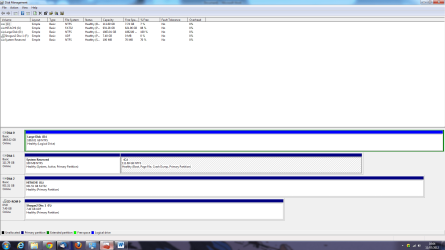
There are two drives. Apologies for the earlier confusion. One smaller SSD and one larger. I've attached a printscreen of Disk Management, as requested. You can ignore Disk 2 (it's an external hard drive).

Thanks for the help with this.

L
 

Attachments

My Computer My Computer

At a glance

Windows 7 Home Premium
OS
Windows 7 Home Premium
Reattaching as the previous document seemed to have become corrupted.

L
 

Attachments

My Computer My Computer

At a glance

Windows 7 Home Premium
OS
Windows 7 Home Premium
I get the following error message when I try to open that doc in Word:

"The image cannot be displayed. Your computer may not have enough memory to open the image, or the image may have been corrupted."

I can assure you I have enough memory.

The easiest way is to post an image right in this thread, not in a Word doc.

But do what you have to do to get us to see it.
 

My Computer My Computer

At a glance

Windows 7 Home Premium SP1, 64-bitIntel Skylake i5-6600K, not overclocked8 GB HyperX DDR4-2666 (2 x 4 GB)none; graphics are integrated on CPU
Computer type
PC/Desktop
Computer Manufacturer/Model Number
Ignatz Special; 4 speed manual gearbox; factory air conditioning; one of one
OS
Windows 7 Home Premium SP1, 64-bit
CPU
Intel Skylake i5-6600K, not overclocked
Motherboard
AsRock Z170M Extreme 4, micro ATX
Memory
8 GB HyperX DDR4-2666 (2 x 4 GB)
Graphics Card(s)
none; graphics are integrated on CPU
Sound Card
onboard: Realtek ALC1150; external: USB Behringer UF0-202
Monitor(s) Displays
Dell S2340M 23 inch IPS
Screen Resolution
1600 x 900
Hard Drives
System: Crucial MX100 series SSD, 128 GB;
Data: Samsung Spinpoint 103SJ, 1 TB;
Backup: WD Caviar Green WD30EZRX-00D8PB0, 3 TB
PSU
Rosewill SilentNight 500 watt fanless, semi-modular
Case
Antec Solo II
Cooling
Noctua NH-U12S; Noctua F12 intake, Noctua S12A exhaust
Keyboard
Microsoft 200 6JH-00001 USB
Mouse
Dell or Microsoft optical wired; USB
Antivirus
Microsoft Security Essentials and Malwarebytes Premium
Browser
Pale Moon
Other Info
All fans PWM; speeds at idle: CPU circa 500 rpm; intake circa 600 rpm; exhaust circa 600 rpm; CPU temps 27 idle and 47 C load in a warm room (27 C/81 F) when running Intel Extreme Tuning Utility stress test.
How about the attached?
 

Attachments

  • Printscreen.png
    Printscreen.png
    53.7 KB · Views: 15

My Computer My Computer

At a glance

Windows 7 Home Premium
OS
Windows 7 Home Premium
That looks as expected. The SSD has System Reserved and C. The large drive is empty.

I assume you store all your stuff in some folder under C Users, most likely C users yourusername?

You need to redirect that folder.

I have never used user folders at all and save directly to the D drive, so I'm not the authority on what you need to do---but it is commonly done.

Below are a couple of tutorials that you can at least look over. I'd wait for others who have actually done the procedure to comment as I think there may be some nuances or there may be other relevant tutorials.


http://www.sevenforums.com/tutorials/87555-user-profile-change-default-location.html?ltr=U

http://www.sevenforums.com/tutorials/18629-user-folders-change-default-location.html?ltr=U
 

My Computer My Computer

At a glance

Windows 7 Home Premium SP1, 64-bitIntel Skylake i5-6600K, not overclocked8 GB HyperX DDR4-2666 (2 x 4 GB)none; graphics are integrated on CPU
Computer type
PC/Desktop
Computer Manufacturer/Model Number
Ignatz Special; 4 speed manual gearbox; factory air conditioning; one of one
OS
Windows 7 Home Premium SP1, 64-bit
CPU
Intel Skylake i5-6600K, not overclocked
Motherboard
AsRock Z170M Extreme 4, micro ATX
Memory
8 GB HyperX DDR4-2666 (2 x 4 GB)
Graphics Card(s)
none; graphics are integrated on CPU
Sound Card
onboard: Realtek ALC1150; external: USB Behringer UF0-202
Monitor(s) Displays
Dell S2340M 23 inch IPS
Screen Resolution
1600 x 900
Hard Drives
System: Crucial MX100 series SSD, 128 GB;
Data: Samsung Spinpoint 103SJ, 1 TB;
Backup: WD Caviar Green WD30EZRX-00D8PB0, 3 TB
PSU
Rosewill SilentNight 500 watt fanless, semi-modular
Case
Antec Solo II
Cooling
Noctua NH-U12S; Noctua F12 intake, Noctua S12A exhaust
Keyboard
Microsoft 200 6JH-00001 USB
Mouse
Dell or Microsoft optical wired; USB
Antivirus
Microsoft Security Essentials and Malwarebytes Premium
Browser
Pale Moon
Other Info
All fans PWM; speeds at idle: CPU circa 500 rpm; intake circa 600 rpm; exhaust circa 600 rpm; CPU temps 27 idle and 47 C load in a warm room (27 C/81 F) when running Intel Extreme Tuning Utility stress test.
I would recommend not redirecting folders, but just changing the library pointers. That used to be the way, but I see most people suggesting to not redirct anymore with Windows 7. On any system I use, I don't store anything on C on purpose. Everything goes to my D drive...docs, photos, music, etc.
 

My Computer My Computer

At a glance

Windows 7 Ultimate x64 SP1Intel Core i7-260012 GB Patriot Extreme DDR3-1333Nvidia GTX 470
OS
Windows 7 Ultimate x64 SP1
CPU
Intel Core i7-2600
Motherboard
Gigabyte GA-P67A-UD3P-B3
Memory
12 GB Patriot Extreme DDR3-1333
Graphics Card(s)
Nvidia GTX 470
Monitor(s) Displays
Dell UltraSharp 2209WA
Hard Drives
OCZ Agility3 240 GB, WD5001AALS, WD7501AALS
PSU
OCZ ModStream 700W
Case
CoolerMaster HAF 912 Advanced
Cooling
CoolerMaster Hyper 212 Plus
I created folders on my D: drive similarly named to the ones on my C: drive. For instance, I have Music, Pictures, Video, Program Files, etc... When I save a data file, I simply save it to the folders I created on the D: drive.

I don't install ALL of my program files on my SSD but only those that I use frequently. I also moved the page file and TEMP file folder to the D: drive.

When installing a program, it's easy to tell it to install on the D: vs. the C:. The default is usually to install to the C:\Program Files\ProgramName folder. Since I have the Program Files folder on my D: drive I simply change the install drive from C: to D:. Many programs require you choose "Custom Install" to be able to alter the default install location.
 

My Computer My Computer

At a glance

W10 Pro desktop, W11 laptop, W11 Pro tablet (...3.7Ghz 8700K i7, i7-11800H, i7-1065G716G desktop, 16G laptop, 4G tabletAMD Radeon RX580, RTX 3060, Intel Iris Plus
Computer type
PC/Desktop
Computer Manufacturer/Model Number
Home Built desktop, Dell G15 5511 Gaming laptop,MS Surface Pro 7 tablet
OS
W10 Pro desktop, W11 laptop, W11 Pro tablet (all 64-bit)
CPU
3.7Ghz 8700K i7, i7-11800H, i7-1065G7
Motherboard
ASUS TUF Z370-Pro Gaming in desktop
Memory
16G desktop, 16G laptop, 4G tablet
Graphics Card(s)
AMD Radeon RX580, RTX 3060, Intel Iris Plus
Sound Card
High Definition Audio (Built-in to mobo)
Monitor(s) Displays
Samsung U32J59 32" (2x), 15.6", 12"
Screen Resolution
3840x2160, 3840x2160, 1920x1080, 2160x1440
Hard Drives
500G SSD for OS; 2T, 10T & 15T HDDs for Data on Desktop, 1TB SSD laptop, 128G SSD tablet.
PSU
Corsair CX 750M
Case
Antec 100
Cooling
CM 212+
Keyboard
IBM Model M - used continuously since 1986
Mouse
Microsoft Pro IntelliMouse
Internet Speed
400M down 8M up
Antivirus
Windows Defender
Browser
FireFox
Other Info
Built my first computer (8Mhz 8088cpu, 640K RAM, 20MB HDD, 2 360K floppy drives) in 1985 and have been building them for myself, relatives and friends ever since.
I created folders on my D: drive similarly named to the ones on my C: drive. For instance, I have Music, Pictures, Video, Program Files, etc... When I save a data file, I simply save it to the folders I created on the D: drive.
That's exactly how I have all of my systems set up, and then I just change the Libraries to point to those folders and only those folders.
 

My Computer My Computer

At a glance

Windows 7 Ultimate x64 SP1Intel Core i7-260012 GB Patriot Extreme DDR3-1333Nvidia GTX 470
OS
Windows 7 Ultimate x64 SP1
CPU
Intel Core i7-2600
Motherboard
Gigabyte GA-P67A-UD3P-B3
Memory
12 GB Patriot Extreme DDR3-1333
Graphics Card(s)
Nvidia GTX 470
Monitor(s) Displays
Dell UltraSharp 2209WA
Hard Drives
OCZ Agility3 240 GB, WD5001AALS, WD7501AALS
PSU
OCZ ModStream 700W
Case
CoolerMaster HAF 912 Advanced
Cooling
CoolerMaster Hyper 212 Plus
I created folders on my D: drive similarly named to the ones on my C: drive. For instance, I have Music, Pictures, Video, Program Files, etc... When I save a data file, I simply save it to the folders I created on the D: drive.
That's exactly how I have all of my systems set up, and then I just change the Libraries to point to those folders and only those folders.

I do something similar, but I don't use libraries or user folders.

I have folders on D named downloads, mp3, pictures, video, etc and save directly to those folders.

I can't remember when or exactly why Microsoft introduced the "user folder" thing, but I never saw any need to get involved with it. Was it on XP that they first appeared? Or Windows 98?

Likewise, libraries don't add anything I need.

Here is another tutorial by Kari that may be pertinent for the OP:

http://www.sevenforums.com/tutorial...reate-move-during-windows-7-installation.html

I think I saw a post by Gregrocker in the last few days in which he said that the best method is to COPY user profiles to D, rather than move them.
 

My Computer My Computer

At a glance

Windows 7 Home Premium SP1, 64-bitIntel Skylake i5-6600K, not overclocked8 GB HyperX DDR4-2666 (2 x 4 GB)none; graphics are integrated on CPU
Computer type
PC/Desktop
Computer Manufacturer/Model Number
Ignatz Special; 4 speed manual gearbox; factory air conditioning; one of one
OS
Windows 7 Home Premium SP1, 64-bit
CPU
Intel Skylake i5-6600K, not overclocked
Motherboard
AsRock Z170M Extreme 4, micro ATX
Memory
8 GB HyperX DDR4-2666 (2 x 4 GB)
Graphics Card(s)
none; graphics are integrated on CPU
Sound Card
onboard: Realtek ALC1150; external: USB Behringer UF0-202
Monitor(s) Displays
Dell S2340M 23 inch IPS
Screen Resolution
1600 x 900
Hard Drives
System: Crucial MX100 series SSD, 128 GB;
Data: Samsung Spinpoint 103SJ, 1 TB;
Backup: WD Caviar Green WD30EZRX-00D8PB0, 3 TB
PSU
Rosewill SilentNight 500 watt fanless, semi-modular
Case
Antec Solo II
Cooling
Noctua NH-U12S; Noctua F12 intake, Noctua S12A exhaust
Keyboard
Microsoft 200 6JH-00001 USB
Mouse
Dell or Microsoft optical wired; USB
Antivirus
Microsoft Security Essentials and Malwarebytes Premium
Browser
Pale Moon
Other Info
All fans PWM; speeds at idle: CPU circa 500 rpm; intake circa 600 rpm; exhaust circa 600 rpm; CPU temps 27 idle and 47 C load in a warm room (27 C/81 F) when running Intel Extreme Tuning Utility stress test.
Back
Top