Dear All,
I have in my disposal a Windows 8 Release preview theme (obtained here, direct link to download) and a more-windows-8-like Windows 8 RTM style (obtained here, direct link to download).
The problem is I like both the glassy RP style and some elements of the RTM style.
I tried figuring out how to replace stuff using ResHacker\Windows Style Builder, but I am no longer that young to figure it out )
Since I like the glassy look of cp more, I'd rather start with it and modify it to include some of the RTM's elements.
What I want is:
1. Remove the taskbar "bevel" of CP and replace it with a slightly darker line of RTM.
You can see the comparison of what is now (above) to what I want (below) in the following image.
2. Make the taskbar a bit more transparent, I guess about ~15% more than it is now in RTM. If the blurring of the underlying image is separate from transparency, I'd also love to decrease that somewhat, by about the same amount.
3. Remove the CP's glossy effects from taskbar buttons (you can compare "The Bat!" button in the above image) to have RTM's more subdued look
4. Make CP's active window's "glass" less transparent (say again ~15%), so it is more colored and more pronounced than that of an inactive window. However, it should not be non-transparent - unlike the RTM windows which are not glassy at all. Glass color should stay as is (I really like how Aura changes my glass color to that of the desktop wallpaper), only the transparency should decrease.
5. Make minimize\restore\close buttons in the top-right windows corner glow brighter on mouse-over. Currently, the glow is very mild in CP, I'd love to have it much more saturated\bright.
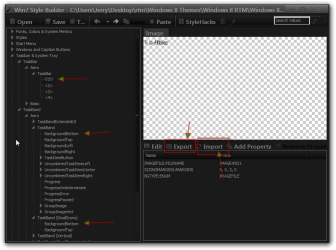
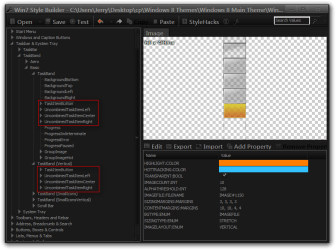
So, I'd really appreciate if anybody with the knowledge would point me in the right direction as to what properties images to change \ replace using e.g. Windows Style Builder to modify the win 8 cp theme to meet the above requirements.
Thank you!
I have in my disposal a Windows 8 Release preview theme (obtained here, direct link to download) and a more-windows-8-like Windows 8 RTM style (obtained here, direct link to download).
The problem is I like both the glassy RP style and some elements of the RTM style.
I tried figuring out how to replace stuff using ResHacker\Windows Style Builder, but I am no longer that young to figure it out )
Since I like the glassy look of cp more, I'd rather start with it and modify it to include some of the RTM's elements.
What I want is:
1. Remove the taskbar "bevel" of CP and replace it with a slightly darker line of RTM.
You can see the comparison of what is now (above) to what I want (below) in the following image.
2. Make the taskbar a bit more transparent, I guess about ~15% more than it is now in RTM. If the blurring of the underlying image is separate from transparency, I'd also love to decrease that somewhat, by about the same amount.
3. Remove the CP's glossy effects from taskbar buttons (you can compare "The Bat!" button in the above image) to have RTM's more subdued look
4. Make CP's active window's "glass" less transparent (say again ~15%), so it is more colored and more pronounced than that of an inactive window. However, it should not be non-transparent - unlike the RTM windows which are not glassy at all. Glass color should stay as is (I really like how Aura changes my glass color to that of the desktop wallpaper), only the transparency should decrease.
5. Make minimize\restore\close buttons in the top-right windows corner glow brighter on mouse-over. Currently, the glow is very mild in CP, I'd love to have it much more saturated\bright.
So, I'd really appreciate if anybody with the knowledge would point me in the right direction as to what properties images to change \ replace using e.g. Windows Style Builder to modify the win 8 cp theme to meet the above requirements.
Thank you!
My Computer
At a glance
win 7 Ultimate x32
- OS
- win 7 Ultimate x32