COMCTL32.OCX missing

idahosurge

New member
Member
Local time
5:31 PM
Messages
81
I am trying to run an application (FS Flight Calculator) and it gives me this error message "Component 'COMCTL32.OCX' or one of its dependencies not correctly registered: a file is missing or invalid

I have Win7 Ult 64b, I searched my OS HD and this file is not on the HD. In Windows\Sys32 I have comctl32.dll and in Windows\SysWOW64 I have scomctl32.dll and comdlg32.ocx, but no where is there comctl32.ocx.

In the command window with adminstrative privilages I did the sfc /scannow command and WRP did not find any integrity violations.

How do I get this file, I did a google search and I all can see is to register the file, but I can not register the file because I do not have the file.
 

My Computer

OS
Win7 Ult 64b
CPU
i7 950
Motherboard
P6T Deluxe v2
Memory
Mushkin Redline #998691 DDR3 1600MHz @ 6-7-6-18
Graphics Card(s)
BFG GTX 285OCFU
Monitor(s) Displays
Asus VW266H
Hard Drives
Seagate 7,200 RPM 750GB
WD VR 10,000 RPM 300GB
WD VR 10,000 PPM 600GB
PSU
Corsair 850TX
Case
HAF-932
Cooling
TRUE Rev C w/ Delta FFB1212EH-PWM Fan
Download COMCTL32.OCX (right click and save to your Desktop).

View attachment 100981

Copy to C:\System32

Start> Type Run in search box and press enter

Type the following command to register the file

regsvr32 \windows\system32\COMCTL32.OCX

You should see a message saying "DllRegisterServer ... succeeded"

Restart system and try again. Good luck. A Guy
 
Last edited:

My Computer

Computer type
PC/Desktop
OS
Windows 10 Home x64
CPU
INTEL Core i5-750 Quad-Core 3.37GHz
Motherboard
ASUS P7P55D
Memory
HyperX Fury Black Series 8GB (2 x 4GB) 1866Mhz
Graphics Card(s)
EVGA GeForce GTX 750 Superclocked 1GB 128-Bit GDDR5
Monitor(s) Displays
LG 32MA68HY 32" IPS
Screen Resolution
1920 x 1080
Hard Drives
Samsung 840 Evo 120GB, SEAGATE 500GB Barracuda® 7200.12, SATA 3 Gb/s, 7200 RPM, 16MB cache
PSU
ANTEC TruePower New TP-550, 80 PLUS, 550W
Case
ANTEC Three Hundred Illusion
Cooling
COOLER MASTER Hyper 212 Plus, 4 x 120mm 1 x 140mm Noctua's
Internet Speed
85 + Mbps
Antivirus
Avast
Browser
Vivaldi
Download COMCTL32.OCX (right click and save to your Desktop).

View attachment 100981

Copy to C:\System32

Start> Type Run in search box and press enter

Type the following command to register the file

regsvr32 \windows\system32\COMCTL32.OCX

You should see a message saying "DllRegisterServer ... succeeded"

Restart system and try again. Good luck. A Guy

Hope I'm not stepping on any toes :)
A small correction there,
the folder should be 'C:\Windows\system32'
and you shouldn't have to restart the system for it to take effect. :)
 

My Computer

Computer type
Laptop
Computer Manufacturer/Model Number
HP EliteBook 8530w Mobile Workstation
OS
Windows 7 Ultimate x64 (XP, 98SE, 95, 3.11, DOS 7.10 on VM) + Ubuntu 10.04 LTS Lucid Lynx
CPU
Intel Core 2 Duo Processor P8600 (2.40 GHz, 3 MB L2 cache)
Motherboard
Mobile Intel PM45 Express Chipset ICH9M-Enhanced
Memory
4GB 800 MHz DDR2 SDRAM
Graphics Card(s)
ATI Mobility FireGL V5700 with 256 MB
Sound Card
SoundMAX Integrated Digital HD Audio
Monitor(s) Displays
15.4-inch WXGA anti-glare (1280 x 800 resolution)
Screen Resolution
1280 x 800
Hard Drives
500GB + 1TB
Mouse
Synaptics PS/2 Port Touchpad, USB Mouse
Internet Speed
4 Mbps
Antivirus
MSE
Browser
Firefox, Chrome, IE
Other Info
Authentec AES2810 Fingerprint Reader
Download COMCTL32.OCX (right click and save to your Desktop).

View attachment 100981

Copy to C:\System32

Start> Type Run in search box and press enter

Type the following command to register the file

regsvr32 \windows\system32\COMCTL32.OCX

You should see a message saying "DllRegisterServer ... succeeded"

Restart system and try again. Good luck. A Guy

Hope I'm not stepping on any toes :)
A small correction there,
the folder should be 'C:\Windows\system32'
and you shouldn't have to restart the system for it to take effect. :)

MY toes! LOL :) Thanks for the correction, lazy on my part. The restart is for insurance. A Guy
 

My Computer

Computer type
PC/Desktop
OS
Windows 10 Home x64
CPU
INTEL Core i5-750 Quad-Core 3.37GHz
Motherboard
ASUS P7P55D
Memory
HyperX Fury Black Series 8GB (2 x 4GB) 1866Mhz
Graphics Card(s)
EVGA GeForce GTX 750 Superclocked 1GB 128-Bit GDDR5
Monitor(s) Displays
LG 32MA68HY 32" IPS
Screen Resolution
1920 x 1080
Hard Drives
Samsung 840 Evo 120GB, SEAGATE 500GB Barracuda® 7200.12, SATA 3 Gb/s, 7200 RPM, 16MB cache
PSU
ANTEC TruePower New TP-550, 80 PLUS, 550W
Case
ANTEC Three Hundred Illusion
Cooling
COOLER MASTER Hyper 212 Plus, 4 x 120mm 1 x 140mm Noctua's
Internet Speed
85 + Mbps
Antivirus
Avast
Browser
Vivaldi
If I may also supply another route as the Start > Run > regsvr command does not always work in Win 7 due to security.

In the bottom Search panel enter "CMD" - when the upper box shows CMD.EXE as an option right click it and select the 'run as administrator' option and type in the same regsvr command string as above.
 

My Computer

Computer Manufacturer/Model Number
Novatech (UK) iRush Pro
OS
MSDN Home Premium
CPU
Intel i5
Motherboard
Intel DP55WB
Memory
4Gb
Graphics Card(s)
ATI Radeon HD 5770
Sound Card
On Board
Monitor(s) Displays
Philips 170B
Hard Drives
1 x 1Tb
(7 Partitions)
PSU
750W
Case
Antec 300
Cooling
Tricool Fans
Keyboard
Microsoft 3000 Wireless
Mouse
Microsoft 5000 Wireless BlueTrack
Internet Speed
6.1 Mbps
A Guy, the file in your zip file is comctl32.htm

I need comctl32.ocx

Can you provide the correct file?

Thanks for trying anyway!

Rod
 

My Computer

OS
Win7 Ult 64b
CPU
i7 950
Motherboard
P6T Deluxe v2
Memory
Mushkin Redline #998691 DDR3 1600MHz @ 6-7-6-18
Graphics Card(s)
BFG GTX 285OCFU
Monitor(s) Displays
Asus VW266H
Hard Drives
Seagate 7,200 RPM 750GB
WD VR 10,000 RPM 300GB
WD VR 10,000 PPM 600GB
PSU
Corsair 850TX
Case
HAF-932
Cooling
TRUE Rev C w/ Delta FFB1212EH-PWM Fan
A Guy, the file in your zip file is comctl32.htm

I need comctl32.ocx

Can you provide the correct file?

Thanks for trying anyway!

Rod

Just rename the comctl32.htm to comctl32.ocx. It works.
 

My Computer

Computer type
Laptop
Computer Manufacturer/Model Number
HP EliteBook 8530w Mobile Workstation
OS
Windows 7 Ultimate x64 (XP, 98SE, 95, 3.11, DOS 7.10 on VM) + Ubuntu 10.04 LTS Lucid Lynx
CPU
Intel Core 2 Duo Processor P8600 (2.40 GHz, 3 MB L2 cache)
Motherboard
Mobile Intel PM45 Express Chipset ICH9M-Enhanced
Memory
4GB 800 MHz DDR2 SDRAM
Graphics Card(s)
ATI Mobility FireGL V5700 with 256 MB
Sound Card
SoundMAX Integrated Digital HD Audio
Monitor(s) Displays
15.4-inch WXGA anti-glare (1280 x 800 resolution)
Screen Resolution
1280 x 800
Hard Drives
500GB + 1TB
Mouse
Synaptics PS/2 Port Touchpad, USB Mouse
Internet Speed
4 Mbps
Antivirus
MSE
Browser
Firefox, Chrome, IE
Other Info
Authentec AES2810 Fingerprint Reader
Thanks to all! I do appreciate the help!
 

My Computer

OS
Win7 Ult 64b
CPU
i7 950
Motherboard
P6T Deluxe v2
Memory
Mushkin Redline #998691 DDR3 1600MHz @ 6-7-6-18
Graphics Card(s)
BFG GTX 285OCFU
Monitor(s) Displays
Asus VW266H
Hard Drives
Seagate 7,200 RPM 750GB
WD VR 10,000 RPM 300GB
WD VR 10,000 PPM 600GB
PSU
Corsair 850TX
Case
HAF-932
Cooling
TRUE Rev C w/ Delta FFB1212EH-PWM Fan
Sorry about that. I had saved it to my desktop, didn't see it had changed. Glad you got it sorted, and we could help. A Guy
 

My Computer

Computer type
PC/Desktop
OS
Windows 10 Home x64
CPU
INTEL Core i5-750 Quad-Core 3.37GHz
Motherboard
ASUS P7P55D
Memory
HyperX Fury Black Series 8GB (2 x 4GB) 1866Mhz
Graphics Card(s)
EVGA GeForce GTX 750 Superclocked 1GB 128-Bit GDDR5
Monitor(s) Displays
LG 32MA68HY 32" IPS
Screen Resolution
1920 x 1080
Hard Drives
Samsung 840 Evo 120GB, SEAGATE 500GB Barracuda® 7200.12, SATA 3 Gb/s, 7200 RPM, 16MB cache
PSU
ANTEC TruePower New TP-550, 80 PLUS, 550W
Case
ANTEC Three Hundred Illusion
Cooling
COOLER MASTER Hyper 212 Plus, 4 x 120mm 1 x 140mm Noctua's
Internet Speed
85 + Mbps
Antivirus
Avast
Browser
Vivaldi
Same problem

hy, I've the same problem on my netbook aspire one. I tried to follow all steps, but I don't know, how I can change the end of the htm-file ? Do I need to unzip it first? Sorry, it might be a silly question for you, but I'm not at all at computers... Before I started to follow the steps, I already had this comctl32.ocx in the sys32. But know, after several tries, I lost the original too... The problem started, as I tried to install a software. So please, help me. Thanks in advance Greetings Swiss girl http://www.sevenforums.com/images/smilies/cry.gif
 

My Computer

Computer Manufacturer/Model Number
Acer Aspire 0ne
OS
Netbook Windows 7 Starter
Welcome to Seven Forums noideaofpc. Here is the file again, corrected. unzip it 1st.

Copy to C:\Windows\System32

Start> Type Run in search box and press enter

Type the following command to register the file

regsvr32 \windows\system32\COMCTL32.OCX

You should see a message saying "DllRegisterServer ... succeeded"

Restart system and try again. A Guy
 
Last edited by a moderator:

My Computer

Computer type
PC/Desktop
OS
Windows 10 Home x64
CPU
INTEL Core i5-750 Quad-Core 3.37GHz
Motherboard
ASUS P7P55D
Memory
HyperX Fury Black Series 8GB (2 x 4GB) 1866Mhz
Graphics Card(s)
EVGA GeForce GTX 750 Superclocked 1GB 128-Bit GDDR5
Monitor(s) Displays
LG 32MA68HY 32" IPS
Screen Resolution
1920 x 1080
Hard Drives
Samsung 840 Evo 120GB, SEAGATE 500GB Barracuda® 7200.12, SATA 3 Gb/s, 7200 RPM, 16MB cache
PSU
ANTEC TruePower New TP-550, 80 PLUS, 550W
Case
ANTEC Three Hundred Illusion
Cooling
COOLER MASTER Hyper 212 Plus, 4 x 120mm 1 x 140mm Noctua's
Internet Speed
85 + Mbps
Antivirus
Avast
Browser
Vivaldi
hy, I've the same problem on my netbook aspire one. I tried to follow all steps, but I don't know, how I can change the end of the htm-file ? Do I need to unzip it first? Sorry, it might be a silly question for you, but I'm not at all at computers... Before I started to follow the steps, I already had this comctl32.ocx in the sys32. But know, after several tries, I lost the original too... The problem started, as I tried to install a software. So please, help me. Thanks in advance Greetings Swiss girl http://www.sevenforums.com/images/smilies/cry.gif

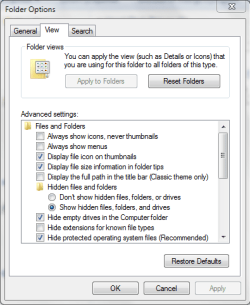
guessing you need to untick 'hide extensions for known file types'
 

Attachments

  • Capture.PNG
    Capture.PNG
    15.3 KB · Views: 49

My Computer

Computer Manufacturer/Model Number
HP dv6519tx
OS
Windows 7 Ultimate x64
CPU
1.80 GHz Intel Core 2 Duo processor T7100
Memory
3 gig ddr2
Graphics Card(s)
NVIDIA GeForce 8400M GS
Sound Card
Realtek High Definition Audio
Monitor(s) Displays
15.4” WXGA High Definition BrightView Widescreen
Screen Resolution
1280 x 800
Hard Drives
Hitachi 320 GB (5400 rpm)
PSU
90 W AC Power Adapter
Cooling
Kitchen plate under the lappy
Keyboard
101 key compatible
Mouse
Touch Pad with On/Off button and dedicated vertical Scroll
Internet Speed
Three Wireless internet prepaid using E160G USB dongle
Welcome to Seven Forums noideaofpc. Here is the file again, corrected. unzip it 1st.


Copy to C:\Windows\System32

Start> Type Run in search box and press enter

Type the following command to register the file

regsvr32 \windows\system32\COMCTL32.OCX

You should see a message saying "DllRegisterServer ... succeeded"

Restart system and try again. A Guy

Hello -

I'm running an ASUS UL30-A2 with Windows 7 Home Premium 64-bit.

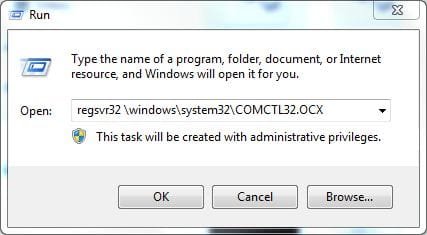
I've encountered the same missing Active X. Downloaded your zip file, unpacked it and moved COMCTL32.OCX to windows\system32 folder. Verified it was there and restarted. Per your tutorial I ran the following:
Capture1.JPG
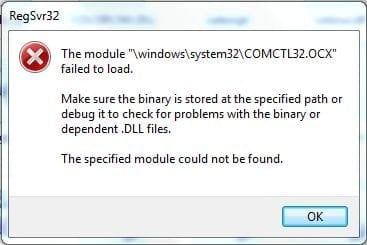
But instead of receiving the message that the operation had succeeded, I received the following:
Capture2.JPG
Playing with Active X controls and dll's isn't my thing and I could definitely use help at this point.

Thank you very much in advance.

-markaz
 
Last edited by a moderator:

My Computer

Computer type
PC/Desktop
Computer Manufacturer/Model Number
Custom
OS
Windows 7 Home Premium x64
CPU
AMD A6-6400K APU
Motherboard
Gigabyte F2A88XM-D3H
Memory
8.0GB DDR3-1600
Graphics Card(s)
Radeon Onboard Graphics
Sound Card
Realtek High Def
Monitor(s) Displays
Acer K242HQL
Screen Resolution
1920x1080
Hard Drives
Samsung 850 EVO SSD 250GB
PSU
Corsair 430W
Case
Silverstone PS-08
Cooling
Enermax fans (120mm-intake, 80mm-exhaust)
Keyboard
Logitech K360
Mouse
Logitech M305 Cordless Optical
Internet Speed
Download 60.19Mbps Upload 6.71Mbps
Antivirus
AVG
Browser
Iron Version 51.0.2700.0 (64-bit)
Did you try:
regsvr32 c:\windows\system32\COMCTL32.OCX
or
regsvr32 %windir%\system32\COMCTL32.OCX
?

Welcome to Seven Forums noideaofpc. Here is the file again, corrected. unzip it 1st.


Copy to C:\Windows\System32

Start> Type Run in search box and press enter

Type the following command to register the file

regsvr32 \windows\system32\COMCTL32.OCX

You should see a message saying "DllRegisterServer ... succeeded"

Restart system and try again. A Guy

Hello -

I'm running an ASUS UL30-A2 with Windows 7 Home Premium 64-bit.

I've encountered the same missing Active X. Downloaded your zip file, unpacked it and moved COMCTL32.OCX to windows\system32 folder. Verified it was there and restarted. Per your tutorial I ran the following:
View attachment 109956
But instead of receiving the message that the operation had succeeded, I received the following:
View attachment 109957
Playing with Active X controls and dll's isn't my thing and I could definitely use help at this point.

Thank you very much in advance.

-markaz
 
Last edited by a moderator:

My Computer

Computer Manufacturer/Model Number
HP DV6 1330sa
OS
Windows 7 Professional 64 Bit SP1
CPU
INTEL DUAL CORE 2.1Ghz
Motherboard
N/A
Memory
4GB DDR3
Graphics Card(s)
INTEL
Sound Card
LAPTOP
Monitor(s) Displays
2
Screen Resolution
3200x1080
Hard Drives
250GB
PSU
LAPTOP
Case
LAPTOP
Cooling
LAPTOP
Keyboard
SOLID YEAR 260U
Mouse
USB
Internet Speed
20 MB/S
Did you try:
regsvr32 c:\windows\system32\COMCTL32.OCX
or
regsvr32 %windir%\system32\COMCTL32.OCX
?

The run command as posted points to c:\windows\system32\COMCTL32.OCX. I just now ran %windir%\system32\COMCTL32.OCX and received the same failure notice.

I was just now getting ready to edit my post to provide add'l information. The program involved here is iSkin. It runs as an executable which generates a popup window to shut down, restart or hibernate Windows. This function works fine. Also included is an executable that controls the appearance of the popup Window. It is this application that is causing the aforementioned problem. Also, Windows has determined this application incompatible with Win 7. I ran it Compatibility Mode (XP Sp2) and it still has the problem.
 

My Computer

Computer type
PC/Desktop
Computer Manufacturer/Model Number
Custom
OS
Windows 7 Home Premium x64
CPU
AMD A6-6400K APU
Motherboard
Gigabyte F2A88XM-D3H
Memory
8.0GB DDR3-1600
Graphics Card(s)
Radeon Onboard Graphics
Sound Card
Realtek High Def
Monitor(s) Displays
Acer K242HQL
Screen Resolution
1920x1080
Hard Drives
Samsung 850 EVO SSD 250GB
PSU
Corsair 430W
Case
Silverstone PS-08
Cooling
Enermax fans (120mm-intake, 80mm-exhaust)
Keyboard
Logitech K360
Mouse
Logitech M305 Cordless Optical
Internet Speed
Download 60.19Mbps Upload 6.71Mbps
Antivirus
AVG
Browser
Iron Version 51.0.2700.0 (64-bit)
Hey, guys.
Sorry for posting after so long, but I've been having the same problems as the last person that posted.

I follow all of the steps, and when I try to register the file, I get a message saying that it failed.

I've looked everywhere and I can't see an answer that I can understand. (I'm not too great with computers).

Please, if anybody knows where it's going wrong, tell me how I can fix this.

-Karu
 

My Computer

OS
Windows 7
Hey, guys.
Sorry for posting after so long, but I've been having the same problems as the last person that posted.

I follow all of the steps, and when I try to register the file, I get a message saying that it failed.

I've looked everywhere and I can't see an answer that I can understand. (I'm not too great with computers).

Please, if anybody knows where it's going wrong, tell me how I can fix this.

-Karu

Welcome to 7 forums

Try doing as suggested by KremmenUK
If I may also supply another route as the Start > Run > regsvr command does not always work in Win 7 due to security.

In the bottom Search panel enter "CMD" - when the upper box shows CMD.EXE as an option right click it and select the 'run as administrator' option and type in the same regsvr command string as above.

If that fails try it with
regsvr32 c:\windows\system32\COMCTL32.OCX
or
regsvr32 %windir%\system32\COMCTL32.OCX
as suggested by Fayla

To sum it all up,
Click on the Start Orb
Type CMD in the search box
Right click on the 'cmd.exe' option on the top and select 'Run as Administrator'
Type the regsvr32 command there and press ENTER
 

My Computer

Computer type
Laptop
Computer Manufacturer/Model Number
HP EliteBook 8530w Mobile Workstation
OS
Windows 7 Ultimate x64 (XP, 98SE, 95, 3.11, DOS 7.10 on VM) + Ubuntu 10.04 LTS Lucid Lynx
CPU
Intel Core 2 Duo Processor P8600 (2.40 GHz, 3 MB L2 cache)
Motherboard
Mobile Intel PM45 Express Chipset ICH9M-Enhanced
Memory
4GB 800 MHz DDR2 SDRAM
Graphics Card(s)
ATI Mobility FireGL V5700 with 256 MB
Sound Card
SoundMAX Integrated Digital HD Audio
Monitor(s) Displays
15.4-inch WXGA anti-glare (1280 x 800 resolution)
Screen Resolution
1280 x 800
Hard Drives
500GB + 1TB
Mouse
Synaptics PS/2 Port Touchpad, USB Mouse
Internet Speed
4 Mbps
Antivirus
MSE
Browser
Firefox, Chrome, IE
Other Info
Authentec AES2810 Fingerprint Reader
I've tried that. Here is exactly what's going wrong.

lgkfc.png


I have the Comctl32.ocx file in my System32, which you can see, and I'm running CMD as admin, and it still isn't working.

(I tried the other string of commands suggested, but they all have the same result, so I just used that one as an example for the picture).
 

My Computer

OS
Windows 7
Sorry for bumping, but, this is starting to really hamper my gaming life, as I need this control to be able to continue my regular schedules.
Does anybody know what's going wrong with it?
 

My Computer

OS
Windows 7
On a 64 bit system the file comctl32.ocx should be placed into the folder c:\windows\sysWOW64

Then run: regsvr32 c:\windows\sysWOW64\comctl32.ocx
 

My Computer

OS
Windows 7 Home Premium 64 Bit
Back
Top