Command lines to solve most of the network problems

Was this help to solve your problem?


  • Total voters
    3
  • Poll closed .

baraka607

New member
Local time
9:59 AM
Messages
47
Location
Dar es Salaam, Tanzania
Here is the Command lines to solve most of the network problems

Start your machine in SAFE MODE
Login as ADMINISTRATOR
Open cmd.exe
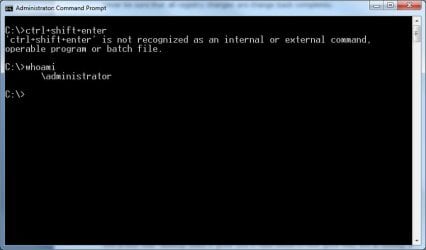
Type in: ctrl+shift+enter" to allow elevation request
Type in again: netsh winsock reset" and press enter
After there you may restart your machine and the network problem will be gone.


Thank you for reading this and remember to vote on top of the thread
 
Last edited:

My Computer My Computer

At a glance

Windows 7 HOME PREMIUM 64-bitIntel(R) Core(TM) i3 CPU M 350 @2.270GHz (4 C...3Gb DDR3Intel HD Graphics
Computer Manufacturer/Model Number
P8 PACKARD BELL
OS
Windows 7 HOME PREMIUM 64-bit
CPU
Intel(R) Core(TM) i3 CPU M 350 @2.270GHz (4 CPUs), ~2.3GHz
Memory
3Gb DDR3
Graphics Card(s)
Intel HD Graphics
Monitor(s) Displays
15.6'' 16:9 HD LED LCD
Hard Drives
320 GB
I must be missing something but typing: ctrl+shift+enter does not work, pressing that key combination does nothing as well.
 

Attachments

  • CtrlShitEnter.jpg
    CtrlShitEnter.jpg
    23.4 KB · Views: 25

My Computer My Computer

At a glance

Windows 7 Enterprise (x64); Windows Server 20...16GB
Computer type
PC/Desktop
Computer Manufacturer/Model Number
Dell OP7010
OS
Windows 7 Enterprise (x64); Windows Server 2008 R2 (x64)
Memory
16GB
Monitor(s) Displays
4 Dell 24" LCD
Screen Resolution
1280x1024
Keyboard
Dell
Mouse
Dell Optical
Internet Speed
40meg
I must be missing something but typing: ctrl+shift+enter does not work, pressing that key combination does nothing as well.


LOL...

Haxcid Rewrite said:
Login as and administrator. (generally this is the account you created on very first boot of your computer). Note that in Windows 7 the administrator account is disabled by default.

Open cmd window. This can be done by pressing the windows key and the r key at the same time. Type cmd into the run box and hit enter.

In the cmd window type: netsh winsock reset

Press enter

Restart your computer.

If you are unable to run the command then you may need to boot into windows in safe mode with networking. This can be done by pressing F8 after the machine posts but before the first windows logo appears. Also you may not be logged in with administrator account be sure that you have administrative right to your system before trying.
 

My Computer My Computer

At a glance

Windows 7; Server 08; Window Home Server; Vis...Intel E8400 @ 3.4Ghz8 Gb Patriot DDr2 800NVidia GTX460 OC
Computer Manufacturer/Model Number
Home Built
OS
Windows 7; Server 08; Window Home Server; Vista; XP
CPU
Intel E8400 @ 3.4Ghz
Motherboard
Gigabyte P35 DS3L
Memory
8 Gb Patriot DDr2 800
Graphics Card(s)
NVidia GTX460 OC
Sound Card
Onboard
Monitor(s) Displays
Samsung 21"
Screen Resolution
1920x1080
Hard Drives
Seagate 160Gb x2
Samsung 250Gb
PSU
Cooler Master 650w 52a on 12v
Case
Antec 300
Cooling
Stock
Keyboard
HP Standard USB
Mouse
Logitech 518
Internet Speed
25Mbit Down 1.5Mbit up
Other Info
http://www.speedtest.net/result/723924362.png
I must be missing something but typing: ctrl+shift+enter does not work, pressing that key combination does nothing as well.


LOL...

Haxcid Rewrite said:
Login as and administrator. (generally this is the account you created on very first boot of your computer). Note that in Windows 7 the administrator account is disabled by default.

Open cmd window. This can be done by pressing the windows key and the r key at the same time. Type cmd into the run box and hit enter.

In the cmd window type: netsh winsock reset

Press enter

Restart your computer.

If you are unable to run the command then you may need to boot into windows in safe mode with networking. This can be done by pressing F8 after the machine posts but before the first windows logo appears. Also you may not be logged in with administrator account be sure that you have administrative right to your system before trying.

The above instructions (in your quote) I understand and do all the time, however the OP has NOT posted them that way. So they are unclear and incorrect for the most part. :)
 

My Computer My Computer

At a glance

Windows 7 Enterprise (x64); Windows Server 20...16GB
Computer type
PC/Desktop
Computer Manufacturer/Model Number
Dell OP7010
OS
Windows 7 Enterprise (x64); Windows Server 2008 R2 (x64)
Memory
16GB
Monitor(s) Displays
4 Dell 24" LCD
Screen Resolution
1280x1024
Keyboard
Dell
Mouse
Dell Optical
Internet Speed
40meg
Back
Top