
Command Prompt command <ipconfig> not working

mrcheesete0

New member
Member
Local time
2:02 AM
Messages
48
when I open up my command prompt and type 'ipconfig' without the ' and press enter it returns the line:
'ipconfig' is nto recognized as an internal or external command, operable program, or batch file

I am trying to find out the information I need in order to set up a static IP Address for port forwarding
 

My Computer

Computer Manufacturer/Model Number
Compaq Presario CQ5205Y
OS
Windows 7
Graphics Card(s)
ASUS GeForce 9500 GT
Sound Card
PPA 8.1 channel surround something or other
In order to set up a static ip address internally, you'll need to either tell your router or your computer not to use automatic DHCP and instead to use a specific IP address.

Go to the System Tray (Notification Area)
Click the Network icon
Click 'Open Network and Sharing Center'
Click the 'Change adapter settings'

Selec the connnection for which you'd like to use a static IP
Right click it
Click 'Properties'
Select 'Internet Protocol Version 4 (TCP/IPv4)'

Select 'Use the following IP address':

In the 'IP Address' field, insert the IP you'd like to use.

Note: The IP you use must be within the router's list of acceptable IP addresses. It's usually a list between 192.168.1.100 to 192.168.1.255

http://social.answers.microsoft.com...7/thread/c1ce0157-3aca-4c86-bf6f-3656805f1844

If you're trying to set up an external static ip you'll need to pay your isp extra for one.
 

My Computer

Computer Manufacturer/Model Number
Apple Macbook Pro (April 2009)
OS
W7 Ult. x64 | OS X
CPU
Intel Mobile Core 2 Duo 2.93Ghz [T9800 Penryn]
Motherboard
NVIDIA nForce 730i Rev. B1 [Mac-F2268EC8 (U2E1)]
Memory
4096MB Samsung DDR3 Dual Channel [PC3-8500F 1066Mhz]
Graphics Card(s)
NVIDIA GeForce 9600M GT 512MB [G96M Rev. C1]
Sound Card
SB X-Fi Surround 5.1 USB | Onboard Realtek (Disabled)
Monitor(s) Displays
Acer x223wbd 22" | Apple Anti-Glare 17" (Disabled)
Screen Resolution
{Current} 1440x900 {Acer} 1680x1050 {Apple} 1920x1200
Hard Drives
{Internal}
Seagate Momentus 320GB 2.5" 7200RPM [ST9320421AS]

{Externals}
LaCie 320GB USB 2.0 HDD [301284UR]
LaCie 750GB USB 2.0 FW400 eSATA HDD [301314U]
LaCie 1TB USB 2.0 HDD [301304UR]
PSU
Magsafe
Case
Aluminum/Unibody (MBP52)
Cooling
2 x 6000 RPM Fans
Keyboard
Logitech G-15v2 [PN 920-000379]
Mouse
Logitech G-9 [PN 910-000338]
Internet Speed
12Mbps/2.5Mbps w/ 24Mbps Speed Boost [Comcast]
Other Info
Logitech X-540 Speakers [PN 970223-0122]
Sennheiser PC-151 Headset
In order to run ipconfig you need to run commond prompt as an administrator and then use the line "ipconfig /all"

Start > Search "cmd" > Right Click > Run as Administrator
Type In: ipconfig /all

Just typing ipconfig should display the current configuration, even at user level. The message he's getting says that IPConfig.exe is not present on his computer.

For the OP ... Which release of Win7 are you using?
 

My Computer

Computer Manufacturer/Model Number
Homebrew
OS
XP Pro SP3 X86 / Win7 Pro X86
CPU
Amd 64 x2 4200 (2.4ghz)
Motherboard
Asus M2N-MX SE Plus
Memory
Kingston DDR2 800 2gb
Graphics Card(s)
Nvidia GF-8400
Sound Card
Realtek on Motherboard
Monitor(s) Displays
Acer x-193bw
Screen Resolution
1440 x 900
Hard Drives
Western Digital 500g
PSU
350watt In-Win
Case
In-Win
Cooling
Air
Keyboard
yes
Mouse
yes
Internet Speed
5mpbs
Other Info
Also ASRock ION 330 as HTPC (on XP).
Acer Aspire as GP netbook (on XP).
Doesn't ipconfig come w/ all versions of windows?
 

My Computer

Computer Manufacturer/Model Number
Apple Macbook Pro (April 2009)
OS
W7 Ult. x64 | OS X
CPU
Intel Mobile Core 2 Duo 2.93Ghz [T9800 Penryn]
Motherboard
NVIDIA nForce 730i Rev. B1 [Mac-F2268EC8 (U2E1)]
Memory
4096MB Samsung DDR3 Dual Channel [PC3-8500F 1066Mhz]
Graphics Card(s)
NVIDIA GeForce 9600M GT 512MB [G96M Rev. C1]
Sound Card
SB X-Fi Surround 5.1 USB | Onboard Realtek (Disabled)
Monitor(s) Displays
Acer x223wbd 22" | Apple Anti-Glare 17" (Disabled)
Screen Resolution
{Current} 1440x900 {Acer} 1680x1050 {Apple} 1920x1200
Hard Drives
{Internal}
Seagate Momentus 320GB 2.5" 7200RPM [ST9320421AS]

{Externals}
LaCie 320GB USB 2.0 HDD [301284UR]
LaCie 750GB USB 2.0 FW400 eSATA HDD [301314U]
LaCie 1TB USB 2.0 HDD [301304UR]
PSU
Magsafe
Case
Aluminum/Unibody (MBP52)
Cooling
2 x 6000 RPM Fans
Keyboard
Logitech G-15v2 [PN 920-000379]
Mouse
Logitech G-9 [PN 910-000338]
Internet Speed
12Mbps/2.5Mbps w/ 24Mbps Speed Boost [Comcast]
Other Info
Logitech X-540 Speakers [PN 970223-0122]
Sennheiser PC-151 Headset
when I open up my command prompt and type 'ipconfig' without the ' and press enter it returns the line:
'ipconfig' is nto recognized as an internal or external command, operable program, or batch file

I am trying to find out the information I need in order to set up a static IP Address for port forwarding

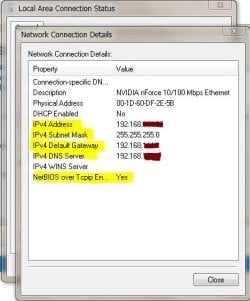
Click the network icon in your taskbar -> Network and Sharing -> Adaptor Settings...
Click the adaptor -> Details...

Whew... they sure buried that one...

Capture.JPG
 

My Computer

Computer Manufacturer/Model Number
Homebrew
OS
XP Pro SP3 X86 / Win7 Pro X86
CPU
Amd 64 x2 4200 (2.4ghz)
Motherboard
Asus M2N-MX SE Plus
Memory
Kingston DDR2 800 2gb
Graphics Card(s)
Nvidia GF-8400
Sound Card
Realtek on Motherboard
Monitor(s) Displays
Acer x-193bw
Screen Resolution
1440 x 900
Hard Drives
Western Digital 500g
PSU
350watt In-Win
Case
In-Win
Cooling
Air
Keyboard
yes
Mouse
yes
Internet Speed
5mpbs
Other Info
Also ASRock ION 330 as HTPC (on XP).
Acer Aspire as GP netbook (on XP).

My Computer

Computer Manufacturer/Model Number
Homebrew
OS
XP Pro SP3 X86 / Win7 Pro X86
CPU
Amd 64 x2 4200 (2.4ghz)
Motherboard
Asus M2N-MX SE Plus
Memory
Kingston DDR2 800 2gb
Graphics Card(s)
Nvidia GF-8400
Sound Card
Realtek on Motherboard
Monitor(s) Displays
Acer x-193bw
Screen Resolution
1440 x 900
Hard Drives
Western Digital 500g
PSU
350watt In-Win
Case
In-Win
Cooling
Air
Keyboard
yes
Mouse
yes
Internet Speed
5mpbs
Other Info
Also ASRock ION 330 as HTPC (on XP).
Acer Aspire as GP netbook (on XP).
when I open up my command prompt and type 'ipconfig' without the ' and press enter it returns the line:
'ipconfig' is nto recognized as an internal or external command, operable program, or batch file

I am trying to find out the information I need in order to set up a static IP Address for port forwarding

Click the network icon in your taskbar -> Network and Sharing -> Adaptor Settings...
Click the adaptor -> Details...

Whew... they sure buried that one...

View attachment 68892


you are truely a life saver, thank you.


In order to set up a static ip address internally, you'll need to either tell your router or your computer not to use automatic DHCP and instead to use a specific IP address.

Go to the System Tray (Notification Area)
Click the Network icon
Click 'Open Network and Sharing Center'
Click the 'Change adapter settings'

Selec the connnection for which you'd like to use a static IP
Right click it
Click 'Properties'
Select 'Internet Protocol Version 4 (TCP/IPv4)'

Select 'Use the following IP address':

In the 'IP Address' field, insert the IP you'd like to use.

Note: The IP you use must be within the router's list of acceptable IP addresses. It's usually a list between 192.168.1.100 to 192.168.1.255
Setting Up a Static IP Address in Windows 7

If you're trying to set up an external static ip you'll need to pay your isp extra for one.

different type of static IP address there. i've set up a static on my old laptop with XP before but i was having troubles with my new desktop.

In order to run ipconfig you need to run commond prompt as an administrator and then use the line "ipconfig /all"

Start > Search "cmd" > Right Click > Run as Administrator
Type In: ipconfig /all

Just typing ipconfig should display the current configuration, even at user level. The message he's getting says that IPConfig.exe is not present on his computer.

For the OP ... Which release of Win7 are you using?

honestly, no idea. I believe i read once it is Home Premium. idk, the highest level of home version available, and 64 bit i know for sure
 

My Computer

Computer Manufacturer/Model Number
Compaq Presario CQ5205Y
OS
Windows 7
Graphics Card(s)
ASUS GeForce 9500 GT
Sound Card
PPA 8.1 channel surround something or other
for the static Ip address thing i was talking about: when using a router, ever time you turn off your computer when you turn it back on, the last digits of your IP address change, depending on how many computers are on your router. and since i am wireless with no password, that could be unlimited. so, in order for my port forwarding to correctly work, I have to make sure that number never changes.
 

My Computer

Computer Manufacturer/Model Number
Compaq Presario CQ5205Y
OS
Windows 7
Graphics Card(s)
ASUS GeForce 9500 GT
Sound Card
PPA 8.1 channel surround something or other
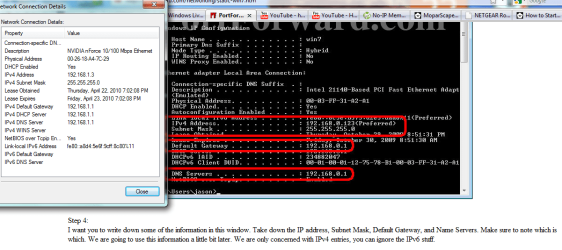
ok, look at my attachment picture, im not quite seeing all that info it says I need to set up the static IP address, any ideas on how to get that first subnet mask?


im an idiot. nevermind this. i found it
 

Attachments

  • IP config'.png
    IP config'.png
    70.2 KB · Views: 1,706

My Computer

Computer Manufacturer/Model Number
Compaq Presario CQ5205Y
OS
Windows 7
Graphics Card(s)
ASUS GeForce 9500 GT
Sound Card
PPA 8.1 channel surround something or other
What do you mean thats a different static ip address than the one you need?

That's the only kind of static ip address if you're talking about an internal ip address (within your network). You can also set it up via the router. You may have to if your router doesn't allow you to set it up independently. If you tell us your router model we can show you how to use that to do it if you don't want to use the Windows method.

EDIT: According to your Default Gateway (Router's IP) you're probably using a D-Link or a Netgear router.

Here are tutorials for both:

D-LINK: http://www.cctvcamerapros.com/DLink-Router-IP-Setup-s/162.htm

Netgear: http://www.icloseup.com/helpfile/Set static IP for Netgear.htm

As I mentioned before, if you want a REAL static ip address, I.e. the address you broadcast across the internet you'll need to contact your ISP because some provide the service for free, some you have to pay and some don't allow it at all.

Network IP Address: 192.168.1.110
Global IP Address: 72.169.40.57

Keep in mind that even if you set up a static ip address within your network (192...) you may not have a static ip address outside of your network (72...). As mentioned, you have to contact your ISP to figure it out.
 

My Computer

Computer Manufacturer/Model Number
Apple Macbook Pro (April 2009)
OS
W7 Ult. x64 | OS X
CPU
Intel Mobile Core 2 Duo 2.93Ghz [T9800 Penryn]
Motherboard
NVIDIA nForce 730i Rev. B1 [Mac-F2268EC8 (U2E1)]
Memory
4096MB Samsung DDR3 Dual Channel [PC3-8500F 1066Mhz]
Graphics Card(s)
NVIDIA GeForce 9600M GT 512MB [G96M Rev. C1]
Sound Card
SB X-Fi Surround 5.1 USB | Onboard Realtek (Disabled)
Monitor(s) Displays
Acer x223wbd 22" | Apple Anti-Glare 17" (Disabled)
Screen Resolution
{Current} 1440x900 {Acer} 1680x1050 {Apple} 1920x1200
Hard Drives
{Internal}
Seagate Momentus 320GB 2.5" 7200RPM [ST9320421AS]

{Externals}
LaCie 320GB USB 2.0 HDD [301284UR]
LaCie 750GB USB 2.0 FW400 eSATA HDD [301314U]
LaCie 1TB USB 2.0 HDD [301304UR]
PSU
Magsafe
Case
Aluminum/Unibody (MBP52)
Cooling
2 x 6000 RPM Fans
Keyboard
Logitech G-15v2 [PN 920-000379]
Mouse
Logitech G-9 [PN 910-000338]
Internet Speed
12Mbps/2.5Mbps w/ 24Mbps Speed Boost [Comcast]
Other Info
Logitech X-540 Speakers [PN 970223-0122]
Sennheiser PC-151 Headset
nah i dont want a real one, just internal. yes its netgear. thanks jsut finished setting it up. :) my new static IP is set up along with my port forwarding of port 43594 for both TCP and UDP
I've had to use the ipconfig three different times from three different computers for three different things.
so far: Windows 7 is THE hardest. I did it on Vista and XP and they are MUCH easier
 

My Computer

Computer Manufacturer/Model Number
Compaq Presario CQ5205Y
OS
Windows 7
Graphics Card(s)
ASUS GeForce 9500 GT
Sound Card
PPA 8.1 channel surround something or other
and i am totally bookmarkign this webpage as this is the best help for windows 7 I have found so far. amybe ill get some help with another problem I've been having tomorrow
 

My Computer

Computer Manufacturer/Model Number
Compaq Presario CQ5205Y
OS
Windows 7
Graphics Card(s)
ASUS GeForce 9500 GT
Sound Card
PPA 8.1 channel surround something or other
nah i dont want a real one, just internal. yes its netgear. thanks jsut finished setting it up. :) my new static IP is set up along with my port forwarding of port 43594 for both TCP and UDP
I've had to use the ipconfig three different times from three different computers for three different things.
so far: Windows 7 is THE hardest. I did it on Vista and XP and they are MUCH easier


Ok... simple trick... If you're setting up static IPs inside a LAN you can quite simply make them up as you go... there's no need to even care what address DHCP might assign... In fact if you are running DHCP for wireless devices you want to actually avoid the DHCP range on your router (to avoid collisions).

It's a private lan... so...

You can get the first three numbers from your router's admin address. In your case 192.168.1

The subnet mask on any net with fewer than 254 machines is always 255.255.255.0

With a subnet mask of 255.255.255.0 the only number that can change is the last one and that you can simply assign on your own in the range of 2 to 254, so it doesn't conflict with your router itself.

Most home router's gateway and dns relays use the same ip address as their admin screen.

Real easy.... Now, don't get me wrong, I'm not saying you did all that searching for nothing... just the opposite... think how easy it will be next time...
 

My Computer

Computer Manufacturer/Model Number
Homebrew
OS
XP Pro SP3 X86 / Win7 Pro X86
CPU
Amd 64 x2 4200 (2.4ghz)
Motherboard
Asus M2N-MX SE Plus
Memory
Kingston DDR2 800 2gb
Graphics Card(s)
Nvidia GF-8400
Sound Card
Realtek on Motherboard
Monitor(s) Displays
Acer x-193bw
Screen Resolution
1440 x 900
Hard Drives
Western Digital 500g
PSU
350watt In-Win
Case
In-Win
Cooling
Air
Keyboard
yes
Mouse
yes
Internet Speed
5mpbs
Other Info
Also ASRock ION 330 as HTPC (on XP).
Acer Aspire as GP netbook (on XP).
Thanks

Im actually using windows 10 and had the same problem, and tried what i read here, but it was a little different on windows 10, but it worked. i had been trying to fix this for so long and finally its fixed. thanks so much.
 

My Computer

Computer type
Laptop
Computer Manufacturer/Model Number
Lenovo
OS
windows 10 64 bit
CPU
Intel I7
Memory
8gb
Graphics Card(s)
Intel HD 4400
Hard Drives
1Tb
Antivirus
Norton
Browser
Google Chrome
CMD - IPCONFIG fixed!

For some reason, I had to start CMD w/ 'run as admin' to get ipconfig working again.

Probably to do w/ a cdir command I did for GNS3 VM purposes (I must have forgot I did one outside of the VM on my main host desktop).
So was probably in wrong directory in CMD prompt. ;_;

Enjoy!
-Nikky
 

My Computer

Computer type
Laptop
Computer Manufacturer/Model Number
Lenovo
OS
Win 7 Pro
CPU
i7
Memory
8G
Browser
Chrome
Back
Top