Command prompt link in Start Menu

Pepito

New member
Member
Local time
8:57 AM
Messages
20
Hello,
I would like to have a command prompt link in the start menu along with the other habitual links
I don't use the command so often to stick a shortcut in taskbar
But when I need it , going to program--> accessories--> command...:sick:
I also don't use keyboard keys,doing all on mice exept typing
So,a little link in right pane will be most helpful for me
Thank you !
 

My Computer

Computer Manufacturer/Model Number
Home made Pc
OS
Windows 7 Ultimate x64
CPU
I7 930
Motherboard
Gigabyte Ga-X58A-UD3R
Memory
OCZ 3x2 12800 memory set
Graphics Card(s)
gigabyte GTX 460 OC 1Go
Sound Card
on Board
Monitor(s) Displays
Ilyama 24' 1920x1080
Hard Drives
OCZ Vertex 2 60 G0
2x Samsung F3 1To
PSU
Cooler Master Silent Pro Gold 600 W
Case
Cooler Master 692 II Advanced
Cooling
Noctua NH-D14
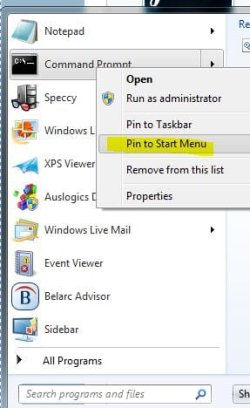
in the start menu type CMD

in the search result right click CMD.exe and then select Pin to Start Menu.

Is this what you were after?

Regards,
JDobbsy1987
 

My Computer

Computer type
PC/Desktop
Computer Manufacturer/Model Number
Self Built
OS
Windows 8.1 Pro x64
CPU
Intel Core i5-2500K @ 3.30GHz - S1155
Motherboard
Asus P8P67 LE Rev3, Intel P67, S115
Memory
8GB Corsair DDR3 XMS3, PC3-12800
Graphics Card(s)
NVIDIA GeForce GTX 650
Sound Card
On-Board
Monitor(s) Displays
3 x 24" {Extended Display}
Screen Resolution
1920 x 1080
Hard Drives
300GB Seagate Barracuda 7200
PSU
550W Coolermaster GX550
Case
Silverstone Precision PS04B
Cooling
Stock
Keyboard
Logitech K120
Mouse
World of Warcraft Cataclysm MMO Gaming Mouse
Internet Speed
80 MB
Antivirus
MSE / Windows Defender
Browser
Chrome
in the start menu type CMD

in the search result right click CMD.exe and then select Pin to Start Menu.

Is this what you were after?

Regards,
JDobbsy1987

Little picture to go with that.
 

Attachments

  • cmd.JPG
    cmd.JPG
    27.9 KB · Views: 12

My Computer

Computer type
PC/Desktop
Computer Manufacturer/Model Number
Self Built
OS
Win 10 Pro x64
CPU
Intel I5-2500K @3.3GHz
Motherboard
Asrock P67 Extreme4
Memory
16GB G.Skill Ripjaws X (4x4GB)
Graphics Card(s)
EVGA GeForce 750 Ti SC 2GB
Sound Card
ASUS Xonar DG 5.1 Channels 24-bit 96KHz PCI Interface Sound
Monitor(s) Displays
auria eq2367
Screen Resolution
1920 x 1080
Hard Drives
250GB Samsung 850 EVO SSD
1TB WD Blue
1TB Hitachi
PSU
SeaSonic X 650W 80 Plus Gold
Case
Corsair Obsidian 750D
Cooling
Corsair H60, Three 140mm case fans
Keyboard
Logitech Wireless Keyboard K520
Mouse
Logitech Wireless Mouse M310
Internet Speed
Wave Broadband ~ 100 dn 5 up
Antivirus
Windows Defender, Malwarebytes Premium
Browser
Edge, IE11, Chrome
Other Info
Laptop specs: HP g7-1365dx /
CPU: AMD A6-3420M APU with Radeon(tm) HD Graphics /
RAM: Crucial 8Gb (2x4Gb) /
SSD: Crucial M4-CT128M4SSD2 ATA Device/ FW 000F /
GFX: AMD Radeon HD 6520G /
OS: Windows 10 Pro x64
Thank you derekimo, i will start to add images to my posts where possible, it always helps :thumbsup:
 

My Computer

Computer type
PC/Desktop
Computer Manufacturer/Model Number
Self Built
OS
Windows 8.1 Pro x64
CPU
Intel Core i5-2500K @ 3.30GHz - S1155
Motherboard
Asus P8P67 LE Rev3, Intel P67, S115
Memory
8GB Corsair DDR3 XMS3, PC3-12800
Graphics Card(s)
NVIDIA GeForce GTX 650
Sound Card
On-Board
Monitor(s) Displays
3 x 24" {Extended Display}
Screen Resolution
1920 x 1080
Hard Drives
300GB Seagate Barracuda 7200
PSU
550W Coolermaster GX550
Case
Silverstone Precision PS04B
Cooling
Stock
Keyboard
Logitech K120
Mouse
World of Warcraft Cataclysm MMO Gaming Mouse
Internet Speed
80 MB
Antivirus
MSE / Windows Defender
Browser
Chrome
Thank you derekimo, i will start to add images to my posts where possible, it always helps :thumbsup:

You're Welcome!

I like them cause it usually means less typing. :geek:
 

My Computer

Computer type
PC/Desktop
Computer Manufacturer/Model Number
Self Built
OS
Win 10 Pro x64
CPU
Intel I5-2500K @3.3GHz
Motherboard
Asrock P67 Extreme4
Memory
16GB G.Skill Ripjaws X (4x4GB)
Graphics Card(s)
EVGA GeForce 750 Ti SC 2GB
Sound Card
ASUS Xonar DG 5.1 Channels 24-bit 96KHz PCI Interface Sound
Monitor(s) Displays
auria eq2367
Screen Resolution
1920 x 1080
Hard Drives
250GB Samsung 850 EVO SSD
1TB WD Blue
1TB Hitachi
PSU
SeaSonic X 650W 80 Plus Gold
Case
Corsair Obsidian 750D
Cooling
Corsair H60, Three 140mm case fans
Keyboard
Logitech Wireless Keyboard K520
Mouse
Logitech Wireless Mouse M310
Internet Speed
Wave Broadband ~ 100 dn 5 up
Antivirus
Windows Defender, Malwarebytes Premium
Browser
Edge, IE11, Chrome
Other Info
Laptop specs: HP g7-1365dx /
CPU: AMD A6-3420M APU with Radeon(tm) HD Graphics /
RAM: Crucial 8Gb (2x4Gb) /
SSD: Crucial M4-CT128M4SSD2 ATA Device/ FW 000F /
GFX: AMD Radeon HD 6520G /
OS: Windows 10 Pro x64
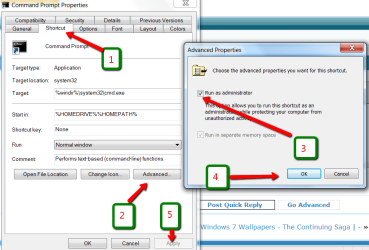
Whilst you are at it, go back to Accessories > cmd (not the .exe), right click on cmd, go to Properties > Shortcut tab > Advanced > Check the box shown > OK > Apply (important). If you do not do that, you will always have to open cmd as admin because else cmd will do nothing for you.
 

Attachments

  • 2010-09-17_2236.png
    2010-09-17_2236.png
    38.8 KB · Views: 20

My Computer

Computer Manufacturer/Model Number
HP, Dell, Gateway, Toshiba - 4 laptops and 2 desktops
OS
Vista, Windows7, Mint Mate, Zorin, Windows 8
CPU
from 1.6GHz Duo to i7
Monitor(s) Displays
2x HP w2207
Hard Drives
5x HDD, 7x SSD, 12x Externals
Keyboard
with trackball - no mices
Mouse
Trackball mice
Internet Speed
DSL 6000
Whilst you are at it, go back to Accessories > cmd (not the .exe), right click on cmd, go to Properties > Shortcut tab > Advanced > Check the box shown > OK > Apply (important). If you do not do that, you will always have to open cmd as admin because else cmd will do nothing for you.

Great Tip Wolfgang! Thanks!
 

My Computer

Computer type
PC/Desktop
Computer Manufacturer/Model Number
Self Built
OS
Win 10 Pro x64
CPU
Intel I5-2500K @3.3GHz
Motherboard
Asrock P67 Extreme4
Memory
16GB G.Skill Ripjaws X (4x4GB)
Graphics Card(s)
EVGA GeForce 750 Ti SC 2GB
Sound Card
ASUS Xonar DG 5.1 Channels 24-bit 96KHz PCI Interface Sound
Monitor(s) Displays
auria eq2367
Screen Resolution
1920 x 1080
Hard Drives
250GB Samsung 850 EVO SSD
1TB WD Blue
1TB Hitachi
PSU
SeaSonic X 650W 80 Plus Gold
Case
Corsair Obsidian 750D
Cooling
Corsair H60, Three 140mm case fans
Keyboard
Logitech Wireless Keyboard K520
Mouse
Logitech Wireless Mouse M310
Internet Speed
Wave Broadband ~ 100 dn 5 up
Antivirus
Windows Defender, Malwarebytes Premium
Browser
Edge, IE11, Chrome
Other Info
Laptop specs: HP g7-1365dx /
CPU: AMD A6-3420M APU with Radeon(tm) HD Graphics /
RAM: Crucial 8Gb (2x4Gb) /
SSD: Crucial M4-CT128M4SSD2 ATA Device/ FW 000F /
GFX: AMD Radeon HD 6520G /
OS: Windows 10 Pro x64
Hi,
Wow, what a quick answers !!
thank you, Jd87 and derekimo
this is exactly what I needed, +1000 for the images,as this one made me understand all the accessories
can be pinned either start menu or Taskbar.
sorry for so simple question,but I'm running 7 just 10 days only

Edit : whs, this is already done :p , I love being the " Boss "
 

My Computer

Computer Manufacturer/Model Number
Home made Pc
OS
Windows 7 Ultimate x64
CPU
I7 930
Motherboard
Gigabyte Ga-X58A-UD3R
Memory
OCZ 3x2 12800 memory set
Graphics Card(s)
gigabyte GTX 460 OC 1Go
Sound Card
on Board
Monitor(s) Displays
Ilyama 24' 1920x1080
Hard Drives
OCZ Vertex 2 60 G0
2x Samsung F3 1To
PSU
Cooler Master Silent Pro Gold 600 W
Case
Cooler Master 692 II Advanced
Cooling
Noctua NH-D14
Hi,
Wow, what a quick answers !!
thank you, Jd87 and derekimo
this is exactly what I needed, +1000 for the images,as this one made me understand all the accessories
can be pinned either start menu or Taskbar.
sorry for so simple question,but I'm running 7 just 10 days only

You're welcome Pepito,

We all had to learn it before we could share it too, 7 is a great OS.
 

My Computer

Computer type
PC/Desktop
Computer Manufacturer/Model Number
Self Built
OS
Win 10 Pro x64
CPU
Intel I5-2500K @3.3GHz
Motherboard
Asrock P67 Extreme4
Memory
16GB G.Skill Ripjaws X (4x4GB)
Graphics Card(s)
EVGA GeForce 750 Ti SC 2GB
Sound Card
ASUS Xonar DG 5.1 Channels 24-bit 96KHz PCI Interface Sound
Monitor(s) Displays
auria eq2367
Screen Resolution
1920 x 1080
Hard Drives
250GB Samsung 850 EVO SSD
1TB WD Blue
1TB Hitachi
PSU
SeaSonic X 650W 80 Plus Gold
Case
Corsair Obsidian 750D
Cooling
Corsair H60, Three 140mm case fans
Keyboard
Logitech Wireless Keyboard K520
Mouse
Logitech Wireless Mouse M310
Internet Speed
Wave Broadband ~ 100 dn 5 up
Antivirus
Windows Defender, Malwarebytes Premium
Browser
Edge, IE11, Chrome
Other Info
Laptop specs: HP g7-1365dx /
CPU: AMD A6-3420M APU with Radeon(tm) HD Graphics /
RAM: Crucial 8Gb (2x4Gb) /
SSD: Crucial M4-CT128M4SSD2 ATA Device/ FW 000F /
GFX: AMD Radeon HD 6520G /
OS: Windows 10 Pro x64
Seems to, but Xp is still under my elbow:).....more exactly in other DD
until I feel at ease with 7
 

My Computer

Computer Manufacturer/Model Number
Home made Pc
OS
Windows 7 Ultimate x64
CPU
I7 930
Motherboard
Gigabyte Ga-X58A-UD3R
Memory
OCZ 3x2 12800 memory set
Graphics Card(s)
gigabyte GTX 460 OC 1Go
Sound Card
on Board
Monitor(s) Displays
Ilyama 24' 1920x1080
Hard Drives
OCZ Vertex 2 60 G0
2x Samsung F3 1To
PSU
Cooler Master Silent Pro Gold 600 W
Case
Cooler Master 692 II Advanced
Cooling
Noctua NH-D14
I'm glad you have the solution you were after :)
 

My Computer

Computer type
PC/Desktop
Computer Manufacturer/Model Number
Self Built
OS
Windows 8.1 Pro x64
CPU
Intel Core i5-2500K @ 3.30GHz - S1155
Motherboard
Asus P8P67 LE Rev3, Intel P67, S115
Memory
8GB Corsair DDR3 XMS3, PC3-12800
Graphics Card(s)
NVIDIA GeForce GTX 650
Sound Card
On-Board
Monitor(s) Displays
3 x 24" {Extended Display}
Screen Resolution
1920 x 1080
Hard Drives
300GB Seagate Barracuda 7200
PSU
550W Coolermaster GX550
Case
Silverstone Precision PS04B
Cooling
Stock
Keyboard
Logitech K120
Mouse
World of Warcraft Cataclysm MMO Gaming Mouse
Internet Speed
80 MB
Antivirus
MSE / Windows Defender
Browser
Chrome
Back
Top