Solved Command Prompt missing File Menu

MaxRabbit

New member
Local time
1:40 PM
Messages
9
Hello! Any help would be appreciated: my command prompt window does not have a file menu. I also cannot manually resize the window. I am not sure what caused this, and I have tried F1-F12 to see if that would toggle a setting, but it did not make a change. Thanks for any help!
 

My Computer

OS
Windows 7 Ultimate 32bit SP1
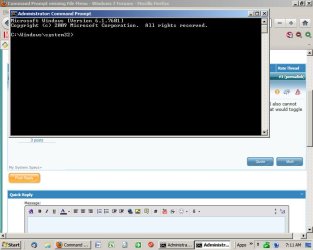
My command prompt windows has always opened at about half height as far as I can remember. See pic below.

You can maximize it through maximize control at the upper right, but I see no reason to do it.

What do you mean by "file menu"?
 

Attachments

  • Untitled-1.jpg
    Untitled-1.jpg
    65 KB · Views: 19

My Computer

Computer type
PC/Desktop
Computer Manufacturer/Model Number
Ignatz Special; 4 speed manual gearbox; factory air conditioning; one of one
OS
Windows 7 Home Premium SP1, 64-bit
CPU
Intel Skylake i5-6600K, not overclocked
Motherboard
AsRock Z170M Extreme 4, micro ATX
Memory
8 GB HyperX DDR4-2666 (2 x 4 GB)
Graphics Card(s)
none; graphics are integrated on CPU
Sound Card
onboard: Realtek ALC1150; external: USB Behringer UF0-202
Monitor(s) Displays
Dell S2340M 23 inch IPS
Screen Resolution
1600 x 900
Hard Drives
System: Crucial MX100 series SSD, 128 GB;
Data: Samsung Spinpoint 103SJ, 1 TB;
Backup: WD Caviar Green WD30EZRX-00D8PB0, 3 TB
PSU
Rosewill SilentNight 500 watt fanless, semi-modular
Case
Antec Solo II
Cooling
Noctua NH-U12S; Noctua F12 intake, Noctua S12A exhaust
Keyboard
Microsoft 200 6JH-00001 USB
Mouse
Dell or Microsoft optical wired; USB
Antivirus
Microsoft Security Essentials and Malwarebytes Premium
Browser
Pale Moon
Other Info
All fans PWM; speeds at idle: CPU circa 500 rpm; intake circa 600 rpm; exhaust circa 600 rpm; CPU temps 27 idle and 47 C load in a warm room (27 C/81 F) when running Intel Extreme Tuning Utility stress test.
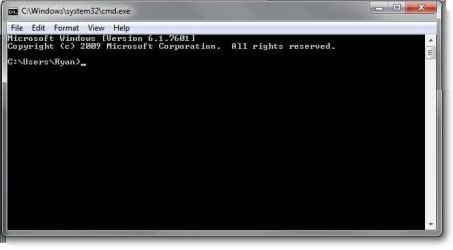
The command prompt has never had a file menu, I assume you mean like this:

lol.jpg

I had to make that one in paint for you.

EDIT: as for resizing, I am unlimited vertically but am unable to make the the width greater than 80 characters, regardless of resolution.
 

My Computer

Computer type
PC/Desktop
Computer Manufacturer/Model Number
Self Build
OS
Windows 7 Ultimate x64
CPU
Intel Core2 Quad Q8300 2.5Ghz
Motherboard
Asus P5QD Turbo
Memory
Kingston HyperX 4x1GB DDR2 1066Mhz
Graphics Card(s)
Asus/Nvidia 9500GT 1GB
Sound Card
On-Board HD
Monitor(s) Displays
22" Widescreen TFT
Screen Resolution
1920x1080
Hard Drives
2x 320Gb Seagate SATAII RAID 0
2x 80Gb Seagate SATAII RAID 0
1x 1tb hybrid (8gb ssd)
PSU
650w
Case
ATX
Cooling
140mm front, 120mm Rear, 80mm Chipset + stock CPU and GPU
Keyboard
Plastic one
Mouse
Plastic one
Internet Speed
4Mbps
Other Info
Laptop: HP Elitebook 2560p
i5 @2.7Ghz 4GB DDR3
The command prompt has never had a file menu, I assume you mean like this:

View attachment 181915

I had to make that one in paint for you.

EDIT: as for resizing, I am unlimited vertically but am unable to make the the width greater than 80 characters, regardless of resolution.
That picture is what I mean, I am missing the menu with File, Edit, etc.
 

My Computer

OS
Windows 7 Ultimate 32bit SP1
The command prompt has never had a file menu, I assume you mean like this:

View attachment 181915

I had to make that one in paint for you.

EDIT: as for resizing, I am unlimited vertically but am unable to make the the width greater than 80 characters, regardless of resolution.
That picture is what I mean, I am missing the menu with File, Edit, etc.
As Sub Styler told you, he made that pic with Windows Paint to show you he knows what you mean but those menus are not nor have they ever been in Command Prompt.

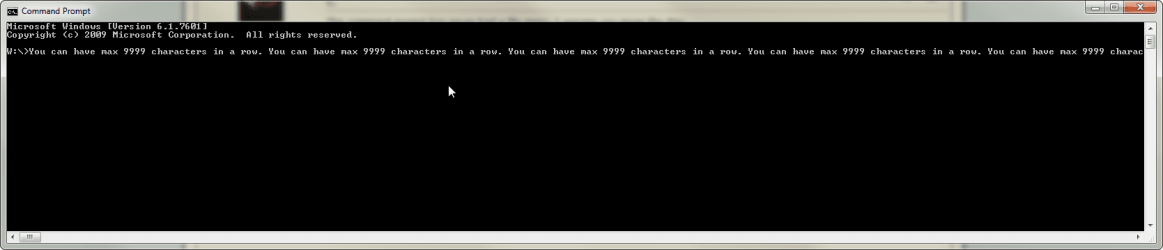
Command Prompt can have up to 9999 characters in a row (I hope I had that big display ;)):

CommandPrompt_1.png

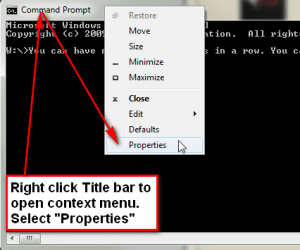
To change properties of the Command Prompt you have to right click the Title Bar and select Properties from context menu:

CommandPrompt_2.png

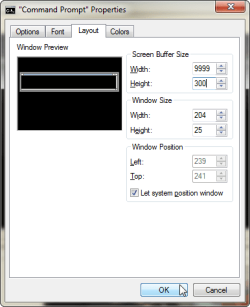
The width and hight (in characters and rows) can be chosen from Layout tab:

CommandPrompt_3.png

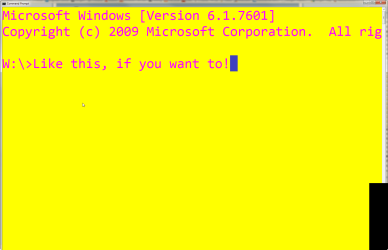
Font and font size from Font tab, background and text color from Colors tab.

CommandPrompt_4.png

Kari
 
Last edited:

My Computer

Computer type
Laptop
Computer Manufacturer/Model Number
HP ENVY 17-1150eg
OS
Windows 10 Pro x64 EN-GB
CPU
1.6 GHz Intel Core i7-720QM Processor
Memory
6 GB
Graphics Card(s)
ATI Mobility Radeon HD 5850 Graphics
Sound Card
Beats sound system with integrated subwoofer
Monitor(s) Displays
17" laptop display, 22" LED and 32" Full HD TV through HDMI
Screen Resolution
1600*900 (1), 1920*1080 (2&3)
Hard Drives
Internal: 2 x 500 GB SATA Hard Disk Drive 7200 rpm
External: 2TB for backups, 3TB USB3 network drive for media
Cooling
As Envy runs a bit warm, I have it on a Cooler Master pad
Keyboard
Logitech diNovo Media Desktop Laser (bluetooth)
Mouse
Logitech Performance Mouse MX
Internet Speed
50/10 Mbps VDSL
Antivirus
Windows Defender 4.3.9431.0
Browser
Maxthon 3.5.2., IE11
Okay, I'm just silly! Thanks so much, guys :)
 

My Computer

OS
Windows 7 Ultimate 32bit SP1
Back
Top