

Open a Command Prompt.
Type path and press Enter. Should look something like this (probably a lot shorter):
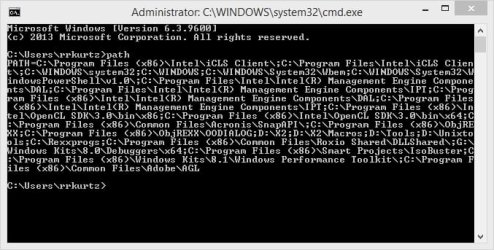
Press the the Alt and Print Screen Keys to capture an image of the Command Prompt window.
Click on Start, type paint and press Enter.
Press the Ctrl and V keys to paste the captured Command Prompt window into Paint.
Click on File then Save as and save as a .JPEG picture to your Desktop.
Now come here and start a reply.
Click on the little wedge to the right of the paper clip icon to open the Manage Attachments window.
Click on the first Browse button and navigate to your Desktop and select the .jpg file you just saved.
Click the Upload button. When it's done, close the Manage Attachments window.
Now click on the little wedge to the right of the paper clip icon and select the .jpg you just uploaded.
That will put it on your reply.
Hopefully that's explicit enough for you to get the info being asked for,. If not, ask for clarification where needed.
Type path and press Enter. Should look something like this (probably a lot shorter):
Press the the Alt and Print Screen Keys to capture an image of the Command Prompt window.
Click on Start, type paint and press Enter.
Press the Ctrl and V keys to paste the captured Command Prompt window into Paint.
Click on File then Save as and save as a .JPEG picture to your Desktop.
Now come here and start a reply.
Click on the little wedge to the right of the paper clip icon to open the Manage Attachments window.
Click on the first Browse button and navigate to your Desktop and select the .jpg file you just saved.
Click the Upload button. When it's done, close the Manage Attachments window.
Now click on the little wedge to the right of the paper clip icon and select the .jpg you just uploaded.
That will put it on your reply.
Hopefully that's explicit enough for you to get the info being asked for,. If not, ask for clarification where needed.
My Computer
- Computer type
- PC/Desktop
- Computer Manufacturer/Model Number
- Lenovo IdeaCenter 450
- OS
- Windows 10 Pro X64
- CPU
- Intel Quad Core i7-4770 @ 3.4Ghz
- Memory
- 16.0GB PC3-12800 DDR3 SDRAM 1600 MHz
- Graphics Card(s)
- Intel Integrated HD Graphics
- Sound Card
- Realtek HD Audio
- Monitor(s) Displays
- HP 22" LCD
- Screen Resolution
- 1680 x 1050
- Hard Drives
- 250GB Samsung EVO SATA-3 SSD
2TB Seagate ST2000DM001 SATA-2
1.5TB Seagate ST3150041AS SATA
- Keyboard
- Dell USB
- Mouse
- Lenovo USB
- Internet Speed
- Cable via Road Runner 3MB Upload, 30MB Download
- Antivirus
- Windows Defender, MBAM Pro, MBAE
- Browser
- Seamonkey
- Other Info
- UEFI/GPT
PLDS DVD-RW DH16AERSH