command prompt

soksattya

New member
Local time
8:22 PM
Messages
5
Location
cambodia
Hi all i need you help me a thing :cry:

I went to use autosave all text on command prompt (CMD), how can i do or use what command prompt cade for mark it autosave when i used command prompt.


Example :


Color 0a

%echo KHC_Office_Manager
Ping 10.192.172.12
%echo KHC_Office_Buying
Ping 10.192.172.11


color 1a

pause

what i need is autosave to my desktop is Ping today.txt


Thank All :)
 

My Computer

OS
Windows 7 x64 X32
CPU
intel
Motherboard
gigabey
Memory
2Gb
You can try this and see if it works and does what you want:

Color 0a

%echo KHC_Office_Manager > "Desktop\Ping today.txt"
Ping 10.192.172.12 >> "Desktop\Ping today.txt"
%echo KHC_Office_Buying >> "Desktop\Ping today.txt"
Ping 10.192.172.11 >> "Desktop\Ping today.txt"

color 1a

pause
 

My Computer

Computer type
PC/Desktop
Computer Manufacturer/Model Number
home built
OS
Multi-Boot W7_Pro_x64 W8.1_Pro_x64 W10_Pro_x64 +Linux_VMs +Chromium_VM
CPU
AMD Athlon II x4 620
Motherboard
Gigabyte GA-MA785G-UD3H
Memory
6GB GSkill DDR2 800
Graphics Card(s)
AMD 4670 GPU + AMD 4200 IGP
Sound Card
on board Realtek ALC889A
Monitor(s) Displays
RCA 40" LCD TV, Insignia 32" LCD TV, HP 15" LCD monitor
Screen Resolution
1680 x 1050
Hard Drives
OCZ Vertex 3 120GB,
Samsung F3 1TB (3),
Several others - WD, Seagate, Hitachi, ...
PSU
Corsair 500 W
Case
Rosewill mid tower
Cooling
CM 90mm rifle
Keyboard
Gyration wireless, Logitech wireless, Dell USB wired
Mouse
Gyration wireless, Logitech wireless, V7 USB wired
Internet Speed
Spectrum - 100Mbps D / 10Mbps U
Antivirus
Avast, MBAM3, EMET, WinPatrol
Browser
Pale Moon, Firefox, IE
Other Info
2 multi-boot PC's
Mainly HTPC/Office/Gen purpose (no gaming).
Trendnet USB KVM.
LG DVD burner/Blue Ray Player.
Tray system for removable SATA backup drives.

Not currently OCd, under-volted.
I use Hybrid sleep, rarely re-boot or shutdown.

Hauppauge HD-PVR, Avermedia PCIe TV Tuner, Hauppauge PCI TV Tuner.
it doesn't work pelz give me more code

example a giant

Microsoft Windows XP [Version 5.1.2600]
(C) Copyright 1985-2001 Microsoft Corp.

C:\Documents and Settings\BATC>ping 192.168.1.1

Pinging 192.168.1.1 with 32 bytes of data:

Reply from 192.168.1.1: bytes=32 time=1ms TTL=149
Reply from 192.168.1.1: bytes=32 time=12ms TTL=149

Ping statistics for 192.168.1.1:
Packets: Sent = 4, Received = 4, Lost = 0 (0% loss),
Approximate round trip times in milli-seconds:
Minimum = 1ms, Maximum = 12ms, Average = 3ms

C:\Documents and Settings\BATC>

And then it well saveauto to desktop file.txt

thank you for helpful to me !
 

My Computer

OS
Windows 7 x64 X32
CPU
intel
Motherboard
gigabey
Memory
2Gb
I'm guessing you get errors because of folder path issues.
I'm guessing you are saving these commands as a BAT file and running the BAT file.

One way you might fix this is adding a CD (Change Directory) command to the BAT file.

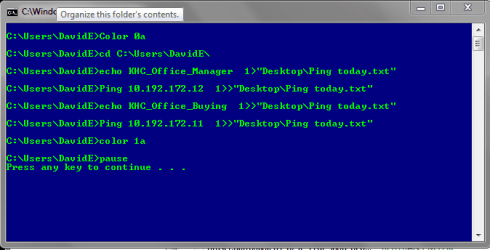
I added the cd C:\Users\DavidE\ to my BAT file and this works for me.
You will need to change DavidE to YOUR USERID for this cd command.


Here is my BAT file:
Color 0a

cd C:\Users\DavidE\

%echo KHC_Office_Manager > "Desktop\Ping today.txt"
Ping 10.192.172.12 >> "Desktop\Ping today.txt"
%echo KHC_Office_Buying >> "Desktop\Ping today.txt"
Ping 10.192.172.11 >> "Desktop\Ping today.txt"

color 1a

pause
If you do have problems post a screen print of the CMD window showing the errors.
http://www.sevenforums.com/tutorials/9733-screenshots-files-upload-post-seven-forums.html#post93869

Here is a screen print of what i see when i run the BAT file...
BatSP01.PNG
 

My Computer

Computer type
PC/Desktop
Computer Manufacturer/Model Number
home built
OS
Multi-Boot W7_Pro_x64 W8.1_Pro_x64 W10_Pro_x64 +Linux_VMs +Chromium_VM
CPU
AMD Athlon II x4 620
Motherboard
Gigabyte GA-MA785G-UD3H
Memory
6GB GSkill DDR2 800
Graphics Card(s)
AMD 4670 GPU + AMD 4200 IGP
Sound Card
on board Realtek ALC889A
Monitor(s) Displays
RCA 40" LCD TV, Insignia 32" LCD TV, HP 15" LCD monitor
Screen Resolution
1680 x 1050
Hard Drives
OCZ Vertex 3 120GB,
Samsung F3 1TB (3),
Several others - WD, Seagate, Hitachi, ...
PSU
Corsair 500 W
Case
Rosewill mid tower
Cooling
CM 90mm rifle
Keyboard
Gyration wireless, Logitech wireless, Dell USB wired
Mouse
Gyration wireless, Logitech wireless, V7 USB wired
Internet Speed
Spectrum - 100Mbps D / 10Mbps U
Antivirus
Avast, MBAM3, EMET, WinPatrol
Browser
Pale Moon, Firefox, IE
Other Info
2 multi-boot PC's
Mainly HTPC/Office/Gen purpose (no gaming).
Trendnet USB KVM.
LG DVD burner/Blue Ray Player.
Tray system for removable SATA backup drives.

Not currently OCd, under-volted.
I use Hybrid sleep, rarely re-boot or shutdown.

Hauppauge HD-PVR, Avermedia PCIe TV Tuner, Hauppauge PCI TV Tuner.
Back
Top