Command Prompt

How to Open a Command Prompt in Windows 7

   Information
This will show you how to open only a non-elevated a command prompt without administrator rights instead of an elevated command prompt with administrator rights (Run as administrator) in Windows 7.

   Warning
Some commands will need to be used in an elevated command prompt instead for them to work.


EXAMPLE: Command Prompt
NOTE: Notice how the command prompt opens to C:\Users\(user name) and not C:\Windows\System32 as a elevated command prompt with administrator rights.
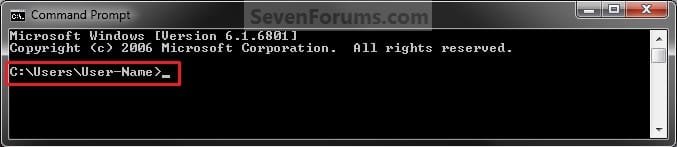
Command_Prompt.jpg


OPTION ONE

Open a Command Prompt from Start Menu


1. Open the Start Menu, click on All Programs, Accessories, and on Command Prompt. (aee screenshot below)
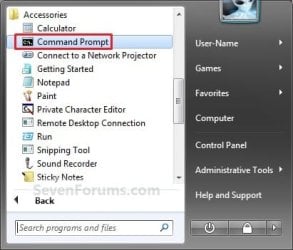
Start-Menu.jpg
OR

2. Open the Start Menu, type cmd in the search box and press Enter. (see screenshot below)
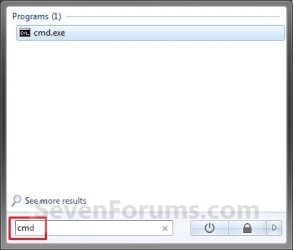
Search_Box.jpg


OPTION TWO

Open a Command Prompt from the Context Menu of a Folder or Drive


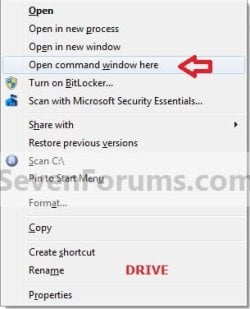
1. Press and hold Shift, then right click on a folder or drive that you want to open the command prompt at that location for, and click on Open Command Prompt Here.
Folder_Context_Menu.jpgDrive_Context_Menu.jpg


OPTION THREE

Open a Command Prompt from Task Manager


1. Open Task Manager (CTRL+SHIFT+ESC).

2. Click on File (menu bar), then press and hold the CTRL key while clicking on New Task (Run...). (see screenshot below)
Task_Manager.jpg
That's it,
Shawn


Last edited:
Hi
All Programs, Accessories, Command Prompt is missing in my one im using Windows 32 bit but if i type in search box area cmd thn it showshow can i get this back in Accessories??
 

My Computer

OS
Windows 7

My Computer

Computer type
PC/Desktop
Computer Manufacturer/Model Number
Self built custom
OS
64-bit Windows 11 Pro for Workstations
CPU
Intel i7-8700K OC'd to 5 GHz
Motherboard
ASUS ROG Maximus XI Formula Z390
Memory
64 GB (4x16GB) G.SKILL TridentZ RGB DDR4 3600 MHz
Graphics Card(s)
ASUS ROG-STRIX-GTX1080TI-O11G-GAMING
Sound Card
Integrated
Monitor(s) Displays
2 x Samsung Odyssey G7 27"
Screen Resolution
2560x1440
Hard Drives
1TB Samsung 990 PRO M.2,
4TB Samsung 990 PRO PRO M.2,
TerraMaster F8 SSD Plus NAS
PSU
Seasonic Prime Titanium 850W
Case
Thermaltake Core P3
Cooling
Corsair Hydro H115i
Keyboard
Logitech wireless K800
Mouse
Logitech MX Master 4
Internet Speed
2 Gb/s Download and 100 Mb/s Upload
Antivirus
Malwarebyte Anti-Malware Premium
Browser
Google Chrome
Other Info
Logitech Z625 speaker system,
Logitech BRIO 4K Pro webcam,
HP Color LaserJet Pro MFP M477fdn,
APC SMART-UPS RT 1000 XL - SURT1000XLI,
Galaxy S23 Plus phone
You're welcome bmb. :)
 

My Computer

Computer type
PC/Desktop
Computer Manufacturer/Model Number
Self built custom
OS
64-bit Windows 11 Pro for Workstations
CPU
Intel i7-8700K OC'd to 5 GHz
Motherboard
ASUS ROG Maximus XI Formula Z390
Memory
64 GB (4x16GB) G.SKILL TridentZ RGB DDR4 3600 MHz
Graphics Card(s)
ASUS ROG-STRIX-GTX1080TI-O11G-GAMING
Sound Card
Integrated
Monitor(s) Displays
2 x Samsung Odyssey G7 27"
Screen Resolution
2560x1440
Hard Drives
1TB Samsung 990 PRO M.2,
4TB Samsung 990 PRO PRO M.2,
TerraMaster F8 SSD Plus NAS
PSU
Seasonic Prime Titanium 850W
Case
Thermaltake Core P3
Cooling
Corsair Hydro H115i
Keyboard
Logitech wireless K800
Mouse
Logitech MX Master 4
Internet Speed
2 Gb/s Download and 100 Mb/s Upload
Antivirus
Malwarebyte Anti-Malware Premium
Browser
Google Chrome
Other Info
Logitech Z625 speaker system,
Logitech BRIO 4K Pro webcam,
HP Color LaserJet Pro MFP M477fdn,
APC SMART-UPS RT 1000 XL - SURT1000XLI,
Galaxy S23 Plus phone
Open Command Window Here

Don't forget that if you want to open a command window in a certain place/folder without going through the directory or typing it in.... you can still do the SHIFT+RIGHT CLICK and click "OPEN COMMAND WINDOW HERE".... just like in Vista...

-just thought I would throw in my 2 cents worth


-tay187
 
Last edited by a moderator:

My Computer

OS
Windows 7 Build 7000 and Vista Home Premium
Thank you for the reminder Tay. Added ;)

Shawn
 

My Computer

Computer type
PC/Desktop
Computer Manufacturer/Model Number
Self built custom
OS
64-bit Windows 11 Pro for Workstations
CPU
Intel i7-8700K OC'd to 5 GHz
Motherboard
ASUS ROG Maximus XI Formula Z390
Memory
64 GB (4x16GB) G.SKILL TridentZ RGB DDR4 3600 MHz
Graphics Card(s)
ASUS ROG-STRIX-GTX1080TI-O11G-GAMING
Sound Card
Integrated
Monitor(s) Displays
2 x Samsung Odyssey G7 27"
Screen Resolution
2560x1440
Hard Drives
1TB Samsung 990 PRO M.2,
4TB Samsung 990 PRO PRO M.2,
TerraMaster F8 SSD Plus NAS
PSU
Seasonic Prime Titanium 850W
Case
Thermaltake Core P3
Cooling
Corsair Hydro H115i
Keyboard
Logitech wireless K800
Mouse
Logitech MX Master 4
Internet Speed
2 Gb/s Download and 100 Mb/s Upload
Antivirus
Malwarebyte Anti-Malware Premium
Browser
Google Chrome
Other Info
Logitech Z625 speaker system,
Logitech BRIO 4K Pro webcam,
HP Color LaserJet Pro MFP M477fdn,
APC SMART-UPS RT 1000 XL - SURT1000XLI,
Galaxy S23 Plus phone
Nice, concise, and understandable even to me. Thanks.
 

My Computer

Computer Manufacturer/Model Number
HP All-in-One 200
OS
MS Windows 7 Home x64
CPU
Pentium(R) Dual-Core CPU E5400 @ 2.70 GHz
Motherboard
HP 2AA2 Chipset Intel G45/G43/P45/P43 Southbridge Intel ICH1
Memory
4 GB DDR3-SDRAM (1333 Mhz)
Graphics Card(s)
Intel(R) G45/G53 Express Chipset 1.76 GB memory
Sound Card
Realtek High Definition Audio
Monitor(s) Displays
Generic PnP Monitor 1920x1080 (32-bit) (60Hz)
Hard Drives
Samsung HD502HJ 500 GB 7200 RPM
Case
All-in-one
Keyboard
HP wireless
Mouse
HP wireless
Internet Speed
Down - 1.6 Mbps Up - 0.16 Mbps
You're most welcome Marossity, and welcome to Seven Forums. :)
 

My Computer

Computer type
PC/Desktop
Computer Manufacturer/Model Number
Self built custom
OS
64-bit Windows 11 Pro for Workstations
CPU
Intel i7-8700K OC'd to 5 GHz
Motherboard
ASUS ROG Maximus XI Formula Z390
Memory
64 GB (4x16GB) G.SKILL TridentZ RGB DDR4 3600 MHz
Graphics Card(s)
ASUS ROG-STRIX-GTX1080TI-O11G-GAMING
Sound Card
Integrated
Monitor(s) Displays
2 x Samsung Odyssey G7 27"
Screen Resolution
2560x1440
Hard Drives
1TB Samsung 990 PRO M.2,
4TB Samsung 990 PRO PRO M.2,
TerraMaster F8 SSD Plus NAS
PSU
Seasonic Prime Titanium 850W
Case
Thermaltake Core P3
Cooling
Corsair Hydro H115i
Keyboard
Logitech wireless K800
Mouse
Logitech MX Master 4
Internet Speed
2 Gb/s Download and 100 Mb/s Upload
Antivirus
Malwarebyte Anti-Malware Premium
Browser
Google Chrome
Other Info
Logitech Z625 speaker system,
Logitech BRIO 4K Pro webcam,
HP Color LaserJet Pro MFP M477fdn,
APC SMART-UPS RT 1000 XL - SURT1000XLI,
Galaxy S23 Plus phone
Hey I can get my cmd open but it wont run the commands im giving like "ipconfig" I tried using help but it gave me the same response. That it is not recognized as an internal or external command operable program or batch file. Can anybody help me out?
 

My Computer

OS
Windows 7 Home Premium 32bit
Hey I can get my cmd open but it wont run the commands im giving like "ipconfig" I tried using help but it gave me the same response. That it is not recognized as an internal or external command operable program or batch file. Can anybody help me out?

For that command you need to open an elevated command prompt. Here's the tutorial: http://www.sevenforums.com/tutorials/783-elevated-command-prompt.html

Edit: Or when you open a regular command prompt (from this tutorial) just type 'cd C:\Windows\System32' (without quotes) to get to the right directory.

Basically you just need to get to 'System32' to run ipconfig
 

My Computer

Computer Manufacturer/Model Number
Vostro
OS
Windows 7 Ultimate (SP1)
CPU
AMD Sempron 3600+
Graphics Card(s)
ATI Radeon Xpress 1150
Screen Resolution
1200 x 800
Hard Drives
WD Scorpio Blue 500 GB

My Computer

Computer Manufacturer/Model Number
Vostro
OS
Windows 7 Ultimate (SP1)
CPU
AMD Sempron 3600+
Graphics Card(s)
ATI Radeon Xpress 1150
Screen Resolution
1200 x 800
Hard Drives
WD Scorpio Blue 500 GB
Hey, I was wondering how to get out of the command prompt...I wanted to do the ipconfig thing, but I'm not sure how...I have Windows 7 Home Premium does that matter?
 

My Computer

OS
Windows 7 Home Premium
Hello PrettyGeek, and welcome to Seven Forums.

You could click on the X boxed in red at the top right corner to close the command prompt. It's the same process as closing any other window. :)

For the ipconfig thing, you could copy and paste this below at the prompt in the command prompt, and press Enter to see the ipconfig information for your computer.

ipconfig /all

OPTION TWO in the tutorial below can give you more details about this command.

http://www.sevenforums.com/tutorials/108982-ip-address-locate-find-your-computer.html

Hope this helps,
Shawn
 

My Computer

Computer type
PC/Desktop
Computer Manufacturer/Model Number
Self built custom
OS
64-bit Windows 11 Pro for Workstations
CPU
Intel i7-8700K OC'd to 5 GHz
Motherboard
ASUS ROG Maximus XI Formula Z390
Memory
64 GB (4x16GB) G.SKILL TridentZ RGB DDR4 3600 MHz
Graphics Card(s)
ASUS ROG-STRIX-GTX1080TI-O11G-GAMING
Sound Card
Integrated
Monitor(s) Displays
2 x Samsung Odyssey G7 27"
Screen Resolution
2560x1440
Hard Drives
1TB Samsung 990 PRO M.2,
4TB Samsung 990 PRO PRO M.2,
TerraMaster F8 SSD Plus NAS
PSU
Seasonic Prime Titanium 850W
Case
Thermaltake Core P3
Cooling
Corsair Hydro H115i
Keyboard
Logitech wireless K800
Mouse
Logitech MX Master 4
Internet Speed
2 Gb/s Download and 100 Mb/s Upload
Antivirus
Malwarebyte Anti-Malware Premium
Browser
Google Chrome
Other Info
Logitech Z625 speaker system,
Logitech BRIO 4K Pro webcam,
HP Color LaserJet Pro MFP M477fdn,
APC SMART-UPS RT 1000 XL - SURT1000XLI,
Galaxy S23 Plus phone
To exit the command prompt, just type Exit then press Enter and the command prompt window will close or use Brink's quicker method if that's what you prefer.
 

My Computer

Computer Manufacturer/Model Number
HP Pavilion Elite 495UK
OS
Windows 7 Ultimate SP1 64-Bit
CPU
Intel Core i7 870 @ 2.93GHz
Motherboard
MSI 2A9C (CPU1)
Memory
8Gb Dual-Channel DDR3 @ 664MHz
Graphics Card(s)
nVidia GeForce GTX 460 1024MB dedicated RAM
Sound Card
Realtek HD Audio
Monitor(s) Displays
HP2310i
Screen Resolution
1920 x 1080
Hard Drives
1x1954GB Hitachi HDS22020ALA 330 (RAID), 1x1954GB Hitachi External for backup and storage
PSU
460W
Case
HP Elite
Cooling
Air cooled
Keyboard
Logitech K750 solar-powered keyboard
Mouse
Logitech Wireless M180 mouse
Internet Speed
2Mb
Other Info
Pure Avanti Flow Internet Radio with iPod Dock, 64Gb iPod, HP USB Speakers, Sony MDR-V500 Headphones, Sony Vaio F-Series Laptop
You're welcome ApurvM, and welcome to Seven Forums. :)
 

My Computer

Computer type
PC/Desktop
Computer Manufacturer/Model Number
Self built custom
OS
64-bit Windows 11 Pro for Workstations
CPU
Intel i7-8700K OC'd to 5 GHz
Motherboard
ASUS ROG Maximus XI Formula Z390
Memory
64 GB (4x16GB) G.SKILL TridentZ RGB DDR4 3600 MHz
Graphics Card(s)
ASUS ROG-STRIX-GTX1080TI-O11G-GAMING
Sound Card
Integrated
Monitor(s) Displays
2 x Samsung Odyssey G7 27"
Screen Resolution
2560x1440
Hard Drives
1TB Samsung 990 PRO M.2,
4TB Samsung 990 PRO PRO M.2,
TerraMaster F8 SSD Plus NAS
PSU
Seasonic Prime Titanium 850W
Case
Thermaltake Core P3
Cooling
Corsair Hydro H115i
Keyboard
Logitech wireless K800
Mouse
Logitech MX Master 4
Internet Speed
2 Gb/s Download and 100 Mb/s Upload
Antivirus
Malwarebyte Anti-Malware Premium
Browser
Google Chrome
Other Info
Logitech Z625 speaker system,
Logitech BRIO 4K Pro webcam,
HP Color LaserJet Pro MFP M477fdn,
APC SMART-UPS RT 1000 XL - SURT1000XLI,
Galaxy S23 Plus phone
Ok, I am stuck. My command prompt is 100% gone. Including from the System32. What do I do? I while ago my services were all shut off. I manually reset them, does the command prompt have a service?
 

My Computer

Computer Manufacturer/Model Number
Gigabyte
OS
Windows 7 Ultimate x64
CPU
AMD Phenom II x6 1045T 2.7 Ghz
Motherboard
Gigabyte GA-M68MT-S2
Memory
8GB XMS3 Corsair DDR3/1333 Mhz
Graphics Card(s)
AMD XFX Radeon 6790
Sound Card
Realtek
Monitor(s) Displays
HPvs17 , HP w1707
Hard Drives
1.5 Tb Seagate SATA HDD
PSU
550w Ultra Lifetime Warranty
Case
Cooler Master
Cooling
3 140mm Fans, 3 120mm Fans
Keyboard
Logitech MK320
Mouse
Logitech MK320
Internet Speed
Slow As Shit
If you have a prior restore point, you can try to recover the cmd.exe in the system32 folder with Shadow Explorer.
 

My Computer

Computer Manufacturer/Model Number
HP, Dell, Gateway, Toshiba - 4 laptops and 2 desktops
OS
Vista, Windows7, Mint Mate, Zorin, Windows 8
CPU
from 1.6GHz Duo to i7
Monitor(s) Displays
2x HP w2207
Hard Drives
5x HDD, 7x SSD, 12x Externals
Keyboard
with trackball - no mices
Mouse
Trackball mice
Internet Speed
DSL 6000
Back
Top