Command Prompt

How to Open a Command Prompt in Windows 7

   Information
This will show you how to open only a non-elevated a command prompt without administrator rights instead of an elevated command prompt with administrator rights (Run as administrator) in Windows 7.

   Warning
Some commands will need to be used in an elevated command prompt instead for them to work.


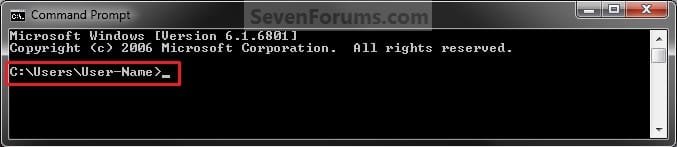
EXAMPLE: Command Prompt
NOTE: Notice how the command prompt opens to C:\Users\(user name) and not C:\Windows\System32 as a elevated command prompt with administrator rights.
Command_Prompt.jpg


OPTION ONE

Open a Command Prompt from Start Menu


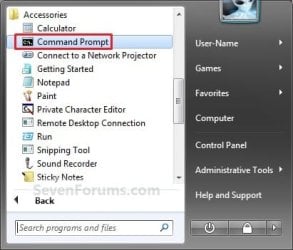
1. Open the Start Menu, click on All Programs, Accessories, and on Command Prompt. (aee screenshot below)
Start-Menu.jpg
OR

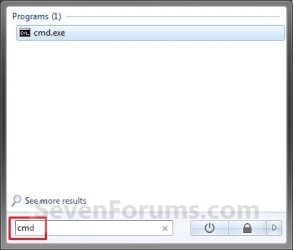
2. Open the Start Menu, type cmd in the search box and press Enter. (see screenshot below)
Search_Box.jpg


OPTION TWO

Open a Command Prompt from the Context Menu of a Folder or Drive


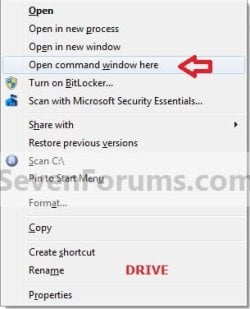
1. Press and hold Shift, then right click on a folder or drive that you want to open the command prompt at that location for, and click on Open Command Prompt Here.
Folder_Context_Menu.jpgDrive_Context_Menu.jpg


OPTION THREE

Open a Command Prompt from Task Manager


1. Open Task Manager (CTRL+SHIFT+ESC).

2. Click on File (menu bar), then press and hold the CTRL key while clicking on New Task (Run...). (see screenshot below)
Task_Manager.jpg
That's it,
Shawn


Last edited:
If you have a prior restore point, you can try to recover the cmd.exe in the system32 folder with Shadow Explorer.

I tried the shadowexplorer and the nearest thing I have to cmd is the cmddll and cmdl32. Both don't do the cmd.

Sorry, the cmd key opens the command prompt for a millesecond. Then it closes.
 
Last edited by a moderator:

My Computer

Computer Manufacturer/Model Number
Gigabyte
OS
Windows 7 Ultimate x64
CPU
AMD Phenom II x6 1045T 2.7 Ghz
Motherboard
Gigabyte GA-M68MT-S2
Memory
8GB XMS3 Corsair DDR3/1333 Mhz
Graphics Card(s)
AMD XFX Radeon 6790
Sound Card
Realtek
Monitor(s) Displays
HPvs17 , HP w1707
Hard Drives
1.5 Tb Seagate SATA HDD
PSU
550w Ultra Lifetime Warranty
Case
Cooler Master
Cooling
3 140mm Fans, 3 120mm Fans
Keyboard
Logitech MK320
Mouse
Logitech MK320
Internet Speed
Slow As Shit
Hello TmanTM,

You might see if running a sfc /scannow command may be able to restore the default C:\Windows\System32\cmd.exe file for you.
 

My Computer

Computer type
PC/Desktop
Computer Manufacturer/Model Number
Self built custom
OS
64-bit Windows 11 Pro for Workstations
CPU
Intel i7-8700K OC'd to 5 GHz
Motherboard
ASUS ROG Maximus XI Formula Z390
Memory
64 GB (4x16GB) G.SKILL TridentZ RGB DDR4 3600 MHz
Graphics Card(s)
ASUS ROG-STRIX-GTX1080TI-O11G-GAMING
Sound Card
Integrated
Monitor(s) Displays
2 x Samsung Odyssey G7 27"
Screen Resolution
2560x1440
Hard Drives
1TB Samsung 990 PRO M.2,
4TB Samsung 990 PRO PRO M.2,
TerraMaster F8 SSD Plus NAS
PSU
Seasonic Prime Titanium 850W
Case
Thermaltake Core P3
Cooling
Corsair Hydro H115i
Keyboard
Logitech wireless K800
Mouse
Logitech MX Master 4
Internet Speed
2 Gb/s Download and 100 Mb/s Upload
Antivirus
Malwarebyte Anti-Malware Premium
Browser
Google Chrome
Other Info
Logitech Z625 speaker system,
Logitech BRIO 4K Pro webcam,
HP Color LaserJet Pro MFP M477fdn,
APC SMART-UPS RT 1000 XL - SURT1000XLI,
Galaxy S23 Plus phone
I have downloaded a windows xp version of the cmd.exe because I can't find a windows 7 version. I tried the sfc /scannow command but it says the restore process failed to start or something like that. Should I njust use the cmd.exe that I downloaded?
 

My Computer

Computer Manufacturer/Model Number
Gigabyte
OS
Windows 7 Ultimate x64
CPU
AMD Phenom II x6 1045T 2.7 Ghz
Motherboard
Gigabyte GA-M68MT-S2
Memory
8GB XMS3 Corsair DDR3/1333 Mhz
Graphics Card(s)
AMD XFX Radeon 6790
Sound Card
Realtek
Monitor(s) Displays
HPvs17 , HP w1707
Hard Drives
1.5 Tb Seagate SATA HDD
PSU
550w Ultra Lifetime Warranty
Case
Cooler Master
Cooling
3 140mm Fans, 3 120mm Fans
Keyboard
Logitech MK320
Mouse
Logitech MK320
Internet Speed
Slow As Shit
TmanTM,

No, don't use a XP copy. Here's a clean copy from my system in ZIP file below. After you download the ZIP file, extract (drag and drop) the cmd.exe file to your desktop, unblock the extracted cmd.exe file, then copy it into your C:\Windows\System32 folder. :)
 

Attachments

My Computer

Computer type
PC/Desktop
Computer Manufacturer/Model Number
Self built custom
OS
64-bit Windows 11 Pro for Workstations
CPU
Intel i7-8700K OC'd to 5 GHz
Motherboard
ASUS ROG Maximus XI Formula Z390
Memory
64 GB (4x16GB) G.SKILL TridentZ RGB DDR4 3600 MHz
Graphics Card(s)
ASUS ROG-STRIX-GTX1080TI-O11G-GAMING
Sound Card
Integrated
Monitor(s) Displays
2 x Samsung Odyssey G7 27"
Screen Resolution
2560x1440
Hard Drives
1TB Samsung 990 PRO M.2,
4TB Samsung 990 PRO PRO M.2,
TerraMaster F8 SSD Plus NAS
PSU
Seasonic Prime Titanium 850W
Case
Thermaltake Core P3
Cooling
Corsair Hydro H115i
Keyboard
Logitech wireless K800
Mouse
Logitech MX Master 4
Internet Speed
2 Gb/s Download and 100 Mb/s Upload
Antivirus
Malwarebyte Anti-Malware Premium
Browser
Google Chrome
Other Info
Logitech Z625 speaker system,
Logitech BRIO 4K Pro webcam,
HP Color LaserJet Pro MFP M477fdn,
APC SMART-UPS RT 1000 XL - SURT1000XLI,
Galaxy S23 Plus phone
It is working now. Thank you so much for your time and effort.
 

My Computer

Computer Manufacturer/Model Number
Gigabyte
OS
Windows 7 Ultimate x64
CPU
AMD Phenom II x6 1045T 2.7 Ghz
Motherboard
Gigabyte GA-M68MT-S2
Memory
8GB XMS3 Corsair DDR3/1333 Mhz
Graphics Card(s)
AMD XFX Radeon 6790
Sound Card
Realtek
Monitor(s) Displays
HPvs17 , HP w1707
Hard Drives
1.5 Tb Seagate SATA HDD
PSU
550w Ultra Lifetime Warranty
Case
Cooler Master
Cooling
3 140mm Fans, 3 120mm Fans
Keyboard
Logitech MK320
Mouse
Logitech MK320
Internet Speed
Slow As Shit
You're most welcome TManTM. :)
 

My Computer

Computer type
PC/Desktop
Computer Manufacturer/Model Number
Self built custom
OS
64-bit Windows 11 Pro for Workstations
CPU
Intel i7-8700K OC'd to 5 GHz
Motherboard
ASUS ROG Maximus XI Formula Z390
Memory
64 GB (4x16GB) G.SKILL TridentZ RGB DDR4 3600 MHz
Graphics Card(s)
ASUS ROG-STRIX-GTX1080TI-O11G-GAMING
Sound Card
Integrated
Monitor(s) Displays
2 x Samsung Odyssey G7 27"
Screen Resolution
2560x1440
Hard Drives
1TB Samsung 990 PRO M.2,
4TB Samsung 990 PRO PRO M.2,
TerraMaster F8 SSD Plus NAS
PSU
Seasonic Prime Titanium 850W
Case
Thermaltake Core P3
Cooling
Corsair Hydro H115i
Keyboard
Logitech wireless K800
Mouse
Logitech MX Master 4
Internet Speed
2 Gb/s Download and 100 Mb/s Upload
Antivirus
Malwarebyte Anti-Malware Premium
Browser
Google Chrome
Other Info
Logitech Z625 speaker system,
Logitech BRIO 4K Pro webcam,
HP Color LaserJet Pro MFP M477fdn,
APC SMART-UPS RT 1000 XL - SURT1000XLI,
Galaxy S23 Plus phone
Hello, I tried each of the methods to open a command prompt not as an administrator, and each of the methods resulted in me getting a command prompt window as an administrator. Does this mean I have a setting somewhere to make the command prompt open as an administrator of which I am not aware? Advice to resolve this would be appreciated. (Windows 7 Home)
Regards,
Henry
 

My Computer

OS
64
Hello Henrys,

As a test, type diskpart in the command prompt and press Enter to see if you are prompted by UAC or get an access denied message. :)
 

My Computer

Computer type
PC/Desktop
Computer Manufacturer/Model Number
Self built custom
OS
64-bit Windows 11 Pro for Workstations
CPU
Intel i7-8700K OC'd to 5 GHz
Motherboard
ASUS ROG Maximus XI Formula Z390
Memory
64 GB (4x16GB) G.SKILL TridentZ RGB DDR4 3600 MHz
Graphics Card(s)
ASUS ROG-STRIX-GTX1080TI-O11G-GAMING
Sound Card
Integrated
Monitor(s) Displays
2 x Samsung Odyssey G7 27"
Screen Resolution
2560x1440
Hard Drives
1TB Samsung 990 PRO M.2,
4TB Samsung 990 PRO PRO M.2,
TerraMaster F8 SSD Plus NAS
PSU
Seasonic Prime Titanium 850W
Case
Thermaltake Core P3
Cooling
Corsair Hydro H115i
Keyboard
Logitech wireless K800
Mouse
Logitech MX Master 4
Internet Speed
2 Gb/s Download and 100 Mb/s Upload
Antivirus
Malwarebyte Anti-Malware Premium
Browser
Google Chrome
Other Info
Logitech Z625 speaker system,
Logitech BRIO 4K Pro webcam,
HP Color LaserJet Pro MFP M477fdn,
APC SMART-UPS RT 1000 XL - SURT1000XLI,
Galaxy S23 Plus phone
The main reason I wanted to run the command prompt not as an administrator was because I wanted to run the ASP.NET Configuration tool in VS2013 and I found a blog that included instructions to do so.
Accessing the ASP.NET Web Configuration Tool in Visual Studio 2013 - .NET Web Development and Tools Blog - Site Home - MSDN Blogs

However, I decided when I need the ASP.NET configuration tool I will use it in VS2012, then resume my work in VS2013. It is a simple solution. So now there is no need to run the cmd not as an admin, except for knowledge sake, which is optional at this point.

If you happen to know what would cause one to always run the command prompt as an admin it would be appreciated. I think at one time, I may have tinkered with some settings thinking as a web developer I'd "always" want to run as an admin to do my work, so I might as well set the thing to do so, but it's been so long that I don't recall how to undo the setting, or even what settings I may have changed.

Appreciate the help.
 

My Computer

OS
64
Here are a couple of items that could cause this.

Are you logged in to the built-in elevated "Administrator" account?

Did you disable UAC?
 

My Computer

Computer type
PC/Desktop
Computer Manufacturer/Model Number
Self built custom
OS
64-bit Windows 11 Pro for Workstations
CPU
Intel i7-8700K OC'd to 5 GHz
Motherboard
ASUS ROG Maximus XI Formula Z390
Memory
64 GB (4x16GB) G.SKILL TridentZ RGB DDR4 3600 MHz
Graphics Card(s)
ASUS ROG-STRIX-GTX1080TI-O11G-GAMING
Sound Card
Integrated
Monitor(s) Displays
2 x Samsung Odyssey G7 27"
Screen Resolution
2560x1440
Hard Drives
1TB Samsung 990 PRO M.2,
4TB Samsung 990 PRO PRO M.2,
TerraMaster F8 SSD Plus NAS
PSU
Seasonic Prime Titanium 850W
Case
Thermaltake Core P3
Cooling
Corsair Hydro H115i
Keyboard
Logitech wireless K800
Mouse
Logitech MX Master 4
Internet Speed
2 Gb/s Download and 100 Mb/s Upload
Antivirus
Malwarebyte Anti-Malware Premium
Browser
Google Chrome
Other Info
Logitech Z625 speaker system,
Logitech BRIO 4K Pro webcam,
HP Color LaserJet Pro MFP M477fdn,
APC SMART-UPS RT 1000 XL - SURT1000XLI,
Galaxy S23 Plus phone
Yes, you pegged it. I am logged in as Admin on my PC. Doing web development it's often easier to get things done this way, I guess not always.

I do appreciate your help. thank you.
 

My Computer

OS
64
You're most welcome. :)
 

My Computer

Computer type
PC/Desktop
Computer Manufacturer/Model Number
Self built custom
OS
64-bit Windows 11 Pro for Workstations
CPU
Intel i7-8700K OC'd to 5 GHz
Motherboard
ASUS ROG Maximus XI Formula Z390
Memory
64 GB (4x16GB) G.SKILL TridentZ RGB DDR4 3600 MHz
Graphics Card(s)
ASUS ROG-STRIX-GTX1080TI-O11G-GAMING
Sound Card
Integrated
Monitor(s) Displays
2 x Samsung Odyssey G7 27"
Screen Resolution
2560x1440
Hard Drives
1TB Samsung 990 PRO M.2,
4TB Samsung 990 PRO PRO M.2,
TerraMaster F8 SSD Plus NAS
PSU
Seasonic Prime Titanium 850W
Case
Thermaltake Core P3
Cooling
Corsair Hydro H115i
Keyboard
Logitech wireless K800
Mouse
Logitech MX Master 4
Internet Speed
2 Gb/s Download and 100 Mb/s Upload
Antivirus
Malwarebyte Anti-Malware Premium
Browser
Google Chrome
Other Info
Logitech Z625 speaker system,
Logitech BRIO 4K Pro webcam,
HP Color LaserJet Pro MFP M477fdn,
APC SMART-UPS RT 1000 XL - SURT1000XLI,
Galaxy S23 Plus phone
I deleted cmd from computer.. what i need to do??? Please help. :cry:
 

My Computer

Computer type
PC/Desktop
OS
Windows 7 Home Premium 64bit
Hello Berny, and welcome to Seven Forums.

No worries. Since cmd.exe is a Windows system file, you can run the SFC /SCANNOW command to restore it. :)
 

My Computer

Computer type
PC/Desktop
Computer Manufacturer/Model Number
Self built custom
OS
64-bit Windows 11 Pro for Workstations
CPU
Intel i7-8700K OC'd to 5 GHz
Motherboard
ASUS ROG Maximus XI Formula Z390
Memory
64 GB (4x16GB) G.SKILL TridentZ RGB DDR4 3600 MHz
Graphics Card(s)
ASUS ROG-STRIX-GTX1080TI-O11G-GAMING
Sound Card
Integrated
Monitor(s) Displays
2 x Samsung Odyssey G7 27"
Screen Resolution
2560x1440
Hard Drives
1TB Samsung 990 PRO M.2,
4TB Samsung 990 PRO PRO M.2,
TerraMaster F8 SSD Plus NAS
PSU
Seasonic Prime Titanium 850W
Case
Thermaltake Core P3
Cooling
Corsair Hydro H115i
Keyboard
Logitech wireless K800
Mouse
Logitech MX Master 4
Internet Speed
2 Gb/s Download and 100 Mb/s Upload
Antivirus
Malwarebyte Anti-Malware Premium
Browser
Google Chrome
Other Info
Logitech Z625 speaker system,
Logitech BRIO 4K Pro webcam,
HP Color LaserJet Pro MFP M477fdn,
APC SMART-UPS RT 1000 XL - SURT1000XLI,
Galaxy S23 Plus phone
Back
Top