Comodo Leak Test: What's your score?

Maxx, Norton 360 is not a partial suite.
It includes an excellent automatic firewall which can be configured to be as noisy as Comodo firewall.

Computer Security Systems | Compare Norton Products

I checked out your link and did not see Firewall mentioned anywhere on the page. Do you have another link showing that Norton 360 has a Firewall?

As far as the Comodo Firewall being noisy that is a thing of the past as the developers have made Comodo 2011 very quiet and still just as effective as ever.

Comodo Firewall can also be configured to be very quiet :D Once it knows what I want it to look for, and then I set it to bother me but once in a while
 

My Computer My Computer

Computer Manufacturer/Model Number
Pugh Technologies
OS
W7 Professional x64
CPU
AMD Athlon II X3 445 Rana 3.10 GHz
Motherboard
MSI 870A-G54
Memory
PNY XLR DDR3 1600 4x2GB
Graphics Card(s)
NVIDIA GeForce GTS 450 (fermi) 1GB GDDR5
Sound Card
Realtek ALC892 onboard
Monitor(s) Displays
ASUS VE205t, Viewsonic VX2035WM
Screen Resolution
1600x900, 1600x1050
Hard Drives
977GB Hitachi Hitachi HDS721010CLA332
244GB Western Digital WDC WD2500AAJS-65B4A0
488GB Western Digital WDC WD5000AAJS-00A8B0
488GB Western Digital WDC WD5000AAKS-00UU3A0
PSU
Antec EarthWatts EA650 650W
Case
ThermalTake Armor A90 Mid Tower
Cooling
3x 120mm in, 1x 120mm & 200mm out, self built hydro-cooler
Keyboard
Logitec 55
Mouse
Razer Deathadder
Internet Speed
20 Mbps D/L, 9 Mbps U/L
I got 210 and I am running the standard windows firewall.

The thing demanded that I ran it under the admin account, -- that's probably why I got a lesser score (my main account is a standard user.)

you get less points when testing on an ADMIN-account.
but, you don´t have to use an ADMIN-account, you can run CLT on your "normal" USER-account.

unless Comodo has released a new changed version of CLT recently....
I thought as much. The program has that shield symbol in the bottom right of its icon and it asks for the admin password on load. Clicking No just causes it to shut down :)
 

My Computer My Computer

Computer Manufacturer/Model Number
HP DV6 1330sa
OS
Windows 7 Professional 64 Bit SP1
CPU
INTEL DUAL CORE 2.1Ghz
Motherboard
N/A
Memory
4GB DDR3
Graphics Card(s)
INTEL
Sound Card
LAPTOP
Monitor(s) Displays
2
Screen Resolution
3200x1080
Hard Drives
250GB
PSU
LAPTOP
Case
LAPTOP
Cooling
LAPTOP
Keyboard
SOLID YEAR 260U
Mouse
USB
Internet Speed
20 MB/S
I got 210 and I am running the standard windows firewall.

The thing demanded that I ran it under the admin account, -- that's probably why I got a lesser score (my main account is a standard user.)

you get less points when testing on an ADMIN-account.
but, you don´t have to use an ADMIN-account, you can run CLT on your "normal" USER-account.

unless Comodo has released a new changed version of CLT recently....
I thought as much. The program has that shield symbol in the bottom right of its icon and it asks for the admin password on load. Clicking No just causes it to shut down :)

after i had turned off my computer i realized what you meant....

you get a UAC-prompt when you run CLT, but that´s normal, as you have to run CLT "as ADMIN" (elevated).
but that is NOT the same as using your ADMIN-account for the tests.

i have tested several firewalls with CLT & CPIL.
if i login to my ADMIN-account and run CLT, then there are usually a few leaks.

if i login to my USER-account and run CLT, the result is better as a USER-account is more restricted and thus provides better security.

i´m using Online Armor and get a full score, 340/340.
 

My Computer My Computer

Computer Manufacturer/Model Number
Dell
OS
W7-Enterprise + WS-2008 (Converted to Workstation)
CPU
P4 2,4GHz (at 1,8GHz, "slow" RDRAM, only 400MHz FSB...)
Motherboard
Intel 850E
Memory
2GB
Graphics Card(s)
NVIDIA QUADRO2 PRO 64MB
Sound Card
Yes
Monitor(s) Displays
Dell 1702FP
Screen Resolution
1280x1024
Hard Drives
Yes
PSU
Yes
Case
Yes
Cooling
Yes
Keyboard
Yes
Mouse
Yes, and i also have Cats...
Internet Speed
University: 100 MBit/s, Home: UMTS 7,2 MBit/s
Other Info
W7 on a DINOSAUR: P2 with 266MHz CPU & 160MB RAM
You don´t have to use an ADMIN-account, you can run CLT on your "normal" USER-account.

unless Comodo has released a new changed version of CLT recently....

That's good advise and as far as I know Comodo has not released a new version of CLT so your advise stands.

after i had turned off my computer i realized what Rei Tumult meant....

you get a UAC-prompt when you run CLT, but that´s normal, as you have to run CLT "as ADMIN" (elevated).
but that is NOT the same as using your ADMIN-account for the tests.

BTW nice computer security set up listed in your signature gotta love the saftey and security of virtualization software!

thanks !
yes, i think it´s a good security-setup.
it won´t be easy to penetrate. :D
 

My Computer My Computer

Computer Manufacturer/Model Number
Dell
OS
W7-Enterprise + WS-2008 (Converted to Workstation)
CPU
P4 2,4GHz (at 1,8GHz, "slow" RDRAM, only 400MHz FSB...)
Motherboard
Intel 850E
Memory
2GB
Graphics Card(s)
NVIDIA QUADRO2 PRO 64MB
Sound Card
Yes
Monitor(s) Displays
Dell 1702FP
Screen Resolution
1280x1024
Hard Drives
Yes
PSU
Yes
Case
Yes
Cooling
Yes
Keyboard
Yes
Mouse
Yes, and i also have Cats...
Internet Speed
University: 100 MBit/s, Home: UMTS 7,2 MBit/s
Other Info
W7 on a DINOSAUR: P2 with 266MHz CPU & 160MB RAM
@ Maxxwire

Sorry about that, I should have said I'm running Norton 360 Ver 4.0 All in one security suite which includes a firewall. I'm trying it out since a friend of mine bought the 3 license version and let me take it for a spin to see what I think of it.

I'm also running MSE alongside it and it plays well, as MSE usually does with other AV's.

Comodo and Norton firewalls seem to play well together.

Comodo Defense +, MSE and Norton 360 are also all running under the spyware & unwanted program protection

So far no conflicts (Knock on wood)
 
Last edited:

My Computer My Computer

Computer type
PC/Desktop
Computer Manufacturer/Model Number
Dell Hell oh Well
OS
Win 7 32 Home Premium, Win 7 64 Pro, Win 8.1, Win 10
CPU
Intel Core 2 Duo 2.93GHz
Memory
Not much with my ADHD
Graphics Card(s)
ATI Radeon HD 4350
Monitor(s) Displays
24" HDTV/Monitor
Screen Resolution
Blurry after a Scotch or 2
Hard Drives
1 HDD 250 GB, 1 HDD 1 TB, 3 - 1 TB Externals
Case
Don't get on my case...man :D
Cooling
I have an Air Conditioner & Diet Pepsi
Keyboard
Saitek Cyborg
Mouse
10 yr old MS optical mouse that still works
Internet Speed
Never fast enough
Antivirus
Various
Browser
Various
Comodo's Cloud Scanner detected CLT as malware.

lol :D i was wondering when someone was going to mention that.

When this build was first released i assumed that because i was just running the basic firewall (defense+ disabled) that the cloud scanner was also disabled until i run it through the GRC leak test & it burst into action.

I have also had it crop up with a couple of system tools (cloud heuristic) which is understandable as they access drivers & system files
 

My Computer My Computer

Computer Manufacturer/Model Number
Hewlett Packard Compaq Presario CQ60-305au
OS
Windows Seven Home Premium 32bit SP1
CPU
AMD Athlon QI46 2.1Ghz
Motherboard
Wistron 303c
Memory
2048 Mb DDR2 SD RAM
Graphics Card(s)
NVidea GE GoForce 8200M G/256mb dedicated graphics memory
Sound Card
MCP78S NVidea high definition
Monitor(s) Displays
15.6" High definition Brightview Widescreen
Screen Resolution
1336x768
Hard Drives
Toshiba MK2555GSX ATA
Comodo and Norton firewalls seem to play well together.

Comodo Defense +, MSE and Norton 360 are also all running under the spyware & unwanted program protection

So far no conflicts (Knock on wood)

I can understand you're wanting to try Norton 360 since your friend offered you a free license, but ultimately Firewalls operate according to the rules that they have been given and only the one set of more restrictive rules will apply unless you run 2 identical sets of rules in each Firewall in which case having 2 Firewalls identically programmed would mute any additional protection that having the additional Firewall would offer. My guess is that the 2 Firewalls appear to be 'getting along' because they are both set in default 'allow all' mode.

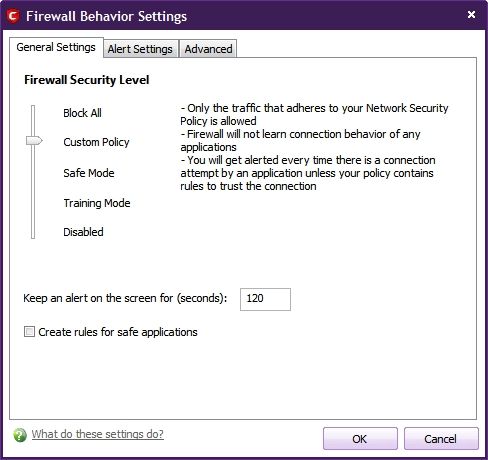
What mode are you running your Comodo Firewall in? If you run it in the default Safe Mode it will create rules for all trusted programs just like Norton does, but if you bump its security level it up a notch to Custom Policy Mode and remove the previous 'Safe Mode allow all' rules the Comodo Firewall will allow you to decide which programs will be allowed to access the Internet and you can thereby develop your own set of Firewall Rules based on your own personal computer security decisions which is what the Comodo Firewall can be all about and you will have a whole new level of control over what programs your computer allows access to the Internet rendering the allow all default settings of Norton effectively bypassed.

5e4b288c.jpg


~Maxx~
.
da59fa57.png
 

My Computer My Computer

Computer Manufacturer/Model Number
HP HPE 270f
OS
Windows 7 x64 Home Premium
CPU
Intel Core i7 930 @ 2.8 Ghz Socket 1366 LGA
Motherboard
Pegatron Truckee v1.04E41
Memory
8 GB 1366 Mhz DDR3 (PC3-10700) RAM
Graphics Card(s)
ATI Radeon 5770 1 GB DDR5 RAM
Sound Card
Realtech High Definition
Monitor(s) Displays
32" Sony Bravia
Screen Resolution
1366 X 768
Hard Drives
Intel 25nm 120 GB Series 320 SSD HD Tune- 265 MBps Read/ 130 MBps Write

LaCie 1TB + 1TB RAID 0 eSATA Drive HD Tune- 160 MBps Read/ 90 MBps Write
Keyboard
Logitech Illuminated
Mouse
Logitech MX Revolution
Internet Speed
36.4 Mbps Maximum on a 37 Mbps Motorola SB501 Modem
You can set up Norton the same why by turning off Automatic Program Control and turning on Advanced Events Monitoring.
 

My Computer My Computer

OS
Arch Linux 64-bit
You can set up Norton the same why by turning off Automatic Program Control and turning on Advanced Events Monitoring.

Could you please show us your CLT results from using this configuration? A screenshot is worth 1,000 words!

~Maxx~
.
da59fa57.png
 

My Computer My Computer

Computer Manufacturer/Model Number
HP HPE 270f
OS
Windows 7 x64 Home Premium
CPU
Intel Core i7 930 @ 2.8 Ghz Socket 1366 LGA
Motherboard
Pegatron Truckee v1.04E41
Memory
8 GB 1366 Mhz DDR3 (PC3-10700) RAM
Graphics Card(s)
ATI Radeon 5770 1 GB DDR5 RAM
Sound Card
Realtech High Definition
Monitor(s) Displays
32" Sony Bravia
Screen Resolution
1366 X 768
Hard Drives
Intel 25nm 120 GB Series 320 SSD HD Tune- 265 MBps Read/ 130 MBps Write

LaCie 1TB + 1TB RAID 0 eSATA Drive HD Tune- 160 MBps Read/ 90 MBps Write
Keyboard
Logitech Illuminated
Mouse
Logitech MX Revolution
Internet Speed
36.4 Mbps Maximum on a 37 Mbps Motorola SB501 Modem
When I threw Norton in I didn't pay much attention to the firewall config since it's Mid terms and I haven't had much time for anything.

In Norton the program rules are set to Auto and I did I enable a couple of traffic rules that weren't.

Comodo was there first (had it for about 3 months before Norton) it's set to custom policy, Defense + in safe mode. I manually enable sandbox mode when I need it. I allowed the installation of Norton Firewall as just an extra layer of defense. I was more curious as to how the AV would play with the other programs. When I get my life back I'll do some more investigating.
 

My Computer My Computer

Computer type
PC/Desktop
Computer Manufacturer/Model Number
Dell Hell oh Well
OS
Win 7 32 Home Premium, Win 7 64 Pro, Win 8.1, Win 10
CPU
Intel Core 2 Duo 2.93GHz
Memory
Not much with my ADHD
Graphics Card(s)
ATI Radeon HD 4350
Monitor(s) Displays
24" HDTV/Monitor
Screen Resolution
Blurry after a Scotch or 2
Hard Drives
1 HDD 250 GB, 1 HDD 1 TB, 3 - 1 TB Externals
Case
Don't get on my case...man :D
Cooling
I have an Air Conditioner & Diet Pepsi
Keyboard
Saitek Cyborg
Mouse
10 yr old MS optical mouse that still works
Internet Speed
Never fast enough
Antivirus
Various
Browser
Various
I allowed the installation of Norton Firewall as just an extra layer of defense. I was more curious as to how the AV would play with the other programs. When I get my life back I'll do some more investigating.

Please share your results with us when you have the time.

~Maxx~
.
da59fa57.png
 

My Computer My Computer

Computer Manufacturer/Model Number
HP HPE 270f
OS
Windows 7 x64 Home Premium
CPU
Intel Core i7 930 @ 2.8 Ghz Socket 1366 LGA
Motherboard
Pegatron Truckee v1.04E41
Memory
8 GB 1366 Mhz DDR3 (PC3-10700) RAM
Graphics Card(s)
ATI Radeon 5770 1 GB DDR5 RAM
Sound Card
Realtech High Definition
Monitor(s) Displays
32" Sony Bravia
Screen Resolution
1366 X 768
Hard Drives
Intel 25nm 120 GB Series 320 SSD HD Tune- 265 MBps Read/ 130 MBps Write

LaCie 1TB + 1TB RAID 0 eSATA Drive HD Tune- 160 MBps Read/ 90 MBps Write
Keyboard
Logitech Illuminated
Mouse
Logitech MX Revolution
Internet Speed
36.4 Mbps Maximum on a 37 Mbps Motorola SB501 Modem
When I threw Norton in I didn't pay much attention to the firewall config since it's Mid terms and I haven't had much time for anything.

In Norton the program rules are set to Auto and I did I enable a couple of traffic rules that weren't.

Comodo was there first (had it for about 3 months before Norton) it's set to custom policy, Defense + in safe mode. I manually enable sandbox mode when I need it. I allowed the installation of Norton Firewall as just an extra layer of defense. I was more curious as to how the AV would play with the other programs. When I get my life back I'll do some more investigating.

don´t use 2 firewalls !
it´s a bad idea...;)

although i once had both Windows firewall & Outpost ( if i remember correctly) running together for a week until i discovered my mistake, and i didn´t notice any problems.
 

My Computer My Computer

Computer Manufacturer/Model Number
Dell
OS
W7-Enterprise + WS-2008 (Converted to Workstation)
CPU
P4 2,4GHz (at 1,8GHz, "slow" RDRAM, only 400MHz FSB...)
Motherboard
Intel 850E
Memory
2GB
Graphics Card(s)
NVIDIA QUADRO2 PRO 64MB
Sound Card
Yes
Monitor(s) Displays
Dell 1702FP
Screen Resolution
1280x1024
Hard Drives
Yes
PSU
Yes
Case
Yes
Cooling
Yes
Keyboard
Yes
Mouse
Yes, and i also have Cats...
Internet Speed
University: 100 MBit/s, Home: UMTS 7,2 MBit/s
Other Info
W7 on a DINOSAUR: P2 with 266MHz CPU & 160MB RAM
don´t use 2 firewalls !
it´s a bad idea...;)

although i once had both Windows firewall & Outpost ( if i remember correctly) running together for a week until i discovered my mistake, and i didn´t notice any problems.

This is the standard advice although I once had left Windows Firewall on after installing the Comodo Firewall much like you did with Outpost without any problems and I think that the fact that Windows Firewall default is set to let all outbound traffic pass was the reason behind it not conflicting with the rather large set of outbound rules that I have set in the Comodo Firewall.

~Maxx~
.
da59fa57.png
 

My Computer My Computer

Computer Manufacturer/Model Number
HP HPE 270f
OS
Windows 7 x64 Home Premium
CPU
Intel Core i7 930 @ 2.8 Ghz Socket 1366 LGA
Motherboard
Pegatron Truckee v1.04E41
Memory
8 GB 1366 Mhz DDR3 (PC3-10700) RAM
Graphics Card(s)
ATI Radeon 5770 1 GB DDR5 RAM
Sound Card
Realtech High Definition
Monitor(s) Displays
32" Sony Bravia
Screen Resolution
1366 X 768
Hard Drives
Intel 25nm 120 GB Series 320 SSD HD Tune- 265 MBps Read/ 130 MBps Write

LaCie 1TB + 1TB RAID 0 eSATA Drive HD Tune- 160 MBps Read/ 90 MBps Write
Keyboard
Logitech Illuminated
Mouse
Logitech MX Revolution
Internet Speed
36.4 Mbps Maximum on a 37 Mbps Motorola SB501 Modem
I tend to think of the Norton Firewall as a firewall in the background. It's not set to allow all traffic, The automatic program control is engaged and so is auto learn IPv6 NAT Transversal traffic. Intrusion pervention is on, as is browser protection and download intelligence. Comodo is set to Auto under Norton Program rules. Norton general settings are Uncommon Protocols, Stealth blocked ports, Stateful protocol filter all on. There's more settings under the Traffic Rules, but I've got class in 1/2 an hour, too many to list.

My one gripe (so far) with Norton compared to Comodo is there is no quick way to stop all traffic. There's a shortcut to disable the smart firewall, but not stop all, like on Comodo.

What I mainly regulate traffic under is the Comodo firewall.

I know you're not supposed to have 2 firewalls due to possible conflicts. It could be that Win 7 is just more tolerant of these? I've done a quick scan of my logs and I see no conflicts, well, at least none that I can see, so far.

There is one curious thing I've noticed about Comodo Firewall though:

http://www.sevenforums.com/system-security/114878-comodo-multiple-logon-logoff.html

Anyone else notice or have this behavior present on their machines? This was occuring before I threw Norton on the sys and still continues.

Laterz
 

My Computer My Computer

Computer type
PC/Desktop
Computer Manufacturer/Model Number
Dell Hell oh Well
OS
Win 7 32 Home Premium, Win 7 64 Pro, Win 8.1, Win 10
CPU
Intel Core 2 Duo 2.93GHz
Memory
Not much with my ADHD
Graphics Card(s)
ATI Radeon HD 4350
Monitor(s) Displays
24" HDTV/Monitor
Screen Resolution
Blurry after a Scotch or 2
Hard Drives
1 HDD 250 GB, 1 HDD 1 TB, 3 - 1 TB Externals
Case
Don't get on my case...man :D
Cooling
I have an Air Conditioner & Diet Pepsi
Keyboard
Saitek Cyborg
Mouse
10 yr old MS optical mouse that still works
Internet Speed
Never fast enough
Antivirus
Various
Browser
Various
Symantec End Point got a 200/340 score and with everything blocked in Firewall got a 340/340 score so its all in the setting you can get what ever you want normal setting was the first score.
 

My Computer My Computer

Computer Manufacturer/Model Number
Custom Build
OS
Window's 7 Ultimate 64bit
CPU
E8400 Lapped
Motherboard
P5Q Pro Turbo Asus
Memory
Kingston 4 gig
Graphics Card(s)
2=ATI 5670Video Crossfire / HVR2250 TV Tuner Card
Sound Card
HDMI sound
Monitor(s) Displays
Sony 46"
Screen Resolution
1280x720
Hard Drives
1 WD 160gig YS, 1 Black Edition 320gig and one 250gig WD YS Model plus external Caviar Black 640gig Drives
PSU
Antec 550 Modular
Case
Antec Custom 180B
Cooling
X-1283 Lapped Artic Silver 5
Keyboard
Wave Combo Logitech
Mouse
Logitech LX-8
Internet Speed
5mb down 768 up
Other Info
Custom side fan in case, plus moved middle lower fan to the front of hard drives , also installed a second intake fan in lower two optical drive slots. Rear fans are controlled by Fan mate controllers. temps inside case are monitored by probe and temps coming out the top exhaust are also monitored, temps as of right now 20c inside and 22.7 out the exhaust. Front intake fans are controlled by Asu
I tend to think of the Norton Firewall as a firewall in the background. It's not set to allow all traffic, The automatic program control is engaged and so is auto learn IPv6 NAT Transversal traffic.

When I was using the Norton 2009 Firewall I spent many hours pouring over the Firewall Logs and I never saw it block anything as every outbound request was allowed by default and I suspect that is why it gets along with Comodo on your Win 7 computer where you set the Firewall rules.

~Maxx~
.
da59fa57.png
 

My Computer My Computer

Computer Manufacturer/Model Number
HP HPE 270f
OS
Windows 7 x64 Home Premium
CPU
Intel Core i7 930 @ 2.8 Ghz Socket 1366 LGA
Motherboard
Pegatron Truckee v1.04E41
Memory
8 GB 1366 Mhz DDR3 (PC3-10700) RAM
Graphics Card(s)
ATI Radeon 5770 1 GB DDR5 RAM
Sound Card
Realtech High Definition
Monitor(s) Displays
32" Sony Bravia
Screen Resolution
1366 X 768
Hard Drives
Intel 25nm 120 GB Series 320 SSD HD Tune- 265 MBps Read/ 130 MBps Write

LaCie 1TB + 1TB RAID 0 eSATA Drive HD Tune- 160 MBps Read/ 90 MBps Write
Keyboard
Logitech Illuminated
Mouse
Logitech MX Revolution
Internet Speed
36.4 Mbps Maximum on a 37 Mbps Motorola SB501 Modem
Symantec End Point got a 200/340 score and with everything blocked in Firewall got a 340/340 score so its all in the setting you can get what ever you want normal setting was the first score.

Could you offer any possible explanations as to how Norton could get a perfect score on the Leak Tests on your computer but completely fail on 60% of the Matousec Proactive Security Challenge which is also a Firewall-HIPS Test?

~Maxx~
>
da59fa57.png
 

My Computer My Computer

Computer Manufacturer/Model Number
HP HPE 270f
OS
Windows 7 x64 Home Premium
CPU
Intel Core i7 930 @ 2.8 Ghz Socket 1366 LGA
Motherboard
Pegatron Truckee v1.04E41
Memory
8 GB 1366 Mhz DDR3 (PC3-10700) RAM
Graphics Card(s)
ATI Radeon 5770 1 GB DDR5 RAM
Sound Card
Realtech High Definition
Monitor(s) Displays
32" Sony Bravia
Screen Resolution
1366 X 768
Hard Drives
Intel 25nm 120 GB Series 320 SSD HD Tune- 265 MBps Read/ 130 MBps Write

LaCie 1TB + 1TB RAID 0 eSATA Drive HD Tune- 160 MBps Read/ 90 MBps Write
Keyboard
Logitech Illuminated
Mouse
Logitech MX Revolution
Internet Speed
36.4 Mbps Maximum on a 37 Mbps Motorola SB501 Modem
Possibly Maxx...I'll have to investigate some more when I get a chance & make a list of all the traffic rules.

I was more interested in the AV performance then the firewall since Comodo seems to be doing a good job. I haven't done any tweaks on it yet, which is probably when all hell will break loose.

Maybe sometime this weekend I'll disable Comodo & run the test & see how Norton stacks up. That might be interesting.
 

My Computer My Computer

Computer type
PC/Desktop
Computer Manufacturer/Model Number
Dell Hell oh Well
OS
Win 7 32 Home Premium, Win 7 64 Pro, Win 8.1, Win 10
CPU
Intel Core 2 Duo 2.93GHz
Memory
Not much with my ADHD
Graphics Card(s)
ATI Radeon HD 4350
Monitor(s) Displays
24" HDTV/Monitor
Screen Resolution
Blurry after a Scotch or 2
Hard Drives
1 HDD 250 GB, 1 HDD 1 TB, 3 - 1 TB Externals
Case
Don't get on my case...man :D
Cooling
I have an Air Conditioner & Diet Pepsi
Keyboard
Saitek Cyborg
Mouse
10 yr old MS optical mouse that still works
Internet Speed
Never fast enough
Antivirus
Various
Browser
Various
I was more interested in the AV performance then the firewall since Comodo seems to be doing a good job. .

I retired my Antivirus program after I started running my browser in the virtual space of Sandboxie and I haven't detected so much as a single tracking cookie on either of my computers since the.

~Maxx~
.
da59fa57.png
 

My Computer My Computer

Computer Manufacturer/Model Number
HP HPE 270f
OS
Windows 7 x64 Home Premium
CPU
Intel Core i7 930 @ 2.8 Ghz Socket 1366 LGA
Motherboard
Pegatron Truckee v1.04E41
Memory
8 GB 1366 Mhz DDR3 (PC3-10700) RAM
Graphics Card(s)
ATI Radeon 5770 1 GB DDR5 RAM
Sound Card
Realtech High Definition
Monitor(s) Displays
32" Sony Bravia
Screen Resolution
1366 X 768
Hard Drives
Intel 25nm 120 GB Series 320 SSD HD Tune- 265 MBps Read/ 130 MBps Write

LaCie 1TB + 1TB RAID 0 eSATA Drive HD Tune- 160 MBps Read/ 90 MBps Write
Keyboard
Logitech Illuminated
Mouse
Logitech MX Revolution
Internet Speed
36.4 Mbps Maximum on a 37 Mbps Motorola SB501 Modem
Back
Top