Comodo Leak Test: What's your score?

Ok, so now I'm nervous all of a sudden. Is this telling me I'm infected and don't know it, or just the vulnerability of such?

And what format are you saving the file as?
 

Attachments

My Computer My Computer

At a glance

Windows 7 ultimate X64Core i7 870 Lynnfield4GB Corsair XMS 3 1600MhzGeForce 8800 GTS (for the time being)
Computer Manufacturer/Model Number
Custom
OS
Windows 7 ultimate X64
CPU
Core i7 870 Lynnfield
Motherboard
MSI P55-GD55
Memory
4GB Corsair XMS 3 1600Mhz
Graphics Card(s)
GeForce 8800 GTS (for the time being)
Sound Card
Onboard 7.1 digital
Monitor(s) Displays
Dell 19"
Screen Resolution
1280x1024
Hard Drives
Barracuda 750Gb
PSU
Corsair TX 650w
Case
Thermaltake Armour Extreme Edition
Cooling
Corsair H50
Keyboard
Dell XPS slim
Mouse
Dell XPS mouse (only good product)
Internet Speed
100 Mbps +/-
No, you're not infected ... It's just showing you the possible vulnerabilities that you're subject to.. ;)
 

My Computer My Computer

At a glance

64-bit Windows 8.1 ProCore(TM) i5 CPU 4330 Haswell @ 3.20GHz12.00 GBIntel(R) HD Graphics
Computer type
PC/Desktop
Computer Manufacturer/Model Number
LENOVO K450 @3.0GHZ
OS
64-bit Windows 8.1 Pro
CPU
Core(TM) i5 CPU 4330 Haswell @ 3.20GHz
Motherboard
LENOVO
Memory
12.00 GB
Graphics Card(s)
Intel(R) HD Graphics
Sound Card
Intel HD integtrated
Monitor(s) Displays
HP 25' ISP Monitor
Screen Resolution
1900/1020
Hard Drives
(1) ST1000DM003-1CH162 (2) Generic STORAGE DEVICE USB Device (3) Generic STORAGE DEVICE USB Device
Internet Speed
100mb down/10mb up
Hello
(newbie here)

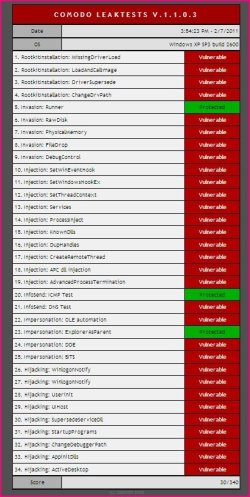
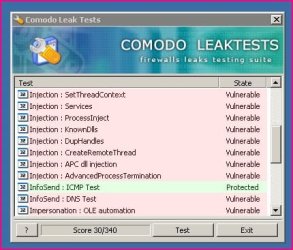
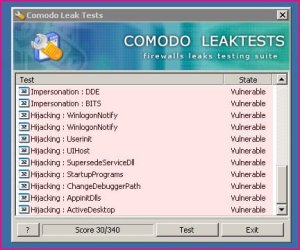
I have ran the Comodo leak test three times and the score I get is a paltry 30 / 340.

I have my Comodo firewall set up exactly as in Post 29 of this thread, so I don't know where I am going wrong.

Can someone help / offer any advice please?

Thanks in advance!
 
Last edited:

My Computer My Computer

At a glance

Windows 7 Home Premium 64 bitIntel(R) Core(TM) i33.00
Computer Manufacturer/Model Number
Acer Aspire 5742
OS
Windows 7 Home Premium 64 bit
CPU
Intel(R) Core(TM) i3
Memory
3.00
Monitor(s) Displays
Intel(R) HD Graphics [Display adapter]
Hard Drives
235.99 Gigabytes Usable Hard Drive Capacity
198.74 Gigabytes Hard Drive Free Space

MATSHITA DVD-RAM UJ890AS [Optical drive]

Hitachi HTS545025B9A300 [Hard drive] (250.06 GB)
Hopefully a link or the screenshot of the test results will show now :confused:
 

Attachments

  • 000_Snippy0003.jpg
    000_Snippy0003.jpg
    67.2 KB · Views: 13
  • 000_Snippy0004.jpg
    000_Snippy0004.jpg
    33.5 KB · Views: 7
  • 001_Snippy0005.jpg
    001_Snippy0005.jpg
    32.5 KB · Views: 8
  • 002_Snippy0006.jpg
    002_Snippy0006.jpg
    31.6 KB · Views: 5

My Computer My Computer

At a glance

Windows 7 Home Premium 64 bitIntel(R) Core(TM) i33.00
Computer Manufacturer/Model Number
Acer Aspire 5742
OS
Windows 7 Home Premium 64 bit
CPU
Intel(R) Core(TM) i3
Memory
3.00
Monitor(s) Displays
Intel(R) HD Graphics [Display adapter]
Hard Drives
235.99 Gigabytes Usable Hard Drive Capacity
198.74 Gigabytes Hard Drive Free Space

MATSHITA DVD-RAM UJ890AS [Optical drive]

Hitachi HTS545025B9A300 [Hard drive] (250.06 GB)
Tara100- Are you making sure to Deny each and every Firewall and Defense+ pop-up during the test? If so you might try disabling the Comodo Sandbox during the Leak Tests and see if that improves your score.

~Maxx~

ComodoFirewallLogo.png
 

My Computer My Computer

At a glance

Windows 7 x64 Home PremiumIntel Core i7 930 @ 2.8 Ghz Socket 1366 LGA8 GB 1366 Mhz DDR3 (PC3-10700) RAMATI Radeon 5770 1 GB DDR5 RAM
Computer Manufacturer/Model Number
HP HPE 270f
OS
Windows 7 x64 Home Premium
CPU
Intel Core i7 930 @ 2.8 Ghz Socket 1366 LGA
Motherboard
Pegatron Truckee v1.04E41
Memory
8 GB 1366 Mhz DDR3 (PC3-10700) RAM
Graphics Card(s)
ATI Radeon 5770 1 GB DDR5 RAM
Sound Card
Realtech High Definition
Monitor(s) Displays
32" Sony Bravia
Screen Resolution
1366 X 768
Hard Drives
Intel 25nm 120 GB Series 320 SSD HD Tune- 265 MBps Read/ 130 MBps Write

LaCie 1TB + 1TB RAID 0 eSATA Drive HD Tune- 160 MBps Read/ 90 MBps Write
Keyboard
Logitech Illuminated
Mouse
Logitech MX Revolution
Internet Speed
36.4 Mbps Maximum on a 37 Mbps Motorola SB501 Modem
Hi

I do have 'sandbox' disabled, and I followed this helpful info I found to a tee, and now my score is just 20!

1. Make sure you have the following CIS settings:
Configuration = proactive. [Proactive security is the strongest security configuration, and will provide the best protection against leaks. I suggest that you always use the proactive security configuration. To select this setting, click on the "more" tab, then click on "manage my configurations". Select "proactive Security", click "activate", and then click "close".]
Firewall = safe mode, custom policy mode, or block all mode.
Defense + = safe mode or paranoid mode
Image execution control level = enabled [To set this, click on the defense+ tab, then click on "Defense + settings", then click the "execution control settings" tab.]
Detect shellcode injections = selected [To set this, click on the defense+ tab, then click on "Defense + settings", then click the "execution control settings" tab. At the bottom of the window, select the check-box titled "Detect shellcode injections (i.e. Buffer overflow protection)"].
Monitor settings = make sure all of the boxes are selected [To set this, click on the defense+ tab, then click on "Defense + settings", then click the "Monitor settings" tab.]
Sandbox = disabled [CLT was not designed to be used in a sandbox. If CLT is sandboxed, it will generate erroneous results!]


2. Make sure there are no CIS rules that have been generated by having run CLT previously (i.e. remove rules for CLT):

Defense+ Security Policy

Click the "defense+" tab at the top of the CIS window
Click "Computer Security Policy"
Click on "Defense+ Rules" tab. Scroll down the list of files. Select any entry that has "clt.exe" in the application name and click the remove button.
Click on "Always Sandbox" tab. Scroll down the list of files. Select any entry that has "clt.exe" in the application name and click the remove button.
Click on "Blocked Files" tab. Scroll down the list of files. Select any entry that has "clt.exe" in the application name and click the remove button.
click "Ok"

Unrecognized files

Click the "defense+" tab at the top of the CIS window
Click "Unrecognized Files"
Click on "Unrecognized Files" tab. Scroll down the list of files. Select any entry that has "clt.exe" in the application name and click the remove button.
click "Ok"

Trusted files

Click the "defense+" tab at the top of the CIS window
Click "Trusted Files"
Scroll down the list of files. Select any entry that has "clt.exe" in the application name and click the remove button.
click "Close"

Firewall Security policy

Click the "firewall" tab at the top of the CIS window
Click on "Network Security Policy"
Click on the "Application Rules" tab
Scroll down the list of files. Select any entry that has "clt.exe" in the application name and click the remove button.
click "OK".

3. Delete the Internet Explorer (IE) browsing history cache. Run IE, click on the "tools" menu, then select "internet options". Click on the "general tab" and then click on the "delete" button under browsing history. You can also delete the browsing history using cleaning programs such as CCleaner or Cleanup! The reason why you need to clean the IE history: If CLT was previously run and previously failed "Impersonation: Coat", IE will open the target webpage from the IE cache, and not through the leak, leading to a false failure of "Impersonation: Coat". Erasing the browsing history ensures that IE cannot load the webpage from the cache and forces IE to load the webpage through the leak.

4. Reboot your computer (The current version of CLT does not "clean out" some actions that it creates after it has been run. If CLT is re-run without rebooting, it may give an inaccurate score because of these left over actions. The only way to clean out these actions is to re-boot).

5. Run CLT*. If you get an alert from the antivirus, click "ignore" and then "Add to trusted files" (the antivirus is alerting you that a leak test application has been launched [it's flagged as "Application.Win32.LeakTest..."]; it is not saying that the file is malicious). The first alert that appears should be a defense+ alert that says "explorer.exe is a safe application. However, the executable clt.exe could not be recognized..." For this alert, make sure that "remember my answer" is unchecked, and then click allow. The CLT program window should appear. Click the "Test" button in CLT and, from this point onward, click "block" when a CIS alert appears. Now check your score. It should be 340/340.

* Remember to run CLT with the sandbox disabled. If CLT is sandboxed, it will generate erroneous results! CLT was not designed to test HIPS security from within a sandbox.

6. CLT was designed to test the HIPS component of CIS. Based on current feedback from the developers, CLT can give erroneous and unreliable results when testing CIS in any configuration that is different from the one described above (it is a limitation within CLT). The reasons why CLT may give unreliable results when using other CIS configurations will be the topic of another FAQ post (as soon as we get more feedback from the developers).

7. If you still cannot get good score on CLT, try the following:

Run diagnostics [click on the "more tab", then click "diagnostics"]. Repair any problem that is found with your CIS installation.
Perhaps your copy of CLT is corrupted. Download a fresh copy of CLT from here. Unzip the folder. Perform steps 1-3 above, then reboot. Then, run the newly downloaded CLT

 

My Computer My Computer

At a glance

Windows 7 Home Premium 64 bitIntel(R) Core(TM) i33.00
Computer Manufacturer/Model Number
Acer Aspire 5742
OS
Windows 7 Home Premium 64 bit
CPU
Intel(R) Core(TM) i3
Memory
3.00
Monitor(s) Displays
Intel(R) HD Graphics [Display adapter]
Hard Drives
235.99 Gigabytes Usable Hard Drive Capacity
198.74 Gigabytes Hard Drive Free Space

MATSHITA DVD-RAM UJ890AS [Optical drive]

Hitachi HTS545025B9A300 [Hard drive] (250.06 GB)
Tara100- Are you making sure that you are Denying each and every Firewall and Defense+ pop-up during the Leak Test? Did you follow through on all the suggestions that you listed from Comodo? If so then I would suggest that you take your problem over to the Comodo Forums so you can get this situation straightened out. This link will take you to to the Comodo Leak Testing forum where you will be able to get some good advise on how to rectify this problem...

Leak Testing/Attacks/Vulnerability Research

~Maxx~

ComodoFirewallLogo.png
 

My Computer My Computer

At a glance

Windows 7 x64 Home PremiumIntel Core i7 930 @ 2.8 Ghz Socket 1366 LGA8 GB 1366 Mhz DDR3 (PC3-10700) RAMATI Radeon 5770 1 GB DDR5 RAM
Computer Manufacturer/Model Number
HP HPE 270f
OS
Windows 7 x64 Home Premium
CPU
Intel Core i7 930 @ 2.8 Ghz Socket 1366 LGA
Motherboard
Pegatron Truckee v1.04E41
Memory
8 GB 1366 Mhz DDR3 (PC3-10700) RAM
Graphics Card(s)
ATI Radeon 5770 1 GB DDR5 RAM
Sound Card
Realtech High Definition
Monitor(s) Displays
32" Sony Bravia
Screen Resolution
1366 X 768
Hard Drives
Intel 25nm 120 GB Series 320 SSD HD Tune- 265 MBps Read/ 130 MBps Write

LaCie 1TB + 1TB RAID 0 eSATA Drive HD Tune- 160 MBps Read/ 90 MBps Write
Keyboard
Logitech Illuminated
Mouse
Logitech MX Revolution
Internet Speed
36.4 Mbps Maximum on a 37 Mbps Motorola SB501 Modem
Thanks for the reply again :)

I have posted over there since starting the thread here, and the response (albeit from only one person) is that my CIS is working fine :shock:

Im finding that difficult to take on board, and there are folks aver there in almost sheer panic because their leak test scores are 300 / 330. Mine is 20, hence my disbelief that Comodo is working fine.
I also stated that I never receive any pop up alerts anymore, yet when I used the 'old' Comodo, I still got quite a few even though it had 'learned' my PCs ins and outs.

I've also run the Comodo diagnostics tool, and it didn't pick up any issues.

Thanks anyway for the replies :)
 

My Computer My Computer

At a glance

Windows 7 Home Premium 64 bitIntel(R) Core(TM) i33.00
Computer Manufacturer/Model Number
Acer Aspire 5742
OS
Windows 7 Home Premium 64 bit
CPU
Intel(R) Core(TM) i3
Memory
3.00
Monitor(s) Displays
Intel(R) HD Graphics [Display adapter]
Hard Drives
235.99 Gigabytes Usable Hard Drive Capacity
198.74 Gigabytes Hard Drive Free Space

MATSHITA DVD-RAM UJ890AS [Optical drive]

Hitachi HTS545025B9A300 [Hard drive] (250.06 GB)
Tara100- I see that you are running Windows XP 32 bit. What version of Comodo do you currently have installed? Have you ever run any other versions of Comodo like the classic v3.14? Like John said over on the Comodo Forums you may get a better score with an older version of Comodo. I would suggest trying CIS v3.14 x32 if you want a better Leak Test score because obviously v5.3 isn't testing well with your Win XP x32 OS. You can download it from FileHippo here...

Comodo Internet Security 3.14.130099

~Maxx~

ComodoFirewallLogo.png
 

My Computer My Computer

At a glance

Windows 7 x64 Home PremiumIntel Core i7 930 @ 2.8 Ghz Socket 1366 LGA8 GB 1366 Mhz DDR3 (PC3-10700) RAMATI Radeon 5770 1 GB DDR5 RAM
Computer Manufacturer/Model Number
HP HPE 270f
OS
Windows 7 x64 Home Premium
CPU
Intel Core i7 930 @ 2.8 Ghz Socket 1366 LGA
Motherboard
Pegatron Truckee v1.04E41
Memory
8 GB 1366 Mhz DDR3 (PC3-10700) RAM
Graphics Card(s)
ATI Radeon 5770 1 GB DDR5 RAM
Sound Card
Realtech High Definition
Monitor(s) Displays
32" Sony Bravia
Screen Resolution
1366 X 768
Hard Drives
Intel 25nm 120 GB Series 320 SSD HD Tune- 265 MBps Read/ 130 MBps Write

LaCie 1TB + 1TB RAID 0 eSATA Drive HD Tune- 160 MBps Read/ 90 MBps Write
Keyboard
Logitech Illuminated
Mouse
Logitech MX Revolution
Internet Speed
36.4 Mbps Maximum on a 37 Mbps Motorola SB501 Modem
Hi again Maxx

My Comodo is version 5.3.1, and yes, I have run other versions as I've been with Comodo for a few years now.
I might just do a clean uninstall and re-install and see if there's an improvement.

Thanks again for your posts :)
 

My Computer My Computer

At a glance

Windows 7 Home Premium 64 bitIntel(R) Core(TM) i33.00
Computer Manufacturer/Model Number
Acer Aspire 5742
OS
Windows 7 Home Premium 64 bit
CPU
Intel(R) Core(TM) i3
Memory
3.00
Monitor(s) Displays
Intel(R) HD Graphics [Display adapter]
Hard Drives
235.99 Gigabytes Usable Hard Drive Capacity
198.74 Gigabytes Hard Drive Free Space

MATSHITA DVD-RAM UJ890AS [Optical drive]

Hitachi HTS545025B9A300 [Hard drive] (250.06 GB)
I might just do a clean uninstall and re-install and see if there's an improvement.

Thanks again for your posts :)

Let us know how things turn out!

~Maxx~

ComodoFirewallLogo.png
 

My Computer My Computer

At a glance

Windows 7 x64 Home PremiumIntel Core i7 930 @ 2.8 Ghz Socket 1366 LGA8 GB 1366 Mhz DDR3 (PC3-10700) RAMATI Radeon 5770 1 GB DDR5 RAM
Computer Manufacturer/Model Number
HP HPE 270f
OS
Windows 7 x64 Home Premium
CPU
Intel Core i7 930 @ 2.8 Ghz Socket 1366 LGA
Motherboard
Pegatron Truckee v1.04E41
Memory
8 GB 1366 Mhz DDR3 (PC3-10700) RAM
Graphics Card(s)
ATI Radeon 5770 1 GB DDR5 RAM
Sound Card
Realtech High Definition
Monitor(s) Displays
32" Sony Bravia
Screen Resolution
1366 X 768
Hard Drives
Intel 25nm 120 GB Series 320 SSD HD Tune- 265 MBps Read/ 130 MBps Write

LaCie 1TB + 1TB RAID 0 eSATA Drive HD Tune- 160 MBps Read/ 90 MBps Write
Keyboard
Logitech Illuminated
Mouse
Logitech MX Revolution
Internet Speed
36.4 Mbps Maximum on a 37 Mbps Motorola SB501 Modem
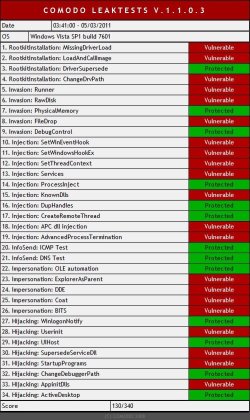
erm... I've got the following results. when launching the proggy comodo asks to allow/sandbox/block... I done 2 tests, allow and sandbox and got the following....

can someone advise please
 

Attachments

  • leaktest - allow.jpg
    leaktest - allow.jpg
    87.8 KB · Views: 30
  • leaktest - sandbox.jpg
    leaktest - sandbox.jpg
    85.1 KB · Views: 31

My Computer My Computer

At a glance

Windows 7AMD Athlon Barton2.5GB DDR @ 169MHz 2.5-3-3-7RADEON 9200 SERIES
Computer Manufacturer/Model Number
XP3000+
OS
Windows 7
CPU
AMD Athlon Barton
Motherboard
MSI MS-6712 (Socket-A)
Memory
2.5GB DDR @ 169MHz 2.5-3-3-7
Graphics Card(s)
RADEON 9200 SERIES
Sound Card
Realtek AC'97 Audio for VIA (R) Audio Controller
Monitor(s) Displays
256MB RADEON 9200 SERIES
Screen Resolution
1280 x 1024
Hard Drives
Seagate ST3160021A ATA Device 150GB
Cooling
Fans
erm... I've got the following results. when launching the proggy comodo asks to allow/sandbox/block... I done 2 tests, allow and sandbox and got the following....

can someone advise please

I did the same thing as you. The second time, blocking and sandboxing requests, and I got a score of 330/340 the second time. My first score was 190/340. My failing in the second test was 'Impersonation: Explorer as Parent'. Which makes me more frustrated that I ended up with a redirect virus in IE9. Stupidity will always find a way :o
 

My Computer My Computer

At a glance

Windows 7 Home Premium 64bitAMD Athlon(tm) 64 X2 Dual-Core Processor TK-4...3GBATI Radeon HD 3200 Graphics
Computer Manufacturer/Model Number
Acer Aspire 5532
OS
Windows 7 Home Premium 64bit
CPU
AMD Athlon(tm) 64 X2 Dual-Core Processor TK-42 1.60 GHz
Memory
3GB
Graphics Card(s)
ATI Radeon HD 3200 Graphics
Monitor(s) Displays
Generic PnP Monitor
The Comodo Leak Tests were designed long before Comodo's Automatic Sandbox was implemented so it is best to disable the Sandbox during Leak Testing for optimal results. With Comodo v5.3 I get a 340/340 on the Leak Tests with the Sandbox disabled.

~Maxx~

ComodoFirewallLogo.png
 

My Computer My Computer

At a glance

Windows 7 x64 Home PremiumIntel Core i7 930 @ 2.8 Ghz Socket 1366 LGA8 GB 1366 Mhz DDR3 (PC3-10700) RAMATI Radeon 5770 1 GB DDR5 RAM
Computer Manufacturer/Model Number
HP HPE 270f
OS
Windows 7 x64 Home Premium
CPU
Intel Core i7 930 @ 2.8 Ghz Socket 1366 LGA
Motherboard
Pegatron Truckee v1.04E41
Memory
8 GB 1366 Mhz DDR3 (PC3-10700) RAM
Graphics Card(s)
ATI Radeon 5770 1 GB DDR5 RAM
Sound Card
Realtech High Definition
Monitor(s) Displays
32" Sony Bravia
Screen Resolution
1366 X 768
Hard Drives
Intel 25nm 120 GB Series 320 SSD HD Tune- 265 MBps Read/ 130 MBps Write

LaCie 1TB + 1TB RAID 0 eSATA Drive HD Tune- 160 MBps Read/ 90 MBps Write
Keyboard
Logitech Illuminated
Mouse
Logitech MX Revolution
Internet Speed
36.4 Mbps Maximum on a 37 Mbps Motorola SB501 Modem
Still get a lousy 190, even after clean install with all suggested settings, so I give up. A Guy
 

My Computer My Computer

At a glance

Windows 10 Home x64INTEL Core i5-750 Quad-Core 3.37GHzHyperX Fury Black Series 8GB (2 x 4GB) 1866MhzEVGA GeForce GTX 750 Superclocked 1GB 128-Bit...
Computer type
PC/Desktop
OS
Windows 10 Home x64
CPU
INTEL Core i5-750 Quad-Core 3.37GHz
Motherboard
ASUS P7P55D
Memory
HyperX Fury Black Series 8GB (2 x 4GB) 1866Mhz
Graphics Card(s)
EVGA GeForce GTX 750 Superclocked 1GB 128-Bit GDDR5
Monitor(s) Displays
LG 32MA68HY 32" IPS
Screen Resolution
1920 x 1080
Hard Drives
Samsung 840 Evo 120GB, SEAGATE 500GB Barracuda® 7200.12, SATA 3 Gb/s, 7200 RPM, 16MB cache
PSU
ANTEC TruePower New TP-550, 80 PLUS, 550W
Case
ANTEC Three Hundred Illusion
Cooling
COOLER MASTER Hyper 212 Plus, 4 x 120mm 1 x 140mm Noctua's
Internet Speed
85 + Mbps
Antivirus
Avast
Browser
Vivaldi
Still get a lousy 190, even after clean install with all suggested settings, so I give up. A Guy

Have you ever tried v3.14? I never failed to get a 340/340 using that version. Even though I am now using v5.3 I still run it like I did v3.14 without all of the pop-up reducing gimmicks they've thrown in.

~Maxx~
 

My Computer My Computer

At a glance

Windows 7 x64 Home PremiumIntel Core i7 930 @ 2.8 Ghz Socket 1366 LGA8 GB 1366 Mhz DDR3 (PC3-10700) RAMATI Radeon 5770 1 GB DDR5 RAM
Computer Manufacturer/Model Number
HP HPE 270f
OS
Windows 7 x64 Home Premium
CPU
Intel Core i7 930 @ 2.8 Ghz Socket 1366 LGA
Motherboard
Pegatron Truckee v1.04E41
Memory
8 GB 1366 Mhz DDR3 (PC3-10700) RAM
Graphics Card(s)
ATI Radeon 5770 1 GB DDR5 RAM
Sound Card
Realtech High Definition
Monitor(s) Displays
32" Sony Bravia
Screen Resolution
1366 X 768
Hard Drives
Intel 25nm 120 GB Series 320 SSD HD Tune- 265 MBps Read/ 130 MBps Write

LaCie 1TB + 1TB RAID 0 eSATA Drive HD Tune- 160 MBps Read/ 90 MBps Write
Keyboard
Logitech Illuminated
Mouse
Logitech MX Revolution
Internet Speed
36.4 Mbps Maximum on a 37 Mbps Motorola SB501 Modem
The Comodo Leak Tests were designed long before Comodo's Automatic Sandbox was implemented so it is best to disable the Sandbox during Leak Testing for optimal results. With Comodo v5.3 I get a 340/340 on the Leak Tests with the Sandbox disabled.

~Maxx~

ComodoFirewallLogo.png

nice1 mate, done the same got 340/340 :party:
 

My Computer My Computer

At a glance

Windows 7AMD Athlon Barton2.5GB DDR @ 169MHz 2.5-3-3-7RADEON 9200 SERIES
Computer Manufacturer/Model Number
XP3000+
OS
Windows 7
CPU
AMD Athlon Barton
Motherboard
MSI MS-6712 (Socket-A)
Memory
2.5GB DDR @ 169MHz 2.5-3-3-7
Graphics Card(s)
RADEON 9200 SERIES
Sound Card
Realtek AC'97 Audio for VIA (R) Audio Controller
Monitor(s) Displays
256MB RADEON 9200 SERIES
Screen Resolution
1280 x 1024
Hard Drives
Seagate ST3160021A ATA Device 150GB
Cooling
Fans
I got a similar result with the test (windows firewall)...which prompted me to download the firewall which when I tried to install promply told me I had to uninstall a incompatable program, namely Commodo AV which I've just installed and updated.... :)
 

My Computer My Computer

At a glance

Windows 7 Professional 64 bit930 i7 quad O/C 4ghzG Skill 3x2gb O/C to 1603mhz 1T timingEVGA 570
Computer Manufacturer/Model Number
home built
OS
Windows 7 Professional 64 bit
CPU
930 i7 quad O/C 4ghz
Motherboard
Asus P6X58D premium
Memory
G Skill 3x2gb O/C to 1603mhz 1T timing
Graphics Card(s)
EVGA 570
Sound Card
creative titanium
Monitor(s) Displays
samsung s23a950d..120hz 3D
Screen Resolution
1920x1080
Hard Drives
Western Digital 3X150 Velocoraptors in Raid 5
PSU
Antec Quattro 1000 watt
Case
Xigmatek Elysium
Cooling
Custom Loop..Kryos block.360rad..BP comp fittings etc
Keyboard
Razor arcosa
Mouse
Razer Diamondback
Internet Speed
Wireless so w/e I get at the time
I got a similar result with the test (windows firewall)...which prompted me to download the firewall which when I tried to install promply told me I had to uninstall a incompatable program, namely Commodo AV which I've just installed and updated.... :)

Yes, only one instance of Comodo is allowed at a time. Did you perform the leaktests on your new Firewall yet?

~Maxx~

ComodoFirewallLogo.png
 

My Computer My Computer

At a glance

Windows 7 x64 Home PremiumIntel Core i7 930 @ 2.8 Ghz Socket 1366 LGA8 GB 1366 Mhz DDR3 (PC3-10700) RAMATI Radeon 5770 1 GB DDR5 RAM
Computer Manufacturer/Model Number
HP HPE 270f
OS
Windows 7 x64 Home Premium
CPU
Intel Core i7 930 @ 2.8 Ghz Socket 1366 LGA
Motherboard
Pegatron Truckee v1.04E41
Memory
8 GB 1366 Mhz DDR3 (PC3-10700) RAM
Graphics Card(s)
ATI Radeon 5770 1 GB DDR5 RAM
Sound Card
Realtech High Definition
Monitor(s) Displays
32" Sony Bravia
Screen Resolution
1366 X 768
Hard Drives
Intel 25nm 120 GB Series 320 SSD HD Tune- 265 MBps Read/ 130 MBps Write

LaCie 1TB + 1TB RAID 0 eSATA Drive HD Tune- 160 MBps Read/ 90 MBps Write
Keyboard
Logitech Illuminated
Mouse
Logitech MX Revolution
Internet Speed
36.4 Mbps Maximum on a 37 Mbps Motorola SB501 Modem
I got a similar result with the test (windows firewall)...which prompted me to download the firewall which when I tried to install promply told me I had to uninstall a incompatable program, namely Commodo AV which I've just installed and updated.... :)

Yes, only one instance of Comodo is allowed at a time. Did you perform the leaktests on your new Firewall yet?

~Maxx~

ComodoFirewallLogo.png

No..I didn't install it..I wanted the AV so damm the firewall :mad:
 

My Computer My Computer

At a glance

Windows 7 Professional 64 bit930 i7 quad O/C 4ghzG Skill 3x2gb O/C to 1603mhz 1T timingEVGA 570
Computer Manufacturer/Model Number
home built
OS
Windows 7 Professional 64 bit
CPU
930 i7 quad O/C 4ghz
Motherboard
Asus P6X58D premium
Memory
G Skill 3x2gb O/C to 1603mhz 1T timing
Graphics Card(s)
EVGA 570
Sound Card
creative titanium
Monitor(s) Displays
samsung s23a950d..120hz 3D
Screen Resolution
1920x1080
Hard Drives
Western Digital 3X150 Velocoraptors in Raid 5
PSU
Antec Quattro 1000 watt
Case
Xigmatek Elysium
Cooling
Custom Loop..Kryos block.360rad..BP comp fittings etc
Keyboard
Razor arcosa
Mouse
Razer Diamondback
Internet Speed
Wireless so w/e I get at the time
Back
Top