
NominOnRamin
New member
- Local time
- 12:02 PM
- Messages
- 2
Hey Guys,
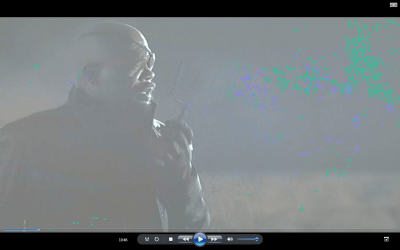
I'm trying to watch some movies on my windows media player but the video's all appear kinda buggy. Specifically there are little color dots that show up all the time and the image seems kind of washed out. All of my games appear fine, Youtube appears fine, Netflix looks normal. But no matter what I seem to use: VLC, WMPlayer, WMCenter, Media Browser Service. They all have this issue.
The little dots/pixels/whatever don't stay the same color and they disappear or change when there's like movement in the movie. It can't be the video file itself because this happens to all of my video files when I try to run them.
Does anybody know how to fix this? Any ideas even?
Thanks in advance,
NominOnRamin
Here's my system specs:
(Some stuff will repeat itself as I copy/pasted a couple of things into one .txt)
Processor: AMD Athlon(tm) 64 X2 Dual-Core Processor TK-55
Clock Speed: 1808 MHz
Physical Memory: 1.93 GB
Display Adapter: NVIDIA GeForce Go 6100
VRAM: 64.0 MB
Driver Version: UNKNOWN?
Sound Adapter: Speakers (Conexant High Definition Audio)
Driver Version: 4.33.1.0
Operating System: Microsoft Windows 7 Ultimate
DirectX Version: DirectX 10.0 (Mar 2009) or later
Product: Compaq Presario F730US Notebook PC
Serial Number: CNF7475Y12
Product Number: GR967UA#ABA
OS Name Microsoft Windows 7 Ultimate
Version 6.1.7601 Service Pack 1 Build 7601
Other OS Description Not Available
OS Manufacturer Microsoft Corporation
System Name COMPUTER-PC
System Manufacturer Hewlett-Packard
System Model Presario F700 (GR967UA#ABA)
System Type x64-based PC
Processor AMD Athlon(tm) 64 X2 Dual-Core Processor TK-55, 1800 Mhz, 2 Core(s), 2 Logical Processor(s)
BIOS Version/Date Hewlett-Packard F.1C, 8/16/2007
SMBIOS Version 2.4
Windows Directory C:\Windows
System Directory C:\Windows\system32
Boot Device \Device\HarddiskVolume1
Locale United States
Hardware Abstraction Layer Version = "6.1.7601.17514"
User Name Computer-PC\Computer
Time Zone Pacific Daylight Time
Installed Physical Memory (RAM) 2.00 GB
Total Physical Memory 1.94 GB
Available Physical Memory 707 MB
Total Virtual Memory 3.87 GB
Available Virtual Memory 2.15 GB
Page File Space 1.94 GB
Page File C:\pagefile.sys
I'm trying to watch some movies on my windows media player but the video's all appear kinda buggy. Specifically there are little color dots that show up all the time and the image seems kind of washed out. All of my games appear fine, Youtube appears fine, Netflix looks normal. But no matter what I seem to use: VLC, WMPlayer, WMCenter, Media Browser Service. They all have this issue.
The little dots/pixels/whatever don't stay the same color and they disappear or change when there's like movement in the movie. It can't be the video file itself because this happens to all of my video files when I try to run them.
Does anybody know how to fix this? Any ideas even?
Thanks in advance,
NominOnRamin
Here's my system specs:
(Some stuff will repeat itself as I copy/pasted a couple of things into one .txt)
Processor: AMD Athlon(tm) 64 X2 Dual-Core Processor TK-55
Clock Speed: 1808 MHz
Physical Memory: 1.93 GB
Display Adapter: NVIDIA GeForce Go 6100
VRAM: 64.0 MB
Driver Version: UNKNOWN?
Sound Adapter: Speakers (Conexant High Definition Audio)
Driver Version: 4.33.1.0
Operating System: Microsoft Windows 7 Ultimate
DirectX Version: DirectX 10.0 (Mar 2009) or later
Product: Compaq Presario F730US Notebook PC
Serial Number: CNF7475Y12
Product Number: GR967UA#ABA
OS Name Microsoft Windows 7 Ultimate
Version 6.1.7601 Service Pack 1 Build 7601
Other OS Description Not Available
OS Manufacturer Microsoft Corporation
System Name COMPUTER-PC
System Manufacturer Hewlett-Packard
System Model Presario F700 (GR967UA#ABA)
System Type x64-based PC
Processor AMD Athlon(tm) 64 X2 Dual-Core Processor TK-55, 1800 Mhz, 2 Core(s), 2 Logical Processor(s)
BIOS Version/Date Hewlett-Packard F.1C, 8/16/2007
SMBIOS Version 2.4
Windows Directory C:\Windows
System Directory C:\Windows\system32
Boot Device \Device\HarddiskVolume1
Locale United States
Hardware Abstraction Layer Version = "6.1.7601.17514"
User Name Computer-PC\Computer
Time Zone Pacific Daylight Time
Installed Physical Memory (RAM) 2.00 GB
Total Physical Memory 1.94 GB
Available Physical Memory 707 MB
Total Virtual Memory 3.87 GB
Available Virtual Memory 2.15 GB
Page File Space 1.94 GB
Page File C:\pagefile.sys
Attachments

Last edited:
My Computer
At a glance
Microsoft Windows 7 Ultimate x64Processor: AMD Athlon(tm) 64 X2 Dual-Core Pro...Physical Memory: 1.93 GB VRAM: 64.0 MBDisplay Adapter: NVIDIA GeForce Go 6100
- Computer type
- Laptop
- Computer Manufacturer/Model Number
- Compaq Presario F730US Notebook PC
- OS
- Microsoft Windows 7 Ultimate x64
- CPU
- Processor: AMD Athlon(tm) 64 X2 Dual-Core Processor TK-55
- Memory
- Physical Memory: 1.93 GB VRAM: 64.0 MB
- Graphics Card(s)
- Display Adapter: NVIDIA GeForce Go 6100
- Browser
- Google Chrome

