Compatibility dropdown list doesn't show system's OS

DV1

New member
Member
Local time
8:33 AM
Messages
24
I have a friend who has an HP Media Center pc. It was a model that came and went and searching doesn't show much info on it.

While having a conversation on Skype I was helping him with some software and asked him to look at the compatibility settings. What is odd is that they were set to Windows 95. I then told him to click so that he could reset but when he did that the list only showed up to Windows 2000, there was nothing for XP service Pack 3 which is what he uses.

Though it's not Win7 I wonder if someone here might have a suggestion as to how he can have XP show up on the list - or even if that's possible.

Thanks

Daniel
 

My Computer

OS
Windows 7 Home Premium 32bit
I have a friend who has an HP Media Center pc. It was a model that came and went and searching doesn't show much info on it.

While having a conversation on Skype I was helping him with some software and asked him to look at the compatibility settings. What is odd is that they were set to Windows 95. I then told him to click so that he could reset but when he did that the list only showed up to Windows 2000, there was nothing for XP service Pack 3 which is what he uses.

Though it's not Win7 I wonder if someone here might have a suggestion as to how he can have XP show up on the list - or even if that's possible.

Thanks

Daniel

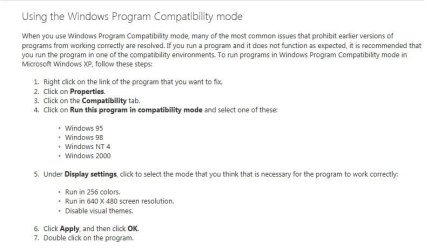
This should be of some help,

How to use Windows Program Compatibility mode in Windows XP
 

Attachments

  • Capture.JPG
    Capture.JPG
    44.9 KB · Views: 5

My Computer

Computer type
PC/Desktop
Computer Manufacturer/Model Number
Self Built
OS
Win 10 Pro x64
CPU
Intel I5-2500K @3.3GHz
Motherboard
Asrock P67 Extreme4
Memory
16GB G.Skill Ripjaws X (4x4GB)
Graphics Card(s)
EVGA GeForce 750 Ti SC 2GB
Sound Card
ASUS Xonar DG 5.1 Channels 24-bit 96KHz PCI Interface Sound
Monitor(s) Displays
auria eq2367
Screen Resolution
1920 x 1080
Hard Drives
250GB Samsung 850 EVO SSD
1TB WD Blue
1TB Hitachi
PSU
SeaSonic X 650W 80 Plus Gold
Case
Corsair Obsidian 750D
Cooling
Corsair H60, Three 140mm case fans
Keyboard
Logitech Wireless Keyboard K520
Mouse
Logitech Wireless Mouse M310
Internet Speed
Wave Broadband ~ 100 dn 5 up
Antivirus
Windows Defender, Malwarebytes Premium
Browser
Edge, IE11, Chrome
Other Info
Laptop specs: HP g7-1365dx /
CPU: AMD A6-3420M APU with Radeon(tm) HD Graphics /
RAM: Crucial 8Gb (2x4Gb) /
SSD: Crucial M4-CT128M4SSD2 ATA Device/ FW 000F /
GFX: AMD Radeon HD 6520G /
OS: Windows 10 Pro x64
Try having him uncheck run in compatible mode, XP SP3 won't show because it is the current OS.
 

My Computer

Computer type
PC/Desktop
Computer Manufacturer/Model Number
Home Built Desktop By DataTech
OS
Windows 7 Ultimate X64 SP1
CPU
Intel i5-2550K, Differing ~4.4-4.8GHz No built in GPU
Motherboard
ASUS P8Z68-V PRO/GEN3
Memory
16GB G.Skill Sniper 1866MHz @ 2133MHz 2x8GB
Graphics Card(s)
ASUS GTX650TIB-DC2OC-2GD5, (650TI Boost)
Sound Card
Onboard Realtek 5-1
Monitor(s) Displays
Samsung P2570HD
Screen Resolution
1920x1080
Hard Drives
Samsung 840 Pro 256GB SSD for OS, 500GB Seagate Constellation (Enterprise drive) for Data
PSU
Corsair HX650W
Case
Inwin Dragon Rider
Cooling
Hyper 212 EVO w/two Noctua fans, push-pull, @1300 RPM
Keyboard
E-Z Eyes, bright yellow keys with large characters
Mouse
steelseries SENSEI Laser Pro Gaming
Internet Speed
48-51Mbs Mbs down, 11 Mbs up Xfinity Cable
Antivirus
Norton Internet Security 2013
Browser
IE 10, Opera, Pale Moon if needed
Other Info
4 case fans, LG BluRay-RE, ASUS DVD-RW, Mr. Fusion power supply, 1.21 gigawatts.
Windows XP does not show on the list because it is running XP! The compatibility list will never show the current operating system, just the ones that came before it.
The default "compatibility of any installed program on that PC will be 'XP mode'.
 

My Computer

Computer type
PC/Desktop
Computer Manufacturer/Model Number
Home Built - Jan 2013
OS
Windows 7 64 Bit Home Premium SP1
CPU
i7-3820
Motherboard
Asus P9X79-PRO - Bios 4608
Memory
GSkill F3-14900CL9Q - 16GB
Graphics Card(s)
EVGA GeForce GTX660 - Driver 352.86
Sound Card
On board Realtek ALC898
Monitor(s) Displays
Acer S271HL
Screen Resolution
1920 x 1080
Hard Drives
#1- Samsung 840 Pro Series
#2- Western Digital WD1002FAEX Sata3 Black
#3- Western Digital WD1002FAEX Sata3 Black
PSU
Corsair CMPSU-850TX-V2 - 850 watt (by Seasonic)
Case
Corsair Obsidian 550D
Cooling
Standard 3 120mm case fans, Cooler Master Hyper 212 EVO
Keyboard
MS KC-0405
Mouse
Intellimouse 5-button
Internet Speed
56 Mbits/Sec (on a good day)
Antivirus
Avast & Malwarebytes
Browser
Firefox
Other Info
Asus DVD - DRW-24B1ST 24X
Thank you all. I will relay the info to him. His job is in the offices of a large bank and usually only has time for personal use of pc on weekends.

Anyway, I will tell him that it's already on XP default. Though I'm thinking he's going to have to get a new pc soon. I'd tell him to look into the HP Z220 series but I don't think he'll be readily amenable to that. :D
 

My Computer

OS
Windows 7 Home Premium 32bit
Back
Top