compatibility mode not working

greenlink23

Hero of Time
Member
Local time
4:17 PM
Messages
44
help. my compatibility mode stoped working. i got a blue screen the other day installing avg 8.5 (but i don't think this is the reason, it happened b/c i was still running Avg 8 while installing the newer version)

i am running build 7022. and it was working before and the install avg bsod seems to have screwed something up

these are what i have settings on (i have also tried everyother os)
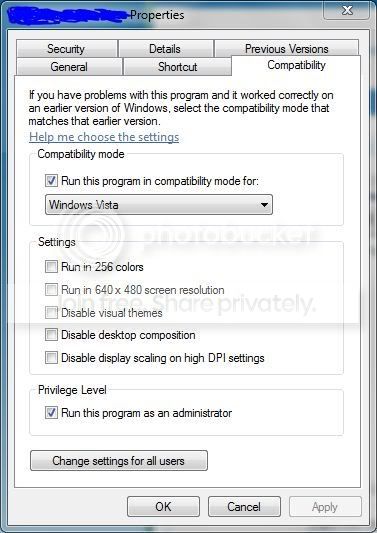
Capture2-1.jpg


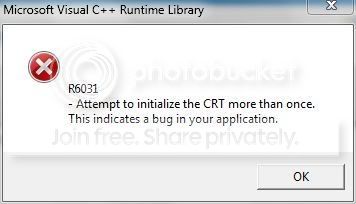
and this is the error:
Capture-3.jpg
 

My Computer

OS
Vista & Win 7
CPU
AMD Turion 64X2
Memory
2GB
Screen Resolution
1280x800
If you have used any hacks to remove the watermark and send feedback, that will effect your compatibility mode and you will need to do a system restore back to the date you applied the patch and if you can't do system restore then you will need to do a Repair Install.
 

My Computer

Computer Manufacturer/Model Number
Home Brew
OS
Windows 7 Ultimate Vista Ultimate x64
CPU
Core 2 Duo E8500 3.16Ghz @ 3.8Ghz
Motherboard
eVGA 750i FTW
Memory
2x2Gigs Patriot PC2-6400 LL
Graphics Card(s)
Inno3D GeForce GTX260 216 SP
Monitor(s) Displays
ASUS VW222U 22" 2ms Response time
Screen Resolution
1680x1050
Hard Drives
SATA 150GB
SATA II 250GB
USB IDE 750GB Ext.
PSU
HYTEC 600W & Thermaltake 650W Toughpower Power Exp
Case
Thermaltake Armor LCS (Liquid Cooling System)
Cooling
Liquid Cooling System
Keyboard
Logitech G15 Gaming Keyboard
Mouse
Logitech G9 Gaming Mouse

My Computer

Computer Manufacturer/Model Number
Dell XPS420
OS
Vista Ult 64 bit Seven Ult RTM x64
CPU
Intel Core2 Quad Q6600 2.40 gigahertz
Memory
Crucial Ballistix 4x2GB PC2 6400
Graphics Card(s)
NVIDIA GeForce 8600 GTS 256 MB
Sound Card
Creative SB X-Fi audio
Monitor(s) Displays
HP w2207 + HPvs15
Screen Resolution
1680x1050 + 1024x768
Hard Drives
2-WD5000AAKS-500 GB
WD5000AAV-500 GB external
Keyboard
Microsoft Comfort Curve
Mouse
MX Revolution
Other Info
Wacom Intuos 2 Graphics Tablet
Experience Index=5.5
Back
Top