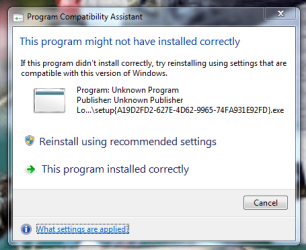
I get the attached image every start up & nothing can seem to get rid of it
Is there a way to identify from the message a location or program name Thanks for help
Not at least until you identify what it's causing it. That option will attempt to run the program with administrator privileges, and if a virus it's the root cause, you for sure won't want to give it full access to your computer. Be sure before entering your password in UAC.
My Computer
Computer type
Laptop
Computer Manufacturer/Model Number
Toshiba Sattelite A665-S6092
OS
Windows 7 Ultimate x64
CPU
Intel Core i7-740QM
Memory
8 GB DDR3
Graphics Card(s)
NVIDIA GeForce 330GT
Screen Resolution
1366x768
Hard Drives
Samsung 840 SSD 500GB
1TB USB3 external HD
Cooling
Coolermaster Notepal U3 notebook cooling pad
Internet Speed
3mbps ASDL
Antivirus
ClamWin 0.98.7
Browser
Opera 12.17 x86 (main), Firefox 38 (sec), IE11 (last resort)
Download and run ProcessExplorer. It does not need to be installed.
Drag-and-drop target to find an image. If you're not sure which application corresponds to which image in Process Explorer, click and drag the little gun sight icon on the Process Explorer toolbar, and drop it on any visible window to find out what process/image it is.
Once the error message is on the screen, start ProcessExplorer and drag the target icon and drop it on the error message window. It will show the process that generated that window highlighted in blue in the PE window.
My Computer
Computer type
PC/Desktop
Computer Manufacturer/Model Number
Lenovo IdeaCenter 450
OS
Windows 10 Pro X64
CPU
Intel Quad Core i7-4770 @ 3.4Ghz
Memory
16.0GB PC3-12800 DDR3 SDRAM 1600 MHz
Graphics Card(s)
Intel Integrated HD Graphics
Sound Card
Realtek HD Audio
Monitor(s) Displays
HP 22" LCD
Screen Resolution
1680 x 1050
Hard Drives
250GB Samsung EVO SATA-3 SSD
2TB Seagate ST2000DM001 SATA-2
1.5TB Seagate ST3150041AS SATA