Solved Compatibility with MS Office XP Professional

Jeanine

New member
Local time
12:54 AM
Messages
9
Location
Norfolk, UK
This is my 1st post. After spending 4 hours researching an issue online I've decided that this is the place to get real and relevant answers. Rather than tack onto very old threads, I thought I'd start a new one as I have one specific problem. I'm running MS Office XP Pro, which is quite sufficient for my needs, and I use Word every day. I'm the only user so my PC has a simple set-up. In Documents (Public) I keep folders of photos. If I want to email a folder of photos to someone, I compress the folder and attach it as a zip file to an email. I have triple-checked the settings in Properties and nothing is locked/encrypted/restricted. Yet the recipient can't gain access to the downloaded zip file. Is this likely to be a compatibility issue at my end or the recipient's end? Or could it be a security software issue? I don't want to switch to using Open Office or whatever it's called.

My computer knowledge is very basic. A couple of years ago I moved from much-loved Windows XP to Windows 7 Home Premium and am now fairly comfortable with it. I'm self-taught and learn through experience - mostly by way of trial and error!

I would greatly appreciate any genuine advice.
 

My Computer My Computer

Computer type
PC/Desktop
Computer Manufacturer/Model Number
Zoostorm
OS
Windows 7 Home Premium 32-bit
CPU
Intel Celeron
Memory
3.00 GB
Antivirus
Kaspersky Internet Security 2015
Browser
MS IE and Google Chrome
You won't like this advice but you really need to get off XP and upgrade to a newer OS. XP hasn't been supported since early last year and is now subject to virus and other malware infections. You can still buy OEM copies of Win 7 Home Premium or Win 7 Pro if you look around a little (here in the U.S., Newegg still sells them); that is the one most likely to be compatible with your system.

Also, what version (year) of MS Office Pro are you using?
 

My Computer My Computer

Computer type
PC/Desktop
Computer Manufacturer/Model Number
Custom Build
OS
Win 7 Ultimate 64 bit
CPU
Intel i7-3930K
Motherboard
ASUS P9X79 WS
Memory
Kingston HyperX Genesis 32GB Kit (8x4GB Modules) 1600MHz DDR
Graphics Card(s)
MSI R7850 Twin Frozr 2GD5/OC Radeon HD 7850 2GB 256-bit GDDR
Sound Card
Asus Xonar Essence STX
Monitor(s) Displays
3x Asus VG248QE 24", Vizio 32" TV
Screen Resolution
1920 x 1080, ?
Hard Drives
Samsung 128GB 840 Pro SSD (1),
Samsung 4TB 850 EVO SSDs (4)
Samsung 4TB 850 EVO SSDs (16) external backup drives used in 2.5" hot swap bays in the computer.
PSU
Corsair HX750w
Case
Antec Two Hundred v2 (modified)
Cooling
Cooler Master GeminII S524 120mm (fan replaced with a 140mm)
Keyboard
Logitech G510s
Mouse
Logitech M525 (two in use)
Internet Speed
=< 32Mbps down, 8Mbps up
Antivirus
AVAST!, MBAM, SAS, Spybot S&D (all but MBAM free) Glary Util
Browser
IE11
Other Info
LSI 9211-8i HBA card (8 SATA III ports), 2.5" & 3.5" Hot Swap Bays, HooToo HT-CR001 PCI-E to USB 3.0 Internal Hub + 6 Slot Card Reader, and LG Model CH12LS28 BD-ROM Optical Drive. Also, ScanSnap S1500 ADF duplexing scanner, Canon 9000F flat bed scanner, Corsair SP2500 2.1 speakers, Samsung CLP 415nw laser color printer, Cyberpower PP2200SW UPS
But I'm not running Windows XP. I'm using Windows 7.
 

My Computer My Computer

Computer type
PC/Desktop
Computer Manufacturer/Model Number
Zoostorm
OS
Windows 7 Home Premium 32-bit
CPU
Intel Celeron
Memory
3.00 GB
Antivirus
Kaspersky Internet Security 2015
Browser
MS IE and Google Chrome
I would greatly appreciate any genuine advice.

Hi Jeanine, welcome to the Seven Forums.

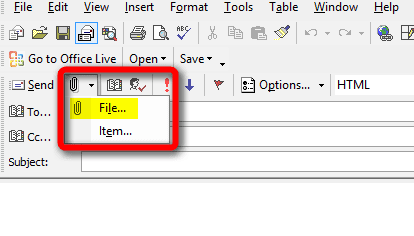
Could you please be more specific and tell exactly how do you attach the ZIP file to email message? Are you using the attachment button selecting File as in screenshot from Outlook XP below:

2015-01-02_19h47_49.png


You won't like this advice but you really need to get off XP and upgrade to a newer OS. XP hasn't been supported since early last year and is now subject to virus and other malware infections. You can still buy OEM copies of Win 7 Home Premium or Win 7 Pro if you look around a little (here in the U.S., Newegg still sells them); that is the one most likely to be compatible with your system.

Also, what version (year) of MS Office Pro are you using?
Mylady, the only reason OP would not like your advice I can think of is that it's invalid. The OP is already running Windows 7 as her specs clearly tell. She also mentions as clearly that the issue in question is with MS Office XP, not with Windows XP so that's the version of Office she is using. The Office XP is also known as Office 2002.

Kari
 

My Computer My Computer

Computer type
Laptop
Computer Manufacturer/Model Number
HP ENVY 17-1150eg
OS
Windows 10 Pro x64 EN-GB
CPU
1.6 GHz Intel Core i7-720QM Processor
Memory
6 GB
Graphics Card(s)
ATI Mobility Radeon HD 5850 Graphics
Sound Card
Beats sound system with integrated subwoofer
Monitor(s) Displays
17" laptop display, 22" LED and 32" Full HD TV through HDMI
Screen Resolution
1600*900 (1), 1920*1080 (2&3)
Hard Drives
Internal: 2 x 500 GB SATA Hard Disk Drive 7200 rpm
External: 2TB for backups, 3TB USB3 network drive for media
Cooling
As Envy runs a bit warm, I have it on a Cooler Master pad
Keyboard
Logitech diNovo Media Desktop Laser (bluetooth)
Mouse
Logitech Performance Mouse MX
Internet Speed
50/10 Mbps VDSL
Antivirus
Windows Defender 4.3.9431.0
Browser
Maxthon 3.5.2., IE11
You are correct. My mistake.:o
 

My Computer My Computer

Computer type
PC/Desktop
Computer Manufacturer/Model Number
Custom Build
OS
Win 7 Ultimate 64 bit
CPU
Intel i7-3930K
Motherboard
ASUS P9X79 WS
Memory
Kingston HyperX Genesis 32GB Kit (8x4GB Modules) 1600MHz DDR
Graphics Card(s)
MSI R7850 Twin Frozr 2GD5/OC Radeon HD 7850 2GB 256-bit GDDR
Sound Card
Asus Xonar Essence STX
Monitor(s) Displays
3x Asus VG248QE 24", Vizio 32" TV
Screen Resolution
1920 x 1080, ?
Hard Drives
Samsung 128GB 840 Pro SSD (1),
Samsung 4TB 850 EVO SSDs (4)
Samsung 4TB 850 EVO SSDs (16) external backup drives used in 2.5" hot swap bays in the computer.
PSU
Corsair HX750w
Case
Antec Two Hundred v2 (modified)
Cooling
Cooler Master GeminII S524 120mm (fan replaced with a 140mm)
Keyboard
Logitech G510s
Mouse
Logitech M525 (two in use)
Internet Speed
=< 32Mbps down, 8Mbps up
Antivirus
AVAST!, MBAM, SAS, Spybot S&D (all but MBAM free) Glary Util
Browser
IE11
Other Info
LSI 9211-8i HBA card (8 SATA III ports), 2.5" & 3.5" Hot Swap Bays, HooToo HT-CR001 PCI-E to USB 3.0 Internal Hub + 6 Slot Card Reader, and LG Model CH12LS28 BD-ROM Optical Drive. Also, ScanSnap S1500 ADF duplexing scanner, Canon 9000F flat bed scanner, Corsair SP2500 2.1 speakers, Samsung CLP 415nw laser color printer, Cyberpower PP2200SW UPS
Thank you, Kari, for your enquiry. I don't use Outlook at all. I use Yahoo Basic Webmail for 99% of my emailing. I also have a secondary account with Orange.

I'm such a computer novice that I don't even know if I'm having an Office issue here!
 

My Computer My Computer

Computer type
PC/Desktop
Computer Manufacturer/Model Number
Zoostorm
OS
Windows 7 Home Premium 32-bit
CPU
Intel Celeron
Memory
3.00 GB
Antivirus
Kaspersky Internet Security 2015
Browser
MS IE and Google Chrome
OK, I read too much in between the lines. You mentioning you use MS Office XP I assumed you also use Outlook XP (Outlook 2002).

That does not change the my question: please tell how do you attach the ZIP files to your emails? Tell the whole procedure as exactly as you can (which buttons / links you click and so on).

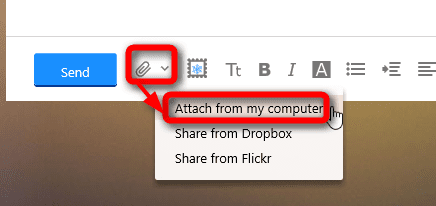
Attachments in Yahoo Mail should be attached from the Attachment button at bottom left in Compose window:

2015-01-02_20h06_49.png

Kari
 

My Computer My Computer

Computer type
Laptop
Computer Manufacturer/Model Number
HP ENVY 17-1150eg
OS
Windows 10 Pro x64 EN-GB
CPU
1.6 GHz Intel Core i7-720QM Processor
Memory
6 GB
Graphics Card(s)
ATI Mobility Radeon HD 5850 Graphics
Sound Card
Beats sound system with integrated subwoofer
Monitor(s) Displays
17" laptop display, 22" LED and 32" Full HD TV through HDMI
Screen Resolution
1600*900 (1), 1920*1080 (2&3)
Hard Drives
Internal: 2 x 500 GB SATA Hard Disk Drive 7200 rpm
External: 2TB for backups, 3TB USB3 network drive for media
Cooling
As Envy runs a bit warm, I have it on a Cooler Master pad
Keyboard
Logitech diNovo Media Desktop Laser (bluetooth)
Mouse
Logitech Performance Mouse MX
Internet Speed
50/10 Mbps VDSL
Antivirus
Windows Defender 4.3.9431.0
Browser
Maxthon 3.5.2., IE11
I compress the folder and attach it as a zip file to an email. I have triple-checked the settings in Properties and nothing is locked/encrypted/restricted. Yet the recipient can't gain access to the downloaded zip file.
Hi and welcome to SevenForums,
Are you using a third party zip program like 7zip... or windows to zip the files ?

Yahoo is a weird email and does have some restrictions on attachment sending :/

Have you attempted to use another email service like gmail or outlook.com to send with ?

The exact sending process would also help a great deal as well as how you zipped the files and what file types were inside the zip folder,
Cheers.
 

My Computer My Computer

Computer type
PC/Desktop
Computer Manufacturer/Model Number
Custom assembled by me :}
OS
Win-7-Pro64bit 7-H-Prem-64bit
CPU
i7-5930K 2nd i9-9940x both water blocked VRM's too
Motherboard
ASUS SABERTOOTH X99 2nd ASUS x299 Apex
Memory
Trident-z 3200C14 2nd Trident-z 3600C16
Graphics Card(s)
EVGA 1080ti ftw3 2nd Titan Xp both water blocked
Sound Card
Built-in Realtek
Monitor(s) Displays
1-AOC G2460PG 24"G-Sync 144Hz/ 2nd 1-ASUS VG248QE 24" 144Hz
Screen Resolution
1920 x 1080 144Hz
Hard Drives
2-Samsung M.2 Evo & Evo Plus
2-Samsung 850 EVO 500GB SSD's/ 3-2.5 W.D. Black 1tb-&3-1tb/3-3.5 WD Black 1tb hdd's
PSU
EVGA SuperNOVA 1000-P2 2nd 1200-P2
Case
2-Corsair Obsidian Series 450D Black ATX Mid Tower
Cooling
Custom water loops
Keyboard
Logitech G710+/ 2nd Logitech G910
Mouse
2-RedDragon M901 Perdition 16400 dpi Gaming mouse = wired
Internet Speed
Comcast Ping 19ms 89.31mbps download speed 6.12mbps upload
Antivirus
Malwarebytes Pro/ Superantispyware Pro
Browser
FireFox & Pale moon
Other Info
2nd ASUS X299 Apex/Intel i9-9940x with Custom water loop/7H-Prem-x64/Corsair 450D case/Ram Trident-z 3600C16 4x8gb / Samsung970Evo plus 500gb SSD/Dual ssd EZ swap evo/PSU EVGA SuperNova 1200w-P2 80+Platinum/GPU Titan Xp /8-ML-140 on push-pull on 2-280GTX rads
I use Yahoo Basic so the Attch Files button is to the right of the Subject box. This takes me to the Attch Files page. I click on the File 1 Browse button. In the window that opens I find and select the compressed folder containing JPG photos and click the Open button. This puts the folder onto the Attch Files page as File 1 and I click the Attch Files button to right of Compose. This attaches the folder (shown as a zip file) to the email, ready to Send. I make sure that the attachment doesn't exceed any size limit and it's usually less than 10 MB.
 

My Computer My Computer

Computer type
PC/Desktop
Computer Manufacturer/Model Number
Zoostorm
OS
Windows 7 Home Premium 32-bit
CPU
Intel Celeron
Memory
3.00 GB
Antivirus
Kaspersky Internet Security 2015
Browser
MS IE and Google Chrome
Hi and thanks,
One thing is for sure any email service can not open a zip folder so these zip folders would have to be downloaded and than the files would have to be Extracted by the recipients,
There could be user error in the saving and extracting process

Also are you using a third party zip folder creator ?
 

My Computer My Computer

Computer type
PC/Desktop
Computer Manufacturer/Model Number
Custom assembled by me :}
OS
Win-7-Pro64bit 7-H-Prem-64bit
CPU
i7-5930K 2nd i9-9940x both water blocked VRM's too
Motherboard
ASUS SABERTOOTH X99 2nd ASUS x299 Apex
Memory
Trident-z 3200C14 2nd Trident-z 3600C16
Graphics Card(s)
EVGA 1080ti ftw3 2nd Titan Xp both water blocked
Sound Card
Built-in Realtek
Monitor(s) Displays
1-AOC G2460PG 24"G-Sync 144Hz/ 2nd 1-ASUS VG248QE 24" 144Hz
Screen Resolution
1920 x 1080 144Hz
Hard Drives
2-Samsung M.2 Evo & Evo Plus
2-Samsung 850 EVO 500GB SSD's/ 3-2.5 W.D. Black 1tb-&3-1tb/3-3.5 WD Black 1tb hdd's
PSU
EVGA SuperNOVA 1000-P2 2nd 1200-P2
Case
2-Corsair Obsidian Series 450D Black ATX Mid Tower
Cooling
Custom water loops
Keyboard
Logitech G710+/ 2nd Logitech G910
Mouse
2-RedDragon M901 Perdition 16400 dpi Gaming mouse = wired
Internet Speed
Comcast Ping 19ms 89.31mbps download speed 6.12mbps upload
Antivirus
Malwarebytes Pro/ Superantispyware Pro
Browser
FireFox & Pale moon
Other Info
2nd ASUS X299 Apex/Intel i9-9940x with Custom water loop/7H-Prem-x64/Corsair 450D case/Ram Trident-z 3600C16 4x8gb / Samsung970Evo plus 500gb SSD/Dual ssd EZ swap evo/PSU EVGA SuperNova 1200w-P2 80+Platinum/GPU Titan Xp /8-ML-140 on push-pull on 2-280GTX rads
You could send yourself an email with an attachment.
See if you have any errors reading the email or attachment.
If you do get any errors, then post exact error message(s) here.
 

My Computer My Computer

Computer type
PC/Desktop
Computer Manufacturer/Model Number
home built
OS
Multi-Boot W7_Pro_x64 W8.1_Pro_x64 W10_Pro_x64 +Linux_VMs +Chromium_VM
CPU
AMD Athlon II x4 620
Motherboard
Gigabyte GA-MA785G-UD3H
Memory
6GB GSkill DDR2 800
Graphics Card(s)
AMD 4670 GPU + AMD 4200 IGP
Sound Card
on board Realtek ALC889A
Monitor(s) Displays
RCA 40" LCD TV, Insignia 32" LCD TV, HP 15" LCD monitor
Screen Resolution
1680 x 1050
Hard Drives
OCZ Vertex 3 120GB,
Samsung F3 1TB (3),
Several others - WD, Seagate, Hitachi, ...
PSU
Corsair 500 W
Case
Rosewill mid tower
Cooling
CM 90mm rifle
Keyboard
Gyration wireless, Logitech wireless, Dell USB wired
Mouse
Gyration wireless, Logitech wireless, V7 USB wired
Internet Speed
Spectrum - 100Mbps D / 10Mbps U
Antivirus
Avast, MBAM3, EMET, WinPatrol
Browser
Pale Moon, Firefox, IE
Other Info
2 multi-boot PC's
Mainly HTPC/Office/Gen purpose (no gaming).
Trendnet USB KVM.
LG DVD burner/Blue Ray Player.
Tray system for removable SATA backup drives.

Not currently OCd, under-volted.
I use Hybrid sleep, rarely re-boot or shutdown.

Hauppauge HD-PVR, Avermedia PCIe TV Tuner, Hauppauge PCI TV Tuner.
Jeanine, please zip some unimportant and non-personal content as you would normally do, then email it to me at my test mail address (email removed, test done). I will check if I can open it.
 
Last edited:

My Computer My Computer

Computer type
Laptop
Computer Manufacturer/Model Number
HP ENVY 17-1150eg
OS
Windows 10 Pro x64 EN-GB
CPU
1.6 GHz Intel Core i7-720QM Processor
Memory
6 GB
Graphics Card(s)
ATI Mobility Radeon HD 5850 Graphics
Sound Card
Beats sound system with integrated subwoofer
Monitor(s) Displays
17" laptop display, 22" LED and 32" Full HD TV through HDMI
Screen Resolution
1600*900 (1), 1920*1080 (2&3)
Hard Drives
Internal: 2 x 500 GB SATA Hard Disk Drive 7200 rpm
External: 2TB for backups, 3TB USB3 network drive for media
Cooling
As Envy runs a bit warm, I have it on a Cooler Master pad
Keyboard
Logitech diNovo Media Desktop Laser (bluetooth)
Mouse
Logitech Performance Mouse MX
Internet Speed
50/10 Mbps VDSL
Antivirus
Windows Defender 4.3.9431.0
Browser
Maxthon 3.5.2., IE11
The compressed folder/zip file would be downloaded by the recipient. I do not use a 3rd party zip facility.

The recipient gets a message saying that access is denied, in spite of there being no restrictions.

I sent a zip file from my Yahoo Mail to my Orange Mail as a test and everything worked perfectly.
 

My Computer My Computer

Computer type
PC/Desktop
Computer Manufacturer/Model Number
Zoostorm
OS
Windows 7 Home Premium 32-bit
CPU
Intel Celeron
Memory
3.00 GB
Antivirus
Kaspersky Internet Security 2015
Browser
MS IE and Google Chrome
OK, so we don't have to use my test mail for this. I removed the email from my previous post.

Your original post was a bit confusing, the fact that you are using Office XP has nothing to do with this. Seems that the issue is in receiver's end, you mail your attachments correctly as proved by yourself that they work.
 

My Computer My Computer

Computer type
Laptop
Computer Manufacturer/Model Number
HP ENVY 17-1150eg
OS
Windows 10 Pro x64 EN-GB
CPU
1.6 GHz Intel Core i7-720QM Processor
Memory
6 GB
Graphics Card(s)
ATI Mobility Radeon HD 5850 Graphics
Sound Card
Beats sound system with integrated subwoofer
Monitor(s) Displays
17" laptop display, 22" LED and 32" Full HD TV through HDMI
Screen Resolution
1600*900 (1), 1920*1080 (2&3)
Hard Drives
Internal: 2 x 500 GB SATA Hard Disk Drive 7200 rpm
External: 2TB for backups, 3TB USB3 network drive for media
Cooling
As Envy runs a bit warm, I have it on a Cooler Master pad
Keyboard
Logitech diNovo Media Desktop Laser (bluetooth)
Mouse
Logitech Performance Mouse MX
Internet Speed
50/10 Mbps VDSL
Antivirus
Windows Defender 4.3.9431.0
Browser
Maxthon 3.5.2., IE11
Thank you, Kari. I have sent an email as you suggested,
 

My Computer My Computer

Computer type
PC/Desktop
Computer Manufacturer/Model Number
Zoostorm
OS
Windows 7 Home Premium 32-bit
CPU
Intel Celeron
Memory
3.00 GB
Antivirus
Kaspersky Internet Security 2015
Browser
MS IE and Google Chrome

My Computer My Computer

Computer type
Laptop
Computer Manufacturer/Model Number
HP ENVY 17-1150eg
OS
Windows 10 Pro x64 EN-GB
CPU
1.6 GHz Intel Core i7-720QM Processor
Memory
6 GB
Graphics Card(s)
ATI Mobility Radeon HD 5850 Graphics
Sound Card
Beats sound system with integrated subwoofer
Monitor(s) Displays
17" laptop display, 22" LED and 32" Full HD TV through HDMI
Screen Resolution
1600*900 (1), 1920*1080 (2&3)
Hard Drives
Internal: 2 x 500 GB SATA Hard Disk Drive 7200 rpm
External: 2TB for backups, 3TB USB3 network drive for media
Cooling
As Envy runs a bit warm, I have it on a Cooler Master pad
Keyboard
Logitech diNovo Media Desktop Laser (bluetooth)
Mouse
Logitech Performance Mouse MX
Internet Speed
50/10 Mbps VDSL
Antivirus
Windows Defender 4.3.9431.0
Browser
Maxthon 3.5.2., IE11
Many thanks, Kari. I will assume the problem is not at my end. Do you think it likely that the problem lies with the recipient's security software?
 

My Computer My Computer

Computer type
PC/Desktop
Computer Manufacturer/Model Number
Zoostorm
OS
Windows 7 Home Premium 32-bit
CPU
Intel Celeron
Memory
3.00 GB
Antivirus
Kaspersky Internet Security 2015
Browser
MS IE and Google Chrome
I can think of many reasons, the security (AV and / or Firewall) system used by receiver is not top on my list. Most common reason in this kind of issues is false usage, the receiver simply doing something wrong.

Without knowing the system specifications (OS, browser, possible email client and so on) of the receiver it is almost impossible to tell why he / she / them cannot open your attachments.

Anyway, rest assured you are doing everything correctly. Your a bit outdated Office version, your archiving program you use for zipping your files, nothing in your system or the way you mail your ZIP archives is wrong and causing this :).

Kari
 

My Computer My Computer

Computer type
Laptop
Computer Manufacturer/Model Number
HP ENVY 17-1150eg
OS
Windows 10 Pro x64 EN-GB
CPU
1.6 GHz Intel Core i7-720QM Processor
Memory
6 GB
Graphics Card(s)
ATI Mobility Radeon HD 5850 Graphics
Sound Card
Beats sound system with integrated subwoofer
Monitor(s) Displays
17" laptop display, 22" LED and 32" Full HD TV through HDMI
Screen Resolution
1600*900 (1), 1920*1080 (2&3)
Hard Drives
Internal: 2 x 500 GB SATA Hard Disk Drive 7200 rpm
External: 2TB for backups, 3TB USB3 network drive for media
Cooling
As Envy runs a bit warm, I have it on a Cooler Master pad
Keyboard
Logitech diNovo Media Desktop Laser (bluetooth)
Mouse
Logitech Performance Mouse MX
Internet Speed
50/10 Mbps VDSL
Antivirus
Windows Defender 4.3.9431.0
Browser
Maxthon 3.5.2., IE11
Thank for the reassurance. You have been understanding regarding my predicament and generous with your advice. I will mark this thread as Solved and may I wish you a Happy New Year.
 

My Computer My Computer

Computer type
PC/Desktop
Computer Manufacturer/Model Number
Zoostorm
OS
Windows 7 Home Premium 32-bit
CPU
Intel Celeron
Memory
3.00 GB
Antivirus
Kaspersky Internet Security 2015
Browser
MS IE and Google Chrome
Happy New Year to you, too :dinesh:.
 

My Computer My Computer

Computer type
Laptop
Computer Manufacturer/Model Number
HP ENVY 17-1150eg
OS
Windows 10 Pro x64 EN-GB
CPU
1.6 GHz Intel Core i7-720QM Processor
Memory
6 GB
Graphics Card(s)
ATI Mobility Radeon HD 5850 Graphics
Sound Card
Beats sound system with integrated subwoofer
Monitor(s) Displays
17" laptop display, 22" LED and 32" Full HD TV through HDMI
Screen Resolution
1600*900 (1), 1920*1080 (2&3)
Hard Drives
Internal: 2 x 500 GB SATA Hard Disk Drive 7200 rpm
External: 2TB for backups, 3TB USB3 network drive for media
Cooling
As Envy runs a bit warm, I have it on a Cooler Master pad
Keyboard
Logitech diNovo Media Desktop Laser (bluetooth)
Mouse
Logitech Performance Mouse MX
Internet Speed
50/10 Mbps VDSL
Antivirus
Windows Defender 4.3.9431.0
Browser
Maxthon 3.5.2., IE11
Back
Top