
Soyabeaner
New member
- Local time
- 7:31 PM
- Messages
- 20
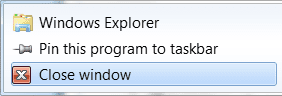
I have a tendency to accidentally move my mouse cursor upwards as I click on taskbar application icons, which triggers the jump list. Is there a way to prevent this?
I know of a 3rd party app called "7 Taskbar Tweaker" that can change the right-click context menu of these taskbar items to the classic options (equivalent to Shift + right click), but that doesn't cover the above annoyance.
I know of a 3rd party app called "7 Taskbar Tweaker" that can change the right-click context menu of these taskbar items to the classic options (equivalent to Shift + right click), but that doesn't cover the above annoyance.
Attachments
My Computer
At a glance
Windows 7 Home Premium 64-bit SP1Intel Core i3-350M @ 2.27GHz8GB DDR3Intel HD Graphics
- Computer type
- Laptop
- Computer Manufacturer/Model Number
- ASUS K52F-A1
- OS
- Windows 7 Home Premium 64-bit SP1
- CPU
- Intel Core i3-350M @ 2.27GHz
- Motherboard
- ASUS K52F
- Memory
- 8GB DDR3
- Graphics Card(s)
- Intel HD Graphics
- Sound Card
- Conexant SmartAudio HD
- Monitor(s) Displays
- Notebook display (disabled) and BenQ EW2420 24" (active)
- Screen Resolution
- 1920 x 1080
- Hard Drives
- Samsung 840 EVO SSD 120GB
- Keyboard
- Logitech K120
- Mouse
- Dell Laser MOCZUL
- Antivirus
- none
- Browser
- Opera portable
- Other Info
- not yet revealed

 .
. 


 .
.
