Completely reinstalling Windows 7 Starter on Samung N150 Netbook

adamned

New member
Local time
11:04 PM
Messages
4
Im trying to reinstall Windows 7 starter on my friends samsung netbook. The computer wont boot up at all. Ive tried using the system recovery feature but that doesnt work, it syas files are missing. I tried running in Safe Mode but the it crashes before the operating system loads. A few other processes display the message 'operating system not found'.

My only choice is to delete everything thats ont he hard drive and format it, then reinstall the operating system. Thing is, she hasnt got any copy of Windows 7 Starter, neither on a disk or optical drive. If I were able to get a copy of the OS, how wouold i go about deleting everything on the hard drive and reinstalling it?

Ive been goin round in circles for a looong time and am getting nowhere so any help from any geniuses on here would be infinitly appreciated :) thanks guys.
 

My Computer My Computer

At a glance

Windows 7 Starter
OS
Windows 7 Starter

My Computer My Computer

At a glance

ME/XP/Vista/Win7
OS
ME/XP/Vista/Win7
ive gone into the system recovery, nothing happens once the samsung logo comes up, it just stays on that page for ages saying 'please wait...' and does nothing. there is no disk drive so i cant use recovery disks, its a netbook
 

My Computer My Computer

At a glance

Windows 7 Starter
OS
Windows 7 Starter
im not fussy about recovering any data because there was nothing on there that i need to keep. i just want to be able to get into Windows anduse the computer
 

My Computer My Computer

At a glance

Windows 7 Starter
OS
Windows 7 Starter

My Computer My Computer

At a glance

ME/XP/Vista/Win7
OS
ME/XP/Vista/Win7
Hello adamned, welcome to Seven Forums!


It's against forum rules to post download links to Windows software but Google is your friend.

After you have copied out or made back-ups of the data you need to save to external media.

If you can find an exact Windows version that the PC shipped with you can do a clean install using the activation key on the COA sticker attached to the PC though it may require a robo-call to MS to sort the OEM batch-key.

How to Activate Windows 7 by Phone

If you can't find an exact same version, you could use the info in this tutorial to create an "all versions" installer of any version Windows installer, to install using the same method I posted above.

Windows 7 Universal Installation Disc - Create

After you have made backups of everything you care to save, the best method is to do a complete wipe secure erase of the entire Hard Disk Drive first, it over-writes everything, all the old Windows code including all the old drivers/programs, giving you the best possible space to install Windows to.

SSD / HDD : Optimize for Windows Reinstallation

.
 

My Computer My Computer

At a glance

W 7 64-bit UltimateIntel Q9550 Yorkfield8GB Dominator 8500C5DATI : XFX 5870
Computer Manufacturer/Model Number
* BFK Customs *
OS
W 7 64-bit Ultimate
CPU
Intel Q9550 Yorkfield
Motherboard
ASUS P5Q Pro
Memory
8GB Dominator 8500C5D
Graphics Card(s)
ATI : XFX 5870
Sound Card
Realtek HD Audio 7-1
Monitor(s) Displays
1x 47" LCD HDMI & 3x 26" LCD HDMI
Screen Resolution
1920x1080P & 1920x1200
Hard Drives
1x 80GB Intel X25-M G2 SSD : 1x 500GB & 1x 640GB WD Caviar Black(s)
PSU
Corsair 620HX
Case
Cooler Master RC-690
Cooling
Tuniq Tower 120, 2x 140mm and 3x 120mm case fans
Keyboard
Microsoft 500
Mouse
Razer Diamondback 3G
Internet Speed
14 Mb/s
Other Info
1x Koutech 3Gb/s SATA HDD Hot Swap Rack
Tap F8 at reboot to see if you have Repair Console on Advanced Boot Tools menu. If so boot in to run Startup Repair up to 3 separate time with reboots to see if you can Repair Win7.

If not on F8, create a System REpair CD on another Win7 machine with same bit-rate in Backup Center. Boot it to do the Repairs at least 3 times, which should automate System Restore - but try it manually anyway if necessary.

You can copy out your files http://www.sevenforums.com/tutorials/93347-copy-paste-windows-recovery-console.html then find any Win7 retail installer, unlock all versions if necessary, to reinstall clean Win7 using these steps to get a perfect reinstall: Reinstalling Windows 7
 
Adamned,

Before I also beat my head against the wall:
Could you tell us what happened to precipitate this calamity?

That info my help us to point you in the correct direction.

Does that netbook have a Certificate of Authority (COA) sticker on the bottom? We may need that info.
 

My Computer My Computer

At a glance

MS Windows 7 Ultimate SP1 64-bitAMD A10-4600M6.00 GB Dual-Channel DDR3 @ 798MHz (11-11-12-28)AMD Radeon HD 7660G
Computer Manufacturer/Model Number
Toshiba Satellite S875D-S7239 laptop
OS
MS Windows 7 Ultimate SP1 64-bit
CPU
AMD A10-4600M
Motherboard
AMD Pumori (Socket FT1)
Memory
6.00 GB Dual-Channel DDR3 @ 798MHz (11-11-12-28)
Graphics Card(s)
AMD Radeon HD 7660G
Sound Card
High Definition Audio Device
Monitor(s) Displays
Generic PnP Monitor (1600x900@60Hz)
Screen Resolution
1600x900@60Hz
Hard Drives
SSD 119GB Corsair CSSD-V128GB2 ATA Device
Keyboard
Standard PS/2 Keyboard
Mouse
HP Wireless Optical Mobile Mouse Model FHA-3410
Internet Speed
What the local pub, local coffee shop offers.
Other Info
Optical Drive:MATSHITA BD-CMB UJ160B ATA Device


Also have an Asus ha1002xp netbook with Win 7 Ultimate installed.
thanks guys, much appreciate the help.

for starters, it doesnt boot up to the windows desktop so anything that requires that is a no-go.
anything i do will have to be done through the setup menus. ive tried countless times using F4 and trying to run the system recovery but it just freezes and doesnt do anything, just displays the Smasung logo and does nothing.

as far as what i did to cause the problems; im not sure. its a friends netbook who doesnt have the faintest idea about computers. she said it just crashed one day so just switched it off, then switched it back on and it wouldnt load windows.

can u clarify what the COA sticker is? there are 2 stickers, one with the netbook model number and serial number on it, and another one with the microsoft logo on it, however the details have been rubbed off through wear so they cannot be read.

i really just want to delete everything off the hard drive (remember i cant do anything through windows, i need to do it through the setup menus or something similar) and reinstall windows then.

Thanks a bunch guys
 

My Computer My Computer

At a glance

Windows 7 Starter
OS
Windows 7 Starter
What about using the F8 key? Is the Repair console on that menu? Follow the steps I gave you.

It would be best if you can repair Win7 as an unreadable Product Key on COA can be difficult to retrieve.

If the Product Key is truly worn off the COA sticker and is unreadable then its possible Samsung or MS can replace it using the Product ID which is the other number on the sticker or else listed when you can boot, at Computer>Properties.

Since your first call to pursue this should be Samsung I would also order the Recovery Disks which will self-activate to avoid having to use the Product Key at all.
 
Last edited:
Using a Notebook or Netbook on your lap, is the cause of overheating, which is the main reason of the problems you have now.

Boot up using the Startup disk CD or Windows 7 DVD. (not the OEM manufacturer's Recovery Disk) If you have a Netbook, needs to be on USB Pendrive.

Do a Strartup Repair:
http://www.sevenforums.com/tutorials/681-startup-repair.html?ltr=S
Note: You may need to do startup repair 3 to 4 times.
http://www.sevenforums.com/tutorials/105541-startup-repair-run-3-separate-times.html

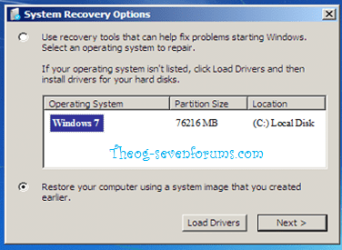
Your Windows installation must show at this screen.
Startup Repair 1.PNG Startup Repair 2.png

If not showing check out the list below.
1) Run Startup Repair once,(drive may be marked inactive) this will mark the drive ACTIVE.

2) Your HD is plugged in to the first Sata port on the MOBO, & first HD boot in BIOS.

3) Make sure your HD is show in BIOS.

4) Check all cables for a good fit.

5) Check to see your HD is listed in dartpart.
http://www.sevenforums.com/tutorials/119713-diskpart-pc-startup.html?ltr=D
type list disk.
Startup Repair 3.PNG

6) Load the Sata Controller Drivers:
http://www.sevenforums.com/tutorials/68942-sata-drivers-load-windows-recovery-options.html
Only needed, if you used when installing Windows.

7) Restore MBR.
http://www.sevenforums.com/tutorials/20864-mbr-restore-windows-7-master-boot-record.html

8) Use the Rebuild BCD in this tutorial:
How to use the Bootrec.exe tool in the Windows Recovery Environment to troubleshoot and repair startup issues in Windows

9) Check your computer for virus or malware.
http://www.sevenforums.com/tutorials/166445-microsoft-standalone-system-sweeper.html?ltr=M

10)The bootkit malware Trojan:Win32/Popureb.E
Don
If this is the problem, a reinstall is need.

11) Mark the Windows HD ACTIVE:
http://www.sevenforums.com/tutorials/71432-partition-mark-active.html?ltr=P

Still not showing.
12) Check the hard drive with the manufacturer's diagnostic tools.
Hard Drive Diagnostics Tools and Utilities (Storage) - TACKtech Corp.
HD Diagnostic

If you have not made your Startup Repair
http://www.sevenforums.com/tutorials/2083-system-repair-disc-create.html
Do you have a mate with Windows 7 & CD/DVD RW Drive, how could burn one off.
If you have a Netbook, you can make a Startup Repair or install disk using Method two of this tutorial:
http://www.sevenforums.com/tutorials/2432-usb-windows-7-installation-key-drive-create.html?ltr=U
on your mate's PC.

http://www.sevenforums.com/tutorials/139576-startup-repair-infinite-loop-recovery.html

http://www.sevenforums.com/tutorials/668-system-recovery-options.html
http://www.sevenforums.com/tutorials/700-system-restore.html?ltr=S
 

My Computer My Computer

At a glance

ME/XP/Vista/Win7
OS
ME/XP/Vista/Win7
adamned,

I'm going to repeat the advice from GregRocker.

Go thru that advice, step-by-step, and let us know the results.

Tap F8 at reboot to see if you have Repair Console on Advanced Boot Tools menu. If so boot in to run Startup Repair up to 3 separate time with reboots to see if you can Repair Windows 7.

If not on F8, create a System REpair CD on another Windows 7 machine with same bit-rate in Backup Center. Boot it to do the Repairs at least 3 times, which should automate System Restore - but try it manually anyway if necessary.

You can copy out your files Copy & Paste - in Windows Recovery Console then find any Windows 7 retail installer, unlock all versions if necessary, to reinstall clean Windows 7 using these steps to get a perfect reinstall: Reinstalling Windows 7
/QUOTE]

I assume you have a 32-bit system, thus if you need to make a System Repair Disc, go to another 32 bit machine and follow this procedure:

[FONT=&quot]DISC - CREATE A SYSTEM REPAIR DISC[/FONT]
START | type System Repair | Enter key | Create Disc button
------------------------------------------------------

Now you have two alternatives:
1. put the System Repair Disc onto a USB stick,
2. buy an external USB DVD/CD unit.

The second choice has the advantage that then you have an easy, viable alternative anytime you want to install software that comes on a CD and also an easy way to burn ISO files to a cd/dvd.

Let us know which approach you want to follow if you can not get the system repaired without a system repair disc.
 

My Computer My Computer

At a glance

MS Windows 7 Ultimate SP1 64-bitAMD A10-4600M6.00 GB Dual-Channel DDR3 @ 798MHz (11-11-12-28)AMD Radeon HD 7660G
Computer Manufacturer/Model Number
Toshiba Satellite S875D-S7239 laptop
OS
MS Windows 7 Ultimate SP1 64-bit
CPU
AMD A10-4600M
Motherboard
AMD Pumori (Socket FT1)
Memory
6.00 GB Dual-Channel DDR3 @ 798MHz (11-11-12-28)
Graphics Card(s)
AMD Radeon HD 7660G
Sound Card
High Definition Audio Device
Monitor(s) Displays
Generic PnP Monitor (1600x900@60Hz)
Screen Resolution
1600x900@60Hz
Hard Drives
SSD 119GB Corsair CSSD-V128GB2 ATA Device
Keyboard
Standard PS/2 Keyboard
Mouse
HP Wireless Optical Mobile Mouse Model FHA-3410
Internet Speed
What the local pub, local coffee shop offers.
Other Info
Optical Drive:MATSHITA BD-CMB UJ160B ATA Device


Also have an Asus ha1002xp netbook with Win 7 Ultimate installed.
strange issue

guys...

I used the system recovery (the basic restore).... but now my desktop and averything is strange... the taskbar is very big (half screen).... the icons has no names.... nothing has names... the start button is only the windows logo.. when i click nothin happens.... can someone help me to back the last good config ??

thks
 

My Computer My Computer

At a glance

Windows 7 starter
OS
Windows 7 starter
Sounds like you may need to reinstall or update your Display driver. Download and install from the manufacturer's Support Downloads webpage for your model PC or display device.

The driver may also come in on Windows Updates under Optional updates when you enable Automatically get recommended drivers and updates for your hardware.
So if you can I would do all of my Updates to completion before importing any drivers which are missing in Device Manager.

However be aware that the factory preinstalled image is an grossly inferior install which compromises native Win7 in many ways. You'd be much better off following these steps to get a perfect Clean Reinstall - Factory OEM Windows 7.
 
Back
Top