Completely reset HomeGroup

matejdro

New member
Member
Local time
10:46 AM
Messages
55
Is there a way to completely reset HomeGroup feature without reinstalling OS?

I created a homegroup on one computer, but there were troubles with it (computers did not see each other etc.), so I deleted homegroup.

But problem is that it shows me "you have been invited to join a homegroup", despite that all computers are already disconnected from that homegroup (it does not exist anymore). So I cannot create new homegroup on that computer.

I have tried to clear C:\Windows\ServiceProfiles\LocalService\AppData\Roaming\PeerNetworking folder, but that did nothing.

Computer with an issue is connected via cable.
 

My Computer

OS
Windows 7 64bit
CPU
Core i7 2600K
Motherboard
Asus P8P67
Memory
APACER DDR3 8GB (2x4GB) 1333 CL9 (DL.08GAJ.H9EK2)
Graphics Card(s)
Gigabyte NVIDIA GTX 570
Sound Card
Integrated
Screen Resolution
1680x1050
Hard Drives
System: KINGSTON SSD HYPERX SH100S3120G
Data: HDD SAMSUNG 1TB SATA2 32MB/7200 (HD103SJ)
PSU
750W (I think)
Hello mate,

Homegroup will function that way. It will see that another computer is on the local network and ask if you want to link them. It doesn't matter which computer starts the connection. If one computer askes to "join", then the other will not. If you do want to connect, click join. if not, don't worry over it. If it asks to join, you AREN'T connected to a homegroup (at least with that computer)

If ever you see something that reads "Leave homegroup", then click it to leave.
 

My Computer

Computer type
PC/Desktop
Computer Manufacturer/Model Number
Custom Asus Build
OS
Microsoft Windows 8.1 Pro 64-bit
CPU
Intel(R) Core(TM) i3-4130 CPU @ 3.40GHz
Motherboard
B85M-E
Memory
8.00 GB
Graphics Card(s)
None
Sound Card
Realtek High Definition Audio
Monitor(s) Displays
Asus 23.6" Monitor
Screen Resolution
1920 x 1080 x 32 bits (4294967296 colors) @ 60 Hz
Hard Drives
INTEL SSDSC2BW180A4
Samsung SSD 840 PRO Series
PSU
Seasonic S12II-380Bronze
Case
Lian Li
Cooling
Fan, Passive
Keyboard
Logitech K120
Mouse
Microsoft Touch Mouse
Internet Speed
4ms Ping, 19.0 Mbps Download, 19.0 Mbps Upload
Antivirus
Eset Endpoint
Browser
Internet Explorer, Chrome
Yes, but i have no homegroup in my network, but computer still insists that there is one and it wants to join it. No other computer asks this (every other computer just have an option to create new homegroup).
 

My Computer

OS
Windows 7 64bit
CPU
Core i7 2600K
Motherboard
Asus P8P67
Memory
APACER DDR3 8GB (2x4GB) 1333 CL9 (DL.08GAJ.H9EK2)
Graphics Card(s)
Gigabyte NVIDIA GTX 570
Sound Card
Integrated
Screen Resolution
1680x1050
Hard Drives
System: KINGSTON SSD HYPERX SH100S3120G
Data: HDD SAMSUNG 1TB SATA2 32MB/7200 (HD103SJ)
PSU
750W (I think)
mate, it is standard. The "join" option will create the homegroup, there doesn't have to be an existing one to "join"

Hope this helps :)
 

My Computer

Computer type
PC/Desktop
Computer Manufacturer/Model Number
Custom Asus Build
OS
Microsoft Windows 8.1 Pro 64-bit
CPU
Intel(R) Core(TM) i3-4130 CPU @ 3.40GHz
Motherboard
B85M-E
Memory
8.00 GB
Graphics Card(s)
None
Sound Card
Realtek High Definition Audio
Monitor(s) Displays
Asus 23.6" Monitor
Screen Resolution
1920 x 1080 x 32 bits (4294967296 colors) @ 60 Hz
Hard Drives
INTEL SSDSC2BW180A4
Samsung SSD 840 PRO Series
PSU
Seasonic S12II-380Bronze
Case
Lian Li
Cooling
Fan, Passive
Keyboard
Logitech K120
Mouse
Microsoft Touch Mouse
Internet Speed
4ms Ping, 19.0 Mbps Download, 19.0 Mbps Upload
Antivirus
Eset Endpoint
Browser
Internet Explorer, Chrome
But why every other PC shows "create"?
 

My Computer

OS
Windows 7 64bit
CPU
Core i7 2600K
Motherboard
Asus P8P67
Memory
APACER DDR3 8GB (2x4GB) 1333 CL9 (DL.08GAJ.H9EK2)
Graphics Card(s)
Gigabyte NVIDIA GTX 570
Sound Card
Integrated
Screen Resolution
1680x1050
Hard Drives
System: KINGSTON SSD HYPERX SH100S3120G
Data: HDD SAMSUNG 1TB SATA2 32MB/7200 (HD103SJ)
PSU
750W (I think)
I am not sure. I have, however, tested this on my own computers.

To make sure you are not part of a homegroup, type "Homegroup" into the start menu search without quotes, and click it. If anywhere in that window it says to "Leave the homegroup...", click it. If not, you are not a part of a homegroup.
 

My Computer

Computer type
PC/Desktop
Computer Manufacturer/Model Number
Custom Asus Build
OS
Microsoft Windows 8.1 Pro 64-bit
CPU
Intel(R) Core(TM) i3-4130 CPU @ 3.40GHz
Motherboard
B85M-E
Memory
8.00 GB
Graphics Card(s)
None
Sound Card
Realtek High Definition Audio
Monitor(s) Displays
Asus 23.6" Monitor
Screen Resolution
1920 x 1080 x 32 bits (4294967296 colors) @ 60 Hz
Hard Drives
INTEL SSDSC2BW180A4
Samsung SSD 840 PRO Series
PSU
Seasonic S12II-380Bronze
Case
Lian Li
Cooling
Fan, Passive
Keyboard
Logitech K120
Mouse
Microsoft Touch Mouse
Internet Speed
4ms Ping, 19.0 Mbps Download, 19.0 Mbps Upload
Antivirus
Eset Endpoint
Browser
Internet Explorer, Chrome
No computer is part of the homegroup, but AFAIK homegroup should first be created before joined. How else could I define password?

Also, if I switch network type public and then to home, it will show wizard for creating new homegroup. But at the end it says that creating failed because homegroup is already created.
 

My Computer

OS
Windows 7 64bit
CPU
Core i7 2600K
Motherboard
Asus P8P67
Memory
APACER DDR3 8GB (2x4GB) 1333 CL9 (DL.08GAJ.H9EK2)
Graphics Card(s)
Gigabyte NVIDIA GTX 570
Sound Card
Integrated
Screen Resolution
1680x1050
Hard Drives
System: KINGSTON SSD HYPERX SH100S3120G
Data: HDD SAMSUNG 1TB SATA2 32MB/7200 (HD103SJ)
PSU
750W (I think)
You are taking different things and making them to mean that which they do not.

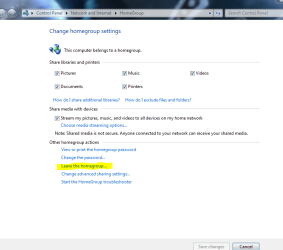
Yes, home group is already created. But no, you are not currently in one. I will post a picture of what it looks like if you are part of a homegroup:
Capture.PNG

The highlighted option "Leave the homegroup..." is how you know you are in one.

Believe me, this is just how it works. It may be different to what you are used to, but that is just the way it is.

The password is what a computer uses to "join" your homegroup (Now remember, it is already created, but no, you are not connected). You can view the password, etc. but you will need the password in order to connect computers together.
 

My Computer

Computer type
PC/Desktop
Computer Manufacturer/Model Number
Custom Asus Build
OS
Microsoft Windows 8.1 Pro 64-bit
CPU
Intel(R) Core(TM) i3-4130 CPU @ 3.40GHz
Motherboard
B85M-E
Memory
8.00 GB
Graphics Card(s)
None
Sound Card
Realtek High Definition Audio
Monitor(s) Displays
Asus 23.6" Monitor
Screen Resolution
1920 x 1080 x 32 bits (4294967296 colors) @ 60 Hz
Hard Drives
INTEL SSDSC2BW180A4
Samsung SSD 840 PRO Series
PSU
Seasonic S12II-380Bronze
Case
Lian Li
Cooling
Fan, Passive
Keyboard
Logitech K120
Mouse
Microsoft Touch Mouse
Internet Speed
4ms Ping, 19.0 Mbps Download, 19.0 Mbps Upload
Antivirus
Eset Endpoint
Browser
Internet Explorer, Chrome
I have booted machine now to re-check what you said and problem was somehow solved and I could create homegroup.

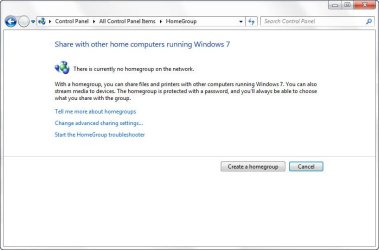
But now problem is, that no other computers can see it. Despite I have created homegroup on one computer, all others still shows "There is currently no homegroup on the network".
 

My Computer

OS
Windows 7 64bit
CPU
Core i7 2600K
Motherboard
Asus P8P67
Memory
APACER DDR3 8GB (2x4GB) 1333 CL9 (DL.08GAJ.H9EK2)
Graphics Card(s)
Gigabyte NVIDIA GTX 570
Sound Card
Integrated
Screen Resolution
1680x1050
Hard Drives
System: KINGSTON SSD HYPERX SH100S3120G
Data: HDD SAMSUNG 1TB SATA2 32MB/7200 (HD103SJ)
PSU
750W (I think)

My Computer

Computer type
PC/Desktop
Computer Manufacturer/Model Number
Custom Asus Build
OS
Microsoft Windows 8.1 Pro 64-bit
CPU
Intel(R) Core(TM) i3-4130 CPU @ 3.40GHz
Motherboard
B85M-E
Memory
8.00 GB
Graphics Card(s)
None
Sound Card
Realtek High Definition Audio
Monitor(s) Displays
Asus 23.6" Monitor
Screen Resolution
1920 x 1080 x 32 bits (4294967296 colors) @ 60 Hz
Hard Drives
INTEL SSDSC2BW180A4
Samsung SSD 840 PRO Series
PSU
Seasonic S12II-380Bronze
Case
Lian Li
Cooling
Fan, Passive
Keyboard
Logitech K120
Mouse
Microsoft Touch Mouse
Internet Speed
4ms Ping, 19.0 Mbps Download, 19.0 Mbps Upload
Antivirus
Eset Endpoint
Browser
Internet Explorer, Chrome
I had problems with my homegroup, so I have decided to recreate it from scratch. I have managed to create it, but now no computers can see it.

Screenshot 1 - every other computer
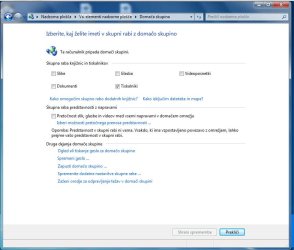
Screenshot 2 - computer that I create homegroup on (sorry, it's not in english but I hope you get the point).
 

Attachments

  • 21-2-2012 1-08-37.jpg
    21-2-2012 1-08-37.jpg
    88 KB · Views: 38
  • 21-2-2012 1-09-05.jpg
    21-2-2012 1-09-05.jpg
    145.6 KB · Views: 39

My Computer

OS
Windows 7 64bit
CPU
Core i7 2600K
Motherboard
Asus P8P67
Memory
APACER DDR3 8GB (2x4GB) 1333 CL9 (DL.08GAJ.H9EK2)
Graphics Card(s)
Gigabyte NVIDIA GTX 570
Sound Card
Integrated
Screen Resolution
1680x1050
Hard Drives
System: KINGSTON SSD HYPERX SH100S3120G
Data: HDD SAMSUNG 1TB SATA2 32MB/7200 (HD103SJ)
PSU
750W (I think)
The picture on the right hand side isn't sharing anything other than printers. If you want to share something, you have to select what you want to share, such as pictures, documents, etc.

For the computer(s) relating to the picture on the left (the one(s) in English), use this troubleshooter: Why can't I create a homegroup? - install the fix, and read through it if the fix doesn't work.
 

My Computer

Computer type
PC/Desktop
Computer Manufacturer/Model Number
Custom Asus Build
OS
Microsoft Windows 8.1 Pro 64-bit
CPU
Intel(R) Core(TM) i3-4130 CPU @ 3.40GHz
Motherboard
B85M-E
Memory
8.00 GB
Graphics Card(s)
None
Sound Card
Realtek High Definition Audio
Monitor(s) Displays
Asus 23.6" Monitor
Screen Resolution
1920 x 1080 x 32 bits (4294967296 colors) @ 60 Hz
Hard Drives
INTEL SSDSC2BW180A4
Samsung SSD 840 PRO Series
PSU
Seasonic S12II-380Bronze
Case
Lian Li
Cooling
Fan, Passive
Keyboard
Logitech K120
Mouse
Microsoft Touch Mouse
Internet Speed
4ms Ping, 19.0 Mbps Download, 19.0 Mbps Upload
Antivirus
Eset Endpoint
Browser
Internet Explorer, Chrome
Well, I should still be able to join homegroup despite there are only printers shared, right?
 

My Computer

OS
Windows 7 64bit
CPU
Core i7 2600K
Motherboard
Asus P8P67
Memory
APACER DDR3 8GB (2x4GB) 1333 CL9 (DL.08GAJ.H9EK2)
Graphics Card(s)
Gigabyte NVIDIA GTX 570
Sound Card
Integrated
Screen Resolution
1680x1050
Hard Drives
System: KINGSTON SSD HYPERX SH100S3120G
Data: HDD SAMSUNG 1TB SATA2 32MB/7200 (HD103SJ)
PSU
750W (I think)
Mate,

I don't know, but you could try it! Test sharing pictures or folders, etc to see if it "works". Here are some settings you might find useful for homegroup: http://www.sevenforums.com/tutorials/44464-homegroup-change-file-folder-sharing-settings.html - tutorial created by Brink

I found this tutorial; you may find it interesting: http://www.sevenforums.com/tutorials/43972-homegroup-add-computer-join.html - tutorial created by Brink
:info: Apparently Only Windows Home Premium and higher can create a homegroup, while all others can only join.
 

My Computer

Computer type
PC/Desktop
Computer Manufacturer/Model Number
Custom Asus Build
OS
Microsoft Windows 8.1 Pro 64-bit
CPU
Intel(R) Core(TM) i3-4130 CPU @ 3.40GHz
Motherboard
B85M-E
Memory
8.00 GB
Graphics Card(s)
None
Sound Card
Realtek High Definition Audio
Monitor(s) Displays
Asus 23.6" Monitor
Screen Resolution
1920 x 1080 x 32 bits (4294967296 colors) @ 60 Hz
Hard Drives
INTEL SSDSC2BW180A4
Samsung SSD 840 PRO Series
PSU
Seasonic S12II-380Bronze
Case
Lian Li
Cooling
Fan, Passive
Keyboard
Logitech K120
Mouse
Microsoft Touch Mouse
Internet Speed
4ms Ping, 19.0 Mbps Download, 19.0 Mbps Upload
Antivirus
Eset Endpoint
Browser
Internet Explorer, Chrome
I am using Windows 8.1, but I finally think I have a way : it worked to remove the stale HomeGroup when nothing else could. Not a solid procedure, but here goes :

1) stop the three "Peer ..." services
2) stop the two "HomeGroup ..." services
3) stop the "PNRP ..." service
4) delete the contents of %Windir%\ServiceProfiles\LocalService\AppData\Roaming\PeerNetworking
5) forget your network, if wireless, and disconnect
6) navigate to HKEY_LOCAL_MACHINE\SYSTEM\CurrentControlSet\Services\HomeGroupProvider\
7) delete the contents of ServiceData and LocalUserMembership
8) navigate to HKEY_LOCAL_MACHINE\SYSTEM\CurrentControlSet\Services\HomeGroupListener\
9) delete the contents of ServiceData

reboot. run homegroup troubleshooter a couple of times.
 

My Computer

Computer type
PC/Desktop
Computer Manufacturer/Model Number
Custom
OS
Windows 7 Home Premium x64
CPU
Intel Core 2 Quad Q6600 G0
Motherboard
MSI P45 Platinum MS-7512
Memory
Transcend JM800QLU-2G x 2 (2x2GB)
Graphics Card(s)
Sapphire Radeon HD6850 1GB
Hard Drives
Seagate ST3360320AS in Transcend Storejet Ultra35 eSATA
Seagate ST31000524AS
PSU
Corsair GS600
Cooling
Stock
Mouse
Logitech Wired M500 USB
Internet Speed
15Mbps
Antivirus
Microsoft Security Essentials
Browser
Google Chrome
Back
Top