Completely Stripping A Lenovo Lappy And Starting From Zero

jweir43

New member
Local time
6:40 AM
Messages
24
Location
Grass Valley CA, 60 mi N of Sacramento
I have a Lenovo G580 that came with Win 7-32 on it and I've been trying to convert it to 7-64 with a LOT of help from folks on this board. I've given up with about 100 hours of fooling around trying to end-run around Lenovo's strangle hold on the machine.

I'd like to wipe the machine clean (including those hidden hard drive partitions) and take any reference to Lenovo off of the machine without turning it into an expensive door-stop. I just want a mid-level machine without any particular bells and whistles other than being able to use the normal goesintas and goesoutas on the machine like USB, internal optical drive, external VGA drive, wi-fi, and the like.

I really appreciate any help, with the caveat that I can engineer most any analog, RF, or microwave circuit you can come up with. My understanding of how to manipulate a laptop computer stops with the on-off switch. Please use terms that you would use with any competent basketweaving major.

Thanks,

Jim
VP Engineering, RST
 

My Computer My Computer

At a glance

Win7 Pro 32bIntel Pentium I3/I5/I7 2020M &Intek mobile Co...4 GB Single Channel DDR3 & 4 GB Dual Chanl DDR2Generic PNP Monitor; Standard VGA Graphics Ad...
Computer type
Laptop
Computer Manufacturer/Model Number
Lenovo G580 & Dell Vostro 1720
OS
Win7 Pro 32b
CPU
Intel Pentium I3/I5/I7 2020M &Intek mobile Core 2 P8400
Motherboard
Lenovo **INVALID** U3E1 & Dell OP 993J U2E1
Memory
4 GB Single Channel DDR3 & 4 GB Dual Chanl DDR2
Graphics Card(s)
Generic PNP Monitor; Standard VGA Graphics Adapter (Both)
Hard Drives
500GB Seagate ST500LTO12 SATA & 300 GB Seagate SATA
Antivirus
MS Security Essentials (Both)
Browser
Chrome (Both)
I have a Lenovo Idea pad 130-15ast (AMD not Intel CPU). This laptop came with windows 10 installed. so I did a few searches on YouTube after being unsuccessful at installing windows 7. First I had to change a few things in the bios (disable secure boot and enable legacy support). Windows 7 will not see my USB ports, Network adapter or touchpad so installing was thru keyboard only. I first booted with a USB live drive of Linux Ubuntu-mate to wipe the laptop hard drive. Then installed windows 7 from DVD drive with copies of my USB drivers and realtec drivers burnt on the DVD. Then from windows I had to navigate with keyboard only to install USB drivers.

Not sure if my process was the best way to do it, but it worked... maybe others can give advice. Also windows 7 creates hidden drive partitions for recovery purposes.
 

My Computer My Computer

At a glance

Windows 7 proI3-810016GB PC2400GTX970
Computer type
PC/Desktop
Computer Manufacturer/Model Number
custom build and a Ideapad 130-15ast
OS
Windows 7 pro
CPU
I3-8100
Motherboard
MSI Z370-A Pro
Memory
16GB PC2400
Graphics Card(s)
GTX970
Sound Card
Motherboard
Monitor(s) Displays
22"
Screen Resolution
1080p
Hard Drives
128 Patriot M.2 (will not accept Windows 7 install yet)
240 PNY SSD
1TB WD 7200
PSU
500w Raidmax 80+
Case
Rosewill ATX Mid Tower Gaming
Cooling
Stock
Keyboard
Logitech
Mouse
Logitech
Internet Speed
25Mb
Antivirus
Zone Alarm
Browser
Chrome
With 4G of memory I always recommend 32 bits as it will run better than with 64 bits, specially on laptops.
64 bits is only required if you have more than 4G of memory.

You can't upgrade from 32 bits to 64 bits.
If you want to install Win 7 64 bits you need to clean the disk and do a Clean install
Backup your data to an external drive before you begin.
 

My Computers My Computers

  • At a glance

    Windows 7 HP 64i5 6600K - 800MHz to 4200MHz4+4G GSkill DDR4 3000IG - Intel 530
    Computer type
    PC/Desktop
    Computer Manufacturer/Model Number
    custom build
    OS
    Windows 7 HP 64
    CPU
    i5 6600K - 800MHz to 4200MHz
    Motherboard
    GA-Z170-HD3P
    Memory
    4+4G GSkill DDR4 3000
    Graphics Card(s)
    IG - Intel 530
    Monitor(s) Displays
    Samsung 226BW
    Screen Resolution
    1680x1050
    Hard Drives
    (1) -1 SM951 – 128GB M.2 AHCI PCIe SSD drive for Windows 7 and Lubuntu
    (2) -1 WD SATA 3 - 1T for Data
    (3) -1 WD SATA 3 - 1T for backup
    PSU
    Thermaltake 450W TR2 gold
    Keyboard
    Old and good Chicony mechanical keyboard
    Mouse
    Logitech mX performance - 9 buttons (had to disable some)
    Internet Speed
    500Mb/s
    Browser
    Firefox 64
    Other Info
    TinyWall firewall
  • At a glance

    Windows 7 Proi7-4500U 800MHz to 3.0GHz(4+4)G DDR3 1600IG intel 4400 + NVIDIA GeForce GT 745M
    Computer type
    Laptop
    System Manufacturer/Model Number
    Asus Q550LF
    OS
    Windows 7 Pro
    CPU
    i7-4500U 800MHz to 3.0GHz
    Motherboard
    Asus Q550LF
    Memory
    (4+4)G DDR3 1600
    Graphics Card(s)
    IG intel 4400 + NVIDIA GeForce GT 745M
    Sound Card
    Realtek
    Monitor(s) Displays
    LG Display LP156WF4-SPH1
    Screen Resolution
    1920 x 1080
    Hard Drives
    BX500 120G SSD for Windows and programs +
    1T HDD for data
    Internet Speed
    500 Mb/s
    Browser
    Firefox
    Other Info
    TinyWall firewall
With 4G of memory I always recommend 32 bits as it will run better than with 64 bits, specially on laptops.
64 bits is only required if you have more than 4G of memory.

You can't upgrade from 32 bits to 64 bits.
If you want to install Win 7 64 bits you need to clean the disk and do a Clean install
Backup your data to an external drive before you begin.

Thanks, MHz.
I don't have the capability right now of upgrading the 4G of memory, but some of my recent engineering programs are choking on 32 bit, refusing to run
Maybe if the Easter BUnny gives me a large check I'll be able to get more memory later in the year.

I've read the tutorials and I'm totally confused. There are drivers if you have this hardware and Windows commands if you have that hardware, and it is a total confuse job. What is wrong with doing a whole disk unpartition and format down to the fundamental level and starting over?

There is no data on this machine that I want to keep.

THanks,

Jim
 

My Computer My Computer

At a glance

Win7 Pro 32bIntel Pentium I3/I5/I7 2020M &Intek mobile Co...4 GB Single Channel DDR3 & 4 GB Dual Chanl DDR2Generic PNP Monitor; Standard VGA Graphics Ad...
Computer type
Laptop
Computer Manufacturer/Model Number
Lenovo G580 & Dell Vostro 1720
OS
Win7 Pro 32b
CPU
Intel Pentium I3/I5/I7 2020M &Intek mobile Core 2 P8400
Motherboard
Lenovo **INVALID** U3E1 & Dell OP 993J U2E1
Memory
4 GB Single Channel DDR3 & 4 GB Dual Chanl DDR2
Graphics Card(s)
Generic PNP Monitor; Standard VGA Graphics Adapter (Both)
Hard Drives
500GB Seagate ST500LTO12 SATA & 300 GB Seagate SATA
Antivirus
MS Security Essentials (Both)
Browser
Chrome (Both)
You will need a license for win7 on that machine. If it is already activated, you can back it up first using dism++ . Or you have probably got a coa license on a sticker somewhwere - maybe in the battery commpartment

What is wrong with doing a whole disk unpartition and format down to the fundamental level and starting over?

There is nothing wrong with it.

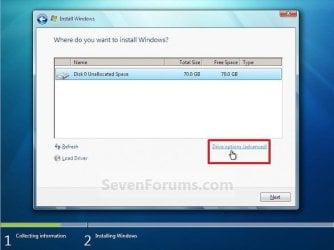
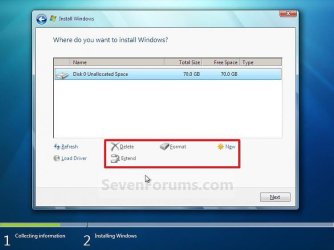
One way is to choose drive options (advanced) during installation and delete all partitions on the target disk.

Step7.jpg

Step8.jpg
 

My Computers My Computers

  • At a glance

    7 X64i5 84002x8gb 3200mhz
    Computer type
    PC/Desktop
    OS
    7 X64
    CPU
    i5 8400
    Motherboard
    gigabyte b365m ds3h
    Memory
    2x8gb 3200mhz
    Hard Drives
    various
    PSU
    pure power 11 400w cm
    Case
    Coolermaster
    Cooling
    cryorig m9i
  • At a glance

    7x64g54008gb ddr4 2400
    Computer type
    PC/Desktop
    OS
    7x64
    CPU
    g5400
    Motherboard
    ga b365m ds3h
    Memory
    8gb ddr4 2400
    PSU
    xfx pro 450w
OK, so I do a C:drive format to get rid of EVERYTHING on the machine's hard drive. I have a legit copy of WIN 7 64. But somewhere in the guts of that Lenovo are a few things that will need Lenovo drivers. VIdeo? USB? WiFi? Printers? ???

Before I completely blank out the machine, how do I go and find what drivers I am going to need after a complete wipe of the hard drive and truly fresh install of 64?

Thanks,

Jim
 

My Computer My Computer

At a glance

Win7 Pro 32bIntel Pentium I3/I5/I7 2020M &Intek mobile Co...4 GB Single Channel DDR3 & 4 GB Dual Chanl DDR2Generic PNP Monitor; Standard VGA Graphics Ad...
Computer type
Laptop
Computer Manufacturer/Model Number
Lenovo G580 & Dell Vostro 1720
OS
Win7 Pro 32b
CPU
Intel Pentium I3/I5/I7 2020M &Intek mobile Core 2 P8400
Motherboard
Lenovo **INVALID** U3E1 & Dell OP 993J U2E1
Memory
4 GB Single Channel DDR3 & 4 GB Dual Chanl DDR2
Graphics Card(s)
Generic PNP Monitor; Standard VGA Graphics Adapter (Both)
Hard Drives
500GB Seagate ST500LTO12 SATA & 300 GB Seagate SATA
Antivirus
MS Security Essentials (Both)
Browser
Chrome (Both)

My Computers My Computers

  • At a glance

    7 X64i5 84002x8gb 3200mhz
    Computer type
    PC/Desktop
    OS
    7 X64
    CPU
    i5 8400
    Motherboard
    gigabyte b365m ds3h
    Memory
    2x8gb 3200mhz
    Hard Drives
    various
    PSU
    pure power 11 400w cm
    Case
    Coolermaster
    Cooling
    cryorig m9i
  • At a glance

    7x64g54008gb ddr4 2400
    Computer type
    PC/Desktop
    OS
    7x64
    CPU
    g5400
    Motherboard
    ga b365m ds3h
    Memory
    8gb ddr4 2400
    PSU
    xfx pro 450w
There are two ways to use the license that came with the computer (you must install same type, ( HB, HP, Pro or ultimate)).
- On the current original SLP installation, do a activation backup using ABR . The advantage it that the SLP license is activated offline
- Use the COA sticker license key code. It will activate online.

For the installation you can use any Win 7 installation disk. Remember that any Win 7 installation disk has all types (HB, HP, Pro and ultimate). With a little trick you can make it universal.
 

My Computers My Computers

  • At a glance

    Windows 7 HP 64i5 6600K - 800MHz to 4200MHz4+4G GSkill DDR4 3000IG - Intel 530
    Computer type
    PC/Desktop
    Computer Manufacturer/Model Number
    custom build
    OS
    Windows 7 HP 64
    CPU
    i5 6600K - 800MHz to 4200MHz
    Motherboard
    GA-Z170-HD3P
    Memory
    4+4G GSkill DDR4 3000
    Graphics Card(s)
    IG - Intel 530
    Monitor(s) Displays
    Samsung 226BW
    Screen Resolution
    1680x1050
    Hard Drives
    (1) -1 SM951 – 128GB M.2 AHCI PCIe SSD drive for Windows 7 and Lubuntu
    (2) -1 WD SATA 3 - 1T for Data
    (3) -1 WD SATA 3 - 1T for backup
    PSU
    Thermaltake 450W TR2 gold
    Keyboard
    Old and good Chicony mechanical keyboard
    Mouse
    Logitech mX performance - 9 buttons (had to disable some)
    Internet Speed
    500Mb/s
    Browser
    Firefox 64
    Other Info
    TinyWall firewall
  • At a glance

    Windows 7 Proi7-4500U 800MHz to 3.0GHz(4+4)G DDR3 1600IG intel 4400 + NVIDIA GeForce GT 745M
    Computer type
    Laptop
    System Manufacturer/Model Number
    Asus Q550LF
    OS
    Windows 7 Pro
    CPU
    i7-4500U 800MHz to 3.0GHz
    Motherboard
    Asus Q550LF
    Memory
    (4+4)G DDR3 1600
    Graphics Card(s)
    IG intel 4400 + NVIDIA GeForce GT 745M
    Sound Card
    Realtek
    Monitor(s) Displays
    LG Display LP156WF4-SPH1
    Screen Resolution
    1920 x 1080
    Hard Drives
    BX500 120G SSD for Windows and programs +
    1T HDD for data
    Internet Speed
    500 Mb/s
    Browser
    Firefox
    Other Info
    TinyWall firewall
Back
Top