Complicated DVD Error

NumberOne1337

New member
Local time
6:39 PM
Messages
29
So.

I've got a LG GSA-4166B, and I was gonna install Battlefield: Bad Company2, but it did not find the disc (neither on my or my dads PC, and both got this DVD-reader/writer so I went into device manager and uninstalled the driver cause I was gonna install the new one I found by googling (GSA-4166B)

However, when I did this I had to restart my PC. What happends now is that I can't, it freeze at "Shutting down"

So I tried unplug the DVD etc, still this error occured. Then I googled this problem and found a solution. However to my current problem - my DVD is showed as "Local Disc: D" in "Computer" Here's a picture: Bildr.no

And in Device manager it says "CD-rom drive" and shows a yellow icon like "Hey, something is missing" ofcourse, driver is missing so I go and update driver and press that I should select manually and now nothing happends, it just continue loading. I also tried doing a system restore, but same here: it just keep loading..

Hope someone can help me. Would be nice to be able to play Battlefield: Bc2 AND have a DVD that actually is working..
 

My Computer

OS
Windows 7
Update: PC won't shut down correctly when the DVD is plugged, so atm it's unplugged
 

My Computer

OS
Windows 7
Did you try completely uninstalling the driver first instead of hitting Update Driver?
 

My Computer

OS
Windows 7 Enterprise 64-bit
CPU
AMD Phenom II X4 3.0GHz
Motherboard
ASUS M5A97
Memory
8GB G-Skill Ripjaws DDR3 1333
Graphics Card(s)
PNY GeForce 460 GTX 1GB OC - Enthusiast Edition
Sound Card
VIA High Definition Audio
Monitor(s) Displays
Dell 19"
Screen Resolution
1280x1024
Hard Drives
1TB - Primary
160GB - Secondary
250GB - External backup for important files
PSU
OCZ Fata1ty 700W Modular PSU
Case
ASUS
Keyboard
Microsoft Wireless Keyboard 2000
Mouse
Microsoft Wireless Mouse 2000
Internet Speed
3 Mbps/768 kbps
Yes, completly uninstall, which ****ed up the whole computer. However, I managed to do a System Recovery to yesterday by: Unplugging DVD (So it could turn off) and then it worked. So now I got the old driver back, and PC can turn off with the device plugged. However, I tried Cod2 = DVD - game can be read. And now I tried Battlefield: Bad Company2, and that won't be read.
 

My Computer

OS
Windows 7
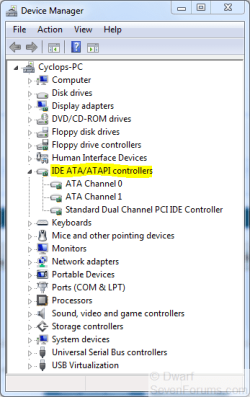
Did you try this?

To remove the drivers go to Device Manager » System » ATA/ATAPI Controllers. Here you should see Ultra ATA storage controllers. Right click and select update drivers » Select install hardware from a list or specific location » next » Don't search I will choose the drivers to install » next » You should see "Standard Dual Channel PCI IDE controller". Select and click next. You may need a reboot or you can right click on My Computer in Device manager and scan for hardware changes.
 

My Computer

OS
Windows 7 Enterprise 64-bit
CPU
AMD Phenom II X4 3.0GHz
Motherboard
ASUS M5A97
Memory
8GB G-Skill Ripjaws DDR3 1333
Graphics Card(s)
PNY GeForce 460 GTX 1GB OC - Enthusiast Edition
Sound Card
VIA High Definition Audio
Monitor(s) Displays
Dell 19"
Screen Resolution
1280x1024
Hard Drives
1TB - Primary
160GB - Secondary
250GB - External backup for important files
PSU
OCZ Fata1ty 700W Modular PSU
Case
ASUS
Keyboard
Microsoft Wireless Keyboard 2000
Mouse
Microsoft Wireless Mouse 2000
Internet Speed
3 Mbps/768 kbps
You mean Device manager -> System devices? However, I find no "ATA/ATAPI Controllers" there.
 

My Computer

OS
Windows 7
I think he means these.

Capture.PNG
 

My Computer

Computer type
PC/Desktop
Computer Manufacturer/Model Number
Dwarf Dwf/11/2012 r09/2013
OS
Windows 8.1 Pro RTM x64
CPU
Intel Core-i5-3570K 4-core @ 3.4GHz (Ivy Bridge) (OC 4.4GHz)
Motherboard
ASRock Z77 Extreme4-M
Memory
4 x 4GB DDR3-1600 Corsair Vengeance CMZ8GX3M2A1600C9B (16GB)
Graphics Card(s)
MSI GeForce GTX770 Gaming OC 2GB
Sound Card
Realtek High Definition on board solution (ALC 898)
Monitor(s) Displays
ViewSonic VA1912w Widescreen (VGA)
Screen Resolution
1440x900
Hard Drives
OCZ Agility 3 SSD 120GB SATA III x2 (RAID 0)
Samsung HD501LJ 500GB SATA II x2
Hitachi HDS721010CLA332 1TB SATA II
Iomega 1.5TB Ext USB 2.0
WD 2.0TB Ext USB 3.0
PSU
XFX Pro Series 850W Semi-Modular
Case
Gigabyte IF233
Cooling
1 x 120mm Front Inlet 1 x 120mm Rear Exhaust
Keyboard
Microsoft Comfort Curve Keyboard 3000 (USB)
Mouse
Microsoft Comfort Mouse 3000 for Business (USB)
Internet Speed
NetGear DG834Gv3 ADSL Modem/Router (Ethernet) ~4.0 Mb/s (O2)
Antivirus
Avast! 8.0.1497
Browser
IE 11
Other Info
Optical Drive: HL-DT-ST BD-RE BH10LS30 SATA Bluray
Lexmark S305 Printer/Scanner/Copier (USB)
WEI Score: 8.1/8.1/8.5/8.5/8.25
Asus Eee PC 1011PX Netbook (Windows 7 x86 Starter)
Bildr.no

Here's how my Device manager looks. What should I pick? Btw I only have one DVD-rom inserted
 

My Computer

OS
Windows 7
Those 3 other drives, are they virtual drives for mounting disc images (ie Daemon Tools)? If so, the Battlefield 2 disc may have protection that detects this.

EDIT: It DOES have copy protection to detect whether or not it is the original disc.
 

My Computer

OS
Windows 7 Enterprise 64-bit
CPU
AMD Phenom II X4 3.0GHz
Motherboard
ASUS M5A97
Memory
8GB G-Skill Ripjaws DDR3 1333
Graphics Card(s)
PNY GeForce 460 GTX 1GB OC - Enthusiast Edition
Sound Card
VIA High Definition Audio
Monitor(s) Displays
Dell 19"
Screen Resolution
1280x1024
Hard Drives
1TB - Primary
160GB - Secondary
250GB - External backup for important files
PSU
OCZ Fata1ty 700W Modular PSU
Case
ASUS
Keyboard
Microsoft Wireless Keyboard 2000
Mouse
Microsoft Wireless Mouse 2000
Internet Speed
3 Mbps/768 kbps
Yes, but it's the originial disc, just bought it today. So I don't get why it wouldn't detect it? btw atm deamon tools is not started
 

My Computer

OS
Windows 7
Yes, but it can detect whether or not it's installed, more likely the virtual drives themselves. Doesn't DRM suck? Do any other discs work with your drive?
 

My Computer

OS
Windows 7 Enterprise 64-bit
CPU
AMD Phenom II X4 3.0GHz
Motherboard
ASUS M5A97
Memory
8GB G-Skill Ripjaws DDR3 1333
Graphics Card(s)
PNY GeForce 460 GTX 1GB OC - Enthusiast Edition
Sound Card
VIA High Definition Audio
Monitor(s) Displays
Dell 19"
Screen Resolution
1280x1024
Hard Drives
1TB - Primary
160GB - Secondary
250GB - External backup for important files
PSU
OCZ Fata1ty 700W Modular PSU
Case
ASUS
Keyboard
Microsoft Wireless Keyboard 2000
Mouse
Microsoft Wireless Mouse 2000
Internet Speed
3 Mbps/768 kbps
Then it's definitely BF2 detecting your virtual drives. Sorry, but you'll have to uninstall Daemon Tools before you play. To ensure that's it, uninstall Daemon Tools with Revo Uninstaller to eliminate all traces of it, reboot, and then try running BF2.
 

My Computer

OS
Windows 7 Enterprise 64-bit
CPU
AMD Phenom II X4 3.0GHz
Motherboard
ASUS M5A97
Memory
8GB G-Skill Ripjaws DDR3 1333
Graphics Card(s)
PNY GeForce 460 GTX 1GB OC - Enthusiast Edition
Sound Card
VIA High Definition Audio
Monitor(s) Displays
Dell 19"
Screen Resolution
1280x1024
Hard Drives
1TB - Primary
160GB - Secondary
250GB - External backup for important files
PSU
OCZ Fata1ty 700W Modular PSU
Case
ASUS
Keyboard
Microsoft Wireless Keyboard 2000
Mouse
Microsoft Wireless Mouse 2000
Internet Speed
3 Mbps/768 kbps
Didn't really help, weird part is that now I tried put in another game - lost planet, and the DVD didn't find that either? Oo

It find Cod2, but not the 2 other games. Guess what I'll have to do is drop by a friend tomorrow who got Bc2 running, put my DVD into his computer and if it's found there - my DVD is f***ed so I guess I buy a new DVD then afterwards. Should I buy a SATA or IDE? Sata is newer -> better, right?
 

My Computer

OS
Windows 7
Sata is the newer and more preferred format, yes. Just make sure you have enough SATA cables in your computer.
 

My Computer

OS
Windows 7 Enterprise 64-bit
CPU
AMD Phenom II X4 3.0GHz
Motherboard
ASUS M5A97
Memory
8GB G-Skill Ripjaws DDR3 1333
Graphics Card(s)
PNY GeForce 460 GTX 1GB OC - Enthusiast Edition
Sound Card
VIA High Definition Audio
Monitor(s) Displays
Dell 19"
Screen Resolution
1280x1024
Hard Drives
1TB - Primary
160GB - Secondary
250GB - External backup for important files
PSU
OCZ Fata1ty 700W Modular PSU
Case
ASUS
Keyboard
Microsoft Wireless Keyboard 2000
Mouse
Microsoft Wireless Mouse 2000
Internet Speed
3 Mbps/768 kbps
You mean SATA slots, don't you? Btw, sata cable is same as you use for harddrives, right? if so I have one spare cable
 

My Computer

OS
Windows 7
One last question: is there a big difference between SATA and IDE? I see Sata seem to cost like 15€ more. IDE= 25€ and Sata 40€
 

My Computer

OS
Windows 7
SATA is easier to set up as there are no jumpers, but other than that the speed difference is negligible. Just go for IDE. All you have to do is set the jumper to SLAVE position.
 

My Computer

OS
Windows 7 Enterprise 64-bit
CPU
AMD Phenom II X4 3.0GHz
Motherboard
ASUS M5A97
Memory
8GB G-Skill Ripjaws DDR3 1333
Graphics Card(s)
PNY GeForce 460 GTX 1GB OC - Enthusiast Edition
Sound Card
VIA High Definition Audio
Monitor(s) Displays
Dell 19"
Screen Resolution
1280x1024
Hard Drives
1TB - Primary
160GB - Secondary
250GB - External backup for important files
PSU
OCZ Fata1ty 700W Modular PSU
Case
ASUS
Keyboard
Microsoft Wireless Keyboard 2000
Mouse
Microsoft Wireless Mouse 2000
Internet Speed
3 Mbps/768 kbps
Here I found a site which sell cheap SATA, as cheap as IDE so I could just pick one here.

Which of these would you prefer? Wermlandsdata - DVD-Brännare SATA

Anyone is fine, cause all are cheap. So please just pick the best one and I would be really thankfull for all help!
 

My Computer

OS
Windows 7
Grab a Samsung, but forget about the ones with Lightscribe as all that does is burn an image onto the top of special DVDs.
 

My Computer

OS
Windows 7 Enterprise 64-bit
CPU
AMD Phenom II X4 3.0GHz
Motherboard
ASUS M5A97
Memory
8GB G-Skill Ripjaws DDR3 1333
Graphics Card(s)
PNY GeForce 460 GTX 1GB OC - Enthusiast Edition
Sound Card
VIA High Definition Audio
Monitor(s) Displays
Dell 19"
Screen Resolution
1280x1024
Hard Drives
1TB - Primary
160GB - Secondary
250GB - External backup for important files
PSU
OCZ Fata1ty 700W Modular PSU
Case
ASUS
Keyboard
Microsoft Wireless Keyboard 2000
Mouse
Microsoft Wireless Mouse 2000
Internet Speed
3 Mbps/768 kbps
Back
Top