Complicated Situation?

writingnerdgirl

New member
Local time
4:16 PM
Messages
10
I will kick off this thread by stating that I will unfortunately need some pretty point-blank instructions. I am practically computer illiterate when compared to many of the users on SevenForums. With that being said, here is what is going on as far as installation questions:

Earlier last year, a friend of mine and myself set up a dual-booting system on my Dell Inspiron 6000 (I bought it in June of 2005) which booted XP and Windows 7 RC. I'm not sure if I recall the partition being a virtual environment-type partition or not (see, I really need some help :p). Naturally, the RC expired but I loved using it. So eventually I got the money to buy the upgrade (I'm a Master's student) and I have bought the Home Premium version.

From the various readings and tutorials on SevenForums, it looks as though I need to install a clean version. I've backed everything up that was on the Windows 7 side to an external hard drive, so that's all been taken care of. My question is, where is there a step-by-step tutorial that will show me how to install the Windows 7 Home Premium upgrade while maintaining the partition between it and the XP?

If there is any more information that you need, please let me know and I will do my very best to get the answers for you. Thank you in advance for your time and patience. :)
 

My Computer

Computer Manufacturer/Model Number
Dell Inspiron 6000
OS
Windows 7
Memory
60 GB?
Screen Resolution
1280x800
Welcome!

It is possible to do an in-place upgrade from the RC to final, but I do not recommend it. Doing a clean install is always a good idea.

Boot from the DVD, and install Windows 7 to the partition the Win7 RC is on now. Do not format or delete any partitions.

That's just about it. You should not lose your dual boot, but if you do, let us know, and we will tell you how to restore it.

Hope this helps,
~JK
 

My Computer

Computer Manufacturer/Model Number
Custom
OS
Windows 7 Professional x64
CPU
Intel i7 2600K OC'd @ 4620 MHz
Motherboard
Asus P8Z68-V Pro
Memory
16GB GSkill Sniper 2133 Mhz (4x4GB)
Graphics Card(s)
EVGA GeForce GTX 480 SuperClocked+
Sound Card
Realtek High Definition Audio
Monitor(s) Displays
2x Acer S273HLbmii 27"
Screen Resolution
2 x 1920x1080
Hard Drives
64GB Crucial M4 SSD

Storage: Hitachi 1TB 5400RPM, Samsung 1.5TB 5400RPM
PSU
Corsair HW Series 750w (modular)
Case
Cooler Master HAF 932 Advanced Blue Edition
Cooling
CM Hyper 212+ CPU cooler, 3x 230mm + 1x 140mm case fans
Keyboard
Logitech MK320 (wireless)
Mouse
Logitech MK320 (wireless)
Internet Speed
30 Mb/s : 2 Mb/s

My Computer

Computer Manufacturer/Model Number
Wally, Innc.
OS
Windows 7 x64 finally!
CPU
AMD Athlon II X2 240
Motherboard
Biostar TA790GX XE
Memory
OCZ Platinum 4GB DDR2 1066 (will not work past 800MHz)
Graphics Card(s)
MSI R4670-MD1G Radeon HD 4670 1GB 128-bit GDDR3
Sound Card
ATI High Definition Audio Device Realtek ALC888
Monitor(s) Displays
HP w19e
Screen Resolution
1440x900
Hard Drives
Western Digital Caviar Green WD5000AADS 500GB SATA
Western Digital Caviar Blue WD5000AAKS 500GB SATA
PSU
Athena Power Micro ATX 400W
Case
HEC 6T 6T10BB Black MicroATX Mini Tower
Cooling
stock
Keyboard
wired, many keys
Mouse
HP wireless, 2 buttons, 1 wheel
Internet Speed
DSL 2Mb (recently getting 1.65M!)
I will kick off this thread by stating that I will unfortunately need some pretty point-blank instructions. I am practically computer illiterate when compared to many of the users on SevenForums. With that being said, here is what is going on as far as installation questions:

Earlier last year, a friend of mine and myself set up a dual-booting system on my Dell Inspiron 6000 (I bought it in June of 2005) which booted XP and Windows 7 RC. I'm not sure if I recall the partition being a virtual environment-type partition or not (see, I really need some help :p). Naturally, the RC expired but I loved using it. So eventually I got the money to buy the upgrade (I'm a Master's student) and I have bought the Home Premium version.

From the various readings and tutorials on SevenForums, it looks as though I need to install a clean version. I've backed everything up that was on the Windows 7 side to an external hard drive, so that's all been taken care of. My question is, where is there a step-by-step tutorial that will show me how to install the Windows 7 Home Premium upgrade while maintaining the partition between it and the XP?

If there is any more information that you need, please let me know and I will do my very best to get the answers for you. Thank you in advance for your time and patience. :)
Hello writingnerdgirl;

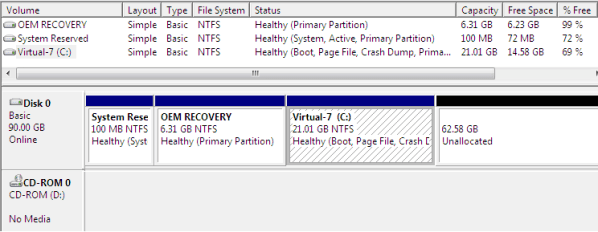
Before any of us can guide you, we need to know how your hard drive / dual boot was setup. The easiest way to do that is to go to the Disk Management Utility in Windows 7 (type disk management in the start search box) and take a snap shot of the drive map and attach it to a post. If you need help doing that, please look at these:

http://www.sevenforums.com/tutorials/51160-screenshot-upload-using-mwsnap.html

http://www.sevenforums.com/tutorials/9717-screenshot-paint.html

http://www.sevenforums.com/tutorials/9733-how-post-screenshot-seven-forums.html

w7_SR_OEM_plus_XP_01.PNG

Cheers!
Robert
 

My Computer

OS
...
@ Jonathan_King: That sounds pretty simple -- thank you very much! :)

@ wallyinnc: I found that tutorial earlier but I wasn't sure if it would be alright for my situation, seeing as how I already had a partition up and working (again, my computer illiteracy is blatant). But it looks like it's the right one to work with. Thank you! :)

@ iseeuu: Is this helpful? Thank you for taking the time to look things over for me. :)
 

Attachments

  • diskmanagement.png
    diskmanagement.png
    17.7 KB · Views: 28

My Computer

Computer Manufacturer/Model Number
Dell Inspiron 6000
OS
Windows 7
Memory
60 GB?
Screen Resolution
1280x800
You are welcome writingnerdgirl.

Per your snip, you have Win7 on the second partition (size 19.67G) so that is where you want to install Windows 7 (you did backup everything you need, right? a clean install in that partition will erase everything that is there now). Write down the partition size, that is how you will need to identify it when installing.
As you are installing Windows 7 after XP, it should take care of your bootloader. If not we can help.
And don't worry, your knowledge of computers is not as bad as you think. I could post a snip only after about 300 posts... :)

One remark: you have pretty limited space on your hard drive. If you could clean up your XP, maybe you could shrink that partition and create more room for windows 7, if that is the OS you will be using and saving files to that partition. If so, this is the time to do it, since if you try to move the partition to the left after installing Seven it might not like it and you can have problems.
Just a suggestion, you don't necessarily need to do that.
 

My Computer

Computer Manufacturer/Model Number
Wally, Innc.
OS
Windows 7 x64 finally!
CPU
AMD Athlon II X2 240
Motherboard
Biostar TA790GX XE
Memory
OCZ Platinum 4GB DDR2 1066 (will not work past 800MHz)
Graphics Card(s)
MSI R4670-MD1G Radeon HD 4670 1GB 128-bit GDDR3
Sound Card
ATI High Definition Audio Device Realtek ALC888
Monitor(s) Displays
HP w19e
Screen Resolution
1440x900
Hard Drives
Western Digital Caviar Green WD5000AADS 500GB SATA
Western Digital Caviar Blue WD5000AAKS 500GB SATA
PSU
Athena Power Micro ATX 400W
Case
HEC 6T 6T10BB Black MicroATX Mini Tower
Cooling
stock
Keyboard
wired, many keys
Mouse
HP wireless, 2 buttons, 1 wheel
Internet Speed
DSL 2Mb (recently getting 1.65M!)
@ Jonathan_King: That sounds pretty simple -- thank you very much! :)

@ wallyinnc: I found that tutorial earlier but I wasn't sure if it would be alright for my situation, seeing as how I already had a partition up and working (again, my computer illiteracy is blatant). But it looks like it's the right one to work with. Thank you! :)

@ iseeuu: Is this helpful? Thank you for taking the time to look things over for me. :)
Yes that is very helpful, thank you. From the info you have provided, it looks like you can safely install 7 following the "Custom Install" path to the same partition containing your 7RC. Your RC files will go to a folder named Windows.old, which you can remove later if not needed with the Windows Cleanup tool. I would suggest to you to boot to Windows 7 and use the Easy Transfer Wizard to save your user settings to your external hard drive. It simplifies restoring your user accounts to 7 after the install.

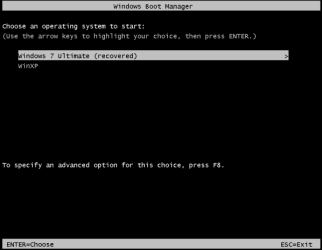
Your dual boot setup should not be affected. I assume you are using a menu like this:

w7_SR_OEM_plus_XP_08.PNG

Please feel free to post back with any questions?
 

My Computer

OS
...
@ wallyinnc: Ah, that eases my mind quite a bit -- good to hear the computer knows to do things that I wouldn't dream of telling it to do!

And I agree -- looking back at the snip, I'm surprised my XP hasn't screamed at me yet. I'll be sure to free up some space, just for good maintenance. Thank you once more! :)


@ iseeuu: Awesome! And yes, that is pretty much the same menu that I have when I get the choice to boot into XP or Windows 7 (I think you're psychic :eek:). Okay, so what I do from here is:
  1. Use Easy Transfer Tool on Windows 7 to back user settings up onto my external hard drive
  2. Restart my system, but not before I insert the installation DVD
  3. Choose "Custom (Clean) Install"
  4. Choose which partition I want to put Windows 7 in, how much space I want in there
  5. Installation will take care of things from there
Does that sound correct?
(EDIT: I ought to follow instructions from the tutorial that wallyinnc gave me http://http://www.sevenforums.com/tutorials/8057-dual-boot-installation-windows-7-xp.html here, yes?)
 

My Computer

Computer Manufacturer/Model Number
Dell Inspiron 6000
OS
Windows 7
Memory
60 GB?
Screen Resolution
1280x800
See, you do know a lot (and are organized and detailed, that never hurts!) ;)
Your plan sounds good to me. Just remember you will have to reinstall all programs because of the Clean Install. windows Easy Transfer will preserve your files and settings, but not the programs.

I think you might end up with 3 entries at the boot screen, it will probably add Windows 7 and leave "Windows 7 (recovered)" or "Windows 7" twice there, although one is not pointing to anything (Robert, correct me if I am wrong).
In that case you can edit your BCD and clean it up. Let us know if it happens.

Regarding your question: yes, but you start from item 3, since you already have a partition created. Which means you are basically just doing a clan install, here is the tutorial for that: http://www.sevenforums.com/tutorials/1649-clean-install-windows-7-a.html
 

My Computer

Computer Manufacturer/Model Number
Wally, Innc.
OS
Windows 7 x64 finally!
CPU
AMD Athlon II X2 240
Motherboard
Biostar TA790GX XE
Memory
OCZ Platinum 4GB DDR2 1066 (will not work past 800MHz)
Graphics Card(s)
MSI R4670-MD1G Radeon HD 4670 1GB 128-bit GDDR3
Sound Card
ATI High Definition Audio Device Realtek ALC888
Monitor(s) Displays
HP w19e
Screen Resolution
1440x900
Hard Drives
Western Digital Caviar Green WD5000AADS 500GB SATA
Western Digital Caviar Blue WD5000AAKS 500GB SATA
PSU
Athena Power Micro ATX 400W
Case
HEC 6T 6T10BB Black MicroATX Mini Tower
Cooling
stock
Keyboard
wired, many keys
Mouse
HP wireless, 2 buttons, 1 wheel
Internet Speed
DSL 2Mb (recently getting 1.65M!)
Correct. You have less than 20GB of space in the current 7RC partition and you will use it all for 7. You only need to select the partition, you will not need to specific size. Wally has pointed you to an excellent tutorial for you to follow.

As far as the boot menu, lets cross that if necessary.

Cheers!
 

My Computer

OS
...
Thank you, iseeuu and wallyinnc!

I don't know why it's doing what it's doing, but I went into BIOS to tell it to boot from the CD/DVD drive and it seems to be doing just that, but no installation screen comes up -- just the screen with the two bootable OS's that iseeuu attached earlier.

I went back just a few minutes ago to see my purchase in the Microsoft Store and I realized that I hadn't changed my download option from the default option to the 32-bit option. So do I need to re-download Windows 7 and re-burn the DVD and see if the installation screen pops up then?

Thank you for your patience, BTW. :) You guys have been more than helpful and educational.
 

My Computer

Computer Manufacturer/Model Number
Dell Inspiron 6000
OS
Windows 7
Memory
60 GB?
Screen Resolution
1280x800
Thank you, iseeuu and wallyinnc!

I don't know why it's doing what it's doing, but I went into BIOS to tell it to boot from the CD/DVD drive and it seems to be doing just that, but no installation screen comes up -- just the screen with the two bootable OS's that iseeuu attached earlier.

I went back just a few minutes ago to see my purchase in the Microsoft Store and I realized that I hadn't changed my download option from the default option to the 32-bit option. So do I need to re-download Windows 7 and re-burn the DVD and see if the installation screen pops up then?

Thank you for your patience, BTW. :) You guys have been more than helpful and educational.
Before the "Boot Menu" appears, you should see a little line of text saying: "Press any key to boot from CD"? If you do not "press any key" the bios will ignore the DVD and continue to the boot menu.

Try again and see if you get that message ...
 

My Computer

OS
...
Thank you, iseeuu and wallyinnc!

I don't know why it's doing what it's doing, but I went into BIOS to tell it to boot from the CD/DVD drive and it seems to be doing just that, but no installation screen comes up -- just the screen with the two bootable OS's that iseeuu attached earlier.

I went back just a few minutes ago to see my purchase in the Microsoft Store and I realized that I hadn't changed my download option from the default option to the 32-bit option. So do I need to re-download Windows 7 and re-burn the DVD and see if the installation screen pops up then?

Thank you for your patience, BTW. :) You guys have been more than helpful and educational.
Before the "Boot Menu" appears, you should see a little line of text saying: "Press any key to boot from CD"? If you do not "press any key" the bios will ignore the DVD and continue to the boot menu.

Try again and see if you get that message ...

I wish I was seeing that, but I'm not. All I'm seeing is the Dell logo along with F2=Setup and F=12 Boot Menu. I tried both of those options and made sure that the first boot option was from the CD/DVD drive, but the result was the same: it went back to the "Boot into earlier system, Boot into Windows 7" menu.

This may be an issue with the computer and not with the software?
 

My Computer

Computer Manufacturer/Model Number
Dell Inspiron 6000
OS
Windows 7
Memory
60 GB?
Screen Resolution
1280x800
Thank you, iseeuu and wallyinnc!

I don't know why it's doing what it's doing, but I went into BIOS to tell it to boot from the CD/DVD drive and it seems to be doing just that, but no installation screen comes up -- just the screen with the two bootable OS's that iseeuu attached earlier.

I went back just a few minutes ago to see my purchase in the Microsoft Store and I realized that I hadn't changed my download option from the default option to the 32-bit option. So do I need to re-download Windows 7 and re-burn the DVD and see if the installation screen pops up then?

Thank you for your patience, BTW. :) You guys have been more than helpful and educational.
Before the "Boot Menu" appears, you should see a little line of text saying: "Press any key to boot from CD"? If you do not "press any key" the bios will ignore the DVD and continue to the boot menu.

Try again and see if you get that message ...

I wish I was seeing that, but I'm not. All I'm seeing is the Dell logo along with F2=Setup and F=12 Boot Menu. I tried both of those options and made sure that the first boot option was from the CD/DVD drive, but the result was the same: it went back to the "Boot into earlier system, Boot into Windows 7" menu.

This may be an issue with the computer and not with the software?
Do you have any other bootable CD DVD? Can you test one of them?

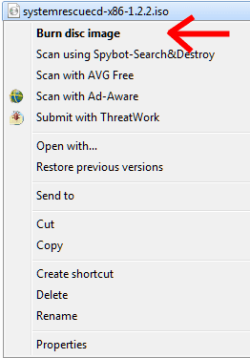
It is possible the DVD is not bootable. Windows 7RC will burn the iso file and make it bootable. Just right click on the iso file and select "Burn Disk Image"

SYSrescueCD_02.png

If a second burn does not produce a bootable DVD, you may have to download the iso file from MS again?
 

My Computer

OS
...
So you tried the Boot menu option and told it to boot from CD/DVD drive and it still wouldn't boot?

Let's Verify your DVD is bootable using ImgBurn. Load the ISO in using the file tab, then look for the word "bootable" in text at left. If it's not bootable you'll need to download the ISO again.

Next insert DVD and Verify ISO against DVD.

If necessary burn another DVD at 4x speed with Verify.
 
I only see one small concern. It looks like she has a 60gb HD with 2 partitions & only about 10gb Free. That may get used up quickly when she starts adding programs & files. Unless of course a nice external HD is connected & has a lot of Free space.

Looks like everybody is on the right track, except as iseeuu & gregrocker sees, it might not be burned as a bootable DVD.


" Doc "
 

My Computer

Computer type
PC/Desktop
Computer Manufacturer/Model Number
Built them myself, Science Experiments !
OS
Win7 Enterprise, Win7 x86 (Ult 7600), Win7 x64 Ult 7600, TechNet RTM on AMD x64 (2.8Ghz)
CPU
AMD fx8350 4ghz, AMD-32 2400mhz, AMD-64 3200mhz, AMDx64 2.8G
Motherboard
SIS 755, ECS-K8M890M-M (Ult 7600), GigaByte & others
Memory
2gb, 4gb on the Ult 7600, 4gb on Technet RTM, 32gb on FX8350
Graphics Card(s)
Draw my own Graphics, several nVidia cards
Sound Card
on motherboard
Monitor(s) Displays
19" flat scr, 28" I-Inc widescr,22" Emprex Widescr, 23" Acer
Screen Resolution
1280 x 1024, 1440 x 900, 1920 x 1080
Hard Drives
6 pata Ide HD's & 2 Sata HD's
added 80gb external on Ult 7600 computer,
numerous extra 1tb, 2TB, 3Tb SATA HD's
A collection of ext HD Docks w/ HDs
PSU
430w, 550w, 600w, 700, 800, etc
Case
All Generic Full Towers
Cooling
Open Air & a few fans, some w/ colored LEDs
Keyboard
Compaq & Dell recycled from GoodWill
Mouse
Made in China Optical Wired Mouse
Internet Speed
Fast Cable InterNet
Antivirus
AVG Free on 24 different Desktops, NO Problems!
Browser
IE 8 is preferred, but use FireFox sometimes
Other Info
Linksys Routers, switches, & Hubs
Too Many USB Flash Drives to count, Biggest is 64GB !
Eight computers in my home network.
Sixteen computers at my business network.
Linked via TeamViewer !
Lots of old used spare computer parts everywhere!
It is not coming to "Press any key to boot from CD" even after F=12 Boot Menu, so the DVD is not burnt correctly, not bootable.
WNG, you need to create a bootable DVD, please see their instructions above, either with Win7 itself or ImgBurn
 

My Computer

Computer Manufacturer/Model Number
Wally, Innc.
OS
Windows 7 x64 finally!
CPU
AMD Athlon II X2 240
Motherboard
Biostar TA790GX XE
Memory
OCZ Platinum 4GB DDR2 1066 (will not work past 800MHz)
Graphics Card(s)
MSI R4670-MD1G Radeon HD 4670 1GB 128-bit GDDR3
Sound Card
ATI High Definition Audio Device Realtek ALC888
Monitor(s) Displays
HP w19e
Screen Resolution
1440x900
Hard Drives
Western Digital Caviar Green WD5000AADS 500GB SATA
Western Digital Caviar Blue WD5000AAKS 500GB SATA
PSU
Athena Power Micro ATX 400W
Case
HEC 6T 6T10BB Black MicroATX Mini Tower
Cooling
stock
Keyboard
wired, many keys
Mouse
HP wireless, 2 buttons, 1 wheel
Internet Speed
DSL 2Mb (recently getting 1.65M!)
Dear 7 Forum friends,

I'm very sorry that I haven't returned to this thread sooner but I'm very grateful all the invaluable help you've given me. :)

What happened was this: after trying to re-burn the DVD three times, I *gave up* and ordered the DVD from MS. I ended up deleting the Windows 7 RC partition and installing the Windows 7 Upgrade over XP, which is what I wanted to do after I sat down and thought about it.

Thank you again for your patience and kindness. Now on to find some drivers! :D
 

My Computer

Computer Manufacturer/Model Number
Dell Inspiron 6000
OS
Windows 7
Memory
60 GB?
Screen Resolution
1280x800
Glad to hear it's working. :)

What drivers do you need? Anything I can find for you?
 

My Computer

Computer Manufacturer/Model Number
Custom
OS
Windows 7 Professional x64
CPU
Intel i7 2600K OC'd @ 4620 MHz
Motherboard
Asus P8Z68-V Pro
Memory
16GB GSkill Sniper 2133 Mhz (4x4GB)
Graphics Card(s)
EVGA GeForce GTX 480 SuperClocked+
Sound Card
Realtek High Definition Audio
Monitor(s) Displays
2x Acer S273HLbmii 27"
Screen Resolution
2 x 1920x1080
Hard Drives
64GB Crucial M4 SSD

Storage: Hitachi 1TB 5400RPM, Samsung 1.5TB 5400RPM
PSU
Corsair HW Series 750w (modular)
Case
Cooler Master HAF 932 Advanced Blue Edition
Cooling
CM Hyper 212+ CPU cooler, 3x 230mm + 1x 140mm case fans
Keyboard
Logitech MK320 (wireless)
Mouse
Logitech MK320 (wireless)
Internet Speed
30 Mb/s : 2 Mb/s
Glad to hear it's working. :)

What drivers do you need? Anything I can find for you?

Thank you, but after I started reading some articles on the matter, I quickly realized I was fairly far out of my depth. I've since handed the computer to my Dad who is a software engineer (in retrospect, that may have been better if I hadn't been so stubborn about doing it myself :p :D).

Thank you again, you have been phenomenally patient throughout my wranglings. :)
 

My Computer

Computer Manufacturer/Model Number
Dell Inspiron 6000
OS
Windows 7
Memory
60 GB?
Screen Resolution
1280x800
Back
Top