Component video output

jtdwab

New member
Local time
4:11 PM
Messages
3
I have a desktop running windows 7 x64 with a PCIe ATI 3850 graphics card. I want to hook up the component out (I have the dongle connected) to an infocus projector.
When the PC boots I see the bios data displayed by the projector but when Windows loads I lose the display. Windows detects it as a generic non-pnp monitor. I can't figure out how to get it to turn on the component output. I have catalyst 10.10 installed.

Thanks,
jtdwab
 

My Computer

OS
Windows 7 x64
Really would help if you gave us more info.
Model# of the projector etc...
 

My Computer

Computer type
PC/Desktop
Computer Manufacturer/Model Number
Acer M5641
OS
Windows 7 Home Premium 64bit
CPU
Q6600
Motherboard
Nvidia MCP73PV
Memory
4GB.
Graphics Card(s)
Sapphire Vapor-X 5750
Sound Card
XFI Extreem music
Monitor(s) Displays
Acer X223W
Screen Resolution
1680x1050
Hard Drives
WD10 02FAEX
WD64 00AAKS
PSU
stock 450w
Case
acer
Cooling
stock
Keyboard
Microsoft Digital Media Pro.
Mouse
Logitech MX620
Internet Speed
49.51Mbs down 4.98Mbs up 17.6ms ping
Antivirus
MSE
Browser
Waterfox
Other Info
Shaw Cable
Netgear R6200
Hi,

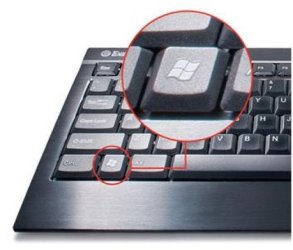
Have you tried pressing...

2440268_f520.jpg + P

This will open up the multiple display config of Windows 7 allowing you to choose from Computer only thru to Projector/External only.

Also, when you right-click the desktop, choose 'Screen Resolution' then click 'Detect'. It could be that Windows needs a little nudge in the right direction ;)


OS
 

My Computer

Computer Manufacturer/Model Number
Compaq Desktop
OS
Windows 7 Ultimate x64
CPU
AMD Sempron Dual Core
Memory
3GB
Graphics Card(s)
NVIDIA GeForce 6150SE nForce 430
Screen Resolution
1024x768
Hard Drives
150GB Sata
Back
Top