
You are using an out of date browser. It may not display this or other websites correctly.
You should upgrade or use an alternative browser.
You should upgrade or use an alternative browser.
Compressing Stuffs
- Thread starter testrun
- Start date

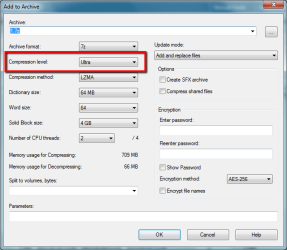
It depends on the type of file. Try 7ZIP using the Ultra compression setting. If it can't compress it, then nothing will - you may have to compress and split the files over 2 or more DVD's
Regards,
Golden
Regards,
Golden
My Computer
- Computer type
- PC/Desktop
- Computer Manufacturer/Model Number
- Golden Mk. I.4
- OS
- Windows 10 Pro x64 ; Xubuntu x64
- CPU
- Intel i7 860 @ 2.80 GHz O/C'ed to 4.0GHz
- Motherboard
- Gigabyte P55A-UD3R Rev.1. Award BIOS F13
- Memory
- 16GB Corsair Vengance DDR3 @ 661 MHz Dual Channel (9-9-9-24)
- Graphics Card(s)
- EVGA NVidia GTX 560 1024MB
- Sound Card
- Realtek Integrated
- Monitor(s) Displays
- Dual Samsung SyncMaster 2494HS
- Screen Resolution
- 1920*1080 and 1920*1080
- Hard Drives
- 1*Samsung 840 EVO 120GB SSD;
1*OCZ Vertex 2 60GB SSD;
2*Samsung F3 SpinPoint 1TB in RAID0;
1*Samsung F1 SpinPoint 1TB;
2*Western Digital 1TB External USB 3.0
1*Western Digital 500GB External USB 3.0
1*Seagate 500GB External USB 2.0
- PSU
- Thermaltake ToughPower QFan 750W
- Case
- Thermaltake Element S VK60001W2Z
- Cooling
- Corsair H60 Water Cooling, 2*230mm and 2*80mm case fans
- Keyboard
- Logitech G110
- Mouse
- Logitech MX518
It depends on the type of file. Try 7ZIP using the Ultra compression setting. If it can't compress it, then nothing will - you may have to compress and split the files over 2 or more DVD's
View attachment 260825
Regards,
Golden
Thanks for answering! But its a single ISO file how can i split the files into 2 or more DVDs? ty
My Computer
- OS
- Windows 7 Pro 64bit
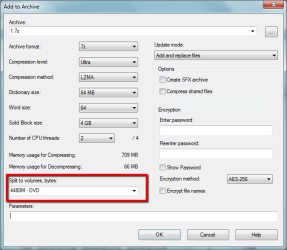
You don't split the ISO - you use 7ZIP to write across a number of ZIP files - see image below.
My Computer
- Computer type
- PC/Desktop
- Computer Manufacturer/Model Number
- Golden Mk. I.4
- OS
- Windows 10 Pro x64 ; Xubuntu x64
- CPU
- Intel i7 860 @ 2.80 GHz O/C'ed to 4.0GHz
- Motherboard
- Gigabyte P55A-UD3R Rev.1. Award BIOS F13
- Memory
- 16GB Corsair Vengance DDR3 @ 661 MHz Dual Channel (9-9-9-24)
- Graphics Card(s)
- EVGA NVidia GTX 560 1024MB
- Sound Card
- Realtek Integrated
- Monitor(s) Displays
- Dual Samsung SyncMaster 2494HS
- Screen Resolution
- 1920*1080 and 1920*1080
- Hard Drives
- 1*Samsung 840 EVO 120GB SSD;
1*OCZ Vertex 2 60GB SSD;
2*Samsung F3 SpinPoint 1TB in RAID0;
1*Samsung F1 SpinPoint 1TB;
2*Western Digital 1TB External USB 3.0
1*Western Digital 500GB External USB 3.0
1*Seagate 500GB External USB 2.0
- PSU
- Thermaltake ToughPower QFan 750W
- Case
- Thermaltake Element S VK60001W2Z
- Cooling
- Corsair H60 Water Cooling, 2*230mm and 2*80mm case fans
- Keyboard
- Logitech G110
- Mouse
- Logitech MX518
You don't split the ISO - you use 7ZIP to write across a number of ZIP files - see image below.
View attachment 260833
Sorry i am really newb to this system. Is this like WinRAR? I think i got WinRAR. 9gb i think i can make it seperate to 3dvd's if i've got to use 3 dvd of 4gb
My Computer
- OS
- Windows 7 Pro 64bit
Yes, its the same. 7ZIP gets better compression that WINRAR, but use that if you are comfortable with it.
My Computer
- Computer type
- PC/Desktop
- Computer Manufacturer/Model Number
- Golden Mk. I.4
- OS
- Windows 10 Pro x64 ; Xubuntu x64
- CPU
- Intel i7 860 @ 2.80 GHz O/C'ed to 4.0GHz
- Motherboard
- Gigabyte P55A-UD3R Rev.1. Award BIOS F13
- Memory
- 16GB Corsair Vengance DDR3 @ 661 MHz Dual Channel (9-9-9-24)
- Graphics Card(s)
- EVGA NVidia GTX 560 1024MB
- Sound Card
- Realtek Integrated
- Monitor(s) Displays
- Dual Samsung SyncMaster 2494HS
- Screen Resolution
- 1920*1080 and 1920*1080
- Hard Drives
- 1*Samsung 840 EVO 120GB SSD;
1*OCZ Vertex 2 60GB SSD;
2*Samsung F3 SpinPoint 1TB in RAID0;
1*Samsung F1 SpinPoint 1TB;
2*Western Digital 1TB External USB 3.0
1*Western Digital 500GB External USB 3.0
1*Seagate 500GB External USB 2.0
- PSU
- Thermaltake ToughPower QFan 750W
- Case
- Thermaltake Element S VK60001W2Z
- Cooling
- Corsair H60 Water Cooling, 2*230mm and 2*80mm case fans
- Keyboard
- Logitech G110
- Mouse
- Logitech MX518

nilank
Banned
Yeah you can use WinRAR for splitting the file up.You don't split the ISO - you use 7ZIP to write across a number of ZIP files - see image below.
View attachment 260833
Sorry i am really newb to this system. Is this like WinRAR? I think i got WinRAR. 9gb i think i can make it seperate to 3dvd's if i've got to use 3 dvd of 4gb
Some info: Compression ratio depends on what data you're gonna compress. For instance, textual data can be compressed the most while files such as MP3, MP4, EXEs can't be compressed much (almost not at all) cuz they already are compressed. Compressed data can only be compressed further if a program can apply a new compression algorithm, but that would be very much limited IMO.
Programs like UHARC can achieve a good ratio, but it takes a real lot of time to first compress, and then decompress when you wanna use your compressed data. So, it's a better option to burn your data to more than 1 DVDs instead.

Also, remember to split them up into parts of 4.35GB each (if you're using the standard 4.7G DVD), why waste space?

Hope that helped.
Last edited:
nilank
Banned
Best gives the highest compression, store gives 0% compression.