
Computer and Media Devices - Network Categories

aem

. .
Guru
Gold Member
VIP
Local time
7:45 PM
Messages
2,698
Does anyone know why in my Network screen, my actual machine is noted as a Media Device, whereas the other machines on my network comes under Computer?

The other machines's Workgroup is WORKGROUP, amd the actual machine's workgroup is Unidentified Network.
 

My Computer My Computer

Computer Manufacturer/Model Number
Lenovo ThinkPad T60
OS
Windows 7 Ultimate 64Bit
CPU
GenuineIntel Intel(R) Core(TM) DuoCore T2400 @ 1.83GHz
Motherboard
Intel(R) 82801G (ICH7 Family)
Memory
2.00 GB
Graphics Card(s)
Mobile Intel(R) 945 Express Chipset
Sound Card
SoundMAX Integrated Digital HD Audio
Monitor(s) Displays
ThinkPad Display
Screen Resolution
1400x1050
Hard Drives
100Gb SATA
Keyboard
Standard Keyboard
Mouse
HID-compliant Mouse
Internet Speed
Cable Broadband - 54Mbps
Other Info
Intel(R) PRO/1000 PL Network Connection
11a/b/g Wireless LAN Mini PCI Express Adapter
Does your computer show up as a Computer as well as a Media Device?

It's showing up as a Media Device as you have media sharing switched on. I'm not a Media expert, but would imagine this is through Media Player or Windows Media Centre.

If it is showing up as a Media Centre but not as a Computer, I would imagine that you have either got Network Discovery set not to auto-discover, apart from media devices. Or, a software firewall installed that is blocking browsing computers, but allowing media sharing.
 

My Computer My Computer

Computer Manufacturer/Model Number
HP EliteBook Mobile Workstation 8730W
OS
Windows 7 Ultimate x64 RTM
CPU
Core 2 Duo 2.8 GHz
Memory
4GB
Graphics Card(s)
Quadro FX 2700M
Monitor(s) Displays
17" WUXGA
Screen Resolution
1920 x 1200
Hard Drives
320GB
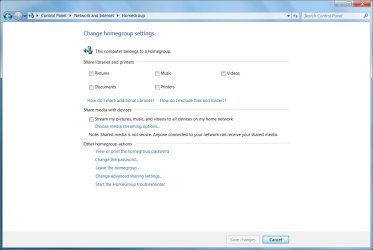
IIRC media sharing is a Homegroup setting.
 

My Computer My Computer

Computer Manufacturer/Model Number
Too many to list.
OS
XP, Seven, 2008R2
CPU
AMD, Intel, VIA
Motherboard
Various
Memory
Corsair, Kingston, etc.
Graphics Card(s)
ATI, NVIDIA
Monitor(s) Displays
Samsung
Hard Drives
Maxtor, Western Digital
Keyboard
qwerty
Internet Speed
22 Mb/s @ home, 1 Gb/s @ server
Other Info
All of my systems still run fastest on XP 32-bit for the most part. Win7 is fun to play with, but I still prefer XP for raw speed, security, and functionality.
Yes it is :D
 

Attachments

  • Homegroupsettings.jpg
    Homegroupsettings.jpg
    63.4 KB · Views: 2,334

My Computer My Computer

Computer Manufacturer/Model Number
HP EliteBook Mobile Workstation 8730W
OS
Windows 7 Ultimate x64 RTM
CPU
Core 2 Duo 2.8 GHz
Memory
4GB
Graphics Card(s)
Quadro FX 2700M
Monitor(s) Displays
17" WUXGA
Screen Resolution
1920 x 1200
Hard Drives
320GB
Does your computer show up as a Computer as well as a Media Device?

It's showing up as a Media Device as you have media sharing switched on. I'm not a Media expert, but would imagine this is through Media Player or Windows Media Centre.

If it is showing up as a Media Centre but not as a Computer, I would imagine that you have either got Network Discovery set not to auto-discover, apart from media devices. Or, a software firewall installed that is blocking browsing computers, but allowing media sharing.

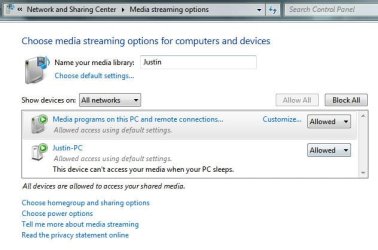
Nope, it's just under Media Devices. All my media streaming was set to Allow. I tested setting them to All disabled and the machine is not listed at all.
 

My Computer My Computer

Computer Manufacturer/Model Number
Lenovo ThinkPad T60
OS
Windows 7 Ultimate 64Bit
CPU
GenuineIntel Intel(R) Core(TM) DuoCore T2400 @ 1.83GHz
Motherboard
Intel(R) 82801G (ICH7 Family)
Memory
2.00 GB
Graphics Card(s)
Mobile Intel(R) 945 Express Chipset
Sound Card
SoundMAX Integrated Digital HD Audio
Monitor(s) Displays
ThinkPad Display
Screen Resolution
1400x1050
Hard Drives
100Gb SATA
Keyboard
Standard Keyboard
Mouse
HID-compliant Mouse
Internet Speed
Cable Broadband - 54Mbps
Other Info
Intel(R) PRO/1000 PL Network Connection
11a/b/g Wireless LAN Mini PCI Express Adapter
What location have you got your network connection set to? i.e. Public, Work, or Home?

Tom
 

My Computer My Computer

Computer Manufacturer/Model Number
HP EliteBook Mobile Workstation 8730W
OS
Windows 7 Ultimate x64 RTM
CPU
Core 2 Duo 2.8 GHz
Memory
4GB
Graphics Card(s)
Quadro FX 2700M
Monitor(s) Displays
17" WUXGA
Screen Resolution
1920 x 1200
Hard Drives
320GB
Also, as another thought - have you got iTunes or something similar installed on your machine?

I've known the iTunes service to cause a machine to display as a media device in network browsing before.

Tom
 

My Computer My Computer

Computer Manufacturer/Model Number
HP EliteBook Mobile Workstation 8730W
OS
Windows 7 Ultimate x64 RTM
CPU
Core 2 Duo 2.8 GHz
Memory
4GB
Graphics Card(s)
Quadro FX 2700M
Monitor(s) Displays
17" WUXGA
Screen Resolution
1920 x 1200
Hard Drives
320GB
I hate testing settings, now my machine is show in both categories.
 

My Computer My Computer

Computer Manufacturer/Model Number
Lenovo ThinkPad T60
OS
Windows 7 Ultimate 64Bit
CPU
GenuineIntel Intel(R) Core(TM) DuoCore T2400 @ 1.83GHz
Motherboard
Intel(R) 82801G (ICH7 Family)
Memory
2.00 GB
Graphics Card(s)
Mobile Intel(R) 945 Express Chipset
Sound Card
SoundMAX Integrated Digital HD Audio
Monitor(s) Displays
ThinkPad Display
Screen Resolution
1400x1050
Hard Drives
100Gb SATA
Keyboard
Standard Keyboard
Mouse
HID-compliant Mouse
Internet Speed
Cable Broadband - 54Mbps
Other Info
Intel(R) PRO/1000 PL Network Connection
11a/b/g Wireless LAN Mini PCI Express Adapter
What location have you got your network connection set to? i.e. Public, Work, or Home?

Tom

Home - Pictures, Music, Videos and Printers ticket.

itunes removed.
 

My Computer My Computer

Computer Manufacturer/Model Number
Lenovo ThinkPad T60
OS
Windows 7 Ultimate 64Bit
CPU
GenuineIntel Intel(R) Core(TM) DuoCore T2400 @ 1.83GHz
Motherboard
Intel(R) 82801G (ICH7 Family)
Memory
2.00 GB
Graphics Card(s)
Mobile Intel(R) 945 Express Chipset
Sound Card
SoundMAX Integrated Digital HD Audio
Monitor(s) Displays
ThinkPad Display
Screen Resolution
1400x1050
Hard Drives
100Gb SATA
Keyboard
Standard Keyboard
Mouse
HID-compliant Mouse
Internet Speed
Cable Broadband - 54Mbps
Other Info
Intel(R) PRO/1000 PL Network Connection
11a/b/g Wireless LAN Mini PCI Express Adapter
Showing in both categories is normal. This isn't a problem.

Your machine is acting as a computer for sharing files etc accross the network, but also has media device sharing capability - hence it is showing under both categories. I wouldn't worry too much about this.

Both of my W7 machines show up under both categories and it doesn't bother me even though I don't use them at all for any media work.
 

My Computer My Computer

Computer Manufacturer/Model Number
HP EliteBook Mobile Workstation 8730W
OS
Windows 7 Ultimate x64 RTM
CPU
Core 2 Duo 2.8 GHz
Memory
4GB
Graphics Card(s)
Quadro FX 2700M
Monitor(s) Displays
17" WUXGA
Screen Resolution
1920 x 1200
Hard Drives
320GB
Fixed (got rid of the Media Device category altogether).

For some reason i had alot of Justin-PCs listed in the box. So i removed them all. That didn't work (still showing Media Device). I then disabled media streaming and it's gone. :D

Thanks Iomegaman for helping out.
 

Attachments

  • Noname.jpg
    Noname.jpg
    34.1 KB · Views: 678

My Computer My Computer

Computer Manufacturer/Model Number
Lenovo ThinkPad T60
OS
Windows 7 Ultimate 64Bit
CPU
GenuineIntel Intel(R) Core(TM) DuoCore T2400 @ 1.83GHz
Motherboard
Intel(R) 82801G (ICH7 Family)
Memory
2.00 GB
Graphics Card(s)
Mobile Intel(R) 945 Express Chipset
Sound Card
SoundMAX Integrated Digital HD Audio
Monitor(s) Displays
ThinkPad Display
Screen Resolution
1400x1050
Hard Drives
100Gb SATA
Keyboard
Standard Keyboard
Mouse
HID-compliant Mouse
Internet Speed
Cable Broadband - 54Mbps
Other Info
Intel(R) PRO/1000 PL Network Connection
11a/b/g Wireless LAN Mini PCI Express Adapter
No problem, glad your sorted now.

It's one of those things that is really frustrating I know :D

Tom
 

My Computer My Computer

Computer Manufacturer/Model Number
HP EliteBook Mobile Workstation 8730W
OS
Windows 7 Ultimate x64 RTM
CPU
Core 2 Duo 2.8 GHz
Memory
4GB
Graphics Card(s)
Quadro FX 2700M
Monitor(s) Displays
17" WUXGA
Screen Resolution
1920 x 1200
Hard Drives
320GB
Computer showing up only as Media Device in Win7 Network

I had a problem not being able to print to a home network printer. The computer to which the printer was attached was only showing up as a Media Device on the network, and there was no listing for the printer.

I uninstalled iCloud from my computer and the problem cleared up immediately. The computer immediately showed up in the network listing and I could re-connect to the printer no problem.
 

My Computer My Computer

Computer type
PC/Desktop
Computer Manufacturer/Model Number
Samsung
OS
Windows 7 64 bit
Back
Top