JavaScript is disabled. For a better experience, please enable JavaScript in your browser before proceeding.
You are using an out of date browser. It may not display this or other websites correctly.
You should upgrade or use an
alternative browser .
Computer beeps but no display
If I restart my computer, most of the time there will be no display but the lights are on and a single beep is heard which is normal. Why is this happening? I resolved it by removing the RAM slots and putting it back in but that's too much work and my pc is in a tough spot. Help?
Computer type PC/Desktop Computer Manufacturer/Model Number Intel , Gigabyte , NVIDIA OS Microsoft Windows 7 Home Premium 64bit CPU i7-2600 3.40GHz 3.70 GHz Motherboard Gigabyte Technology Co. LTD. Z68AP-D3 Memory 8.00 GB Graphics Card(s) GTX 970 Zotac Extreme Core Editon Sound Card (1) NVIDIA High Definition Audio (2) NVIDIA High Definitio Monitor(s) Displays SHARP AQUOS (Single Monitor) Screen Resolution 1920x1080 Hard Drives Western Digital 1TB, SAMSUNG 850 EVO 120GB PSU Seasonic X-650 GOLD Case Cooler Master K350 Cooling Silverstone TD03-LITE Keyboard Steelseries Gaming Keyboard Mouse Logitech G502 Proteous Core Internet Speed 10MBPS Antivirus Malwarebytes Anti-Malware Browser Google Chrome
R.I.P. Britton30=Gary
Guru
VIP
Hi,
Computer type PC/Desktop Computer Manufacturer/Model Number Custom assembled by me :} OS Win-7-Pro64bit 7-H-Prem-64bit CPU i7-5930K 2nd i9-9940x both water blocked VRM's too Motherboard ASUS SABERTOOTH X99 2nd ASUS x299 Apex Memory Trident-z 3200C14 2nd Trident-z 3600C16 Graphics Card(s) EVGA 1080ti ftw3 2nd Titan Xp both water blocked Sound Card Built-in Realtek Monitor(s) Displays 1-AOC G2460PG 24"G-Sync 144Hz/ 2nd 1-ASUS VG248QE 24" 144Hz Screen Resolution 1920 x 1080 144Hz Hard Drives 2-Samsung M.2 Evo & Evo Plus PSU EVGA SuperNOVA 1000-P2 2nd 1200-P2 Case 2-Corsair Obsidian Series 450D Black ATX Mid Tower Cooling Custom water loops Keyboard Logitech G710+/ 2nd Logitech G910 Mouse 2-RedDragon M901 Perdition 16400 dpi Gaming mouse = wired Internet Speed Comcast Ping 19ms 89.31mbps download speed 6.12mbps upload Antivirus Malwarebytes Pro/ Superantispyware Pro Browser FireFox & Pale moon Other Info 2nd ASUS X299 Apex/Intel i9-9940x with Custom water loop/7H-Prem-x64/Corsair 450D case/Ram Trident-z 3600C16 4x8gb / Samsung970Evo plus 500gb SSD/Dual ssd EZ swap evo/PSU EVGA SuperNova 1200w-P2 80+Platinum/GPU Titan Xp /8-ML-140 on push-pull on 2-280GTX rads
A Random
Member
VIP
Thread Starter
Sorry about that, I have a 64bit
Computer type PC/Desktop Computer Manufacturer/Model Number Intel , Gigabyte , NVIDIA OS Microsoft Windows 7 Home Premium 64bit CPU i7-2600 3.40GHz 3.70 GHz Motherboard Gigabyte Technology Co. LTD. Z68AP-D3 Memory 8.00 GB Graphics Card(s) GTX 970 Zotac Extreme Core Editon Sound Card (1) NVIDIA High Definition Audio (2) NVIDIA High Definitio Monitor(s) Displays SHARP AQUOS (Single Monitor) Screen Resolution 1920x1080 Hard Drives Western Digital 1TB, SAMSUNG 850 EVO 120GB PSU Seasonic X-650 GOLD Case Cooler Master K350 Cooling Silverstone TD03-LITE Keyboard Steelseries Gaming Keyboard Mouse Logitech G502 Proteous Core Internet Speed 10MBPS Antivirus Malwarebytes Anti-Malware Browser Google Chrome
R.I.P. Britton30=Gary
Guru
VIP
Computer type PC/Desktop Computer Manufacturer/Model Number Custom assembled by me :} OS Win-7-Pro64bit 7-H-Prem-64bit CPU i7-5930K 2nd i9-9940x both water blocked VRM's too Motherboard ASUS SABERTOOTH X99 2nd ASUS x299 Apex Memory Trident-z 3200C14 2nd Trident-z 3600C16 Graphics Card(s) EVGA 1080ti ftw3 2nd Titan Xp both water blocked Sound Card Built-in Realtek Monitor(s) Displays 1-AOC G2460PG 24"G-Sync 144Hz/ 2nd 1-ASUS VG248QE 24" 144Hz Screen Resolution 1920 x 1080 144Hz Hard Drives 2-Samsung M.2 Evo & Evo Plus PSU EVGA SuperNOVA 1000-P2 2nd 1200-P2 Case 2-Corsair Obsidian Series 450D Black ATX Mid Tower Cooling Custom water loops Keyboard Logitech G710+/ 2nd Logitech G910 Mouse 2-RedDragon M901 Perdition 16400 dpi Gaming mouse = wired Internet Speed Comcast Ping 19ms 89.31mbps download speed 6.12mbps upload Antivirus Malwarebytes Pro/ Superantispyware Pro Browser FireFox & Pale moon Other Info 2nd ASUS X299 Apex/Intel i9-9940x with Custom water loop/7H-Prem-x64/Corsair 450D case/Ram Trident-z 3600C16 4x8gb / Samsung970Evo plus 500gb SSD/Dual ssd EZ swap evo/PSU EVGA SuperNova 1200w-P2 80+Platinum/GPU Titan Xp /8-ML-140 on push-pull on 2-280GTX rads
A Random
Member
VIP
Thread Starter
Computer type PC/Desktop Computer Manufacturer/Model Number Intel , Gigabyte , NVIDIA OS Microsoft Windows 7 Home Premium 64bit CPU i7-2600 3.40GHz 3.70 GHz Motherboard Gigabyte Technology Co. LTD. Z68AP-D3 Memory 8.00 GB Graphics Card(s) GTX 970 Zotac Extreme Core Editon Sound Card (1) NVIDIA High Definition Audio (2) NVIDIA High Definitio Monitor(s) Displays SHARP AQUOS (Single Monitor) Screen Resolution 1920x1080 Hard Drives Western Digital 1TB, SAMSUNG 850 EVO 120GB PSU Seasonic X-650 GOLD Case Cooler Master K350 Cooling Silverstone TD03-LITE Keyboard Steelseries Gaming Keyboard Mouse Logitech G502 Proteous Core Internet Speed 10MBPS Antivirus Malwarebytes Anti-Malware Browser Google Chrome
R.I.P. Britton30=Gary
Guru
VIP
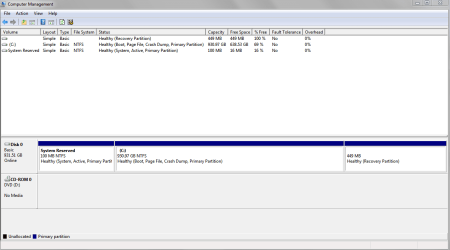
Hi weird every thing looks normal
Computer type PC/Desktop Computer Manufacturer/Model Number Custom assembled by me :} OS Win-7-Pro64bit 7-H-Prem-64bit CPU i7-5930K 2nd i9-9940x both water blocked VRM's too Motherboard ASUS SABERTOOTH X99 2nd ASUS x299 Apex Memory Trident-z 3200C14 2nd Trident-z 3600C16 Graphics Card(s) EVGA 1080ti ftw3 2nd Titan Xp both water blocked Sound Card Built-in Realtek Monitor(s) Displays 1-AOC G2460PG 24"G-Sync 144Hz/ 2nd 1-ASUS VG248QE 24" 144Hz Screen Resolution 1920 x 1080 144Hz Hard Drives 2-Samsung M.2 Evo & Evo Plus PSU EVGA SuperNOVA 1000-P2 2nd 1200-P2 Case 2-Corsair Obsidian Series 450D Black ATX Mid Tower Cooling Custom water loops Keyboard Logitech G710+/ 2nd Logitech G910 Mouse 2-RedDragon M901 Perdition 16400 dpi Gaming mouse = wired Internet Speed Comcast Ping 19ms 89.31mbps download speed 6.12mbps upload Antivirus Malwarebytes Pro/ Superantispyware Pro Browser FireFox & Pale moon Other Info 2nd ASUS X299 Apex/Intel i9-9940x with Custom water loop/7H-Prem-x64/Corsair 450D case/Ram Trident-z 3600C16 4x8gb / Samsung970Evo plus 500gb SSD/Dual ssd EZ swap evo/PSU EVGA SuperNova 1200w-P2 80+Platinum/GPU Titan Xp /8-ML-140 on push-pull on 2-280GTX rads
A Random
Member
VIP
Thread Starter
Is it because of the video card? I heard that when a mobo beeps it's responding but the graphics card isn't?
Computer type PC/Desktop Computer Manufacturer/Model Number Intel , Gigabyte , NVIDIA OS Microsoft Windows 7 Home Premium 64bit CPU i7-2600 3.40GHz 3.70 GHz Motherboard Gigabyte Technology Co. LTD. Z68AP-D3 Memory 8.00 GB Graphics Card(s) GTX 970 Zotac Extreme Core Editon Sound Card (1) NVIDIA High Definition Audio (2) NVIDIA High Definitio Monitor(s) Displays SHARP AQUOS (Single Monitor) Screen Resolution 1920x1080 Hard Drives Western Digital 1TB, SAMSUNG 850 EVO 120GB PSU Seasonic X-650 GOLD Case Cooler Master K350 Cooling Silverstone TD03-LITE Keyboard Steelseries Gaming Keyboard Mouse Logitech G502 Proteous Core Internet Speed 10MBPS Antivirus Malwarebytes Anti-Malware Browser Google Chrome
R.I.P. Britton30=Gary
Guru
VIP
Hi,
Computer type PC/Desktop Computer Manufacturer/Model Number Custom assembled by me :} OS Win-7-Pro64bit 7-H-Prem-64bit CPU i7-5930K 2nd i9-9940x both water blocked VRM's too Motherboard ASUS SABERTOOTH X99 2nd ASUS x299 Apex Memory Trident-z 3200C14 2nd Trident-z 3600C16 Graphics Card(s) EVGA 1080ti ftw3 2nd Titan Xp both water blocked Sound Card Built-in Realtek Monitor(s) Displays 1-AOC G2460PG 24"G-Sync 144Hz/ 2nd 1-ASUS VG248QE 24" 144Hz Screen Resolution 1920 x 1080 144Hz Hard Drives 2-Samsung M.2 Evo & Evo Plus PSU EVGA SuperNOVA 1000-P2 2nd 1200-P2 Case 2-Corsair Obsidian Series 450D Black ATX Mid Tower Cooling Custom water loops Keyboard Logitech G710+/ 2nd Logitech G910 Mouse 2-RedDragon M901 Perdition 16400 dpi Gaming mouse = wired Internet Speed Comcast Ping 19ms 89.31mbps download speed 6.12mbps upload Antivirus Malwarebytes Pro/ Superantispyware Pro Browser FireFox & Pale moon Other Info 2nd ASUS X299 Apex/Intel i9-9940x with Custom water loop/7H-Prem-x64/Corsair 450D case/Ram Trident-z 3600C16 4x8gb / Samsung970Evo plus 500gb SSD/Dual ssd EZ swap evo/PSU EVGA SuperNova 1200w-P2 80+Platinum/GPU Titan Xp /8-ML-140 on push-pull on 2-280GTX rads
A Random
Member
VIP
Thread Starter
I think I got it fixed just by updating the drivers of the graphics card,
.
Computer type PC/Desktop Computer Manufacturer/Model Number Intel , Gigabyte , NVIDIA OS Microsoft Windows 7 Home Premium 64bit CPU i7-2600 3.40GHz 3.70 GHz Motherboard Gigabyte Technology Co. LTD. Z68AP-D3 Memory 8.00 GB Graphics Card(s) GTX 970 Zotac Extreme Core Editon Sound Card (1) NVIDIA High Definition Audio (2) NVIDIA High Definitio Monitor(s) Displays SHARP AQUOS (Single Monitor) Screen Resolution 1920x1080 Hard Drives Western Digital 1TB, SAMSUNG 850 EVO 120GB PSU Seasonic X-650 GOLD Case Cooler Master K350 Cooling Silverstone TD03-LITE Keyboard Steelseries Gaming Keyboard Mouse Logitech G502 Proteous Core Internet Speed 10MBPS Antivirus Malwarebytes Anti-Malware Browser Google Chrome