computer boots slow and load programs

slotman

New member
Local time
4:20 PM
Messages
1
Is there a stand alone program that will list all boot and other programs that load, even from your home page, and the time it takes to load them. You could find which ones are at fault and delete them if not needed. If optimized for windows 10, go to an earlier version or get a similar program that works better. i just want to know what it's doing while I'm waiting. Second, Google Chrome makes my computer run slow on windows 7 waiting for cache. I know cleaning cookies temp files etc., every other day helps but that's annoying. Is there a web browser that's very small and fast like ones used on phones but for a PC Can anyone answer these two questions?

I already scanned for virus's and root kits, de-fragged hard drive, thinned out startup programs, and used Ccleaner. toshiba laptop windows 7 home 64 bit
 

My Computer

Computer type
Laptop
Computer Manufacturer/Model Number
toshiba
OS
windows 7 home 64 bit
Antivirus
avest
Browser
chrome
yeah I could use a program like that too.. lol ;)
my ELITE GAMING RIG w/ my specs as registered here on the forums...
Windows 7 Ultimate SP1 x64..
it should be booting soo much faster!! ;p
 

My Computers

System One System Two

  • Computer type
    PC/Desktop
    Computer Manufacturer/Model Number
    [Self-built](custom-build)(June 2020)
    OS
    Windows 11 Pro (x64)
    CPU
    AMD Ryzen 9 3900X 12-Core Processor
    Motherboard
    Asus PRIME X570-PRO
    Memory
    32GB, 2x G.Skill 16GB (PC3200)(DDR4-2137)
    Graphics Card(s)
    NVIDIA GeForce RTX 3070 Ti 8GB XC3 model by EVGA
    Sound Card
    Realtek® ALC1220A 8-Channel High Definition Audio CODEC
    Monitor(s) Displays
    24" DELL Gaming Monitor - G2422HS - DisplayPort used
    Screen Resolution
    1920x1080p at 165Hz (16:9 Aspect Ratio)
    Hard Drives
    1TB Samsung 980 Pro (NVMe)(SSD)
    2TB Samsung 980 Pro (NVMe)(SSD)
    2TB Samsung 870 EVO (SSD)

    NVMe 1TB
    -- OS(Win10 Pro x64),
    -- programs,
    -- programming(MS Visual Studios 2022 Community Ed.),
    -- music

    NV
    PSU
    Thermaltake TOUGHPOWER DPS G RGB Titanium Certified 1250Watt
    Case
    Corsair Graphite Series 780T Full Tower PC Case
    Cooling
    AMD Wraith cooler (stock) & 3x Corsair case fans
    Keyboard
    Alienware Low Profile RGB Mechanical USB Gaming Keyboard - A
    Mouse
    Redragon M602 RGB Wired USB Gaming mouse
    Internet Speed
    2100Mbps Download, 350Mbps Upload
    Antivirus
    n/a aka "ABOVE TOP SECRET!" lol ;)
    Browser
    Firefox & Google Chrome
  • Computer type
    Laptop
    System Manufacturer/Model Number
    DELL G15 Ryzen edition, model 5515
    OS
    Windows 11 Pro
    CPU
    AMD Ryzen 7 5800H
    Motherboard
    DELL G15 Ryzen edition
    Memory
    16GB DDR4
    Graphics Card(s)
    Ryzen 7 5800H integrated AMD Radeon Graphics and Nvidia GeForce 3060 6GB
    Sound Card
    Realtek ALC3254 with Nahimic 3D Audio for Gamers
    Monitor(s) Displays
    built-in
    Screen Resolution
    1920x1080
    Hard Drives
    500GB NVMe SSD
    PSU
    DELL power brick.
    Case
    laptop
    Cooling
    laptop cooling
    Keyboard
    built-in
    Mouse
    Microsoft basic optical scroll mouse
    Internet Speed
    1000Mbps download, 20Mbps upload
    Browser
    Firefox & Waterfox Classic

My Computer

Computer type
PC/Desktop
OS
Microsoft Windows 7 Home Premium 64-bit 7601 Multiprocessor Free Service Pack 1
CPU
Intel(R) Core(TM) i7-3770 CPU @ 3.40GHz
Motherboard
ASUSTeK COMPUTER INC. P8H77-M
Memory
8.00 GB
Graphics Card(s)
Intel(R) HD Graphics 4000
Sound Card
On Board
Monitor(s) Displays
Dell 24"
Screen Resolution
1920 x 1080
Hard Drives
(1) INTEL SSDSC2CT180A3 ATA Device (2) ST500DM002-1BD142 ATA Device (3) WDC WD3200AAKS-75L9A0 ATA Device (4) Generic- Compact Flash USB Device (5) Generic- MS/MS-Pro USB Device (6) Generic- SD/MMC USB Device (7) Generic- SM/xD-Picture USB
PSU
500w Corsair
Case
Cooler Master
Cooling
3 Fans
Keyboard
Logitech MK300
Mouse
Logitech WOM
Internet Speed
75Mb
Antivirus
Norton 360
Browser
Firefox, Opera, IE

My Computers

System One System Two

  • Computer type
    PC/Desktop
    Computer Manufacturer/Model Number
    custom build
    OS
    Windows 7 HP 64
    CPU
    i5 6600K - 800MHz to 4200MHz
    Motherboard
    GA-Z170-HD3P
    Memory
    4+4G GSkill DDR4 3000
    Graphics Card(s)
    IG - Intel 530
    Monitor(s) Displays
    Samsung 226BW
    Screen Resolution
    1680x1050
    Hard Drives
    (1) -1 SM951 – 128GB M.2 AHCI PCIe SSD drive for Windows 7 and Lubuntu
    (2) -1 WD SATA 3 - 1T for Data
    (3) -1 WD SATA 3 - 1T for backup
    PSU
    Thermaltake 450W TR2 gold
    Keyboard
    Old and good Chicony mechanical keyboard
    Mouse
    Logitech mX performance - 9 buttons (had to disable some)
    Internet Speed
    500Mb/s
    Browser
    Firefox 64
    Other Info
    TinyWall firewall
  • Computer type
    Laptop
    System Manufacturer/Model Number
    Asus Q550LF
    OS
    Windows 7 Pro
    CPU
    i7-4500U 800MHz to 3.0GHz
    Motherboard
    Asus Q550LF
    Memory
    (4+4)G DDR3 1600
    Graphics Card(s)
    IG intel 4400 + NVIDIA GeForce GT 745M
    Sound Card
    Realtek
    Monitor(s) Displays
    LG Display LP156WF4-SPH1
    Screen Resolution
    1920 x 1080
    Hard Drives
    BX500 120G SSD for Windows and programs +
    1T HDD for data
    Internet Speed
    500 Mb/s
    Browser
    Firefox
    Other Info
    TinyWall firewall

My Computer

Computer type
PC/Desktop
OS
Microsoft Windows 7 Home Premium 64-bit 7601 Multiprocessor Free Service Pack 1
CPU
Intel(R) Core(TM) i7-3770 CPU @ 3.40GHz
Motherboard
ASUSTeK COMPUTER INC. P8H77-M
Memory
8.00 GB
Graphics Card(s)
Intel(R) HD Graphics 4000
Sound Card
On Board
Monitor(s) Displays
Dell 24"
Screen Resolution
1920 x 1080
Hard Drives
(1) INTEL SSDSC2CT180A3 ATA Device (2) ST500DM002-1BD142 ATA Device (3) WDC WD3200AAKS-75L9A0 ATA Device (4) Generic- Compact Flash USB Device (5) Generic- MS/MS-Pro USB Device (6) Generic- SD/MMC USB Device (7) Generic- SM/xD-Picture USB
PSU
500w Corsair
Case
Cooler Master
Cooling
3 Fans
Keyboard
Logitech MK300
Mouse
Logitech WOM
Internet Speed
75Mb
Antivirus
Norton 360
Browser
Firefox, Opera, IE

My Computer

Computer type
PC/Desktop
Computer Manufacturer/Model Number
Home made Desktop
OS
Windows 10 Pro. 64/ version 1709 Windows 7 Pro/64
CPU
Intel i7-6800K @ 4.3
Motherboard
ASUS X-99 Deluxe II
Memory
Corsair Platinum 16 gig @2400
Graphics Card(s)
EVGA GTX 1070 OC
Monitor(s) Displays
Asus 27" LED LCD/VE278Q
Screen Resolution
1920-1080 or 1280-720 HDMI
Hard Drives
INTEL SSD 730-240 Gb Sata 3.0/
PSU
EVGA Platium 1200W
Case
Phanteks Luxe Tempered Glass 8 fans/ one radiator
Cooling
XSPC/ Water Cooled CPU
Keyboard
Das 4 Professional
Mouse
Logitech M705/MX Anywhere 2-S
Internet Speed
100 mbits
Antivirus
Microsoft Security Essentials/ Malwarebytes Premium 3.0/ SAS
Browser
I.E. 11 default/Firefox/ ISP Time Warner Cable/Spectrum
Other Info
LG BluRay Burner/
Sound system-KLipsch-THX/
Icy Dock ssd Hot Swap bays.
Try a "Clean Boot" as here:
https://support.microsoft.com/en-gb/help/929135/how-to-perform-a-clean-boot-in-windows

Melchior
Interested to know why an A/V for your system is "Not Applicable" (n/a)
lol... sry that is "ABOVE TOP SECRET"!! ;):D:p
aside from trying ESSET's NOD32 during the mid 2000s because I cold st it to MANUAL scanning ONLY..
so it wasn't wasting resources... never really needed it..

NO,, OK I will TELL but it IS HUSH HUSH..
I don't bother with AV crap its a waste of system resources and it can cause all sorts of problems from running legit stuff to deleting random aged software(point of fact my brother's PC has ... either AVAST or AVG i can't recall off hand) did just that o that note I use a variety of great programs that just fine on Win7 but are old and not much updated...

So yeah I am VERY CAREFUL what websites I go to AND
I have an "IRON TIGHT FIREWALL SYSTEM" setup.. including HARDWARE and SOFTWARE!
MwHAHAHAHA :p:sarc:;);):D:D:D

so yeah there you have it! ;)
so yeah I'm still wondering why my system is taking so loing to boot..
ie OS files?, drivers?, etc...

I keep everything(Windows Update, Drivers, etc) UP TO DATE lol ;) at all times ;) or
at least as often as I can find them...

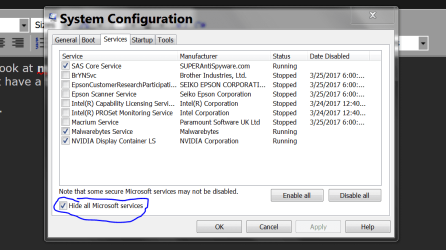
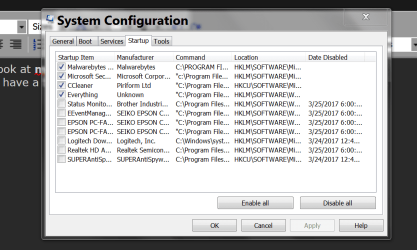
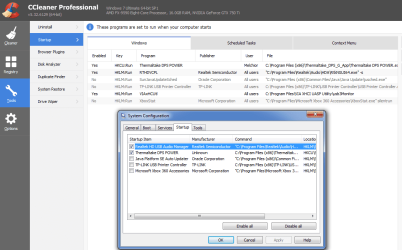
so anyway in the M$ OS config tool showed below I found a boot option called
- "OS Boot Information"
-- "Shows driver names as drivers are being loaded during the startup process."
so the next time my boots I will see if it hangs on anything too long... hoping.. lol ;)
 

Attachments

  • CCleaner & SysConfig__StartupData.png
    CCleaner & SysConfig__StartupData.png
    76.1 KB · Views: 2
Last edited:

My Computers

System One System Two

  • Computer type
    PC/Desktop
    Computer Manufacturer/Model Number
    [Self-built](custom-build)(June 2020)
    OS
    Windows 11 Pro (x64)
    CPU
    AMD Ryzen 9 3900X 12-Core Processor
    Motherboard
    Asus PRIME X570-PRO
    Memory
    32GB, 2x G.Skill 16GB (PC3200)(DDR4-2137)
    Graphics Card(s)
    NVIDIA GeForce RTX 3070 Ti 8GB XC3 model by EVGA
    Sound Card
    Realtek® ALC1220A 8-Channel High Definition Audio CODEC
    Monitor(s) Displays
    24" DELL Gaming Monitor - G2422HS - DisplayPort used
    Screen Resolution
    1920x1080p at 165Hz (16:9 Aspect Ratio)
    Hard Drives
    1TB Samsung 980 Pro (NVMe)(SSD)
    2TB Samsung 980 Pro (NVMe)(SSD)
    2TB Samsung 870 EVO (SSD)

    NVMe 1TB
    -- OS(Win10 Pro x64),
    -- programs,
    -- programming(MS Visual Studios 2022 Community Ed.),
    -- music

    NV
    PSU
    Thermaltake TOUGHPOWER DPS G RGB Titanium Certified 1250Watt
    Case
    Corsair Graphite Series 780T Full Tower PC Case
    Cooling
    AMD Wraith cooler (stock) & 3x Corsair case fans
    Keyboard
    Alienware Low Profile RGB Mechanical USB Gaming Keyboard - A
    Mouse
    Redragon M602 RGB Wired USB Gaming mouse
    Internet Speed
    2100Mbps Download, 350Mbps Upload
    Antivirus
    n/a aka "ABOVE TOP SECRET!" lol ;)
    Browser
    Firefox & Google Chrome
  • Computer type
    Laptop
    System Manufacturer/Model Number
    DELL G15 Ryzen edition, model 5515
    OS
    Windows 11 Pro
    CPU
    AMD Ryzen 7 5800H
    Motherboard
    DELL G15 Ryzen edition
    Memory
    16GB DDR4
    Graphics Card(s)
    Ryzen 7 5800H integrated AMD Radeon Graphics and Nvidia GeForce 3060 6GB
    Sound Card
    Realtek ALC3254 with Nahimic 3D Audio for Gamers
    Monitor(s) Displays
    built-in
    Screen Resolution
    1920x1080
    Hard Drives
    500GB NVMe SSD
    PSU
    DELL power brick.
    Case
    laptop
    Cooling
    laptop cooling
    Keyboard
    built-in
    Mouse
    Microsoft basic optical scroll mouse
    Internet Speed
    1000Mbps download, 20Mbps upload
    Browser
    Firefox & Waterfox Classic
so yeah there you have it! ;)
so yeah I'm still wondering why my system is taking so loing to boot..

Perhaps you have a virus:what:
 

My Computer

Computer type
PC/Desktop
OS
Microsoft Windows 7 Home Premium 64-bit 7601 Multiprocessor Free Service Pack 1
CPU
Intel(R) Core(TM) i7-3770 CPU @ 3.40GHz
Motherboard
ASUSTeK COMPUTER INC. P8H77-M
Memory
8.00 GB
Graphics Card(s)
Intel(R) HD Graphics 4000
Sound Card
On Board
Monitor(s) Displays
Dell 24"
Screen Resolution
1920 x 1080
Hard Drives
(1) INTEL SSDSC2CT180A3 ATA Device (2) ST500DM002-1BD142 ATA Device (3) WDC WD3200AAKS-75L9A0 ATA Device (4) Generic- Compact Flash USB Device (5) Generic- MS/MS-Pro USB Device (6) Generic- SD/MMC USB Device (7) Generic- SM/xD-Picture USB
PSU
500w Corsair
Case
Cooler Master
Cooling
3 Fans
Keyboard
Logitech MK300
Mouse
Logitech WOM
Internet Speed
75Mb
Antivirus
Norton 360
Browser
Firefox, Opera, IE
Perhaps you have a virus:what:

LOL YEAH RIGHT, NOT A CHANCE! :rolleyes::sarc::p

I have Spybot SEARCH & DESTROY, Installed!
plus I also have "TDSSKiller"
I KEEP both up to date!... and make occasional scans but they never turn up anything..
 

My Computers

System One System Two

  • Computer type
    PC/Desktop
    Computer Manufacturer/Model Number
    [Self-built](custom-build)(June 2020)
    OS
    Windows 11 Pro (x64)
    CPU
    AMD Ryzen 9 3900X 12-Core Processor
    Motherboard
    Asus PRIME X570-PRO
    Memory
    32GB, 2x G.Skill 16GB (PC3200)(DDR4-2137)
    Graphics Card(s)
    NVIDIA GeForce RTX 3070 Ti 8GB XC3 model by EVGA
    Sound Card
    Realtek® ALC1220A 8-Channel High Definition Audio CODEC
    Monitor(s) Displays
    24" DELL Gaming Monitor - G2422HS - DisplayPort used
    Screen Resolution
    1920x1080p at 165Hz (16:9 Aspect Ratio)
    Hard Drives
    1TB Samsung 980 Pro (NVMe)(SSD)
    2TB Samsung 980 Pro (NVMe)(SSD)
    2TB Samsung 870 EVO (SSD)

    NVMe 1TB
    -- OS(Win10 Pro x64),
    -- programs,
    -- programming(MS Visual Studios 2022 Community Ed.),
    -- music

    NV
    PSU
    Thermaltake TOUGHPOWER DPS G RGB Titanium Certified 1250Watt
    Case
    Corsair Graphite Series 780T Full Tower PC Case
    Cooling
    AMD Wraith cooler (stock) & 3x Corsair case fans
    Keyboard
    Alienware Low Profile RGB Mechanical USB Gaming Keyboard - A
    Mouse
    Redragon M602 RGB Wired USB Gaming mouse
    Internet Speed
    2100Mbps Download, 350Mbps Upload
    Antivirus
    n/a aka "ABOVE TOP SECRET!" lol ;)
    Browser
    Firefox & Google Chrome
  • Computer type
    Laptop
    System Manufacturer/Model Number
    DELL G15 Ryzen edition, model 5515
    OS
    Windows 11 Pro
    CPU
    AMD Ryzen 7 5800H
    Motherboard
    DELL G15 Ryzen edition
    Memory
    16GB DDR4
    Graphics Card(s)
    Ryzen 7 5800H integrated AMD Radeon Graphics and Nvidia GeForce 3060 6GB
    Sound Card
    Realtek ALC3254 with Nahimic 3D Audio for Gamers
    Monitor(s) Displays
    built-in
    Screen Resolution
    1920x1080
    Hard Drives
    500GB NVMe SSD
    PSU
    DELL power brick.
    Case
    laptop
    Cooling
    laptop cooling
    Keyboard
    built-in
    Mouse
    Microsoft basic optical scroll mouse
    Internet Speed
    1000Mbps download, 20Mbps upload
    Browser
    Firefox & Waterfox Classic
In 37 years of PC building, setup and maintenance, I've never seen even ONE PC that was set up for optimum performance. Argggg! Too many PC tech's just want to get the job done as fast as possible, get the money and run!

Like, go into MSCONFIG and click on the 'Boot' tab, then change the start up delay from 30 sec's to just three sec's. (remove the zero after the 3). That will make your PC boot up 27 sec's faster.

Then go into the Advanced section and tell Windows how many cores your CPU has. The Windows default is just ONE (1). Save the changes and reboot. Now your PC will be booting up and operating at it's MAX efficiency.

There is a lot more that I do during any Windows Setup, but that gets too complicated to list here.

Then seriously minimize the number of programs starting up when the PC boots. If you don't need a program running all the time, then it should NOT be in the Startup list. Run it from a shortcut when you need it.

Good Luck!
TechnoMage :cool:

PS: One program that I have not seen mentioned here, that I use almost daily, is "Super Anti-Spyware". It will find and remove all 'Tracking Cookies' and PUP's. The FREE version is great, but will only get updates and run scans when you run the program. The Pro version will update and scan daily, automatically, as you set it up.

"Spybot Search & Destroy", I've been using since its invention. It's only marginally effective as a malware remover. But its "Immunization" function and it's ability to display and remove BHO's is of some value. But it must be run in Advanced Mode. My own Setup for that program takes up a full sheet of paper, in 10 point type. Without proper setup, the program is almost worthless.
 

My Computer

Computer type
PC/Desktop
Computer Manufacturer/Model Number
Various
OS
Win 7 Pro, SP1, x86, Win-11/Pro/64
CPU
AMD
Motherboard
Various
Memory
8GB Crucial
Graphics Card(s)
Various
Sound Card
OnBoard
Monitor(s) Displays
Acer 21.5"
Hard Drives
Crucial SSD, 500 GB
PSU
OEM
Case
SFF Slim Line Case
Cooling
OEM
Keyboard
eMachines
Mouse
Logitech Wireless
Internet Speed
varies
Antivirus
Windows Defender/Super Anti-Spyware
Browser
Firefox
Another interesting setting (in case of a multi-boot setup) is the Timeout setting . The number of seconds you set represents how long your computer will wait for you to select between the available operating systems, when booting. If no choice is made during the set time, the default operating system will start.
msconfig_10.jpg

By default, this is set to 30 seconds. If you have a multi-boot setup, you might want to set it to a smaller value. Personally, I prefer to set it to only 10 seconds. This way, if I don't select another operating system, the total boot timing of the default one is not impacted much.
so yeah not really... that is a timeout only in case of multi OS selection
OR when you press F8 to access said boot options.. so I will leave that alone..

BUT I did set my OS to 8 cores in the advanced tab... lets see if it boots any faster...

because:
IMPORTANT: If you set a maximum number of cores and RAM memory, Windows will continue to correctly identify the number of cores the processor has and the amount of physical RAM memory. However, it will only use the number of cores (processors) and the maximum memory you set.
soo yeah idk if it will help at boot at all . .we will see.. ;)

BUT WISH ME LUCK.. and PRAY it doesn't BRICK my system lol :confused::cry::sarc:;):p
ok going to reboot now will report back in a sec..

ps: I also set the bot info on.. lets see if that turns up any useful info...
 

My Computers

System One System Two

  • Computer type
    PC/Desktop
    Computer Manufacturer/Model Number
    [Self-built](custom-build)(June 2020)
    OS
    Windows 11 Pro (x64)
    CPU
    AMD Ryzen 9 3900X 12-Core Processor
    Motherboard
    Asus PRIME X570-PRO
    Memory
    32GB, 2x G.Skill 16GB (PC3200)(DDR4-2137)
    Graphics Card(s)
    NVIDIA GeForce RTX 3070 Ti 8GB XC3 model by EVGA
    Sound Card
    Realtek® ALC1220A 8-Channel High Definition Audio CODEC
    Monitor(s) Displays
    24" DELL Gaming Monitor - G2422HS - DisplayPort used
    Screen Resolution
    1920x1080p at 165Hz (16:9 Aspect Ratio)
    Hard Drives
    1TB Samsung 980 Pro (NVMe)(SSD)
    2TB Samsung 980 Pro (NVMe)(SSD)
    2TB Samsung 870 EVO (SSD)

    NVMe 1TB
    -- OS(Win10 Pro x64),
    -- programs,
    -- programming(MS Visual Studios 2022 Community Ed.),
    -- music

    NV
    PSU
    Thermaltake TOUGHPOWER DPS G RGB Titanium Certified 1250Watt
    Case
    Corsair Graphite Series 780T Full Tower PC Case
    Cooling
    AMD Wraith cooler (stock) & 3x Corsair case fans
    Keyboard
    Alienware Low Profile RGB Mechanical USB Gaming Keyboard - A
    Mouse
    Redragon M602 RGB Wired USB Gaming mouse
    Internet Speed
    2100Mbps Download, 350Mbps Upload
    Antivirus
    n/a aka "ABOVE TOP SECRET!" lol ;)
    Browser
    Firefox & Google Chrome
  • Computer type
    Laptop
    System Manufacturer/Model Number
    DELL G15 Ryzen edition, model 5515
    OS
    Windows 11 Pro
    CPU
    AMD Ryzen 7 5800H
    Motherboard
    DELL G15 Ryzen edition
    Memory
    16GB DDR4
    Graphics Card(s)
    Ryzen 7 5800H integrated AMD Radeon Graphics and Nvidia GeForce 3060 6GB
    Sound Card
    Realtek ALC3254 with Nahimic 3D Audio for Gamers
    Monitor(s) Displays
    built-in
    Screen Resolution
    1920x1080
    Hard Drives
    500GB NVMe SSD
    PSU
    DELL power brick.
    Case
    laptop
    Cooling
    laptop cooling
    Keyboard
    built-in
    Mouse
    Microsoft basic optical scroll mouse
    Internet Speed
    1000Mbps download, 20Mbps upload
    Browser
    Firefox & Waterfox Classic
hmm... not really sure.. it may have shaved a few seconds off the boot.. hm... not positive...
1-6 seconds off... maybe :sarc::sarc::sarc::p:rolleyes::(:D
 

My Computers

System One System Two

  • Computer type
    PC/Desktop
    Computer Manufacturer/Model Number
    [Self-built](custom-build)(June 2020)
    OS
    Windows 11 Pro (x64)
    CPU
    AMD Ryzen 9 3900X 12-Core Processor
    Motherboard
    Asus PRIME X570-PRO
    Memory
    32GB, 2x G.Skill 16GB (PC3200)(DDR4-2137)
    Graphics Card(s)
    NVIDIA GeForce RTX 3070 Ti 8GB XC3 model by EVGA
    Sound Card
    Realtek® ALC1220A 8-Channel High Definition Audio CODEC
    Monitor(s) Displays
    24" DELL Gaming Monitor - G2422HS - DisplayPort used
    Screen Resolution
    1920x1080p at 165Hz (16:9 Aspect Ratio)
    Hard Drives
    1TB Samsung 980 Pro (NVMe)(SSD)
    2TB Samsung 980 Pro (NVMe)(SSD)
    2TB Samsung 870 EVO (SSD)

    NVMe 1TB
    -- OS(Win10 Pro x64),
    -- programs,
    -- programming(MS Visual Studios 2022 Community Ed.),
    -- music

    NV
    PSU
    Thermaltake TOUGHPOWER DPS G RGB Titanium Certified 1250Watt
    Case
    Corsair Graphite Series 780T Full Tower PC Case
    Cooling
    AMD Wraith cooler (stock) & 3x Corsair case fans
    Keyboard
    Alienware Low Profile RGB Mechanical USB Gaming Keyboard - A
    Mouse
    Redragon M602 RGB Wired USB Gaming mouse
    Internet Speed
    2100Mbps Download, 350Mbps Upload
    Antivirus
    n/a aka "ABOVE TOP SECRET!" lol ;)
    Browser
    Firefox & Google Chrome
  • Computer type
    Laptop
    System Manufacturer/Model Number
    DELL G15 Ryzen edition, model 5515
    OS
    Windows 11 Pro
    CPU
    AMD Ryzen 7 5800H
    Motherboard
    DELL G15 Ryzen edition
    Memory
    16GB DDR4
    Graphics Card(s)
    Ryzen 7 5800H integrated AMD Radeon Graphics and Nvidia GeForce 3060 6GB
    Sound Card
    Realtek ALC3254 with Nahimic 3D Audio for Gamers
    Monitor(s) Displays
    built-in
    Screen Resolution
    1920x1080
    Hard Drives
    500GB NVMe SSD
    PSU
    DELL power brick.
    Case
    laptop
    Cooling
    laptop cooling
    Keyboard
    built-in
    Mouse
    Microsoft basic optical scroll mouse
    Internet Speed
    1000Mbps download, 20Mbps upload
    Browser
    Firefox & Waterfox Classic
That link is very interesting reading but it deals with shut down as far as I can see whereas the OP has slow boot up problems!

If you had read you had seen that the links provided are to trace boot, shutdown, hibernate, standby and resume.
In my case was shutdown and the bad guy is antivirus.
Trace Windows 7 boot/shutdown/hibernate/standby/resume issues - Windows 7 - MSFN
Gathering a Startup, Shutdown, Sleep, Hibernate, or Reboot Trace - Windows 7 Help Forums
 

My Computers

System One System Two

  • Computer type
    PC/Desktop
    Computer Manufacturer/Model Number
    custom build
    OS
    Windows 7 HP 64
    CPU
    i5 6600K - 800MHz to 4200MHz
    Motherboard
    GA-Z170-HD3P
    Memory
    4+4G GSkill DDR4 3000
    Graphics Card(s)
    IG - Intel 530
    Monitor(s) Displays
    Samsung 226BW
    Screen Resolution
    1680x1050
    Hard Drives
    (1) -1 SM951 – 128GB M.2 AHCI PCIe SSD drive for Windows 7 and Lubuntu
    (2) -1 WD SATA 3 - 1T for Data
    (3) -1 WD SATA 3 - 1T for backup
    PSU
    Thermaltake 450W TR2 gold
    Keyboard
    Old and good Chicony mechanical keyboard
    Mouse
    Logitech mX performance - 9 buttons (had to disable some)
    Internet Speed
    500Mb/s
    Browser
    Firefox 64
    Other Info
    TinyWall firewall
  • Computer type
    Laptop
    System Manufacturer/Model Number
    Asus Q550LF
    OS
    Windows 7 Pro
    CPU
    i7-4500U 800MHz to 3.0GHz
    Motherboard
    Asus Q550LF
    Memory
    (4+4)G DDR3 1600
    Graphics Card(s)
    IG intel 4400 + NVIDIA GeForce GT 745M
    Sound Card
    Realtek
    Monitor(s) Displays
    LG Display LP156WF4-SPH1
    Screen Resolution
    1920 x 1080
    Hard Drives
    BX500 120G SSD for Windows and programs +
    1T HDD for data
    Internet Speed
    500 Mb/s
    Browser
    Firefox
    Other Info
    TinyWall firewall
Back
Top