computer boots when pluged in.

jrr1957

New member
Local time
5:45 PM
Messages
4
Location
crawfordsville in
Replaced my first motherboard recently and was very proud that all worked well. But then the guy I done it for tells me when he plugs it in the computer boots up. Sorry I dont have any thing on the specs cause its not here. Just looking for the best place to start. The motherboard was replaced with the same one that was bad. Everything else is working great. Any suggestions would be wonderful. thanks
 

My Computer

Computer Manufacturer/Model Number
dell dimension 4600
OS
windows 7 ultimate 32bit
CPU
intel p4 2.66 ghz
Memory
1 gig.
Sound Card
none
Monitor(s) Displays
one dell e177fp
Screen Resolution
1024-768
Hard Drives
maxtor 6l200po- maxtor 4r060j0
If at all possible, I'd ask for a demonstration. Sometimes problems get lost in translation.

If this involves travel or time on his part, then be sure that he understands that you work just like the friendly plumber.
The first $50 at the door pays for your travel time and expenses.
 

My Computer

Computer Manufacturer/Model Number
Toshiba Satellite S875D-S7239 laptop
OS
MS Windows 7 Ultimate SP1 64-bit
CPU
AMD A10-4600M
Motherboard
AMD Pumori (Socket FT1)
Memory
6.00 GB Dual-Channel DDR3 @ 798MHz (11-11-12-28)
Graphics Card(s)
AMD Radeon HD 7660G
Sound Card
High Definition Audio Device
Monitor(s) Displays
Generic PnP Monitor (1600x900@60Hz)
Screen Resolution
1600x900@60Hz
Hard Drives
SSD 119GB Corsair CSSD-V128GB2 ATA Device
Keyboard
Standard PS/2 Keyboard
Mouse
HP Wireless Optical Mobile Mouse Model FHA-3410
Internet Speed
What the local pub, local coffee shop offers.
Other Info
Optical Drive:MATSHITA BD-CMB UJ160B ATA Device


Also have an Asus ha1002xp netbook with Win 7 Ultimate installed.
As Karl suggests, see it happening first.

I'm no expert, but it may have something to do with the power settings in the BIOS and/or a CMOS battery that needs to be reset.

Just a thought, has your friend been using the proper shutdown procedure or just switching the power outlet off?
 

My Computer

Computer Manufacturer/Model Number
HP Pavilion Elite 495UK
OS
Windows 7 Ultimate SP1 64-Bit
CPU
Intel Core i7 870 @ 2.93GHz
Motherboard
MSI 2A9C (CPU1)
Memory
8Gb Dual-Channel DDR3 @ 664MHz
Graphics Card(s)
nVidia GeForce GTX 460 1024MB dedicated RAM
Sound Card
Realtek HD Audio
Monitor(s) Displays
HP2310i
Screen Resolution
1920 x 1080
Hard Drives
1x1954GB Hitachi HDS22020ALA 330 (RAID), 1x1954GB Hitachi External for backup and storage
PSU
460W
Case
HP Elite
Cooling
Air cooled
Keyboard
Logitech K750 solar-powered keyboard
Mouse
Logitech Wireless M180 mouse
Internet Speed
2Mb
Other Info
Pure Avanti Flow Internet Radio with iPod Dock, 64Gb iPod, HP USB Speakers, Sony MDR-V500 Headphones, Sony Vaio F-Series Laptop
seavixen,

I had a case once where only when talking with the chap did it come out that he was simply pulling the cord from the wall to turn the unit off.
 

My Computer

Computer Manufacturer/Model Number
Toshiba Satellite S875D-S7239 laptop
OS
MS Windows 7 Ultimate SP1 64-bit
CPU
AMD A10-4600M
Motherboard
AMD Pumori (Socket FT1)
Memory
6.00 GB Dual-Channel DDR3 @ 798MHz (11-11-12-28)
Graphics Card(s)
AMD Radeon HD 7660G
Sound Card
High Definition Audio Device
Monitor(s) Displays
Generic PnP Monitor (1600x900@60Hz)
Screen Resolution
1600x900@60Hz
Hard Drives
SSD 119GB Corsair CSSD-V128GB2 ATA Device
Keyboard
Standard PS/2 Keyboard
Mouse
HP Wireless Optical Mobile Mouse Model FHA-3410
Internet Speed
What the local pub, local coffee shop offers.
Other Info
Optical Drive:MATSHITA BD-CMB UJ160B ATA Device


Also have an Asus ha1002xp netbook with Win 7 Ultimate installed.
Something similar happened to me, so I thought it worth mentioning to ask the guy how the laptop is being powered down.
 

My Computer

Computer Manufacturer/Model Number
HP Pavilion Elite 495UK
OS
Windows 7 Ultimate SP1 64-Bit
CPU
Intel Core i7 870 @ 2.93GHz
Motherboard
MSI 2A9C (CPU1)
Memory
8Gb Dual-Channel DDR3 @ 664MHz
Graphics Card(s)
nVidia GeForce GTX 460 1024MB dedicated RAM
Sound Card
Realtek HD Audio
Monitor(s) Displays
HP2310i
Screen Resolution
1920 x 1080
Hard Drives
1x1954GB Hitachi HDS22020ALA 330 (RAID), 1x1954GB Hitachi External for backup and storage
PSU
460W
Case
HP Elite
Cooling
Air cooled
Keyboard
Logitech K750 solar-powered keyboard
Mouse
Logitech Wireless M180 mouse
Internet Speed
2Mb
Other Info
Pure Avanti Flow Internet Radio with iPod Dock, 64Gb iPod, HP USB Speakers, Sony MDR-V500 Headphones, Sony Vaio F-Series Laptop
Just realized I posted this in software. Sorry. Going to check it out next few days. Anything is possible, This guy knows nothing about computers so it could be usererror. I have never known anyone that can screw up a computer more than he has in the past. He once hung a case fan from the wires in his computer by a bread tie cause he said the little fan on the motherboard was going to slow.
 

My Computer

Computer Manufacturer/Model Number
dell dimension 4600
OS
windows 7 ultimate 32bit
CPU
intel p4 2.66 ghz
Memory
1 gig.
Sound Card
none
Monitor(s) Displays
one dell e177fp
Screen Resolution
1024-768
Hard Drives
maxtor 6l200po- maxtor 4r060j0
"He once hung a case fan from the wires in his computer by a bread tie cause he said the little fan on the motherboard was going to slow."

Is it safe to leave him alone with a computer? :D
 

My Computer

Computer Manufacturer/Model Number
HP Pavilion Elite 495UK
OS
Windows 7 Ultimate SP1 64-Bit
CPU
Intel Core i7 870 @ 2.93GHz
Motherboard
MSI 2A9C (CPU1)
Memory
8Gb Dual-Channel DDR3 @ 664MHz
Graphics Card(s)
nVidia GeForce GTX 460 1024MB dedicated RAM
Sound Card
Realtek HD Audio
Monitor(s) Displays
HP2310i
Screen Resolution
1920 x 1080
Hard Drives
1x1954GB Hitachi HDS22020ALA 330 (RAID), 1x1954GB Hitachi External for backup and storage
PSU
460W
Case
HP Elite
Cooling
Air cooled
Keyboard
Logitech K750 solar-powered keyboard
Mouse
Logitech Wireless M180 mouse
Internet Speed
2Mb
Other Info
Pure Avanti Flow Internet Radio with iPod Dock, 64Gb iPod, HP USB Speakers, Sony MDR-V500 Headphones, Sony Vaio F-Series Laptop
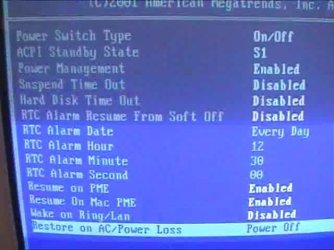
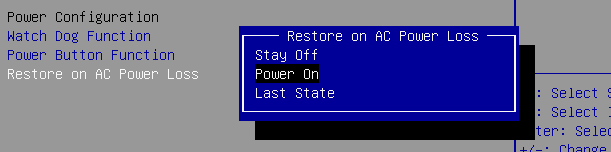
In the BIOS there is a power setting that allows you to tell the PC what to do when the power is lost, like when you have your PC hooked up to power strip or the house power shuts off.
There is:
Last State (If the PC was off then it stays off, if it was on then it powers back on).
Always Off (no matter what state the PC was in, the PC stays off when power is restored)
Always On (powers the PC on no matter what state it was in when the power was lost)

The above aren't necessarily the actual wording, don't remember them off-hand, but that is the gist of it.

Found an image on Google showing the setting on Restore on AC Power Loss. Found another showing 3 options,
 

Attachments

  • bios_0003.jpg
    bios_0003.jpg
    29.3 KB · Views: 1
  • Restore-on-AC-Power-Loss-Power-On.png
    Restore-on-AC-Power-Loss-Power-On.png
    1.6 KB · Views: 1

My Computer

Computer Manufacturer/Model Number
HAL-9000
OS
Windows 7 Ultimate 64bit
CPU
Intel i7 3770K
Motherboard
Asus Sabertooth Z77
Memory
16GB DDR3 1333 Corsair XMS3
Graphics Card(s)
XFX HD6950 2GB EyeFinity
Sound Card
Logitech G35 & Sennheiser PC135 & VIA HD
Monitor(s) Displays
23" HP 2310e, 23" Samsung B2230, 21.5" Viewsonic
Screen Resolution
5760x1080
Hard Drives
16TB of Storage
128GB & 256GB Crucial M4 SSD's, 2X 1TB WD Black, 3x 2TB WD, 3x 2TB Samsung F4, 1.5TB Seagate, WD 500GB,
PSU
Antec True Power New 650watt
Case
Cooler Master HAF-932
Cooling
Corsair H60 Hydro Cooler, 3x 230mm Fans, 2x120mm Fan
Keyboard
Logitech G15 and G13
Mouse
Logitech G700 Gaming Mouse
Internet Speed
50/10 Mbit
Other Info
Speakers : Alesis M1 Active Mk2 Studio Monitors , APC RS 1200 UPS, HP 4500DN Color Laser, HP P1006 mono Laser, Kodak 8500 Dye-Sub, Epson 1280 inkjet, Epson Worforce 610 MFC
+1 for the above.

My desktop was earlier booting whenever I switched on my UPS.

I entered the Power Management setup in the bios. Under "AC Back" function there are three options.

Soft Off - Always in off state

Full on - Always power on system when AC is back

Memory - System power on depends upon the status before AC is lost.

I changed it over from Full on to Soft-off. Now the system will switch on only when I press the Power button on the case.

Check for something similar in the motherboard bios and set it.
 

My Computer

OS
Windows 7 Home Premium 32 bit
Thanks, Will check it out. Just was not sure where to look. Have seen the settings but never had a reason to mess with them. And no he is not safe alone with a computer. Which is why I am always fixing it. Nice guy and loves to tinker, just wish he would do some reading first. Thanks again for all the help.
 

My Computer

Computer Manufacturer/Model Number
dell dimension 4600
OS
windows 7 ultimate 32bit
CPU
intel p4 2.66 ghz
Memory
1 gig.
Sound Card
none
Monitor(s) Displays
one dell e177fp
Screen Resolution
1024-768
Hard Drives
maxtor 6l200po- maxtor 4r060j0
Back
Top