Computer cannot/will not connect to ftp sites

confusedGuy

New member
Local time
7:37 AM
Messages
7
First off, I'll apologize ahead of time if I do not put sufficient information in this first post as this is my first time using a forum of any kind.

Now the problem: simply put, I cannot connect to any ftp site (even ftp.microsoft.com). I strongly believe this has something to do with my computer itself, but I've done endless searches on google and tried several solutions to no avail. Here is a list of what I have tried thus far:

-Connecting using the command prompt. On the command prompt I've typed in "ftp ftp.microsoft.com" and it goes straight to the "ftp>" . Whenever I try to use a command the prompt responds with a "Not connected". However, if I ping the ftp server it does respond like it should.

-Using software ftp clients (Firezilla, SmartFTP, etc.). I put in the necessary information and that's basically as far as it gets.

-Checking "Enable Passive FTP" in IE. That did zip.

-Adjusted Firewall settings... (based on suggestions from forums and such). To the best of my knowledge, everything set as it should. The settings I adjusted were on Windows Firewall. [If its any help, I also have AVG Anti-Virus Free Edition installed]

-Web-based FTP client (particularly Jambai FTP). This is what leads me to believe it is my computer that is the problem because when I use this web-based clients its pretty much the only thing that works and I am able to manipulate the files just fine.


That's pretty much all my attempts in various forms and google searches. I should also note that I am connected wirelessly to my school's network, but the network doesn't seem to be the problem because I tried connecting using my roomate's laptop and it connected just fine.

Hopefully this gives an idea of my problem. If more info is needed by all means tell me. Thanks ahead of time.
 

My Computer

Computer Manufacturer/Model Number
Dell Inspiron 1545
OS
Windows 7 Home Premium 32 bit
CPU
Pentium Dual-Core CPU T4200 @ 2.00GHz
Memory
3.00 GB
Graphics Card(s)
Mobile Intel 4 Series Express Chipset Family
Sound Card
IDT High Definition Audio CODEC
If you have checked your firewall settings on the Windows 7 machine and you have checked your routers firewall settings (if it has one). Then you might want to contact your ISP and ask if they block FTP. Some ISP's block FTP. -WS
 

My Computer

Computer type
PC/Desktop
Computer Manufacturer/Model Number
Dell OP7010
OS
Windows 7 Enterprise (x64); Windows Server 2008 R2 (x64)
Memory
16GB
Monitor(s) Displays
4 Dell 24" LCD
Screen Resolution
1280x1024
Keyboard
Dell
Mouse
Dell Optical
Internet Speed
40meg
Now the problem: simply put, I cannot connect to any ftp site (even ftp.microsoft.com). I strongly believe this has something to do with my computer itself, but I've done endless searches on google and tried several solutions to no avail.
I myself use a very well-known and popular FTP product from Ipswitch Software named "WS-FTP Professional (v12.3)". It's been around for many many years. It's a GUI-based FTP client (not a command-line client) which thus makes it very very easy to use.

Anyway, I tried connecting to ftp.microsoft.com and was immediately rejected because of "login credentials". Actually I still had my current userid/password entered in the data areas for those values, for the normal default FTP site that I'm virtually always connecting to when I open the program.

At that point I simply re-entered the generic userid/password that is almost universally accepted at "public FTP sites" (e.g. this one from Microsoft), namely:
username: anonymous
password: <your email address>
Sure enough, one the new values were entered WS-FTP Pro attempted the reconnect with the new userid/password credentials and BINGO... I was in.

You can download a trial version of WS-FTP Pro, just to see how to use it and decide if you'd like to buy it (it's not free, but it's well worth the price in my opinion).

Anyway, I'm sure that virtually all FTP sites require a login with userid/password of some sort... and as I said the userid of "anonymous" with a password of your email address is almost universally accepted. Only private/secure FTP sites have something different than this.

===>> use the USER and PASS commands to enter these two values, if you are still at a command line trying to connect that way.
 

My Computer

Computer type
PC/Desktop
Computer Manufacturer/Model Number
Home-built, two systems (1) and (2)
OS
Windows 7 Pro x64 (1), Win7 Pro X64 (2)
CPU
i5-3350p 3.1Ghz/6MB-cache (1); E8400 3.0Ghz/6MB-cache (2)
Motherboard
ASUS P8Z77-V Pro (1); ASUS P5Q3 (2)
Memory
8GB PC3-12800 DDR3 (1); 4GB PC3-10600 DDR3 (2)
Graphics Card(s)
ATI HD7750 (1), (see TV cards); ATI R7 250 (2)
Sound Card
Realtek ALC892 HD Audio (1); Realtek ALC1200 HD Audio (2)
Monitor(s) Displays
Eizo HD2441W LCD, Eizo S2433W (1); Eizo 24" S2433W (2)
Screen Resolution
1920x1200, 1920x1200 (1); 1920x1200 (2)
Hard Drives
(1) 1TB SATA-II (7200RPM), 2x2TB SATA-III (7200RPM), 250GB SATA-III (10000RPM) for OS; 2x2TB external USB 3.0

(2) 320GB SATA-II (7200RPM), 750GB SATA-II (7200RPM), 150GB SATA-II (10000RPM) for OS; 2TB external USB 3.0
PSU
Nesteq ECS-6001 600W (1); Nesteq ECS-5001 500W (2)
Case
Acousti-Case 360 (1) and (2)
Cooling
Noctua NH-U12P SE2 for CPU, 2x120mm case fans (1) and (2)
Keyboard
IBM PS/2 (1) and (2)
Mouse
Logitech MX Revolution wireless (1); Microsoft wired (2)
Internet Speed
100mbps down / 10mbps up
Antivirus
Microsoft Security Essentials; Malwarebyte Anti-Malware Pro
Browser
Firefox
Other Info
Ceton InfiniTV 4-tuner cablecard-enabled TV card as well as Hauppauge HVR-2250 OTA/ATSC 2-tuner TV card in (1), running under Win7 WMC
@ WindowsStar: I'm pretty sure its not the ISP because I tried connecting to an ftp site on my friends computer on the SAME wireless network and was able to successfully connect. Thanks for the thought all the same

@ desperber: I tried that software even though I was pretty sure it wouldn't do much good. I ended up getting a connection error - when I looked at the error it looks like it found the host, tried connecting to the host but failed. Though correct credentials were never really the problem - when I tried the command prompt before, it never even asked me for credentials to begin with. Thanks for your efforts though
 

My Computer

Computer Manufacturer/Model Number
Dell Inspiron 1545
OS
Windows 7 Home Premium 32 bit
CPU
Pentium Dual-Core CPU T4200 @ 2.00GHz
Memory
3.00 GB
Graphics Card(s)
Mobile Intel 4 Series Express Chipset Family
Sound Card
IDT High Definition Audio CODEC
@ dsperber: I tried that software even though I was pretty sure it wouldn't do much good. I ended up getting a connection error - when I looked at the error it looks like it found the host, tried connecting to the host but failed.
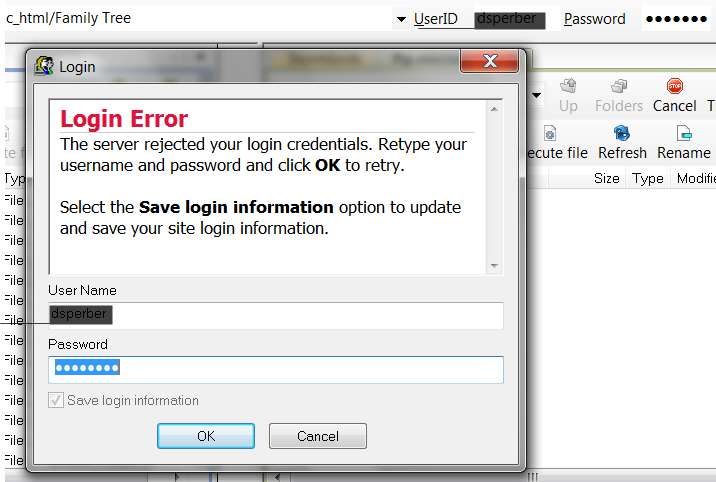
Exactly my initial results. That's what you get if you do not provide the correct login credentials to any FTP site:

credentialserror.jpg


However the proper credentials for ftp.microsoft.com are userid:anonymous and password:<your email address>:

credentialscorrected.jpg


So you need to correct the userid and password. Note that you can make the correction either right there on the error dialog where you can just enter the proper values and then push the OK button, or you can exit the error message and enter the values properly in the top-right where there is room for userid and password and push the "connect to URL" button.

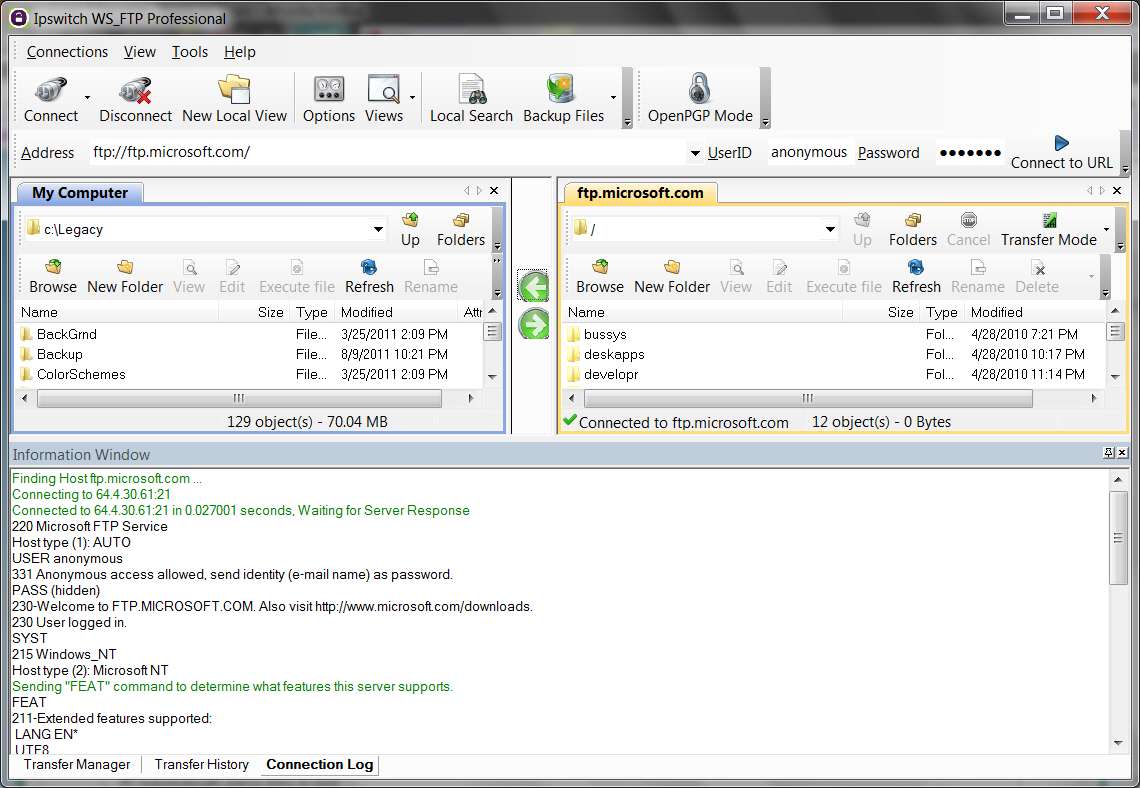
And then once you enter the proper userid and password and push either OK or the "connect to URL" button, it's off to the races!!!

See the connection handshake dialog which went on (in the bottom part of the following screenshot) once I completed the connection to ftp.microsoft.com:

loginsuccess.jpg


Though correct credentials were never really the problem - when I tried the command prompt before, it never even asked me for credentials to begin with. Thanks for your efforts though
Look at the FTP command/response conversation (which is also shown in the bottom section of the screenshot above). You must enter your credentials.
Finding Host ftp.microsoft.com ...
Connecting to 64.4.30.61:21
Connected to 64.4.30.61:21 in 0.027001 seconds, Waiting for Server Response
220 Microsoft FTP Service
Host type (1): AUTO
USER anonymous
331 Anonymous access allowed, send identity (e-mail name) as password.
PASS (hidden)
230-Welcome to FTP.MICROSOFT.COM. Also visit Microsoft Download Center.
230 User logged in.
SYST
215 Windows_NT
Host type (2): Microsoft NT
Sending "FEAT" command to determine what features this server supports.
FEAT
211-Extended features supported:
LANG EN*
UTF8
AUTH TLS;TLS-C;SSL;TLS-P;
PBSZ
PROT C;P;
CCC
HOST
SIZE
MDTM
REST STREAM
211 END
Finished interpreting "FEAT" response.
Sending the FEAT command is optional. You can disable it in the site options of the profile.
PWD
257 "/" is current directory.
CWD /
250 CWD command successful.PWD
257 "/" is current directory.
TYPE A
200 Type set to A.
PASV
227 Entering Passive Mode (64,4,30,61,52,117).
connecting data channel to 64.4.30.61:52,117(13429)
data channel connected to 64.4.30.61:52,117(13429)
LIST
125 Data connection already open; Transfer starting.
transferred 569 bytes in < 0.001 seconds, 4552.000 kbps ( 569.000 kBps), transfer succeeded.
226 Transfer complete.
 

My Computer

Computer type
PC/Desktop
Computer Manufacturer/Model Number
Home-built, two systems (1) and (2)
OS
Windows 7 Pro x64 (1), Win7 Pro X64 (2)
CPU
i5-3350p 3.1Ghz/6MB-cache (1); E8400 3.0Ghz/6MB-cache (2)
Motherboard
ASUS P8Z77-V Pro (1); ASUS P5Q3 (2)
Memory
8GB PC3-12800 DDR3 (1); 4GB PC3-10600 DDR3 (2)
Graphics Card(s)
ATI HD7750 (1), (see TV cards); ATI R7 250 (2)
Sound Card
Realtek ALC892 HD Audio (1); Realtek ALC1200 HD Audio (2)
Monitor(s) Displays
Eizo HD2441W LCD, Eizo S2433W (1); Eizo 24" S2433W (2)
Screen Resolution
1920x1200, 1920x1200 (1); 1920x1200 (2)
Hard Drives
(1) 1TB SATA-II (7200RPM), 2x2TB SATA-III (7200RPM), 250GB SATA-III (10000RPM) for OS; 2x2TB external USB 3.0

(2) 320GB SATA-II (7200RPM), 750GB SATA-II (7200RPM), 150GB SATA-II (10000RPM) for OS; 2TB external USB 3.0
PSU
Nesteq ECS-6001 600W (1); Nesteq ECS-5001 500W (2)
Case
Acousti-Case 360 (1) and (2)
Cooling
Noctua NH-U12P SE2 for CPU, 2x120mm case fans (1) and (2)
Keyboard
IBM PS/2 (1) and (2)
Mouse
Logitech MX Revolution wireless (1); Microsoft wired (2)
Internet Speed
100mbps down / 10mbps up
Antivirus
Microsoft Security Essentials; Malwarebyte Anti-Malware Pro
Browser
Firefox
Other Info
Ceton InfiniTV 4-tuner cablecard-enabled TV card as well as Hauppauge HVR-2250 OTA/ATSC 2-tuner TV card in (1), running under Win7 WMC
@ dsperber: Though correct credentials were never really the problem - when I tried the command prompt before, it never even asked me for credentials to begin with.
Don't quite follow what you are doing here that is not working.

When I duplicated your story (from what I believe you said), I simply went into a command-prompt and entered the "ftp ftp.microsoft.com" command and pressed ENTER. I was then connected successfully and prompted to enter my userid. I entered "anonymous" (which displayed as I typed) and pressed ENTER. This was accepted and I was prompted to enter my password (i.e. email address, for a userid of "anonymous", I typed it (but there was no display as I typed) and I pressed ENTER. It was accepted, and I'm now connected.

commandlogin.jpg


Do you not have the same results? If not, what are your results exactly? Can you post a screenshot of your command-prompt window/conversation?
 

My Computer

Computer type
PC/Desktop
Computer Manufacturer/Model Number
Home-built, two systems (1) and (2)
OS
Windows 7 Pro x64 (1), Win7 Pro X64 (2)
CPU
i5-3350p 3.1Ghz/6MB-cache (1); E8400 3.0Ghz/6MB-cache (2)
Motherboard
ASUS P8Z77-V Pro (1); ASUS P5Q3 (2)
Memory
8GB PC3-12800 DDR3 (1); 4GB PC3-10600 DDR3 (2)
Graphics Card(s)
ATI HD7750 (1), (see TV cards); ATI R7 250 (2)
Sound Card
Realtek ALC892 HD Audio (1); Realtek ALC1200 HD Audio (2)
Monitor(s) Displays
Eizo HD2441W LCD, Eizo S2433W (1); Eizo 24" S2433W (2)
Screen Resolution
1920x1200, 1920x1200 (1); 1920x1200 (2)
Hard Drives
(1) 1TB SATA-II (7200RPM), 2x2TB SATA-III (7200RPM), 250GB SATA-III (10000RPM) for OS; 2x2TB external USB 3.0

(2) 320GB SATA-II (7200RPM), 750GB SATA-II (7200RPM), 150GB SATA-II (10000RPM) for OS; 2TB external USB 3.0
PSU
Nesteq ECS-6001 600W (1); Nesteq ECS-5001 500W (2)
Case
Acousti-Case 360 (1) and (2)
Cooling
Noctua NH-U12P SE2 for CPU, 2x120mm case fans (1) and (2)
Keyboard
IBM PS/2 (1) and (2)
Mouse
Logitech MX Revolution wireless (1); Microsoft wired (2)
Internet Speed
100mbps down / 10mbps up
Antivirus
Microsoft Security Essentials; Malwarebyte Anti-Malware Pro
Browser
Firefox
Other Info
Ceton InfiniTV 4-tuner cablecard-enabled TV card as well as Hauppauge HVR-2250 OTA/ATSC 2-tuner TV card in (1), running under Win7 WMC
Maybe this will help clarify what I mean:

problem.png

problem%2525202.png


It never gets far enough to ask me for credentials
 
Last edited:

My Computer

Computer Manufacturer/Model Number
Dell Inspiron 1545
OS
Windows 7 Home Premium 32 bit
CPU
Pentium Dual-Core CPU T4200 @ 2.00GHz
Memory
3.00 GB
Graphics Card(s)
Mobile Intel 4 Series Express Chipset Family
Sound Card
IDT High Definition Audio CODEC
It never gets far enough to ask me for credentials

This is the reason I think you have a prob with your router. Try to ping the FTP... ping ftp.microsoft.com

Let's find out if you can even reach the site...
 

My Computer

Computer type
PC/Desktop
Computer Manufacturer/Model Number
iBuyPower NZXT
OS
Microsoft Windows 10 Home Build 15036
CPU
Intel(R) Core(TM) i7-860 @ 2.80GHz
Motherboard
Gigabyte Technology Co., Ltd. P55-UD3L
Memory
4.00 GB
Graphics Card(s)
NVIDIA GeForce GTX 750
Sound Card
(1) Line 6 UX2 (2) Realtek High Definition Audio
Monitor(s) Displays
23" acer
Screen Resolution
1920 x 1080 x 32 bits (4294967296 colors) @ 60 Hz
Hard Drives
(1) WDC WD5000AAKS-00D2B0 ATA Device (2) Seagate FreeAgent Go 250G USB Device
Cooling
Corsair H75 liquid cooler (Very easy to install, actually)
Internet Speed
60M cable modem-->Linksys E1200-->1Gbps net card
Browser
Chrome
Other Info
This is probably the longest I've ever had a Windows machine run without having to restore it to scratch. I'm used to restoring to "factory" about every 2 yrs. I've run with Win7 since new in 2009 and only recently (Nov, '14) restored to clean up the machine from all my 'xperimenting. LOL!! I may never need another machine.

Upgraded to 10 when it was still free, then installed 2017 update.
Maybe this will help clarify what I mean:

problem.png

problem%2525202.png


It never gets far enough to ask me for credentials
Fascinating. Obviously WS_FTP Pro is running into the same roadblock as you're experiencing with your command prompt attempt.

Is your Windows login an "administrator"? Note that my own command prompt window shows as "administrator command prompt", though I wouldn't expect that to really be relevant.

Are you going through a proxy? Router? Any special settings in either Windows Firewall or the router for ports 20/21? What if you remove the router temporarily (re-booting as necessary) and go straight out over the modem. Any change? What if you deactivate Windows Firewall. Any change?

Do you have "active layer gateway (ALG)" service running on your computer or not? This article from Microsoft talks about its relevance for FTP and Windows Firewall. It is NOT running on my computer and is shown as requiring "manual startup", which I've not done. Is it also STOPPED on your machine?

Can you use your own LAN/WAN setup with a second totally independent computer, like a laptop? Ideally, trying both a Win7 and WinXP PC would be ideal for the experiments. Does the second computer have no problem getting the FTP connection, or is it also unsuccessful?

I'm just trying to think up different setups that will point to or exonerate one component (hardware or software) at a time.
 

My Computer

Computer type
PC/Desktop
Computer Manufacturer/Model Number
Home-built, two systems (1) and (2)
OS
Windows 7 Pro x64 (1), Win7 Pro X64 (2)
CPU
i5-3350p 3.1Ghz/6MB-cache (1); E8400 3.0Ghz/6MB-cache (2)
Motherboard
ASUS P8Z77-V Pro (1); ASUS P5Q3 (2)
Memory
8GB PC3-12800 DDR3 (1); 4GB PC3-10600 DDR3 (2)
Graphics Card(s)
ATI HD7750 (1), (see TV cards); ATI R7 250 (2)
Sound Card
Realtek ALC892 HD Audio (1); Realtek ALC1200 HD Audio (2)
Monitor(s) Displays
Eizo HD2441W LCD, Eizo S2433W (1); Eizo 24" S2433W (2)
Screen Resolution
1920x1200, 1920x1200 (1); 1920x1200 (2)
Hard Drives
(1) 1TB SATA-II (7200RPM), 2x2TB SATA-III (7200RPM), 250GB SATA-III (10000RPM) for OS; 2x2TB external USB 3.0

(2) 320GB SATA-II (7200RPM), 750GB SATA-II (7200RPM), 150GB SATA-II (10000RPM) for OS; 2TB external USB 3.0
PSU
Nesteq ECS-6001 600W (1); Nesteq ECS-5001 500W (2)
Case
Acousti-Case 360 (1) and (2)
Cooling
Noctua NH-U12P SE2 for CPU, 2x120mm case fans (1) and (2)
Keyboard
IBM PS/2 (1) and (2)
Mouse
Logitech MX Revolution wireless (1); Microsoft wired (2)
Internet Speed
100mbps down / 10mbps up
Antivirus
Microsoft Security Essentials; Malwarebyte Anti-Malware Pro
Browser
Firefox
Other Info
Ceton InfiniTV 4-tuner cablecard-enabled TV card as well as Hauppauge HVR-2250 OTA/ATSC 2-tuner TV card in (1), running under Win7 WMC
Just read your initial post more closely... and you say "I'm connected wirelessly to my school's network". I had thought you had your own home network, and probably local cable modem and probably a router as well.

You also say that your roommate's laptop connects without a problem. Assuming both of you are connected wirelessly to the same school network this would clearly point to your own computer/setup as being the problem... and not some router setting, as your roommate can obviously get through the same school router and out to FTP connections.

Anyway, since your roommate's laptop does not have a problem with FTP then it has to be your own PC which is the culprit. That's not something you didn't know or suspect already, but it does seem like you've already gathered this other evidence (i.e. your roommate's success with his laptop) that would definitely point to your own machine and not some external cause.

Is your roommate's machine also Win7?

Do you both have the "home network" vs. "public network" security settings set the same in Win7 and Windows Firewall?

(I'm just trying to explore anything that might be relevant here and the fact that you have a second machine easily accessible that works whereas yours doesn't work... that's very lucky, assuming some reasonable similarity in the two systems.)
 

My Computer

Computer type
PC/Desktop
Computer Manufacturer/Model Number
Home-built, two systems (1) and (2)
OS
Windows 7 Pro x64 (1), Win7 Pro X64 (2)
CPU
i5-3350p 3.1Ghz/6MB-cache (1); E8400 3.0Ghz/6MB-cache (2)
Motherboard
ASUS P8Z77-V Pro (1); ASUS P5Q3 (2)
Memory
8GB PC3-12800 DDR3 (1); 4GB PC3-10600 DDR3 (2)
Graphics Card(s)
ATI HD7750 (1), (see TV cards); ATI R7 250 (2)
Sound Card
Realtek ALC892 HD Audio (1); Realtek ALC1200 HD Audio (2)
Monitor(s) Displays
Eizo HD2441W LCD, Eizo S2433W (1); Eizo 24" S2433W (2)
Screen Resolution
1920x1200, 1920x1200 (1); 1920x1200 (2)
Hard Drives
(1) 1TB SATA-II (7200RPM), 2x2TB SATA-III (7200RPM), 250GB SATA-III (10000RPM) for OS; 2x2TB external USB 3.0

(2) 320GB SATA-II (7200RPM), 750GB SATA-II (7200RPM), 150GB SATA-II (10000RPM) for OS; 2TB external USB 3.0
PSU
Nesteq ECS-6001 600W (1); Nesteq ECS-5001 500W (2)
Case
Acousti-Case 360 (1) and (2)
Cooling
Noctua NH-U12P SE2 for CPU, 2x120mm case fans (1) and (2)
Keyboard
IBM PS/2 (1) and (2)
Mouse
Logitech MX Revolution wireless (1); Microsoft wired (2)
Internet Speed
100mbps down / 10mbps up
Antivirus
Microsoft Security Essentials; Malwarebyte Anti-Malware Pro
Browser
Firefox
Other Info
Ceton InfiniTV 4-tuner cablecard-enabled TV card as well as Hauppauge HVR-2250 OTA/ATSC 2-tuner TV card in (1), running under Win7 WMC
Yes it is. And I don't know how relevant this is, but until recently my laptop originally came with Windows Vista Home edition - I had just upgraded to Windows 7 about 2 months ago. HOWEVER, I had this problem even before I upgraded so I doubt the upgrade itself is the culprit.
 

My Computer

Computer Manufacturer/Model Number
Dell Inspiron 1545
OS
Windows 7 Home Premium 32 bit
CPU
Pentium Dual-Core CPU T4200 @ 2.00GHz
Memory
3.00 GB
Graphics Card(s)
Mobile Intel 4 Series Express Chipset Family
Sound Card
IDT High Definition Audio CODEC
Okay, so for the sake of having data to look at, I performed two tests on the command prompt for two different ftps: a ping test and a trace route. I'll be honest, I don't know how to interpret these but the microsoft one looks off - the other one is the server of the website for an organization I'm in (I'm the webmaster - this server is the reason I want ftp access). Hopefully these reveal more to you guys than me.

Ping test ftp.microsoft.com
ping%252520microsoft.png


Ping test ftp.sigphieta.org
ping%252520spd.png


Trace Route ftp.microsoft.com
trace%252520route%252520MS.png


Trace Route ftp.sigphieta.org
trace%252520route%252520SPD.png
 

My Computer

Computer Manufacturer/Model Number
Dell Inspiron 1545
OS
Windows 7 Home Premium 32 bit
CPU
Pentium Dual-Core CPU T4200 @ 2.00GHz
Memory
3.00 GB
Graphics Card(s)
Mobile Intel 4 Series Express Chipset Family
Sound Card
IDT High Definition Audio CODEC
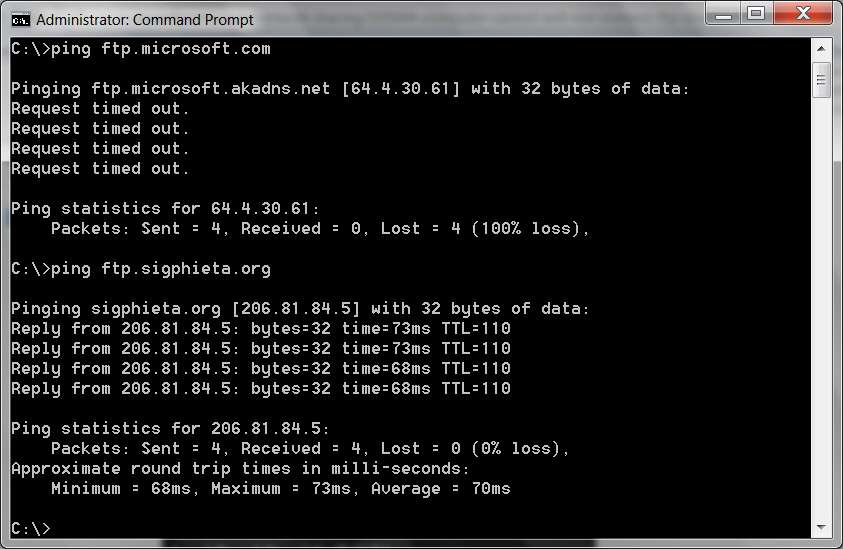
I don't think the ping results are relevant.

pingftp.jpg


Failing to respond to a "ping" sounds like a prudent bit of protection against attack that Microsoft would likely have built.

Same with the trace route. I show similar timeouts from the several variants I can use to show a trace route. Again, not really relevant.

If you CAN connect via FTP to your own site's FTP server, but you CANNOT connect to Microsoft's FTP server... is it possible that your IP address has been "black listed" at Microsoft??

Just out of curiosity, how about trying to connect to another public FTP site (from IBM) that absolutely works with "anonymous" and your email address, which you've certainly never been to before so they couldn't possibly have blacklisted you (please substitute "." instead of "*" in the following URL when you try it):
ftp service*boulder*ibm*com
Did that work or fail??
 

My Computer

Computer type
PC/Desktop
Computer Manufacturer/Model Number
Home-built, two systems (1) and (2)
OS
Windows 7 Pro x64 (1), Win7 Pro X64 (2)
CPU
i5-3350p 3.1Ghz/6MB-cache (1); E8400 3.0Ghz/6MB-cache (2)
Motherboard
ASUS P8Z77-V Pro (1); ASUS P5Q3 (2)
Memory
8GB PC3-12800 DDR3 (1); 4GB PC3-10600 DDR3 (2)
Graphics Card(s)
ATI HD7750 (1), (see TV cards); ATI R7 250 (2)
Sound Card
Realtek ALC892 HD Audio (1); Realtek ALC1200 HD Audio (2)
Monitor(s) Displays
Eizo HD2441W LCD, Eizo S2433W (1); Eizo 24" S2433W (2)
Screen Resolution
1920x1200, 1920x1200 (1); 1920x1200 (2)
Hard Drives
(1) 1TB SATA-II (7200RPM), 2x2TB SATA-III (7200RPM), 250GB SATA-III (10000RPM) for OS; 2x2TB external USB 3.0

(2) 320GB SATA-II (7200RPM), 750GB SATA-II (7200RPM), 150GB SATA-II (10000RPM) for OS; 2TB external USB 3.0
PSU
Nesteq ECS-6001 600W (1); Nesteq ECS-5001 500W (2)
Case
Acousti-Case 360 (1) and (2)
Cooling
Noctua NH-U12P SE2 for CPU, 2x120mm case fans (1) and (2)
Keyboard
IBM PS/2 (1) and (2)
Mouse
Logitech MX Revolution wireless (1); Microsoft wired (2)
Internet Speed
100mbps down / 10mbps up
Antivirus
Microsoft Security Essentials; Malwarebyte Anti-Malware Pro
Browser
Firefox
Other Info
Ceton InfiniTV 4-tuner cablecard-enabled TV card as well as Hauppauge HVR-2250 OTA/ATSC 2-tuner TV card in (1), running under Win7 WMC
basically failed - like before, it did not ask for credentials at all but showed no sort of error message. It seems to fail before it even connects.
 

My Computer

Computer Manufacturer/Model Number
Dell Inspiron 1545
OS
Windows 7 Home Premium 32 bit
CPU
Pentium Dual-Core CPU T4200 @ 2.00GHz
Memory
3.00 GB
Graphics Card(s)
Mobile Intel 4 Series Express Chipset Family
Sound Card
IDT High Definition Audio CODEC
basically failed - like before, it did not ask for credentials at all but showed no sort of error message. It seems to fail before it even connects.
Again... fascinating.

And yet, you have no problem connecting to your own private FTP site (which does or does not accept "anonymous" logins??). This is the "giant clue" really, namely why does this work from this same PC whereas as all other FTP connections appear to fail?

Also, you never did answer my question as to whether the "active layer gateway" service was running? Go into TASKMGR, then the services tab, and arrange alphabetically for easy examination.
 

My Computer

Computer type
PC/Desktop
Computer Manufacturer/Model Number
Home-built, two systems (1) and (2)
OS
Windows 7 Pro x64 (1), Win7 Pro X64 (2)
CPU
i5-3350p 3.1Ghz/6MB-cache (1); E8400 3.0Ghz/6MB-cache (2)
Motherboard
ASUS P8Z77-V Pro (1); ASUS P5Q3 (2)
Memory
8GB PC3-12800 DDR3 (1); 4GB PC3-10600 DDR3 (2)
Graphics Card(s)
ATI HD7750 (1), (see TV cards); ATI R7 250 (2)
Sound Card
Realtek ALC892 HD Audio (1); Realtek ALC1200 HD Audio (2)
Monitor(s) Displays
Eizo HD2441W LCD, Eizo S2433W (1); Eizo 24" S2433W (2)
Screen Resolution
1920x1200, 1920x1200 (1); 1920x1200 (2)
Hard Drives
(1) 1TB SATA-II (7200RPM), 2x2TB SATA-III (7200RPM), 250GB SATA-III (10000RPM) for OS; 2x2TB external USB 3.0

(2) 320GB SATA-II (7200RPM), 750GB SATA-II (7200RPM), 150GB SATA-II (10000RPM) for OS; 2TB external USB 3.0
PSU
Nesteq ECS-6001 600W (1); Nesteq ECS-5001 500W (2)
Case
Acousti-Case 360 (1) and (2)
Cooling
Noctua NH-U12P SE2 for CPU, 2x120mm case fans (1) and (2)
Keyboard
IBM PS/2 (1) and (2)
Mouse
Logitech MX Revolution wireless (1); Microsoft wired (2)
Internet Speed
100mbps down / 10mbps up
Antivirus
Microsoft Security Essentials; Malwarebyte Anti-Malware Pro
Browser
Firefox
Other Info
Ceton InfiniTV 4-tuner cablecard-enabled TV card as well as Hauppauge HVR-2250 OTA/ATSC 2-tuner TV card in (1), running under Win7 WMC
First, to clarify, I can't connect even with the personal ftp (same problem as the other ftps). Second, my task manager does not even list the Application Layer Gateway so I'm assuming I need to have it running for one reason or another...

So I went to my System32 folder and found the service (alg.exe), double clicked, and now its in the task manager as "Stopped", but when I try to start the service I get an error saying "The operation could not be completed. Access Denied."
 

My Computer

Computer Manufacturer/Model Number
Dell Inspiron 1545
OS
Windows 7 Home Premium 32 bit
CPU
Pentium Dual-Core CPU T4200 @ 2.00GHz
Memory
3.00 GB
Graphics Card(s)
Mobile Intel 4 Series Express Chipset Family
Sound Card
IDT High Definition Audio CODEC
Back
Top