Computer crashing: Black screen and looping sound

gabidamo999

New member
Local time
7:51 AM
Messages
12
Hello everyone,
I've built my new computer a week ago and I'm having a problem and I need to know ASAP if any part is defective to do a RMA.
When I play games, (League of Legends, Cod4,..), my computer randomly crashes on a black screen and a looping bug sound. The monitor says ''Monitor going to sleep''. I've tried to run OCCT on my GPU for about 30 minutes @ 90 degrees C withouth problem. I've done one or two pass in Memtest+ to check my RAM too.
Any thoughts on this? Maybe it is my PSU? I've heard about the NVidia HD audio too.
Here is my rig:

  • Windows 7 Home Premium 64 bits
  • CPU: Intel Core i5-3570K
  • PSU: COOLER MASTER GX Series 750W
  • CASE: COOLER MASTER HAF 922
  • MOBO: MSI Z77A-G45 LGA 1155 Intel Z77
  • GPU: EVGA SuperClocked 012-P3-1573-AR GeForce GTX 570
  • RAM: G.SKILL Ripjaws X Series 8GB DDR3 1600
  • HDD: WD Caviar Black 1TB 7200 RPM 64MB Cache
 

My Computer My Computer

At a glance

Windows 7 64 bits
OS
Windows 7 64 bits
Are there any dumps to be uploaded?

Otherwise, uploading everything else-
We'd need you to attach some files to your post. This includes, crash dumps, nfo etc. To get these files, use our thread below.

http://www.sevenforums.com/crashes-debugging/96879-blue-screen-death-bsod-posting-instructions.html


To ensure minidumps are enabled:

* Press Start, in the Search Box type: "sysdm.cpl" (without the quotes), press Enter.
* Select the Advanced tab, click on Startup and Recovery Settings.
* Ensure that Automatically restart is unchecked.
* Under the Write Debugging Information headline select Small memory dump (256 kB) in the dropdown box.
* Ensure that the Small Dump Directory is listed as %systemroot%\Minidump.
* OK till you're out of the dialogue.
* Reboot if changes have been made.


Best Regards,
Frederik.
 

My Computer My Computer

At a glance

Microsoft Windows 7 Ultimate: x64 (SP1)Intel® Core™ i5-2500K ProcessorKingston DDR3 HyperX 1600MHz 8GBASUS GTX 560 TI DirectCU II 900MHz
Computer Manufacturer/Model Number
Brewed
OS
Microsoft Windows 7 Ultimate: x64 (SP1)
CPU
Intel® Core™ i5-2500K Processor
Motherboard
ASUS P8Z68-V PRO
Memory
Kingston DDR3 HyperX 1600MHz 8GB
Graphics Card(s)
ASUS GTX 560 TI DirectCU II 900MHz
Sound Card
Realtek® ALC892 8-Channel High Definition Audio CODEC
Monitor(s) Displays
ACER LCD P246HBD 1920x1080 (24") - Dell 1280x800
Screen Resolution
ACER LCD P246HBD ~ [1920X1080] - DELL ~ [1280x800]
Hard Drives
500 GB WD Caviar SE116 7200rpm SATA2
PSU
Corsair 750W Power Supply
Case
Coolermaster CM Scout
Cooling
Zalman FS-C77 Fatal1ty CPU Cooler
Keyboard
Logitech G15
Mouse
Coolermaster Sentinel Advanced
Internet Speed
[↓ 10 MB/s DL] [↑ 1 MB/s UL]
Other Info
- ROCCAT™ Kave – Solid 5.1 Surround Sound Gaming Headset
- Not overclocking
  • Like
Reactions: Arc
Here is my file! My computer just reboot again with no reason while playing Call of Duty 4.

If that can help, after the reboot a message appeared. (See link picture)
 

My Computer My Computer

At a glance

Windows 7 64 bits
OS
Windows 7 64 bits
Thank you!

BSOD Analyse

Code:
NVIDIA High Definition Audio	HDAUDIO\FUNC_01&VEN_10DE&DEV_0018&SUBSYS_10DE0101&REV_1001\5&28CEA594&0&0001	Ce périphérique est désactivé.
NVIDIA High Definition Audio	HDAUDIO\FUNC_01&VEN_10DE&DEV_0018&SUBSYS_10DE0101&REV_1001\5&28CEA594&0&0101	Ce périphérique est désactivé.
NVIDIA High Definition Audio	HDAUDIO\FUNC_01&VEN_10DE&DEV_0018&SUBSYS_10DE0101&REV_1001\5&28CEA594&0&0201	Ce périphérique est désactivé.
NVIDIA High Definition Audio	HDAUDIO\FUNC_01&VEN_10DE&DEV_0018&SUBSYS_10DE0101&REV_1001\5&28CEA594&0&0301	Ce périphérique est désactivé.

Any specific reason for disabling these?

Different culprits pointed towards your NVIDIA Graphics Driver. Driver Sweeper will ensure that you'd have a clean install at the end of the procedure, and by that no leftover files that'd bork the system.

* Make your way to Nvidia Drivers - Download NVIDIA Drivers and download the latest driver for your card, save it to your desktop for instance.
* Uninstall the Graphic driver you currently have and all its extensions (do not reboot yet)
* Download Driver Sweeper
* Get to safe mode (without network) and search for Driver Sweeper in your :orb:
* Select all the Nvidia components and analyse them
* Clean them, head into Windows without internet and install the driver you downloaded previously


Best Regards,
Frederik.
 

My Computer My Computer

At a glance

Microsoft Windows 7 Ultimate: x64 (SP1)Intel® Core™ i5-2500K ProcessorKingston DDR3 HyperX 1600MHz 8GBASUS GTX 560 TI DirectCU II 900MHz
Computer Manufacturer/Model Number
Brewed
OS
Microsoft Windows 7 Ultimate: x64 (SP1)
CPU
Intel® Core™ i5-2500K Processor
Motherboard
ASUS P8Z68-V PRO
Memory
Kingston DDR3 HyperX 1600MHz 8GB
Graphics Card(s)
ASUS GTX 560 TI DirectCU II 900MHz
Sound Card
Realtek® ALC892 8-Channel High Definition Audio CODEC
Monitor(s) Displays
ACER LCD P246HBD 1920x1080 (24") - Dell 1280x800
Screen Resolution
ACER LCD P246HBD ~ [1920X1080] - DELL ~ [1280x800]
Hard Drives
500 GB WD Caviar SE116 7200rpm SATA2
PSU
Corsair 750W Power Supply
Case
Coolermaster CM Scout
Cooling
Zalman FS-C77 Fatal1ty CPU Cooler
Keyboard
Logitech G15
Mouse
Coolermaster Sentinel Advanced
Internet Speed
[↓ 10 MB/s DL] [↑ 1 MB/s UL]
Other Info
- ROCCAT™ Kave – Solid 5.1 Surround Sound Gaming Headset
- Not overclocking
I disabled these on purpose. Some forums said they could be the cause of the crashes, but it looks like it is not. On the windows event logs I get the Kernel-Power 41 error.

I'll do a clean install or Nvidia drivers (again).

Could it be my PSU failing? I can RMA it if it is defective.

I dont think it's a video card overheating issue because I ran a stress test with OCCT for 30 mins @ 90 degrees without failing.
 

My Computer My Computer

At a glance

Windows 7 64 bits
OS
Windows 7 64 bits
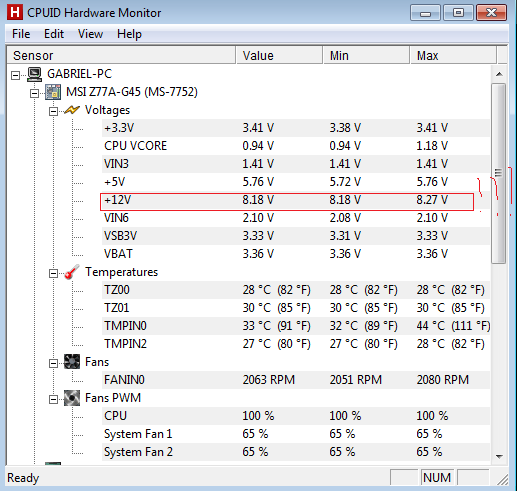
Could this be a problem? my +12V is not very high...
XHPDP.png
 

My Computer My Computer

At a glance

Windows 7 64 bits
OS
Windows 7 64 bits
Hmm.. go to BIOS and pull everything ON default. I'd not suggest you to turn off volts etc. Are those 12 V default?
 

My Computer My Computer

At a glance

Microsoft Windows 7 Ultimate: x64 (SP1)Intel® Core™ i5-2500K ProcessorKingston DDR3 HyperX 1600MHz 8GBASUS GTX 560 TI DirectCU II 900MHz
Computer Manufacturer/Model Number
Brewed
OS
Microsoft Windows 7 Ultimate: x64 (SP1)
CPU
Intel® Core™ i5-2500K Processor
Motherboard
ASUS P8Z68-V PRO
Memory
Kingston DDR3 HyperX 1600MHz 8GB
Graphics Card(s)
ASUS GTX 560 TI DirectCU II 900MHz
Sound Card
Realtek® ALC892 8-Channel High Definition Audio CODEC
Monitor(s) Displays
ACER LCD P246HBD 1920x1080 (24") - Dell 1280x800
Screen Resolution
ACER LCD P246HBD ~ [1920X1080] - DELL ~ [1280x800]
Hard Drives
500 GB WD Caviar SE116 7200rpm SATA2
PSU
Corsair 750W Power Supply
Case
Coolermaster CM Scout
Cooling
Zalman FS-C77 Fatal1ty CPU Cooler
Keyboard
Logitech G15
Mouse
Coolermaster Sentinel Advanced
Internet Speed
[↓ 10 MB/s DL] [↑ 1 MB/s UL]
Other Info
- ROCCAT™ Kave – Solid 5.1 Surround Sound Gaming Headset
- Not overclocking
In my bios my +12 rail appears at 12 volts.. So I think there is no problem. It appears at 8 volts on HWmonitor.

I have a new clue! While playing League of Legends, my screen turned black and it crashed as I described. But, after restarting and entering the game again, after 10 minutes the screen went black (like when it crashed) but it came back to the game after 2-3 seconds! What could cause this?? GPU faulty? PSU faulty?

After that I checked my minidump files. I was able to find two drivers that could be involved in the crashing (maybe, or the last drivers that was detected before crash): nvlddmkm.sys and dxgkrnl.sys.
Now, I connected my GPU and RAM in other slots to try. Maybe these slots were bad or maybe the components were not correctly connected.

Any thoughts?
 

My Computer My Computer

At a glance

Windows 7 64 bits
OS
Windows 7 64 bits
Interesting. Try a clean install of your Graphics Driver.

Different culprits pointed towards your NVIDIA Graphics Driver. Driver Sweeper will ensure that you'd have a clean install at the end of the procedure, and by that no leftover files that'd bork the system.

* Make your way to Nvidia Drivers - Download NVIDIA Drivers and download the latest driver for your card, save it to your desktop for instance.
* Uninstall the Graphic driver you currently have and all its extensions (do not reboot yet)
* Download Driver Sweeper
* Get to safe mode (without network) and search for Driver Sweeper in your :orb:
* Select all the Nvidia components and analyse them
* Clean them, head into Windows without internet and install the driver you downloaded previously


Best Regards,
Frederik.
 
Last edited:

My Computer My Computer

At a glance

Microsoft Windows 7 Ultimate: x64 (SP1)Intel® Core™ i5-2500K ProcessorKingston DDR3 HyperX 1600MHz 8GBASUS GTX 560 TI DirectCU II 900MHz
Computer Manufacturer/Model Number
Brewed
OS
Microsoft Windows 7 Ultimate: x64 (SP1)
CPU
Intel® Core™ i5-2500K Processor
Motherboard
ASUS P8Z68-V PRO
Memory
Kingston DDR3 HyperX 1600MHz 8GB
Graphics Card(s)
ASUS GTX 560 TI DirectCU II 900MHz
Sound Card
Realtek® ALC892 8-Channel High Definition Audio CODEC
Monitor(s) Displays
ACER LCD P246HBD 1920x1080 (24") - Dell 1280x800
Screen Resolution
ACER LCD P246HBD ~ [1920X1080] - DELL ~ [1280x800]
Hard Drives
500 GB WD Caviar SE116 7200rpm SATA2
PSU
Corsair 750W Power Supply
Case
Coolermaster CM Scout
Cooling
Zalman FS-C77 Fatal1ty CPU Cooler
Keyboard
Logitech G15
Mouse
Coolermaster Sentinel Advanced
Internet Speed
[↓ 10 MB/s DL] [↑ 1 MB/s UL]
Other Info
- ROCCAT™ Kave – Solid 5.1 Surround Sound Gaming Headset
- Not overclocking
Thanks for the reply. I have already done that.

My computer just crashed again...

HIDPARSE.SYS was the error.

I don't know what to do anymore! Here is my dump file.
 

My Computer My Computer

At a glance

Windows 7 64 bits
OS
Windows 7 64 bits
SFC /SCANNOW - Windows Reparation Scan

We usually ask people to do this command to check if Windows is corrupted. It's the most common used one to check if the Windows files are corrupted. If it'll find errors, it'll restore them.

   Tip
If you're having a custom customization layer on your Aero, it's likely to get restored to default.


Press Start | search 'cmd' | Right-click it
| open as Admin | type SFC /SCANNOW

http://www.sevenforums.com/tutorials/1538-sfc-scannow-command-system-file-checker.html

¨¨¨¨¨¨¨¨¨¨¨¨¨¨¨¨¨¨¨¨¨¨¨¨¨¨¨¨¨¨¨¨¨¨¨¨¨¨¨¨¨¨¨¨¨¨¨¨¨¨¨¨¨¨¨¨¨¨¨¨¨¨¨¨¨¨¨¨¨¨¨¨¨¨¨¨¨¨¨¨¨¨¨¨¨¨

Code:
¨3: kd> k
Child-SP          RetAddr           Call Site
fffff880`02f53a48 fffff880`03118000 nt!KeBugCheckEx
[COLOR=#00B050]fffff880`02f53a50 fffff880`030eb867 dxgkrnl!TdrBugcheckOnTimeout+0xec
fffff880`02f53a90 fffff880`03117e0f dxgkrnl!DXGADAPTER::Reset+0x2a3
fffff880`02f53b40 fffff880`031e6ec1 dxgkrnl!TdrResetFromTimeout+0x23
fffff880`02f53bc0 fffff800`03719e6a dxgmms1!VidSchiWorkerThread+0x101[/COLOR]
fffff880`02f53c00 fffff800`03473ec6 nt!PspSystemThreadStartup+0x5a
fffff880`02f53c40 00000000`00000000 nt!KiStartSystemThread+0x16
Renew your Direct-X files.

Best Regards,
Frederik.
 

My Computer My Computer

At a glance

Microsoft Windows 7 Ultimate: x64 (SP1)Intel® Core™ i5-2500K ProcessorKingston DDR3 HyperX 1600MHz 8GBASUS GTX 560 TI DirectCU II 900MHz
Computer Manufacturer/Model Number
Brewed
OS
Microsoft Windows 7 Ultimate: x64 (SP1)
CPU
Intel® Core™ i5-2500K Processor
Motherboard
ASUS P8Z68-V PRO
Memory
Kingston DDR3 HyperX 1600MHz 8GB
Graphics Card(s)
ASUS GTX 560 TI DirectCU II 900MHz
Sound Card
Realtek® ALC892 8-Channel High Definition Audio CODEC
Monitor(s) Displays
ACER LCD P246HBD 1920x1080 (24") - Dell 1280x800
Screen Resolution
ACER LCD P246HBD ~ [1920X1080] - DELL ~ [1280x800]
Hard Drives
500 GB WD Caviar SE116 7200rpm SATA2
PSU
Corsair 750W Power Supply
Case
Coolermaster CM Scout
Cooling
Zalman FS-C77 Fatal1ty CPU Cooler
Keyboard
Logitech G15
Mouse
Coolermaster Sentinel Advanced
Internet Speed
[↓ 10 MB/s DL] [↑ 1 MB/s UL]
Other Info
- ROCCAT™ Kave – Solid 5.1 Surround Sound Gaming Headset
- Not overclocking
Thanks again for quick reply!
I just did the scan and all my files are correct.
I also already reinstalled DirectX yesterday.

I think it's a hardware problem, but I do not know which part is responsible!
 

My Computer My Computer

At a glance

Windows 7 64 bits
OS
Windows 7 64 bits
Alright I see. Sorry for post #9 by the way, I noticed I posted the same things twice. That's what happens when you analyse more than several dumps a day. ;)

Have you enabled verifier?

Using Driver Verifier is an iffy proposition. Most times it'll crash and it'll tell you what the driver is. But sometimes it'll crash and won't tell you the driver. Other times it'll crash before you can log in to Windows. If you can't get to Safe Mode, then you'll have to resort to offline editing of the registry to disable Driver Verifier.

So, I'd suggest that you first backup your stuff and then make sure you've got access to another computer so you can contact us if problems arise.
Then make a System Restore point (so you can restore the system using the Vista/Win7 Startup Repair feature) - and create a System Repair Disc (Win7) if you don't have a full installation DVD.
You can do this by going to Start...All Programs...Maintenance...Create a System Repair Disc (don't forget to test the disc to make sure it works).

For Vista, you can download the repair discs from different websites. If unable to locate them, shoot me a PM and I'll point you to them.
For Win8, BSOD's are different - and we'll have to adjust how we do this with them.

Also, to ensure that you can recover, here's another couple of additional steps:
- Get to the Safe Mode menu (rapidly tap F8 just before the Windows splash screen comes up). Scroll down to and select "Disable automatic restart on System Failure"
- Get the RED information from this picture (in particular we will need the name of the file that the error occurred in):
Picture of a BSOD

Then, here's the procedure to run Driver Verifier:
- Go to Start and type in "verifier" (without the quotes) and press Enter
- Select "Create custom settings (for code developers)" and click "Next"
- Select "Select individual settings from a full list" and click "Next"
- Select everything EXCEPT FOR "IRP Logging", "Force Pending I/O Requests" and "Low Resource Simulation" and click "Next" ("Special Pool" may be able to be used depending on amount of RAM and errors being seen. In situations with small amounts of RAM, DO NOT select it),
- Select "Select driver names from a list" and click "Next"
Then select all drivers NOT provided by Microsoft and click "Next"
- Select "Finish" on the next page.

Reboot the system and wait for it to crash to the Blue Screen. Continue to use your system normally, and if you know what causes the crash, do that repeatedly. The objective here is to get the system to crash because Driver Verifier is stressing the drivers out. If it doesn't crash for you, then let it run for at least 36 hours of continuous operation (an estimate on my part).

Reboot into Windows (after the crash) and locate the memory dump file. If present, turn off Driver Verifier by going back in and selecting "Delete existing settings" on the first page. Then, zip up the memory dump file(s) and upload them with your next post. If no dump files were generated, post back for further suggestions.

If you can't get into Windows because it crashes too soon, try it in Safe Mode.
If you can't get into Safe Mode, try using System Restore from your installation DVD to set the system back to the previous restore point that you created.

If that doesn't work, post back and we'll have to see about fixing the registry entry off-line:
Code:
Delete these registry keys to stop Driver Verifier from loading (works in XP, Vista, Win7):
        HKEY_LOCAL_MACHINE\SYSTEM\CurrentControlSet\Control\Session Manager\Memory Management\VerifyDrivers
        HKEY_LOCAL_MACHINE\SYSTEM\CurrentControlSet\Control\Session Manager\Memory Management\VerifyDriverLevel

Best Regards,
Frederik.
 

My Computer My Computer

At a glance

Microsoft Windows 7 Ultimate: x64 (SP1)Intel® Core™ i5-2500K ProcessorKingston DDR3 HyperX 1600MHz 8GBASUS GTX 560 TI DirectCU II 900MHz
Computer Manufacturer/Model Number
Brewed
OS
Microsoft Windows 7 Ultimate: x64 (SP1)
CPU
Intel® Core™ i5-2500K Processor
Motherboard
ASUS P8Z68-V PRO
Memory
Kingston DDR3 HyperX 1600MHz 8GB
Graphics Card(s)
ASUS GTX 560 TI DirectCU II 900MHz
Sound Card
Realtek® ALC892 8-Channel High Definition Audio CODEC
Monitor(s) Displays
ACER LCD P246HBD 1920x1080 (24") - Dell 1280x800
Screen Resolution
ACER LCD P246HBD ~ [1920X1080] - DELL ~ [1280x800]
Hard Drives
500 GB WD Caviar SE116 7200rpm SATA2
PSU
Corsair 750W Power Supply
Case
Coolermaster CM Scout
Cooling
Zalman FS-C77 Fatal1ty CPU Cooler
Keyboard
Logitech G15
Mouse
Coolermaster Sentinel Advanced
Internet Speed
[↓ 10 MB/s DL] [↑ 1 MB/s UL]
Other Info
- ROCCAT™ Kave – Solid 5.1 Surround Sound Gaming Headset
- Not overclocking
Back
Top