Computer Freezing Issue - Regsvr 32

TokaSeya

New member
Local time
2:08 PM
Messages
2
Okay so my computer has been having serious issues all because of this Regsvr 32 error. I don't even know why or how this problem originated. This is the message.

Regsvr32
The module "C:\ProgramData\AawulNonri\AawulNonri.dat" failed to load. Make sure the binary is stored at the specified path or debug it to check for problems with the binary or dependent .DLL files. The specified module could not be found.

As a result of this, my PC just does not work normally anymore, and this Regsvr 32 error creates additional problems, such as:
  • PC is frozen after trying to log onto Main User Account -> Can't even get to the desktop
  • Startup Repair freezes after several minutes
  • Regsvr 32 only shows up on Guest Account -> PC is completely frozen after a couple of minutes of getting to the desktop
These are all of the really severe problems I've been experiencing. I essentially can't even log onto my main user account on the PC and can only log onto the guest account for only a couple of minutes and then the Regsvr 32 error shows up and then the PC freezes. I can't do anything because my PC freezes instantly after logging on the guest account and I can't even get to the control panel to see the full specs of my PC. I just want everything to be normal again. My other option is to remove the hard drive, get my stuff, and send the PC to some repair store, but I wanted to get help from this forum first before I did anything. At this point, any advice will be helpful.
Thank you.
 

My Computer

Computer type
PC/Desktop
Computer Manufacturer/Model Number
Dell
OS
Windows 7 Home Premium 64 bit
CPU
XPS 7100
Hard Drives
1 TB

My Computer

Computer type
PC/Desktop
Computer Manufacturer/Model Number
Own build (new) Desk1 / Asus ROG Win 7 / Desk2 1st build
OS
Desk1 7 Home Prem / Desk2 10 Pro / Main lap Asus ROG 10 Pro 2 laptop Toshiba 7 Pro Asus P2520 7 & 10
CPU
Desk1 i5 3750K / Laptop i7 GTX 860M / Desk2 i5 2500
Motherboard
Desk1 Asus P877-V / Desk2 Gigabyte H67 UD3H / Laptop ?
Memory
Desk1 8GB (1866) / Desk2 16GB (1333) / Laptop 8Gb DDR3
Graphics Card(s)
Desk 1& 2NVidia GTX 650 & Laptops on board Intel
Sound Card
Desk 1 & 2 -XONAR DG Realtek High Def audio Laptop
Monitor(s) Displays
Desk 1 Benq HD 2450 / Desk2 Philips 24" / Laptop 17.5"
Screen Resolution
1920x1080 D1 & D2 & Laptop 1
Hard Drives
Desk1 Samsung 120GB 830 SSD
Asus ROG 256GB 850 Pro SSD
Desk2 Samsung 840 256 SSD
Toshiba 120GB EVO
PSU
Desk 1 Corsair HX 1050/ Laptop ? / Desk 2 Corsair HX 650
Case
Desk 1 Cooler HAF XM ? Toshiba laptop / Desk2 Coolermaster
Cooling
Fans on all Desk1 -2 Desk2 - all Coolermasters 5 Laptop ?
Keyboard
Desk 1 MS Sidewinder X6 Desk 2 MS Sidewinder X 4
Mouse
Desk 1&2 - Gigabyte MS 900 gamer - laptop - Logitec wireless
Internet Speed
ADSL2+
Other Info
One other Desktop (tester) and spare Toshba laptop both with SSD's
Running Kaspersky 2016 ISS on all machines config'd identically
Logitec audio stereo systems on each machine (x3)
Canon MG5250MFC
Router/modem TP-Link running WPA2SK
Hi ICIT2LOL. Thank you so much for replying. I was beginning to feel hopeless. I can only boot into Safe Mode on my guest account and then as soon as I get to the desktop the Regsvr 32 message shows up and then the PC completely freezes. I read the SFC/SCANNOW Command and Disk Check options you linked to but unfortunately I can't run either of them because as soon as I log into the guest account my PC freezes. Is there anything else I can do? I don't even understand where this Regsvr 32 problem came from. Thank you for providing the links and I will be sure to use them in the future if some other random issue occurs.
 

My Computer

Computer type
PC/Desktop
Computer Manufacturer/Model Number
Dell
OS
Windows 7 Home Premium 64 bit
CPU
XPS 7100
Hard Drives
1 TB
Ok mate I know how you feel and it is very frustrating. Now I found this https://support.microsoft.com/en-us/kb/249873 it does mean however that you get into the registry and if the machine is freezing that makes using the fixes more than little difficult.

Now what I am going to suggest is probably not what you want to hear but have you backed up all of your data? If you have then I think a clean install is your nest choice. If you haven't backed up the data don't panic because there are ways of retrieving it but you will need either an external drive or another machine.
This is what I have done on occasions where I cannot get the machine to boot properly or if at all.
BOOTABLE UBUNTU
Make a bootable Ubuntu disk Download Ubuntu Desktop | Download | Ubuntu
Set the BIOS to boot from the optical when the machine boots it will show you a screen with TRY or INSTALL > select TRY not INSTALL
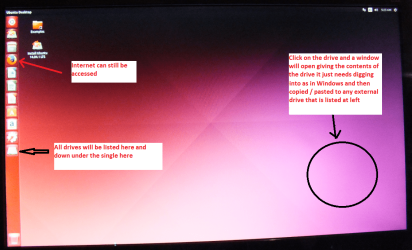
When it is finished - it takes very little time you will get a screen like in the pic .
Open the drive you want > User and dig down until you get to the data / settings you may be able to copy / paste the material you want to an external source or other installed drive doing this.
I am not sure if it will but I have recovered tons of data etc using this method both on "dead" or just plain drives that you cannot get data from using Windows.
There is an alternative in this http://www.sevenforums.com/tutorials/287439-emergency-kit-save-your-files-dead-os.html however I have not used this one though it does work along similar lines - I just fin d the Ubuntu disk easy to make and use.
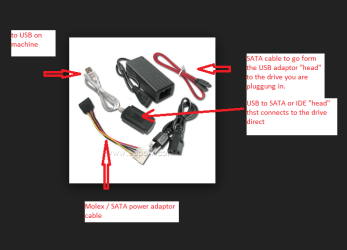
If yo are using another machine you will need to take out the hard drive from the freezing machine and hook it up to the other machine using a USB to SATA adaptor - not expensive and very handy. see pics
 

Attachments

  • UBUNTU SCREEN X2.PNG
    UBUNTU SCREEN X2.PNG
    272.7 KB · Views: 0
  • USBSATA.PNG
    USBSATA.PNG
    26.6 KB · Views: 0

My Computer

Computer type
PC/Desktop
Computer Manufacturer/Model Number
Own build (new) Desk1 / Asus ROG Win 7 / Desk2 1st build
OS
Desk1 7 Home Prem / Desk2 10 Pro / Main lap Asus ROG 10 Pro 2 laptop Toshiba 7 Pro Asus P2520 7 & 10
CPU
Desk1 i5 3750K / Laptop i7 GTX 860M / Desk2 i5 2500
Motherboard
Desk1 Asus P877-V / Desk2 Gigabyte H67 UD3H / Laptop ?
Memory
Desk1 8GB (1866) / Desk2 16GB (1333) / Laptop 8Gb DDR3
Graphics Card(s)
Desk 1& 2NVidia GTX 650 & Laptops on board Intel
Sound Card
Desk 1 & 2 -XONAR DG Realtek High Def audio Laptop
Monitor(s) Displays
Desk 1 Benq HD 2450 / Desk2 Philips 24" / Laptop 17.5"
Screen Resolution
1920x1080 D1 & D2 & Laptop 1
Hard Drives
Desk1 Samsung 120GB 830 SSD
Asus ROG 256GB 850 Pro SSD
Desk2 Samsung 840 256 SSD
Toshiba 120GB EVO
PSU
Desk 1 Corsair HX 1050/ Laptop ? / Desk 2 Corsair HX 650
Case
Desk 1 Cooler HAF XM ? Toshiba laptop / Desk2 Coolermaster
Cooling
Fans on all Desk1 -2 Desk2 - all Coolermasters 5 Laptop ?
Keyboard
Desk 1 MS Sidewinder X6 Desk 2 MS Sidewinder X 4
Mouse
Desk 1&2 - Gigabyte MS 900 gamer - laptop - Logitec wireless
Internet Speed
ADSL2+
Other Info
One other Desktop (tester) and spare Toshba laptop both with SSD's
Running Kaspersky 2016 ISS on all machines config'd identically
Logitec audio stereo systems on each machine (x3)
Canon MG5250MFC
Router/modem TP-Link running WPA2SK
Back
Top