Computer goes to sleep and I have to activate by click

Manutjee

New member
Local time
8:21 PM
Messages
33
Location
The Netherlands
Hi again,

I'm here with another question;
My computer goes to sleep after several minutes and I have to activate it by clicking on my left-mousebutton. Before today I just needed to move my mouse to activate my computer. Does anyone know how to change this?

And I'm also sorry for putting this in the wrong section... I did not know where to put this... :o

Thanks!
 

My Computer My Computer

At a glance

Windows 7
OS
Windows 7
I have an optical mouse, and to wake my computer I must hit a key or right click. Is it possible that in the past when you woke your computer by just moving the mouse, it was not actually asleep, but merely had the monitor turned off, as directed by the power option. I hope that you understand that everyone here is just trying to help and have to ask what might appear as foolish questions in order to ascertain all the necessary information.

All the best to you.
 

My Computer My Computer

At a glance

Windows 10, Home Clean InstallIntel Core2 processsor Q8200(2.33Ghz 1333FSB)...6 gbATI Radeon 256MB HD3650
Computer type
PC/Desktop
Computer Manufacturer/Model Number
Dell XPS 420
OS
Windows 10, Home Clean Install
CPU
Intel Core2 processsor Q8200(2.33Ghz 1333FSB) Quad Core Tech
Motherboard
Dell
Memory
6 gb
Graphics Card(s)
ATI Radeon 256MB HD3650
Sound Card
Intergrated 7.1 Channel Audio
Monitor(s) Displays
Dell SP2009W 20"
Hard Drives
640 GB Serial ATA Hard drive
Cooling
Fan
Keyboard
Dell USB Keyboard
Mouse
Dell Premium Optical USB
Internet Speed
DSL 2.85
I think my computer did go to sleep 'cause when I used to move my mouse, the screen turned on and I only needed to click on my account name. It's hard for me to explain, my English isn't that good...

By the way, I also wanted to add this; even when I am on Messenger my computer turns to sleep/off when I haven't touch my mouse in half an hour or so. So I think that has nothing to do with my monitor. I also wanted to know where I can change the delay/timer in my options... - If that's possible.
 

My Computer My Computer

At a glance

Windows 7
OS
Windows 7
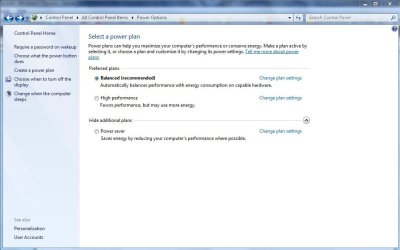
goto control panel\ power options and click "change plan settings" for sleep options :)
 

My Computer My Computer

At a glance

win7 ultimate / virtual boxIntel Core i7 3770K,1155, Ivy BridgeGSkill Ripjaws Z Series 1600 CL 9.0 16GBKFA2 GeForce GTX 670 EX OC 2048MB GDDR5 PCI-E...
Computer Manufacturer/Model Number
built my own
OS
win7 ultimate / virtual box
CPU
Intel Core i7 3770K,1155, Ivy Bridge
Motherboard
MSI Z77A-G43
Memory
GSkill Ripjaws Z Series 1600 CL 9.0 16GB
Graphics Card(s)
KFA2 GeForce GTX 670 EX OC 2048MB GDDR5 PCI-E gfx card
Sound Card
onboard Nvidia HDMI audio
Monitor(s) Displays
ASUS VK222H 22" widescreen LCD monitor
Screen Resolution
1680x1050
Hard Drives
Kingston 128gb SSD
OCZ Vertex 90gb SSD
500GB WDCaviar 16mb 5000KS
320GB WDCaviar 16mb 3200AAKS sata 2
1TB Samsung 16mb HD103SJ sata 2
PSU
Corsair HX 750W ATX2.2 Modular
Cooling
Antec 25 Kuhler H2O 620
Keyboard
logitech
Mouse
logitech MX518
Internet Speed
7mb adsl
Can you put a screenshot on? I can't find it, my computer is Dutch and maybe with a icon I can find it... :)
 

My Computer My Computer

At a glance

Windows 7
OS
Windows 7

My Computer My Computer

At a glance

win7 ultimate / virtual boxIntel Core i7 3770K,1155, Ivy BridgeGSkill Ripjaws Z Series 1600 CL 9.0 16GBKFA2 GeForce GTX 670 EX OC 2048MB GDDR5 PCI-E...
Computer Manufacturer/Model Number
built my own
OS
win7 ultimate / virtual box
CPU
Intel Core i7 3770K,1155, Ivy Bridge
Motherboard
MSI Z77A-G43
Memory
GSkill Ripjaws Z Series 1600 CL 9.0 16GB
Graphics Card(s)
KFA2 GeForce GTX 670 EX OC 2048MB GDDR5 PCI-E gfx card
Sound Card
onboard Nvidia HDMI audio
Monitor(s) Displays
ASUS VK222H 22" widescreen LCD monitor
Screen Resolution
1680x1050
Hard Drives
Kingston 128gb SSD
OCZ Vertex 90gb SSD
500GB WDCaviar 16mb 5000KS
320GB WDCaviar 16mb 3200AAKS sata 2
1TB Samsung 16mb HD103SJ sata 2
PSU
Corsair HX 750W ATX2.2 Modular
Cooling
Antec 25 Kuhler H2O 620
Keyboard
logitech
Mouse
logitech MX518
Internet Speed
7mb adsl
Thank you for the screenshot but the problem is my computer is dutch and I don't know where to find the control panel on my computer in Dutch - LOL!
 

My Computer My Computer

At a glance

Windows 7
OS
Windows 7
Thank you for the screenshot but the problem is my computer is dutch and I don't know where to find the control panel on my computer in Dutch - LOL!

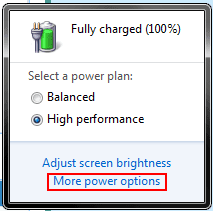
lol ok well the control panel link should be on your main menu after you click the start orb somewhere just below computer and above devices and printers, or another way to get there is right click your desktop and pick personalize then screen saver then click change power settings :)
 

My Computer My Computer

At a glance

win7 ultimate / virtual boxIntel Core i7 3770K,1155, Ivy BridgeGSkill Ripjaws Z Series 1600 CL 9.0 16GBKFA2 GeForce GTX 670 EX OC 2048MB GDDR5 PCI-E...
Computer Manufacturer/Model Number
built my own
OS
win7 ultimate / virtual box
CPU
Intel Core i7 3770K,1155, Ivy Bridge
Motherboard
MSI Z77A-G43
Memory
GSkill Ripjaws Z Series 1600 CL 9.0 16GB
Graphics Card(s)
KFA2 GeForce GTX 670 EX OC 2048MB GDDR5 PCI-E gfx card
Sound Card
onboard Nvidia HDMI audio
Monitor(s) Displays
ASUS VK222H 22" widescreen LCD monitor
Screen Resolution
1680x1050
Hard Drives
Kingston 128gb SSD
OCZ Vertex 90gb SSD
500GB WDCaviar 16mb 5000KS
320GB WDCaviar 16mb 3200AAKS sata 2
1TB Samsung 16mb HD103SJ sata 2
PSU
Corsair HX 750W ATX2.2 Modular
Cooling
Antec 25 Kuhler H2O 620
Keyboard
logitech
Mouse
logitech MX518
Internet Speed
7mb adsl
How's this?
One click
Capture.PNG
Select what is shown below
Untitled.png
:)
 

My Computer My Computer

At a glance

Windows Seven UltimateAMD Piledriver FX 8320 @ 3.5GHzCrucial Ballistix 8GB 1600 MHz DDR3ASUS GeForce GTX 970 Strix Edition @ 1.114 GHz
Computer type
PC/Desktop
Computer Manufacturer/Model Number
The Dominator?
OS
Windows Seven Ultimate
CPU
AMD Piledriver FX 8320 @ 3.5GHz
Motherboard
ASUS M5A97 EVO R2.0
Memory
Crucial Ballistix 8GB 1600 MHz DDR3
Graphics Card(s)
ASUS GeForce GTX 970 Strix Edition @ 1.114 GHz
Sound Card
Integrated
Monitor(s) Displays
LG 23EA63V 23" IPS 1080p Monitor
Screen Resolution
1920x1080
Hard Drives
Samsung SSD 840 EVO 120 GB
1x WD GreenPower 500GB 7200RPM
1 External HDD 1TB
PSU
Corsair CX500
Case
Zalman Z9 Plus
Cooling
CPU - Corsair Hydro H80i, Case - 3x Aerocool Shark Edition
Keyboard
Xenta Backlit Keyboard (Not very good!)
Mouse
Logitech G400
Internet Speed
Download: 7 mb/s Upload: 0.76 mb/s
Antivirus
Microsoft Security Essentials
Browser
Google Chrome
Other Info
Overclockers UK Desk Pad 89 x 45 cm
1200x730x600mm Desk
Using Virtual Audio Cable to split stereo sound into Audio Technica ATH-M50 headphones and Logitech X-530 speakers.
Can you put a screenshot on? I can't find it, my computer is Dutch and maybe with a icon I can find it... :)

here ya go View attachment 45773

Found it! :) I have my PC in high performance and I did the last check-thingy and change it to never. Now they're both standing at Never.

Edit; But I still do not understand why I had to click to activate everything again in stead of moving my mouse like I did before.

And I'd like to show a screenshot;
969h09.jpg


Nooit is Dutch for never. The first one says: "Turn of the monitor after..."
The second one says: "Turn of the computer after..."
 

My Computer My Computer

At a glance

Windows 7
OS
Windows 7
Back
Top