computer going back to sign in page when downloading..

rl7

New member
Local time
3:33 AM
Messages
8
Hi, I am new to Windows 7 32bit. I am having a problem when I am downloading or trying to back up my data on my harddisk, after 1 or 2 minutes the computer reverts back to my sign in page...and it shows that as being 'locked'....and also a 'Change User'-I have a Guest Account but it is turned off. When I resign in it then goes back to the original page but again cycles back to the sign in page..again and again.
I only have an Admin account(password protected) and a Guest account I would like to delete but don't know how.
How do I get this 'unlocked' status off my sign in page(Admin user) and how do I get the computer to stop cycling back to that page whenever I have to perform a task as downloading pictures or backing up my system(which are the only 2 I have encountered SO FAR)..??
Please help,
Rob
 

My Computer My Computer

At a glance

Windows 7 Professional 32 bitAMD Athlon Neo X2 Duo Core L3253 GBATI Mobility Radeon HD 3200
Computer Manufacturer/Model Number
Lenovo ThinkPad Edge 13
OS
Windows 7 Professional 32 bit
CPU
AMD Athlon Neo X2 Duo Core L325
Memory
3 GB
Graphics Card(s)
ATI Mobility Radeon HD 3200
Sound Card
CX20582
Monitor(s) Displays
13.3 TFT 1366 x 768 ( WXGA )
Hard Drives
250 GB
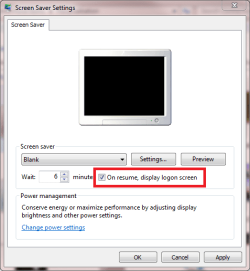
Before it goes to the login screen, does a screensaver or a blank screen and then it goes to the login screen when you move the mouse / press a key. If so, open the start menu and type Change Screensaver. Press enter and then there should be a check box that says "On resume, display logon screen", make sure it is unchecked. Also if you don't want any screensaver (if there is one set), click the drop down box and click "None"


I Hope I'm understanding the question correctly and am giving you the right answer.
;)
 

My Computer My Computer

At a glance

Windows 7 Home Premium x64AMD4 GBATI Radeon Intergrated Graphics
Computer Manufacturer/Model Number
Toshiba
OS
Windows 7 Home Premium x64
CPU
AMD
Memory
4 GB
Graphics Card(s)
ATI Radeon Intergrated Graphics
Sound Card
Realtek
Screen Resolution
1366 X 768
Hard Drives
223 GB HDD
OK...let me try to describe it better...when I am already signed in and working with things(offline as well as online), the computer will go to a blank screen and then load up my sign in page(which by the way shows as being 'locked', which I have no idea how that happened, or if I should unlock it,although I do not know how to do that also). I only have my Administrator account although the sign in page when it comes back on will show a 'change user' which I tried..and it was still my picture and the same password which worked...even when trying that 'user' it still shuts down every minute or so and then goes back to the sign in page.
So how do I stop that constant recycle always interrupting what I am doing, although if I am in a process like downloading pics, it will continue during that interruption.
Is there a setting somewhere on Windows 7 that handles this?
Would really appreciate your help...let me know if I can supply more info on this..
Thanks,
Rob
 

My Computer My Computer

At a glance

Windows 7 Professional 32 bitAMD Athlon Neo X2 Duo Core L3253 GBATI Mobility Radeon HD 3200
Computer Manufacturer/Model Number
Lenovo ThinkPad Edge 13
OS
Windows 7 Professional 32 bit
CPU
AMD Athlon Neo X2 Duo Core L325
Memory
3 GB
Graphics Card(s)
ATI Mobility Radeon HD 3200
Sound Card
CX20582
Monitor(s) Displays
13.3 TFT 1366 x 768 ( WXGA )
Hard Drives
250 GB
Welcome Rob
Unique question
Run an full anti virus scan
Download and make a full scan with malwarebytes. Be sure to update it first.

Possibly the user account is corrupt. Try making a new user account and see if the problem persists.

You can also try to repair with a sfc command
http://www.sevenforums.com/tutorials/1538-sfc-scannow-command-system-file-checker.html

Go to search and type event viewer. Look for critical errors that happened around the time of your problem

Finally try with a clean boot to see if the problem persists.
How to troubleshoot a problem by performing a clean boot in Windows Vista or in Windows 7
Try the new user account last.
 

My Computer My Computer

At a glance

Windows 10, Home Clean InstallIntel Core2 processsor Q8200(2.33Ghz 1333FSB)...6 gbATI Radeon 256MB HD3650
Computer type
PC/Desktop
Computer Manufacturer/Model Number
Dell XPS 420
OS
Windows 10, Home Clean Install
CPU
Intel Core2 processsor Q8200(2.33Ghz 1333FSB) Quad Core Tech
Motherboard
Dell
Memory
6 gb
Graphics Card(s)
ATI Radeon 256MB HD3650
Sound Card
Intergrated 7.1 Channel Audio
Monitor(s) Displays
Dell SP2009W 20"
Hard Drives
640 GB Serial ATA Hard drive
Cooling
Fan
Keyboard
Dell USB Keyboard
Mouse
Dell Premium Optical USB
Internet Speed
DSL 2.85
  • Like
Reactions: rl7
I still believe this is Screen Saver setting. Excatly what OP describes happens if Screen Saver time out is a bit short, and he has chosen "On resume, display logon screen". If the chosen screensaver is blank, it goes just like he tells: like "shut down" (screen goes blank), he moves the mouse or presses a key, and the logon (lock) screen is presented.

As OP tells, it only happens when he is downloading or backing up. If the computer is then untouched a minute or two so that a too short screensaver timer kicks in, what else could happen if that option is chosen in screen saver properties?

Screen_Saver.png

Kari
 

My Computer My Computer

At a glance

Windows 10 Pro x64 EN-GB1.6 GHz Intel Core i7-720QM Processor6 GBATI Mobility Radeon HD 5850 Graphics
Computer type
Laptop
Computer Manufacturer/Model Number
HP ENVY 17-1150eg
OS
Windows 10 Pro x64 EN-GB
CPU
1.6 GHz Intel Core i7-720QM Processor
Memory
6 GB
Graphics Card(s)
ATI Mobility Radeon HD 5850 Graphics
Sound Card
Beats sound system with integrated subwoofer
Monitor(s) Displays
17" laptop display, 22" LED and 32" Full HD TV through HDMI
Screen Resolution
1600*900 (1), 1920*1080 (2&3)
Hard Drives
Internal: 2 x 500 GB SATA Hard Disk Drive 7200 rpm
External: 2TB for backups, 3TB USB3 network drive for media
Cooling
As Envy runs a bit warm, I have it on a Cooler Master pad
Keyboard
Logitech diNovo Media Desktop Laser (bluetooth)
Mouse
Logitech Performance Mouse MX
Internet Speed
50/10 Mbps VDSL
Antivirus
Windows Defender 4.3.9431.0
Browser
Maxthon 3.5.2., IE11
Excellent Kari.
 

My Computer My Computer

At a glance

Windows 10, Home Clean InstallIntel Core2 processsor Q8200(2.33Ghz 1333FSB)...6 gbATI Radeon 256MB HD3650
Computer type
PC/Desktop
Computer Manufacturer/Model Number
Dell XPS 420
OS
Windows 10, Home Clean Install
CPU
Intel Core2 processsor Q8200(2.33Ghz 1333FSB) Quad Core Tech
Motherboard
Dell
Memory
6 gb
Graphics Card(s)
ATI Radeon 256MB HD3650
Sound Card
Intergrated 7.1 Channel Audio
Monitor(s) Displays
Dell SP2009W 20"
Hard Drives
640 GB Serial ATA Hard drive
Cooling
Fan
Keyboard
Dell USB Keyboard
Mouse
Dell Premium Optical USB
Internet Speed
DSL 2.85
Back
Top