Computer has started to lag as of today.

MartyTheGamer

New member
Local time
8:27 PM
Messages
9
Hello.

So today I have noticed my computer has started to lag. Some programs load and run slower than usual. Games run quite a bit choppier. I tried virus scanning and that didn't help. Cleaned up registry with CCleaner but nothing. I'm worried the lag will get worse and I won't be able to use the computer much. I've had this problem before and was told to get Windows re-installed. I'm not sure what to do to fix this problem.

Sorry if I have posted this in the wrong section, not sure where it's supposed to go. If it's wrong, move it.
 

My Computer My Computer

At a glance

Windows 7 Ultimate 64 bitIntel Pentium G6454 GBNvidia GeForce GT630
Computer type
PC/Desktop
Computer Manufacturer/Model Number
Lenovo
OS
Windows 7 Ultimate 64 bit
CPU
Intel Pentium G645
Memory
4 GB
Graphics Card(s)
Nvidia GeForce GT630
Antivirus
Avast
Browser
Chrome
Hi and welcome to SevenForums,
Use Clean boot,
http://www.sevenforums.com/tutorials/179159-troubleshoot-application-conflicts-performing-clean-startup.html
Click Start and type in the search box,
msconfig
Click on the suggestion on top or hit the Enter key,
Go to the Startup section and take some screen shots for a complete list,
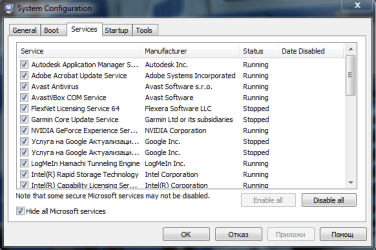
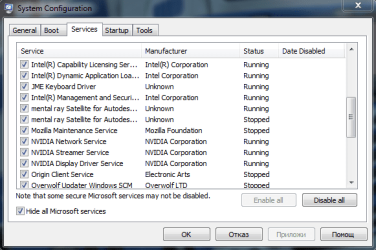
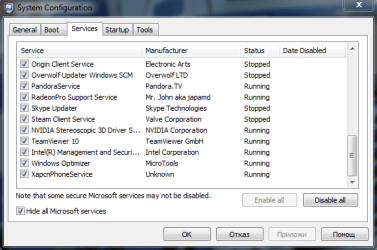
Go to the Services section and on the bottom left Check the box to Hide All Microsoft services,
Repeat the screen shots,
See the links above my signature on how to take and upload screen shots here,
Cheers.
 

My Computer My Computer

At a glance

Win-7-Pro64bit 7-H-Prem-64biti7-5930K 2nd i9-9940x both water blocked VRM'...Trident-z 3200C14 2nd Trident-z 3600C16EVGA 1080ti ftw3 2nd Titan Xp both water blocked
Computer type
PC/Desktop
Computer Manufacturer/Model Number
Custom assembled by me :}
OS
Win-7-Pro64bit 7-H-Prem-64bit
CPU
i7-5930K 2nd i9-9940x both water blocked VRM's too
Motherboard
ASUS SABERTOOTH X99 2nd ASUS x299 Apex
Memory
Trident-z 3200C14 2nd Trident-z 3600C16
Graphics Card(s)
EVGA 1080ti ftw3 2nd Titan Xp both water blocked
Sound Card
Built-in Realtek
Monitor(s) Displays
1-AOC G2460PG 24"G-Sync 144Hz/ 2nd 1-ASUS VG248QE 24" 144Hz
Screen Resolution
1920 x 1080 144Hz
Hard Drives
2-Samsung M.2 Evo & Evo Plus
2-Samsung 850 EVO 500GB SSD's/ 3-2.5 W.D. Black 1tb-&3-1tb/3-3.5 WD Black 1tb hdd's
PSU
EVGA SuperNOVA 1000-P2 2nd 1200-P2
Case
2-Corsair Obsidian Series 450D Black ATX Mid Tower
Cooling
Custom water loops
Keyboard
Logitech G710+/ 2nd Logitech G910
Mouse
2-RedDragon M901 Perdition 16400 dpi Gaming mouse = wired
Internet Speed
Comcast Ping 19ms 89.31mbps download speed 6.12mbps upload
Antivirus
Malwarebytes Pro/ Superantispyware Pro
Browser
FireFox & Pale moon
Other Info
2nd ASUS X299 Apex/Intel i9-9940x with Custom water loop/7H-Prem-x64/Corsair 450D case/Ram Trident-z 3600C16 4x8gb / Samsung970Evo plus 500gb SSD/Dual ssd EZ swap evo/PSU EVGA SuperNova 1200w-P2 80+Platinum/GPU Titan Xp /8-ML-140 on push-pull on 2-280GTX rads
Okay so for the applications under Startup I asked for help a friend before this and he told me to turn off most of them, as I had like 20 enabled :o

Anyways, here's all the screenshots of everything. Hopefully a way to fix this issue can be found...
b13cad3fe06667ed62941296cdbb1c99.png

5026cb057bd23eb86d1eb5b9aebe7887.png

1df275943f30721141ef75b0037a6ace.png

0ddca7912492aa151155eee844250930.png

00ee7416cdbc03755666fbc3a00d21f5.png

I think I see where the issue might be, firstly I have too much applications under Services...
 

My Computer My Computer

At a glance

Windows 7 Ultimate 64 bitIntel Pentium G6454 GBNvidia GeForce GT630
Computer type
PC/Desktop
Computer Manufacturer/Model Number
Lenovo
OS
Windows 7 Ultimate 64 bit
CPU
Intel Pentium G645
Memory
4 GB
Graphics Card(s)
Nvidia GeForce GT630
Antivirus
Avast
Browser
Chrome
Back
Top