
Computer having trouble loading Libraries?

Nic182

New member
Local time
4:15 PM
Messages
2
Hey I'm new to the Forums and I was wondering if I could get some help?
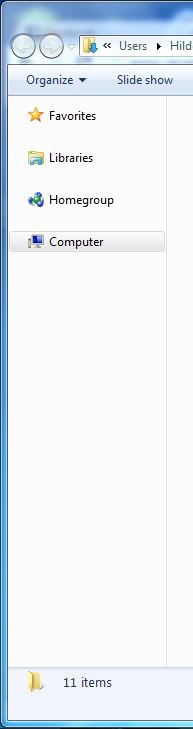
I'm not sure what this area of the Computer is called but for some reason it's not loading, and it's taking so long to load things when I click on one of them. Here's a picture to show what I mean.

If you can help me find out what this problem is it'd be much appreciated
NEvLVX6.jpg
 
Last edited by a moderator:

My Computer

OS
Windows 7 Ultimate x64
Hello, Welcome to sevenforums!

Nothing was attached.

Fill in system specs, also please. [use speccy from piriform.com if you need assistance on system parts]

Please be more specific about the problem, also.

At the moment, we have nothing to go on.
 

My Computer

Computer type
PC/Desktop
Computer Manufacturer/Model Number
Self Built Custom
OS
Windows 7 Ultimate Retail Box (64-bit installed) + Service Pack 1
CPU
AMD FX-8350 CPU v1.15 (or 1.0F) BIOS was required!
Motherboard
MSI 890FXA-GD70
Memory
8G CAS-7 G-Skill DDR3 @1333 (2 fours) [mobo nonOC max rec'd]
Graphics Card(s)
Radeon HD 7950 [3 gigs of GDDR5] MSI Twin Frozr model
Sound Card
Realtek High Definition Audio (onboard mobo, ALC-889 chip)
Monitor(s) Displays
2 WS LED Monitors: One LG One Viewsonic
Screen Resolution
1920 by 1080
Hard Drives
SSD for OS: Samsung 840 Pro
SSD for VM and utilities: Adata SX900
7200 RPM SATA HDs for the rest: Hitachi and Seagate
PSU
Corsair TX850 - 850W max, in service since August 2010.
Case
Thermaltake Armor A90
Cooling
Thermaltake Spin Q CPU Cooler, in service since August 2010
Keyboard
Logitech G11
Mouse
Logitech M310 Wireless
Internet Speed
100 Megabit broadband supposedly upgraded from 50 (Cable)
Antivirus
Bitdefender Internet Security 2014 suite
Browser
Pale Moon 64-bit main, also IceDragon, Opera, and Maxthon.
Other Info
CompTIA A+ certified (220-800 series) in July 2013.
it's called 'navigation pane'. used for easy accessing files and folders. this is default feature of windows, so if somehow it loads very slowly, most likely it's not the navigation pane but rather the content of the folder you're opening that causes the slowdown. does it happen when you click other folders or just that one folder ?
 

My Computer

Computer type
PC/Desktop
OS
Windows 7 Ultimate x86
Not sure what you think is 'not loading'. If e.g. you want the individual libraries to show, just double click on 'Libraries".
 

My Computer

Computer Manufacturer/Model Number
HP, Dell, Gateway, Toshiba - 4 laptops and 2 desktops
OS
Vista, Windows7, Mint Mate, Zorin, Windows 8
CPU
from 1.6GHz Duo to i7
Monitor(s) Displays
2x HP w2207
Hard Drives
5x HDD, 7x SSD, 12x Externals
Keyboard
with trackball - no mices
Mouse
Trackball mice
Internet Speed
DSL 6000
Back
Top