Computer is now booting to the UEFI instead of directly to Windows

arrowM

New member
Local time
10:29 AM
Messages
7
After installing a round of usual updates (Microsoft Security updates, Virus definition updates), my computer asked to restart so it could finish applying the updates. Nothing suspicious there, as this is pretty normal. However, when it restarted, my computer booted to the motherboard's UEFI (ASRock motherboard) for whatever reason. I just selected "Save Changes and Exit" to continue booting into Windows. However, now my computer goes into the UEFI every time it starts up. How do I make it go directly to Windows again?
 

My Computer My Computer

At a glance

Windows 7 Home Premium 64bitIntel Core i716GB Corsair VengeanceMSI Nvidia GTX 660 Ti
Computer type
PC/Desktop
Computer Manufacturer/Model Number
Custom build
OS
Windows 7 Home Premium 64bit
CPU
Intel Core i7
Motherboard
ASRock
Memory
16GB Corsair Vengeance
Graphics Card(s)
MSI Nvidia GTX 660 Ti
Hard Drives
Seagate 1TB HDD
Antivirus
Avast! Free Antivirus
Browser
Google Chrome
After installing a round of usual updates (Microsoft Security updates, Virus definition updates), my computer asked to restart so it could finish applying the updates. Nothing suspicious there, as this is pretty normal. However, when it restarted, my computer booted to the motherboard's UEFI (ASRock motherboard) for whatever reason. I just selected "Save Changes and Exit" to continue booting into Windows. However, now my computer goes into the UEFI every time it starts up. How do I make it go directly to Windows again?

Welcome to Sevenforums,

An update might have changed/reset the way in Bios the primary disk boot. Check in your Bios settings for disk options if its set to AHCI, IDE, or RAID mode.

Choose AHCI if you're not doing any RAID0/1/5/10
 

My Computer My Computer

At a glance

Windows 7 Professional SP1 - x64 [Non-UEFI Boot]Ivy Bridge Core i5 3570K (Delidded)G.Skill "Ares" DDR3 PC3-12800 - 1600MHz (16Gb)Asus Dual-RX480-O4G
Computer type
PC/Desktop
Computer Manufacturer/Model Number
Custom Build
OS
Windows 7 Professional SP1 - x64 [Non-UEFI Boot]
CPU
Ivy Bridge Core i5 3570K (Delidded)
Motherboard
Asus P8Z77-V LE PLUS
Memory
G.Skill "Ares" DDR3 PC3-12800 - 1600MHz (16Gb)
Graphics Card(s)
Asus Dual-RX480-O4G
Sound Card
Creative Sound Blaster Z w/5.1 sound system
Monitor(s) Displays
Asus IPS 23"
Screen Resolution
16/9
Hard Drives
Internal:
500Go Sata 6Gb/s (x2)
500Go Sata 3Gb/s (x2)
SSD 60Go Sata 6Gb/s
PSU
In Win C 900W Series 80+ Platinum
Case
Thermaltake Chaser A71
Cooling
Custom Water Cooling Loop
Keyboard
Cooler Master QuickFire XTi
Mouse
Razer Imperator 2012 (4G)
Antivirus
MSE
Browser
IE 11.0.xxx Rtm
Other Info
"Raid0" with Intel Smart Response Technology (HDD/SSD)
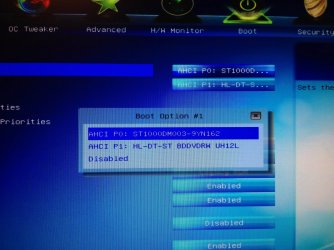
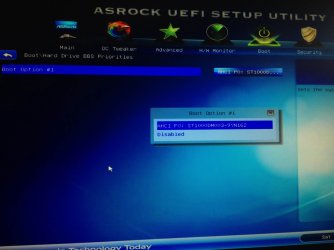
The two options for boot are:

AHCI P0: ST1000DM003-9YN162
AHCI P1: HL-DT-ST BDDVDRW UH12L

My computer was already set on the first boot, AHCI P0. Should I try the other one?
 

My Computer My Computer

At a glance

Windows 7 Home Premium 64bitIntel Core i716GB Corsair VengeanceMSI Nvidia GTX 660 Ti
Computer type
PC/Desktop
Computer Manufacturer/Model Number
Custom build
OS
Windows 7 Home Premium 64bit
CPU
Intel Core i7
Motherboard
ASRock
Memory
16GB Corsair Vengeance
Graphics Card(s)
MSI Nvidia GTX 660 Ti
Hard Drives
Seagate 1TB HDD
Antivirus
Avast! Free Antivirus
Browser
Google Chrome
The two options for boot are:

AHCI P0: ST1000DM003-9YN162
AHCI P1: HL-DT-ST BDDVDRW UH12L

My computer was already set on the first boot, AHCI P0. Should I try the other one?

Ain't you got another Tab which shows only the option AHCI, IDE, RAID? Dig that Bios in advanced settings.

Looks what you're telling is the sequence order of the drive, which are OK to me.

No, you should boot to AHCI as it looks like that's how your OS had been installed.
 

My Computer My Computer

At a glance

Windows 7 Professional SP1 - x64 [Non-UEFI Boot]Ivy Bridge Core i5 3570K (Delidded)G.Skill "Ares" DDR3 PC3-12800 - 1600MHz (16Gb)Asus Dual-RX480-O4G
Computer type
PC/Desktop
Computer Manufacturer/Model Number
Custom Build
OS
Windows 7 Professional SP1 - x64 [Non-UEFI Boot]
CPU
Ivy Bridge Core i5 3570K (Delidded)
Motherboard
Asus P8Z77-V LE PLUS
Memory
G.Skill "Ares" DDR3 PC3-12800 - 1600MHz (16Gb)
Graphics Card(s)
Asus Dual-RX480-O4G
Sound Card
Creative Sound Blaster Z w/5.1 sound system
Monitor(s) Displays
Asus IPS 23"
Screen Resolution
16/9
Hard Drives
Internal:
500Go Sata 6Gb/s (x2)
500Go Sata 3Gb/s (x2)
SSD 60Go Sata 6Gb/s
PSU
In Win C 900W Series 80+ Platinum
Case
Thermaltake Chaser A71
Cooling
Custom Water Cooling Loop
Keyboard
Cooler Master QuickFire XTi
Mouse
Razer Imperator 2012 (4G)
Antivirus
MSE
Browser
IE 11.0.xxx Rtm
Other Info
"Raid0" with Intel Smart Response Technology (HDD/SSD)
If UEFI is not showing in your boot options then it's doubtful its even attempting to boot to UEFI. What makes you think this exactly?

Please provide a picture of what you're seeing that makes you think this.

UEFI BIOS vs. Legacy BIOS - YouTube
 
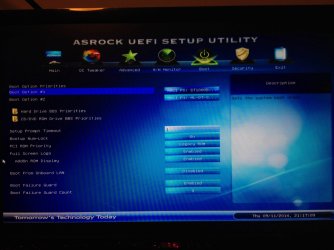
Here are pictures of the UEFI and boot settings that appear when I boot my computer.IMG_1125.JPG

IMG_1126.JPG
 

My Computer My Computer

At a glance

Windows 7 Home Premium 64bitIntel Core i716GB Corsair VengeanceMSI Nvidia GTX 660 Ti
Computer type
PC/Desktop
Computer Manufacturer/Model Number
Custom build
OS
Windows 7 Home Premium 64bit
CPU
Intel Core i7
Motherboard
ASRock
Memory
16GB Corsair Vengeance
Graphics Card(s)
MSI Nvidia GTX 660 Ti
Hard Drives
Seagate 1TB HDD
Antivirus
Avast! Free Antivirus
Browser
Google Chrome
What screen exactly does it boot to? Is there any other message?

Setup Prompt Timeout is showing 1 which seems to indicate it has been set to prompt to enter BIOS setup for a period of time. When you highlight that setting it should tell you in the text to the right what exactly it does and what the choices mean and their values.

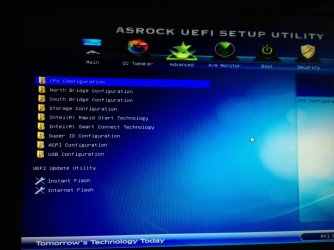
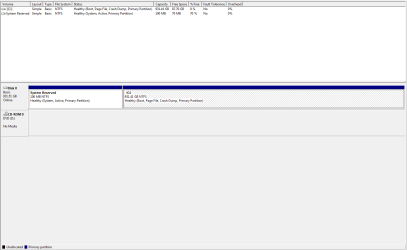
Otherwise let us see the Advanced tab which contains the UEFI settings. It doesn't appear you have UEFI engaged as there are no EFI choices in the Boot menu list. Is there an EFI System partition in Disk Mgmt?

Did you happen to notice if WIndows Update contained a UEFI Firmware (BIOS) update which might have set the Prompt Timeout so that you were prompted to enter BIOS setup to remind you to check those settings in case they had been changed and suddenly Win7 become unbootable. I've not seen this before but heard manufacturers were going to start pushing UEFI updates through on Windows Update and wondered how they would handle previously changed settings (like Legacy vs. UEFI) and this may be it.
 
Last edited:
Last edited:

My Computer My Computer

At a glance

Windows 7 Professional SP1 - x64 [Non-UEFI Boot]Ivy Bridge Core i5 3570K (Delidded)G.Skill "Ares" DDR3 PC3-12800 - 1600MHz (16Gb)Asus Dual-RX480-O4G
Computer type
PC/Desktop
Computer Manufacturer/Model Number
Custom Build
OS
Windows 7 Professional SP1 - x64 [Non-UEFI Boot]
CPU
Ivy Bridge Core i5 3570K (Delidded)
Motherboard
Asus P8Z77-V LE PLUS
Memory
G.Skill "Ares" DDR3 PC3-12800 - 1600MHz (16Gb)
Graphics Card(s)
Asus Dual-RX480-O4G
Sound Card
Creative Sound Blaster Z w/5.1 sound system
Monitor(s) Displays
Asus IPS 23"
Screen Resolution
16/9
Hard Drives
Internal:
500Go Sata 6Gb/s (x2)
500Go Sata 3Gb/s (x2)
SSD 60Go Sata 6Gb/s
PSU
In Win C 900W Series 80+ Platinum
Case
Thermaltake Chaser A71
Cooling
Custom Water Cooling Loop
Keyboard
Cooler Master QuickFire XTi
Mouse
Razer Imperator 2012 (4G)
Antivirus
MSE
Browser
IE 11.0.xxx Rtm
Other Info
"Raid0" with Intel Smart Response Technology (HDD/SSD)
I tried changing the Setup Prompt Timeout to 0 seconds, but 0 is invalid so it reverted to 1 second.

I didn't find any place to change the Secure Mode setting.

It appears that I am currently in Legacy BIOS mode. Could that have anything to do with this?

When I turn my computer on, it goes into the "Main" tab of the ASRock UEFI Setup Utility. Here's a picture of the "Advanced" tab:IMG_1128.JPG
 

My Computer My Computer

At a glance

Windows 7 Home Premium 64bitIntel Core i716GB Corsair VengeanceMSI Nvidia GTX 660 Ti
Computer type
PC/Desktop
Computer Manufacturer/Model Number
Custom build
OS
Windows 7 Home Premium 64bit
CPU
Intel Core i7
Motherboard
ASRock
Memory
16GB Corsair Vengeance
Graphics Card(s)
MSI Nvidia GTX 660 Ti
Hard Drives
Seagate 1TB HDD
Antivirus
Avast! Free Antivirus
Browser
Google Chrome
Can we see a screenshot of http://www.sevenforums.com/tutorials/274797-disk-management-post-screen-capture-image.html.

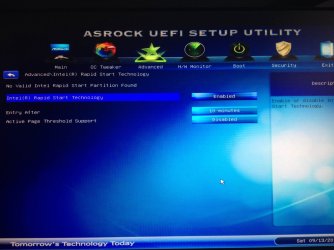
What are the IRST choices on Advanced?

It wouldn't boot if not Legacy install, but lets see the config

Also what are the HD BBS Priorities choices in this screen, which determine which HD will show up to boot in the Boot Menu:

332956d1410495834t-computer-now-booting-uefi-instead-directly-windows-img_1125.jpg
 
Last edited:
I had this same problem this very morning.
I had just added an additional Hard drive, just an easy straight forward task.

I was amazed that the PC would not boot - and the Gigabyte set up page appeared inferring that the machine had unsuccessfully tried to boot using UEFI. I was asked to go into the boot settings and confirm which drive should be chosen. I could not find the disk listed! This of course gave me the info needed to work the problem out.

A quick check revealed that I had knocked the sata lead on the C:\ drive - so I pushed it back (just a very minimal distance), and immediate success.
I do feel that the usual mass produced sata leads leave something to be desired.
This may not be the answer in your case, but, it may help someone who has played about inside (as I did) and then experienced a non start.
Regards
C
 

My Computer My Computer

At a glance

home premium 32 bitIntel4 Gbnvidia
Computer type
PC/Desktop
Computer Manufacturer/Model Number
custom build
OS
home premium 32 bit
CPU
Intel
Motherboard
Gigabyte
Memory
4 Gb
Graphics Card(s)
nvidia
Keyboard
Microsoft USB
Mouse
Logitech M705
Antivirus
Eset smart security 8
Browser
FireFox
Here are the IRST settings and HD BBS Priorities, in order.IMG_1131.JPG

IMG_1132.JPG
 

My Computer My Computer

At a glance

Windows 7 Home Premium 64bitIntel Core i716GB Corsair VengeanceMSI Nvidia GTX 660 Ti
Computer type
PC/Desktop
Computer Manufacturer/Model Number
Custom build
OS
Windows 7 Home Premium 64bit
CPU
Intel Core i7
Motherboard
ASRock
Memory
16GB Corsair Vengeance
Graphics Card(s)
MSI Nvidia GTX 660 Ti
Hard Drives
Seagate 1TB HDD
Antivirus
Avast! Free Antivirus
Browser
Google Chrome
Disabling IRST didn't work.
 

My Computer My Computer

At a glance

Windows 7 Home Premium 64bitIntel Core i716GB Corsair VengeanceMSI Nvidia GTX 660 Ti
Computer type
PC/Desktop
Computer Manufacturer/Model Number
Custom build
OS
Windows 7 Home Premium 64bit
CPU
Intel Core i7
Motherboard
ASRock
Memory
16GB Corsair Vengeance
Graphics Card(s)
MSI Nvidia GTX 660 Ti
Hard Drives
Seagate 1TB HDD
Antivirus
Avast! Free Antivirus
Browser
Google Chrome
Where is the screenshot of Disk Mgmt requested?

Highlight Boot Failure Guard and Count listings to see what it says they are on the right hand side. By now you should have looked at this text explanation of every setting in the BIOS to see if they apply. What exactly is the Boot Failure Guard?

I still think it might be Setup Prompt Timeout. What does the explanation for that say?

Does the popup at boot include any other error or box or just the Main page of the BIOS setup that you showed?

Go to the AsRock Support Downloads webpage for your model mobo and read the Manual to try to find how to suppress the popup you are getting. If it's not in the Manual then contact their Support to ask about it.
 
There is no description for what Boot Failure Guard is. Here is the description for Setup Prompt Timeout:

"Number of seconds to wait for setup activation key. 65535(0xFFFF) means indefinite waiting."

Yeah, it just boots to the main page of the UEFI setup utility.

Here's the requested image of the Disk Mgmt:DiskMgmtCapture.PNG
 

My Computer My Computer

At a glance

Windows 7 Home Premium 64bitIntel Core i716GB Corsair VengeanceMSI Nvidia GTX 660 Ti
Computer type
PC/Desktop
Computer Manufacturer/Model Number
Custom build
OS
Windows 7 Home Premium 64bit
CPU
Intel Core i7
Motherboard
ASRock
Memory
16GB Corsair Vengeance
Graphics Card(s)
MSI Nvidia GTX 660 Ti
Hard Drives
Seagate 1TB HDD
Antivirus
Avast! Free Antivirus
Browser
Google Chrome
Back
Top