computer keeps rebooting, sending to startup repair endless times..

faisy26

New member
Local time
10:33 AM
Messages
4
Location
Cleveland
I have a computer given to me by a friend. It has windows 7 installed on it, with 1Ghz, 512 Ram, 120 GB Hard drive( not tech savvy).. anyways, I left it running at night, and when I got up in the morning, it was doing " startup repair". Now, it keeps on going to startup repair after being turned on, and says "searching for problems", then says attempting to repair, and finally says, "cannot repair automatically". when you hit ok, it restarts the computer and the whole process starts all over again with the same results.

In advanced diagnosis and repair details, it gives the following message:

No OS files found on disk.
Repair action: Partition table repair
Results: Failed, Error code = 0x490
Time Taken= 547 ms

is there anyway to fix it in the command prompt or anything else.. I tried to hit F8, but still goes to Startup repair instead of starting windows in safe mode. just started an online class, need the computer desperately,and don't have the funds to get another computer, so any help will be greatly appreciated.
 

My Computer My Computer

At a glance

Windows 7
Computer Manufacturer/Model Number
HP
OS
Windows 7
Hard Drives
120 GB
Welcome to Windows Seven Forums.

Are you sure it has Windows installed on it?

Have a look at this tutorial, you'll most likely need to go to step number 8 in the list.

http://www.sevenforums.com/tutorials/139576-startup-repair-infinite-loop-recovery.html

If the product key is still visible on the COA (Certificate of Authenticity) sticker on the laptop base and you can beg, steal or borrow a copy of Windows the same as what should be on the laptop you can carry out a clean install and use the laptop's product key.

http://www.sevenforums.com/tutorials/174907-clean-install-factory-coa-activation-key.html
 

My Computer My Computer

At a glance

Windows 7 Ultimate SP1 64-BitIntel Core i7 870 @ 2.93GHz8Gb Dual-Channel DDR3 @ 664MHznVidia GeForce GTX 460 1024MB dedicated RAM
Computer Manufacturer/Model Number
HP Pavilion Elite 495UK
OS
Windows 7 Ultimate SP1 64-Bit
CPU
Intel Core i7 870 @ 2.93GHz
Motherboard
MSI 2A9C (CPU1)
Memory
8Gb Dual-Channel DDR3 @ 664MHz
Graphics Card(s)
nVidia GeForce GTX 460 1024MB dedicated RAM
Sound Card
Realtek HD Audio
Monitor(s) Displays
HP2310i
Screen Resolution
1920 x 1080
Hard Drives
1x1954GB Hitachi HDS22020ALA 330 (RAID), 1x1954GB Hitachi External for backup and storage
PSU
460W
Case
HP Elite
Cooling
Air cooled
Keyboard
Logitech K750 solar-powered keyboard
Mouse
Logitech Wireless M180 mouse
Internet Speed
2Mb
Other Info
Pure Avanti Flow Internet Radio with iPod Dock, 64Gb iPod, HP USB Speakers, Sony MDR-V500 Headphones, Sony Vaio F-Series Laptop
You're running Win7 with an almost prohibitively small amount of RAM. I have run it on 512mb for test purposes but couldn't even run AV or gadgets until I upgraded to a gig of RAM which makes all the difference. I would only run 32 bit. You also need the cleanest possible install: Reinstalling Windows 7

You'll need to boot into System Recovery Options on Win7 DVD or System Repair Disc
to run Startup Repair repeatedly to see if it can fix the loop.

Additional troubleshooting steps.
 
Thanks, but I tried something else here on the forum, where I believe I made a partition active, and now when I tried to restart it, it says " BOOTMGR missing".( stupid me)..couldn't fix one problem, and now started something new..
 

My Computer My Computer

At a glance

Windows 7
Computer Manufacturer/Model Number
HP
OS
Windows 7
Hard Drives
120 GB
With that error you need to make sure Win7 partition or it's 100mb System Reserved partition are marked Active: Partition - Mark as Active (Method Two)

Then run from the Win7 DVD or Repair CD Startup Repair - Run 3 Separate Times.

You can also mark Active using free Partition Wizard bootable CD which will provide a picture of what you're doing. Post back a camera snap of your partitioning if possible. Then click on Disk # to highlight it, from Disk tab select Rebuild MBR, Apply. This may preclude the need to run Startup Repairs.

Other steps in my troubleshooting steps.
 
After gregrocker get you going don't forget about that ram. 2 gigs runs okay, 4 gigs runs good and more ram runs great. If you have any questions on ram just ask and we will help.
 

My Computer My Computer

At a glance

Windows 10 Pro. 64/ version 1709 Windows 7 Pr...Intel i7-6800K @ 4.3Corsair Platinum 16 gig @2400EVGA GTX 1070 OC
Computer type
PC/Desktop
Computer Manufacturer/Model Number
Home made Desktop
OS
Windows 10 Pro. 64/ version 1709 Windows 7 Pro/64
CPU
Intel i7-6800K @ 4.3
Motherboard
ASUS X-99 Deluxe II
Memory
Corsair Platinum 16 gig @2400
Graphics Card(s)
EVGA GTX 1070 OC
Monitor(s) Displays
Asus 27" LED LCD/VE278Q
Screen Resolution
1920-1080 or 1280-720 HDMI
Hard Drives
INTEL SSD 730-240 Gb Sata 3.0/
PSU
EVGA Platium 1200W
Case
Phanteks Luxe Tempered Glass 8 fans/ one radiator
Cooling
XSPC/ Water Cooled CPU
Keyboard
Das 4 Professional
Mouse
Logitech M705/MX Anywhere 2-S
Internet Speed
100 mbits
Antivirus
Microsoft Security Essentials/ Malwarebytes Premium 3.0/ SAS
Browser
I.E. 11 default/Firefox/ ISP Time Warner Cable/Spectrum
Other Info
LG BluRay Burner/
Sound system-KLipsch-THX/
Icy Dock ssd Hot Swap bays.
Computer restarting...still not working...

Thanks guys for your help..especially gregrocker.. I finally got the partition thing done, and now " BOOTMGR Missing" message is gone..(it sucks not to know much about computers..lol) but still it keeps running startup Repair, and then keeps on saying " cannot repair the computer automatically. "
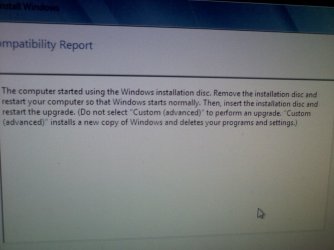
Then I tried to do the Repair install from Windows DVD, and when asked, I hit "upgrade", but then it gives me this message: (please see the pic, so you can know what it is).
Is there anyway to do repair install and keep the files? If I could I would rather do that, but if last resort can you please walk me through a clean install, I guess.
After this I will get back to you to see if my computer is upgradeable or not..it shows the following specs, as far as I understood:

Windows 7 Ultimate 32-bit
Pentium 4 CPU 3.00 GHZ
1.5 GB RAM
120 GB HDD

Thanks you so much.
 

Attachments

  • 676A0538.JPG
    676A0538.JPG
    153.1 KB · Views: 150

My Computer My Computer

At a glance

Windows 7
Computer Manufacturer/Model Number
HP
OS
Windows 7
Hard Drives
120 GB
Your files should already be backed up externally since you are in the middle of repairs.

Please post back a screenshot of your maximized Disk Management drive map using SNipping Tool in Start Menu. Screen Shots

We need to make sure Win7 or it's 100mb system Reserved partition (preferred) are marked Active: Partition - Mark as Active

Then run Startup Repair - Run 3 Separate Times until Win7 boots on its own, which may require repairing or rewriting the System Boot files to the Active Partition.
 
100mb system Reserved partition

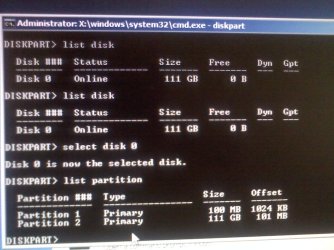
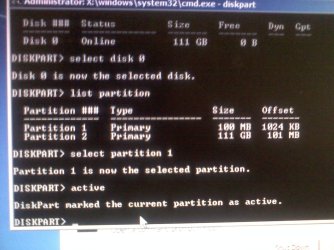
I think , I got it right..but after trying 3 times, it still send me to Startup Repair.. should I keep on trying?676A0539(2).JPG

676A0540(2).JPG
 

My Computer My Computer

At a glance

Windows 7
Computer Manufacturer/Model Number
HP
OS
Windows 7
Hard Drives
120 GB
Back
Top