
Computer locks up during certain games, event viewer included

I'd save a backup image with Macrium - Image your system,
then with all other HD's disconnected apply the image using the boot media provided.

You may need to confirm the Partition Marked Active and then run Startup Repair - Run 3 Separate Times if it won't start.
So boot via boot menu with the CD, choose the hard drive i want to image and put it on another hard drive connected, then when i get my replacement, is what concerns me, if the image is backed up on the other drive wont it also need to be connected to apply the image?

Also that sound fix seems to work for a few days before the issue begins again, i think because the hard drive is on the fritz its causing the drivers to be corrupt but just in case, im gonna post this again
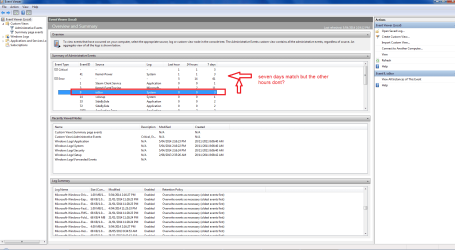
ive noticed that when the kernal error happens this particular error comes up in the event viewer too, but then again so do a bunch of others that seem to represent programs
 

Attachments

  • event viewer 3.png
    event viewer 3.png
    62 KB · Views: 1

My Computer My Computer

At a glance

windows 7 Ultimate Service pack 1 x64intel i5 2500k8gb RamSapphire AMD 6950 2gb
Computer type
PC/Desktop
OS
windows 7 Ultimate Service pack 1 x64
CPU
intel i5 2500k
Motherboard
Asus p8z68-v motherboard
Memory
8gb Ram
Graphics Card(s)
Sapphire AMD 6950 2gb
Screen Resolution
1920x1080
Hard Drives
2x samsung hd103SJ
1x ST2000DL003-9VT166
PSU
Silverstone silver 850watt power supply (ST85F-P)
Case
silverstone raven RV02-E
Keyboard
microsoft side winder x4
Mouse
Razer death adder v2
Apply the image to another or new HD to see if it resolves the issue since the HD was bad. It's possible although unlikely.

If not there are still the steps for a Diagnostics Reinstall I wrote out for you and have asked you about repeatedly without reply. You have not yet done a reinstall, correct? This gives a chance to narrow exactly what the problem is. To go on so long with this without doing a perfect reinstall is wasting time.
 
Apply the image to another or new HD to see if it resolves the issue since the HD was bad. It's possible although unlikely.

If not there are still the steps for a Diagnostics Reinstall I wrote out for you and have asked you about repeatedly without reply. You have not yet done a reinstall, correct? This gives a chance to narrow exactly what the problem is. To go on so long with this without doing a perfect reinstall is wasting time.

but i did with that ssd... i did a fresh install of win7 on that drive
 

My Computer My Computer

At a glance

windows 7 Ultimate Service pack 1 x64intel i5 2500k8gb RamSapphire AMD 6950 2gb
Computer type
PC/Desktop
OS
windows 7 Ultimate Service pack 1 x64
CPU
intel i5 2500k
Motherboard
Asus p8z68-v motherboard
Memory
8gb Ram
Graphics Card(s)
Sapphire AMD 6950 2gb
Screen Resolution
1920x1080
Hard Drives
2x samsung hd103SJ
1x ST2000DL003-9VT166
PSU
Silverstone silver 850watt power supply (ST85F-P)
Case
silverstone raven RV02-E
Keyboard
microsoft side winder x4
Mouse
Razer death adder v2
But did you do the diagnostic install in which you stretch out the steps to pinpoint where the problem arises?

If the problem showed up the whole time then it does seem to confirm hardware. But you seem to think that drivers might be the problem so the Diagnostic install can help there too because it gives you a baseline with only the WIndows drivers, then you can try the chipset and select other drivers like GPU from manufacturer to see if it helps.

I can walk you through this so that you have more definitive results than a comment buried several pages ago that you did something similar on the SSD. Or you can continue to work with Gary on the hardware. Your choice.
 
But did you do the diagnostic install in which you stretch out the steps to pinpoint where the problem arises?

If the problem showed up the whole time then it does seem to confirm hardware. But you seem to think that drivers might be the problem so the Diagnostic install can help there too because it gives you a baseline with only the WIndows drivers, then you can try the chipset and select other drivers like GPU from manufacturer to see if it helps.

I can walk you through this so that you have more definitive results than a comment buried several pages ago that you did something similar on the SSD. Or you can continue to work with Gary on the hardware. Your choice.

I see... Well as your option you think you could walk me through this thing? Although can i ask a favor and say we do it tomorrow? its just im pretty much here for a quickie because im pretty much busy for the rest of the day and the night too.
 

My Computer My Computer

At a glance

windows 7 Ultimate Service pack 1 x64intel i5 2500k8gb RamSapphire AMD 6950 2gb
Computer type
PC/Desktop
OS
windows 7 Ultimate Service pack 1 x64
CPU
intel i5 2500k
Motherboard
Asus p8z68-v motherboard
Memory
8gb Ram
Graphics Card(s)
Sapphire AMD 6950 2gb
Screen Resolution
1920x1080
Hard Drives
2x samsung hd103SJ
1x ST2000DL003-9VT166
PSU
Silverstone silver 850watt power supply (ST85F-P)
Case
silverstone raven RV02-E
Keyboard
microsoft side winder x4
Mouse
Razer death adder v2
If you'll read over the diagnostic install it can stretch out for as long as you want. In fact the more time you take the more likely you'll find the cause - unless it starts off right after the bare install with the freezing.
 
If you'll read over the diagnostic install it can stretch out for as long as you want. In fact the more time you take the more likely you'll find the cause - unless it starts off right after the bare install with the freezing.

Right, last post. I will try the diagnostic steps again tomorrow, although like i said i would like someone there to help me with it incase something does end up going wrong. The freezing seems to occur randomly but with a higher chance of it happening during gaming.
 

My Computer My Computer

At a glance

windows 7 Ultimate Service pack 1 x64intel i5 2500k8gb RamSapphire AMD 6950 2gb
Computer type
PC/Desktop
OS
windows 7 Ultimate Service pack 1 x64
CPU
intel i5 2500k
Motherboard
Asus p8z68-v motherboard
Memory
8gb Ram
Graphics Card(s)
Sapphire AMD 6950 2gb
Screen Resolution
1920x1080
Hard Drives
2x samsung hd103SJ
1x ST2000DL003-9VT166
PSU
Silverstone silver 850watt power supply (ST85F-P)
Case
silverstone raven RV02-E
Keyboard
microsoft side winder x4
Mouse
Razer death adder v2
I will be around tomorrow to check in. I've also asked for some fresh eyes on his case since it needs some new perspectives.
 
Forgive me here, I haven't read the entire thread, but if you are overclocking anything, revert back to stock speeds. An overclock may cause an event ID 41.
 

My Computer My Computer

At a glance

Windows 7 Ultimate X64 SP1Intel i5-2550K, Differing ~4.4-4.8GHz No buil...16GB G.Skill Sniper 1866MHz @ 2133MHz 2x8GBASUS GTX650TIB-DC2OC-2GD5, (650TI Boost)
Computer type
PC/Desktop
Computer Manufacturer/Model Number
Home Built Desktop By DataTech
OS
Windows 7 Ultimate X64 SP1
CPU
Intel i5-2550K, Differing ~4.4-4.8GHz No built in GPU
Motherboard
ASUS P8Z68-V PRO/GEN3
Memory
16GB G.Skill Sniper 1866MHz @ 2133MHz 2x8GB
Graphics Card(s)
ASUS GTX650TIB-DC2OC-2GD5, (650TI Boost)
Sound Card
Onboard Realtek 5-1
Monitor(s) Displays
Samsung P2570HD
Screen Resolution
1920x1080
Hard Drives
Samsung 840 Pro 256GB SSD for OS, 500GB Seagate Constellation (Enterprise drive) for Data
PSU
Corsair HX650W
Case
Inwin Dragon Rider
Cooling
Hyper 212 EVO w/two Noctua fans, push-pull, @1300 RPM
Keyboard
E-Z Eyes, bright yellow keys with large characters
Mouse
steelseries SENSEI Laser Pro Gaming
Internet Speed
48-51Mbs Mbs down, 11 Mbs up Xfinity Cable
Antivirus
Norton Internet Security 2013
Browser
IE 10, Opera, Pale Moon if needed
Other Info
4 case fans, LG BluRay-RE, ASUS DVD-RW, Mr. Fusion power supply, 1.21 gigawatts.
Forgive me here, I haven't read the entire thread, but if you are overclocking anything, revert back to stock speeds. An overclock may cause an event ID 41.

Sorry to reopen this but this problem was fixed. I uninstalled the sound driver from each USB port I had plugged it into and the problem never came up again. So yeah im going to mark this thread as fixed
 

My Computer My Computer

At a glance

windows 7 Ultimate Service pack 1 x64intel i5 2500k8gb RamSapphire AMD 6950 2gb
Computer type
PC/Desktop
OS
windows 7 Ultimate Service pack 1 x64
CPU
intel i5 2500k
Motherboard
Asus p8z68-v motherboard
Memory
8gb Ram
Graphics Card(s)
Sapphire AMD 6950 2gb
Screen Resolution
1920x1080
Hard Drives
2x samsung hd103SJ
1x ST2000DL003-9VT166
PSU
Silverstone silver 850watt power supply (ST85F-P)
Case
silverstone raven RV02-E
Keyboard
microsoft side winder x4
Mouse
Razer death adder v2
Ok... so it turns out the problem may not be solved after all. It had started to occur again. This time i was playing guild wars 2 but i ALSO have a second monitor plugged in which i had band of brothers playing so i could watch that during the boring moments of GW2. About 30 minutes to an hour in the game the computer just locks up. I also had HWmonitor running at the time and all the temperature values for the graphics card and cpu were well withing safetly limits.

Anyone want to take a guess at what might be causing the problem?
 

My Computer My Computer

At a glance

windows 7 Ultimate Service pack 1 x64intel i5 2500k8gb RamSapphire AMD 6950 2gb
Computer type
PC/Desktop
OS
windows 7 Ultimate Service pack 1 x64
CPU
intel i5 2500k
Motherboard
Asus p8z68-v motherboard
Memory
8gb Ram
Graphics Card(s)
Sapphire AMD 6950 2gb
Screen Resolution
1920x1080
Hard Drives
2x samsung hd103SJ
1x ST2000DL003-9VT166
PSU
Silverstone silver 850watt power supply (ST85F-P)
Case
silverstone raven RV02-E
Keyboard
microsoft side winder x4
Mouse
Razer death adder v2
Back
Top