Computer Management - Missing the Properties Menu

asterismW

New member
Local time
8:58 AM
Messages
6
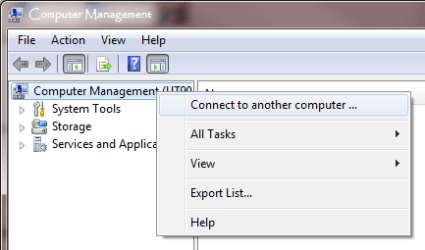
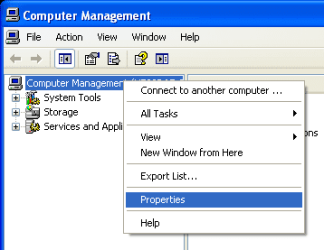
I stumbled upon this thread, but it's pretty old, so I thought I'd start a new one. In XP in Computer Management, you could right click on the computer and get a Properties option. This was especially useful if you were connecting to a remote computer. For example, you could edit the environment variables of a remote system. In Window 7, the Properties option is gone. (See attachments.) Is there any way to get it back, or else another way to remotely administer environment variables? Note: I know how to get to the Properties of the local system; that's not what I'm looking for. I want to be able to access the Properties of a remote system.
 

Attachments
  • compMgmtXP.png
    compMgmtXP.png
    6.5 KB · Views: 10
  • compMgmtWin7.png
    compMgmtWin7.png
    10 KB · Views: 11

My Computer

OS
Windows 7 Ultimate x64, Windows 7 Enterprise x64

My Computer

Computer type
PC/Desktop
Computer Manufacturer/Model Number
Custom
OS
Windows 7 Ultimate x64
CPU
Intel Core i7 2600K (O/C 4.7GHz)
Motherboard
Asus ROG Maximus IV Extreme-Z - Intel Z68 Chipset
Memory
8GB Corsair Vengeance LP, DDR3, 1600Mhz
Graphics Card(s)
Nvidia GTX 460 Graphics Card
Sound Card
Onboard
Monitor(s) Displays
Dell E228WFP
Hard Drives
2 x 500GB Samsung SpinPoint Drives (1 for OS, 1 for Data and Apps)
PSU
CoolerMaster 1000W
Case
CoolerMaster HAF
Cooling
Air
Internet Speed
Fibre - 60MB Down, 30MB Up
Antivirus
ESET NOD32 Antivirus
As I said, I want to be able to access the computer Properties of a remote system, specifically the environment variables.

It would be a shame to lose that functionality, as it's been very useful.
 

My Computer

OS
Windows 7 Ultimate x64, Windows 7 Enterprise x64
I agree, I have used it before to restart PC's and Servers on a network.

I think SysInternals had a tool to view remote PC msinfo32 information.
Sysinternals System Information Utilities

See psinfo.

Does that help?


Dave
 

My Computer

Computer type
PC/Desktop
Computer Manufacturer/Model Number
Custom
OS
Windows 7 Ultimate x64
CPU
Intel Core i7 2600K (O/C 4.7GHz)
Motherboard
Asus ROG Maximus IV Extreme-Z - Intel Z68 Chipset
Memory
8GB Corsair Vengeance LP, DDR3, 1600Mhz
Graphics Card(s)
Nvidia GTX 460 Graphics Card
Sound Card
Onboard
Monitor(s) Displays
Dell E228WFP
Hard Drives
2 x 500GB Samsung SpinPoint Drives (1 for OS, 1 for Data and Apps)
PSU
CoolerMaster 1000W
Case
CoolerMaster HAF
Cooling
Air
Internet Speed
Fibre - 60MB Down, 30MB Up
Antivirus
ESET NOD32 Antivirus
I've used SysInternals before, and while it's very useful, as far as I can tell, it doesn't do what I want. PsInfo only shows information, and the other tools don't allow you to edit the environment variables.
 
Last edited:

My Computer

OS
Windows 7 Ultimate x64, Windows 7 Enterprise x64

My Computer

Computer type
PC/Desktop
Computer Manufacturer/Model Number
Custom
OS
Windows 7 Ultimate x64
CPU
Intel Core i7 2600K (O/C 4.7GHz)
Motherboard
Asus ROG Maximus IV Extreme-Z - Intel Z68 Chipset
Memory
8GB Corsair Vengeance LP, DDR3, 1600Mhz
Graphics Card(s)
Nvidia GTX 460 Graphics Card
Sound Card
Onboard
Monitor(s) Displays
Dell E228WFP
Hard Drives
2 x 500GB Samsung SpinPoint Drives (1 for OS, 1 for Data and Apps)
PSU
CoolerMaster 1000W
Case
CoolerMaster HAF
Cooling
Air
Internet Speed
Fibre - 60MB Down, 30MB Up
Antivirus
ESET NOD32 Antivirus
I had not heard of setx before, thank you. I've gotten it to work... sort of. When I issue the command

setx remotecomputer PATH somevalue /m

it replaces the remote computer's PATH value with somevalue, which is what I'd expect. However, how do I simply add to the variable? If I try

setx remotecomputer PATH "%PATH%;somevalue" /m

it replaces the remote computer's PATH value with the local computer's PATH value, and adds somevalue. How do I tell it to add somevalue to the PATH value that the remote computer already has?
 

My Computer

OS
Windows 7 Ultimate x64, Windows 7 Enterprise x64

My Computer

Computer type
PC/Desktop
Computer Manufacturer/Model Number
Custom
OS
Windows 7 Ultimate x64
CPU
Intel Core i7 2600K (O/C 4.7GHz)
Motherboard
Asus ROG Maximus IV Extreme-Z - Intel Z68 Chipset
Memory
8GB Corsair Vengeance LP, DDR3, 1600Mhz
Graphics Card(s)
Nvidia GTX 460 Graphics Card
Sound Card
Onboard
Monitor(s) Displays
Dell E228WFP
Hard Drives
2 x 500GB Samsung SpinPoint Drives (1 for OS, 1 for Data and Apps)
PSU
CoolerMaster 1000W
Case
CoolerMaster HAF
Cooling
Air
Internet Speed
Fibre - 60MB Down, 30MB Up
Antivirus
ESET NOD32 Antivirus
The first link explains setx a little better, but it doesn't really address the issue I had, which was trying to add to the PATH value of a remote computer. I installed Rapid Environment Editor, and it looks like a nice little GUI for environment editing, but it doesn't seem to have an option for remote environment editing (and it's not very complex, so I think I would have found it).

No, I think I'll have to go back to editing remote environment variables the old fashioned way: by remoting in (if no one is logged in) or walking over to the computer (if someone is). Why Microsoft thought they should do away with such a simple and useful function is beyond me.

Many thanks, Dave; you've been more than helpful. :)
 

My Computer

OS
Windows 7 Ultimate x64, Windows 7 Enterprise x64
Back
Top