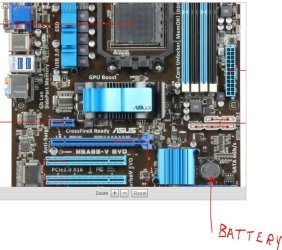
First off apologies if this is in the wrong forum but i wasnt sure which section to post this in.
Basically when I try to turn my computer on the power light comes on but the computer fails to boot and doesnt even display anything on my monitor, and then it continues to stay in that state until i turn off the power supply.
At first I thought it was my power supply as my old psu made a terrible grinding sound and my computer was running slowly before it ended up failing to work so i replaced it yesterday but the same problem still exists. I also read that the other 2 things it could be were the graphics card and the RAM which i bought about 6 months ago so I doubt it would be the RAM. I have checked the RAM slots by trying to boot the computer with no RAM in the slots and the computer lets off a beeping sound which I assume is a good sign that the RAM slots are working. I also tried to put in an older graphics card in instead of my current graphics card and the computer let off the same beeping sound, but I am unsure why as the graphics card was securely in the slot but it was also a very old card so I think that may be the problem. I am unsure of what to do so any help or suggestions are welcome.
Thanks in advance.
6 pata Ide HD's & 2 Sata HD's
added 80gb external on Ult 7600 computer,
numerous extra 1tb, 2TB, 3Tb SATA HD's
A collection of ext HD Docks w/ HDs
PSU
430w, 550w, 600w, 700, 800, etc
Case
All Generic Full Towers
Cooling
Open Air & a few fans, some w/ colored LEDs
Keyboard
Compaq & Dell recycled from GoodWill
Mouse
Made in China Optical Wired Mouse
Internet Speed
Fast Cable InterNet
Antivirus
AVG Free on 24 different Desktops, NO Problems!
Browser
IE 8 is preferred, but use FireFox sometimes
Other Info
Linksys Routers, switches, & Hubs
Too Many USB Flash Drives to count, Biggest is 64GB !
Eight computers in my home network.
Sixteen computers at my business network.
Linked via TeamViewer !
Lots of old used spare computer parts everywhere!
It's a Samsung LCD TV im using as a monitor and I'm using a vga cable to connect it, unfortunately I cant test it with a different cable just now but I don't believe that would be the problem anyway. I'll test it tomorrow and post results on this. Thanks.
We have seen many boot problems related to TVs connected to computers during install or boot up of win7 If you have access to any old VGA monitor try it
My Computer
Computer type
PC/Desktop
Computer Manufacturer/Model Number
Built them myself, Science Experiments !
OS
Win7 Enterprise, Win7 x86 (Ult 7600), Win7 x64 Ult 7600, TechNet RTM on AMD x64 (2.8Ghz)
6 pata Ide HD's & 2 Sata HD's
added 80gb external on Ult 7600 computer,
numerous extra 1tb, 2TB, 3Tb SATA HD's
A collection of ext HD Docks w/ HDs
PSU
430w, 550w, 600w, 700, 800, etc
Case
All Generic Full Towers
Cooling
Open Air & a few fans, some w/ colored LEDs
Keyboard
Compaq & Dell recycled from GoodWill
Mouse
Made in China Optical Wired Mouse
Internet Speed
Fast Cable InterNet
Antivirus
AVG Free on 24 different Desktops, NO Problems!
Browser
IE 8 is preferred, but use FireFox sometimes
Other Info
Linksys Routers, switches, & Hubs
Too Many USB Flash Drives to count, Biggest is 64GB !
Eight computers in my home network.
Sixteen computers at my business network.
Linked via TeamViewer !
Lots of old used spare computer parts everywhere!
The strange thing is I actually had a monitor that worked up until I installed W7 and then once i tried to use it with W7 it would cut out and give an error message right before the desktop would appear upon booting. Dont know if that could help narrow the problem down at all though?
What was the Make & model of the older video card you tried ? Was it the exact same type of slot connector (PCI-E) ? Have you tried with just one ram memory stick ?
My Computer
Computer type
PC/Desktop
Computer Manufacturer/Model Number
Built them myself, Science Experiments !
OS
Win7 Enterprise, Win7 x86 (Ult 7600), Win7 x64 Ult 7600, TechNet RTM on AMD x64 (2.8Ghz)
6 pata Ide HD's & 2 Sata HD's
added 80gb external on Ult 7600 computer,
numerous extra 1tb, 2TB, 3Tb SATA HD's
A collection of ext HD Docks w/ HDs
PSU
430w, 550w, 600w, 700, 800, etc
Case
All Generic Full Towers
Cooling
Open Air & a few fans, some w/ colored LEDs
Keyboard
Compaq & Dell recycled from GoodWill
Mouse
Made in China Optical Wired Mouse
Internet Speed
Fast Cable InterNet
Antivirus
AVG Free on 24 different Desktops, NO Problems!
Browser
IE 8 is preferred, but use FireFox sometimes
Other Info
Linksys Routers, switches, & Hubs
Too Many USB Flash Drives to count, Biggest is 64GB !
Eight computers in my home network.
Sixteen computers at my business network.
Linked via TeamViewer !
Lots of old used spare computer parts everywhere!
The old graphics card I used was an ATI radeon x300SE which fits the same slot as my current graphics card and yes I have tried booting with one RAM stick and also swapping positions etc.
6 pata Ide HD's & 2 Sata HD's
added 80gb external on Ult 7600 computer,
numerous extra 1tb, 2TB, 3Tb SATA HD's
A collection of ext HD Docks w/ HDs
PSU
430w, 550w, 600w, 700, 800, etc
Case
All Generic Full Towers
Cooling
Open Air & a few fans, some w/ colored LEDs
Keyboard
Compaq & Dell recycled from GoodWill
Mouse
Made in China Optical Wired Mouse
Internet Speed
Fast Cable InterNet
Antivirus
AVG Free on 24 different Desktops, NO Problems!
Browser
IE 8 is preferred, but use FireFox sometimes
Other Info
Linksys Routers, switches, & Hubs
Too Many USB Flash Drives to count, Biggest is 64GB !
Eight computers in my home network.
Sixteen computers at my business network.
Linked via TeamViewer !
Lots of old used spare computer parts everywhere!
6 pata Ide HD's & 2 Sata HD's
added 80gb external on Ult 7600 computer,
numerous extra 1tb, 2TB, 3Tb SATA HD's
A collection of ext HD Docks w/ HDs
PSU
430w, 550w, 600w, 700, 800, etc
Case
All Generic Full Towers
Cooling
Open Air & a few fans, some w/ colored LEDs
Keyboard
Compaq & Dell recycled from GoodWill
Mouse
Made in China Optical Wired Mouse
Internet Speed
Fast Cable InterNet
Antivirus
AVG Free on 24 different Desktops, NO Problems!
Browser
IE 8 is preferred, but use FireFox sometimes
Other Info
Linksys Routers, switches, & Hubs
Too Many USB Flash Drives to count, Biggest is 64GB !
Eight computers in my home network.
Sixteen computers at my business network.
Linked via TeamViewer !
Lots of old used spare computer parts everywhere!
Ok I've tried a new battery but still no success. Also, I went to my local pc store and a guy there said it could be a hard drive error. do you think this is the case as I don't have a W7 backup disc and I don't want to go back to vista
Do you know the make & model of the HD ? Do you have any other CDs or DVDs that are bootable by themselves as stand alone programs that don't need the HD. That way we can see if we get a video display on the screen/monitor.
My Computer
Computer type
PC/Desktop
Computer Manufacturer/Model Number
Built them myself, Science Experiments !
OS
Win7 Enterprise, Win7 x86 (Ult 7600), Win7 x64 Ult 7600, TechNet RTM on AMD x64 (2.8Ghz)
6 pata Ide HD's & 2 Sata HD's
added 80gb external on Ult 7600 computer,
numerous extra 1tb, 2TB, 3Tb SATA HD's
A collection of ext HD Docks w/ HDs
PSU
430w, 550w, 600w, 700, 800, etc
Case
All Generic Full Towers
Cooling
Open Air & a few fans, some w/ colored LEDs
Keyboard
Compaq & Dell recycled from GoodWill
Mouse
Made in China Optical Wired Mouse
Internet Speed
Fast Cable InterNet
Antivirus
AVG Free on 24 different Desktops, NO Problems!
Browser
IE 8 is preferred, but use FireFox sometimes
Other Info
Linksys Routers, switches, & Hubs
Too Many USB Flash Drives to count, Biggest is 64GB !
Eight computers in my home network.
Sixteen computers at my business network.
Linked via TeamViewer !
Lots of old used spare computer parts everywhere!
With the variation in graphics cards & monitors you could try booting to a live CD.
I'd try Hirens Boot CD. It allows you to boot totally independent of your Windows 7 and HDD. It also contains many utilities which may help in resolving your problem. Download Hiren
It can be made to a USB if needed.
A friend may need to burn the CD.
Edit: I gather prior to Win 7 install you had a working card-monitor combo.
My Computer
Computer type
PC/Desktop
Computer Manufacturer/Model Number
Own build
OS
Windows 7x64 Home Premium SP1
CPU
Intel i7 2600k
Motherboard
ASUS P8Z68 Deluxe
Memory
G.Skill Ripjaws (DDR3-1600) 2x4GB
Graphics Card(s)
Nvidia GeForce GTS 450; Intel HD Graphics 3000(GT2+)
Ok i downloaded and burned Hiren to a disc and tried to start the computer but the same no booting problem exists which i presume suggests that it is the graphics card rather than the hard drive? And yes i had a working card-monitor combo on my old monitor before w7.
Next try the one-time BIOS Boot Menu key given on first screen.
What are the exact results of these attempts? What error do you get, what lights, fan and other behavior from the PC, and what appears on the screen exactly?
Do you have onboard graphics chip on the mobo in addition to the card? If not, reinstall the video card. If so, disable it in BIOS or unplug it and default to onboard graphics to try booting.
You need to get Hirens booted so you can run its tests on the HD and memory, to start.