Computer Not Detecting Hard Drive

Qcan

New member
Local time
6:49 PM
Messages
6
Hi,

I had to reinstall Windows 7. All went well except that computer will now only recognize 1 hard drive. The bios shows a second hard drive, but I cannot find it by going into computer managment. Further, my crappy bios has no features to allow me to manipulate anything.

A bit of background. I might be responsible for this as I was using a program called "Killdisk" to wipe my hard drive clean. I ended up canceling the job a couple of hours into it as it was taking too long. Since then, I have not been able to view it.

Yeah... I'm a dumbass.

Need some ideas and options please.

The hard drive is 500g. System is Windows 7 Ultimate 32 bit.

Thanks.
 

My Computer

OS
Windows 7 Ultimate 32bit.
Live Linux CD?

Do you have access to a Live Linux CD (like Ubuntu)?

If so:

  • Disconnect your good HDD
  • Reboot your PC with the Live CD in the drive
  • Use the "Try" option (not the "Install" option)
  • Once its booted up, start "GParted"
  • Try to reformat your bad HDD (choose NTFS)
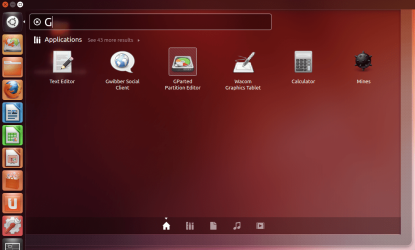
If you use Ubuntu with Unity you will have to type "Gparted" in the Search box (no quotes).
Start Gparted - Unity.png
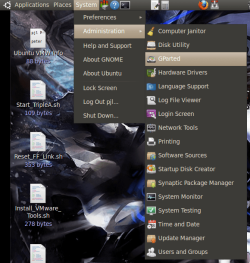
If you are using an older version you should be able to find it in:
System menu > Administration > Gparted

Start Gparted.png

 
Last edited:

My Computer

Computer type
PC/Desktop
Computer Manufacturer/Model Number
n/a
OS
W7 Ultimate SP1, LM19.2 MATE, W10 Home 1703, W10 Pro 1703 VM, #All 64 bit
CPU
AMD Phenom II x6 1100T, 3.3 GHz
Motherboard
ASUS M4A88T-M/USB3 (AM3)
Memory
12GB DDR3 1333 G-Skill (4GB x 2), G-Skill (2GB x 2)
Graphics Card(s)
NVIDIA GeForce GTX 660
Sound Card
Realtek?
Monitor(s) Displays
Samsung S23B350
Screen Resolution
1920x1080
Hard Drives
WD Green 2TB (SATA), WD Green 3TB (SATA), WD Blue 4TB (SATA), WD Blue 6TB (SATA)
PSU
Cooler Master
Case
Antec GX300 Tower
Cooling
3x Antec TRICOOL 120mm Fans
Mouse
Wired Optical
Internet Speed
DSL
Antivirus
Avast
Browser
Pale Moon (64 bit)
Other Info
2018-12-27 Upgraded HDDs
2015-12-10 Upgraded case, graphics card, storage
2015-08-15 Upgraded motherboard & RAM
2015-07-15 Upgraded LM17.1 to LM17.2
No.... unfortunatly not - but thanks for the reply.
 

My Computer

OS
Windows 7 Ultimate 32bit.
You may have to wait ...

No.... unfortunatly not - but thanks for the reply.

You may have to wait for gregrocker or one of the other HDD experts to "drop in" on this thread. :(


I assume that you can't format the HDD using the W7 install disc?

:eek: Remember to disconnect your good HDD, before you try formatting the bad one (just in case). :eek:
 

My Computer

Computer type
PC/Desktop
Computer Manufacturer/Model Number
n/a
OS
W7 Ultimate SP1, LM19.2 MATE, W10 Home 1703, W10 Pro 1703 VM, #All 64 bit
CPU
AMD Phenom II x6 1100T, 3.3 GHz
Motherboard
ASUS M4A88T-M/USB3 (AM3)
Memory
12GB DDR3 1333 G-Skill (4GB x 2), G-Skill (2GB x 2)
Graphics Card(s)
NVIDIA GeForce GTX 660
Sound Card
Realtek?
Monitor(s) Displays
Samsung S23B350
Screen Resolution
1920x1080
Hard Drives
WD Green 2TB (SATA), WD Green 3TB (SATA), WD Blue 4TB (SATA), WD Blue 6TB (SATA)
PSU
Cooler Master
Case
Antec GX300 Tower
Cooling
3x Antec TRICOOL 120mm Fans
Mouse
Wired Optical
Internet Speed
DSL
Antivirus
Avast
Browser
Pale Moon (64 bit)
Other Info
2018-12-27 Upgraded HDDs
2015-12-10 Upgraded case, graphics card, storage
2015-08-15 Upgraded motherboard & RAM
2015-07-15 Upgraded LM17.1 to LM17.2
Correct.
 

My Computer

OS
Windows 7 Ultimate 32bit.

My Computer

Computer type
PC/Desktop
Computer Manufacturer/Model Number
Custom Build
OS
Windows 7 Home Premium 32-Bit - Build 7600 SP1
CPU
Intel Core i3-2120 3.30Ghz
Motherboard
Asus P8Z68-V LX Intel Z68 Socket H2 ATX
Memory
Kingston 4 GB DDR3 1333 mhz
Graphics Card(s)
AMD Radeon HD6670
Sound Card
Sound Blaster Audigy SE 24-Bit
Monitor(s) Displays
Asus VE228
Screen Resolution
1440 X 900
Hard Drives
OCZ Vertex 3 120 GB Sata 3 SSD ==
Kingston SH103/S3 120 G Hyper X 120 GB SSD ==
Western Digital 500 GB Caviar Green 7200 RPM ==
PSU
Corsair CX600M == 600 Watt
Case
NZXT Apollo - Silver with Clear Side Panel
Cooling
Three 120 mm Fans
Keyboard
Microsoft Natural 4000
Mouse
Microsoft Custom Optical 3000
Internet Speed
AT&T Fiber Optic Wireless Network
Antivirus
Microsoft Security Essentials
Browser
Chrome
Other Info
120 mm Blue LED Fan -- Three Blue LED Lazer Light Sticks
Hi Bigmck,

Thnaks very much for guiding me re: screenshots and file uploads. If all goes well, the attachment will be enclosed here. Yes, I meant computer management.

Hope someone can help.

Thanks.
 

Attachments

  • Capture001.PNG
    Capture001.PNG
    52 KB · Views: 28

My Computer

OS
Windows 7 Ultimate 32bit.
What about if you hit your Start Button and click on Computer, does the missing HDD show there?
 

My Computer

Computer type
PC/Desktop
Computer Manufacturer/Model Number
Custom Build
OS
Windows 7 Home Premium 32-Bit - Build 7600 SP1
CPU
Intel Core i3-2120 3.30Ghz
Motherboard
Asus P8Z68-V LX Intel Z68 Socket H2 ATX
Memory
Kingston 4 GB DDR3 1333 mhz
Graphics Card(s)
AMD Radeon HD6670
Sound Card
Sound Blaster Audigy SE 24-Bit
Monitor(s) Displays
Asus VE228
Screen Resolution
1440 X 900
Hard Drives
OCZ Vertex 3 120 GB Sata 3 SSD ==
Kingston SH103/S3 120 G Hyper X 120 GB SSD ==
Western Digital 500 GB Caviar Green 7200 RPM ==
PSU
Corsair CX600M == 600 Watt
Case
NZXT Apollo - Silver with Clear Side Panel
Cooling
Three 120 mm Fans
Keyboard
Microsoft Natural 4000
Mouse
Microsoft Custom Optical 3000
Internet Speed
AT&T Fiber Optic Wireless Network
Antivirus
Microsoft Security Essentials
Browser
Chrome
Other Info
120 mm Blue LED Fan -- Three Blue LED Lazer Light Sticks
You can also check device manager. Maybe windows doesn't have drivers for it.

Also you can try booting into windows RE see if it shows up.

Lastly go into diskpart from the command prompt. In windows RE or normal windows type in the command list disk and see how many show up.
 

My Computer

OS
Windows 7 Ultimate x64
What about if you hit your Start Button and click on Computer, does the missing HDD show there?

*** No.


You can also check device manager. Maybe windows doesn't have drivers for it.

*** I ran device driver. The message I got indicated "PCI Simple Communications Controller" - No driver found.
I did a search.... no driver was found. Not sure if this might be related to the hard drive in question.

Also you can try booting into windows RE see if it showa up.

*** Tried it a couple of times.... nothing. Having said that, I can see the hard drive in the BIOS. However, I cannot do anything in my BIOS (crappy BIOS).

Lastly go into diskpart from the command prompt. In windows RE or normal windows type in the command list disk and see how many show up.

*** I wasn't too familiar with diskpart... but figured it out from the cmd line. It only recognized 1 HD.

I just find it weird that my BIOS recognizes it... but nothing else.
 

My Computer

OS
Windows 7 Ultimate 32bit.
Do you know the HDD manufacturer and HDD model?

You could try downloading the manufacturer's HDD tool(s).
 

My Computer

Computer type
PC/Desktop
Computer Manufacturer/Model Number
n/a
OS
W7 Ultimate SP1, LM19.2 MATE, W10 Home 1703, W10 Pro 1703 VM, #All 64 bit
CPU
AMD Phenom II x6 1100T, 3.3 GHz
Motherboard
ASUS M4A88T-M/USB3 (AM3)
Memory
12GB DDR3 1333 G-Skill (4GB x 2), G-Skill (2GB x 2)
Graphics Card(s)
NVIDIA GeForce GTX 660
Sound Card
Realtek?
Monitor(s) Displays
Samsung S23B350
Screen Resolution
1920x1080
Hard Drives
WD Green 2TB (SATA), WD Green 3TB (SATA), WD Blue 4TB (SATA), WD Blue 6TB (SATA)
PSU
Cooler Master
Case
Antec GX300 Tower
Cooling
3x Antec TRICOOL 120mm Fans
Mouse
Wired Optical
Internet Speed
DSL
Antivirus
Avast
Browser
Pale Moon (64 bit)
Other Info
2018-12-27 Upgraded HDDs
2015-12-10 Upgraded case, graphics card, storage
2015-08-15 Upgraded motherboard & RAM
2015-07-15 Upgraded LM17.1 to LM17.2
Good idea. I think that will be my next step as I am pretty much out of options. Thanks.
 

My Computer

OS
Windows 7 Ultimate 32bit.
Do you have another computer available that you could try the HDD in to see if it shows there?
 

My Computer

Computer type
PC/Desktop
Computer Manufacturer/Model Number
Custom Build
OS
Windows 7 Home Premium 32-Bit - Build 7600 SP1
CPU
Intel Core i3-2120 3.30Ghz
Motherboard
Asus P8Z68-V LX Intel Z68 Socket H2 ATX
Memory
Kingston 4 GB DDR3 1333 mhz
Graphics Card(s)
AMD Radeon HD6670
Sound Card
Sound Blaster Audigy SE 24-Bit
Monitor(s) Displays
Asus VE228
Screen Resolution
1440 X 900
Hard Drives
OCZ Vertex 3 120 GB Sata 3 SSD ==
Kingston SH103/S3 120 G Hyper X 120 GB SSD ==
Western Digital 500 GB Caviar Green 7200 RPM ==
PSU
Corsair CX600M == 600 Watt
Case
NZXT Apollo - Silver with Clear Side Panel
Cooling
Three 120 mm Fans
Keyboard
Microsoft Natural 4000
Mouse
Microsoft Custom Optical 3000
Internet Speed
AT&T Fiber Optic Wireless Network
Antivirus
Microsoft Security Essentials
Browser
Chrome
Other Info
120 mm Blue LED Fan -- Three Blue LED Lazer Light Sticks
Back
Top