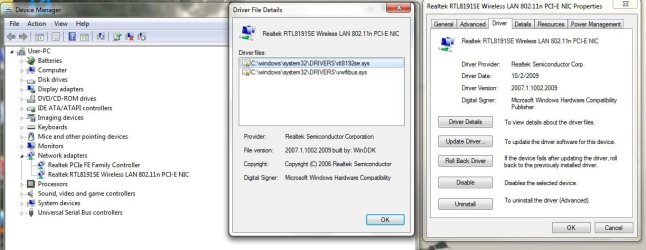
About a week ago, my power went out, and when it came back on, I still had no internet. After a few calls to my local provider, they had me re-install my network adapters, and I could finally get internet when wired in. The problem is that it wont connect via wireless. I thought it was the router, but since my wife's computer (Vista) can connect via wireless, it has to be something with my computer. Further investigation shows that it wont even recognize any wireless networks. Ive tried a bunch of things like ipconfig/release and /renew, and cleared my DNS cache, but nothing seems to be working. Hopefully someone has seen this before and can help.
Here's some additional info that could be useful:
C:\Users\User>ipconfig/all
Windows IP Configuration
Host Name . . . . . . . . . . . . : User-PC
Primary Dns Suffix . . . . . . . :
Node Type . . . . . . . . . . . . : Hybrid
IP Routing Enabled. . . . . . . . : No
WINS Proxy Enabled. . . . . . . . : No
DNS Suffix Search List. . . . . . : gha.chartermi.net
Ethernet adapter Local Area Connection:
Connection-specific DNS Suffix . : gha.chartermi.net
Description . . . . . . . . . . . : Realtek PCIe FE Family Controller
Physical Address. . . . . . . . . : 00-26-6C-44-45-C0
DHCP Enabled. . . . . . . . . . . : Yes
Autoconfiguration Enabled . . . . : Yes
Link-local IPv6 Address . . . . . : fe80::cc13:f063:d894:e76a%17(Preferred)
IPv4 Address. . . . . . . . . . . : 192.168.1.101(Preferred)
Subnet Mask . . . . . . . . . . . : 255.255.255.0
Lease Obtained. . . . . . . . . . : Sunday, February 27, 2011 12:08:44 PM
Lease Expires . . . . . . . . . . : Monday, February 28, 2011 12:53:13 PM
Default Gateway . . . . . . . . . : 192.168.1.1
DHCP Server . . . . . . . . . . . : 192.168.1.1
DHCPv6 IAID . . . . . . . . . . . : 184559212
DHCPv6 Client DUID. . . . . . . . : 00-01-00-01-12-F0-3B-32-00-26-6C-44-45-C0
DNS Servers . . . . . . . . . . . : 24.247.15.53
24.247.24.53
68.115.71.53
NetBIOS over Tcpip. . . . . . . . : Enabled
Tunnel adapter isatap.gha.chartermi.net:
Media State . . . . . . . . . . . : Media disconnected
Connection-specific DNS Suffix . :
Description . . . . . . . . . . . : Microsoft ISATAP Adapter #2
Physical Address. . . . . . . . . : 00-00-00-00-00-00-00-E0
DHCP Enabled. . . . . . . . . . . : No
Autoconfiguration Enabled . . . . : Yes
Tunnel adapter Teredo Tunneling Pseudo-Interface:
Connection-specific DNS Suffix . :
Description . . . . . . . . . . . : Teredo Tunneling Pseudo-Interface
Physical Address. . . . . . . . . : 00-00-00-00-00-00-00-E0
DHCP Enabled. . . . . . . . . . . : No
Autoconfiguration Enabled . . . . : Yes
IPv6 Address. . . . . . . . . . . : 2001:0:4137:9e76:482:3670:9eac:e291(Prefe
rred)
Link-local IPv6 Address . . . . . : fe80::482:3670:9eac:e291%13(Preferred)
Default Gateway . . . . . . . . . : ::
NetBIOS over Tcpip. . . . . . . . : Disabled
Tunnel adapter Reusable ISATAP Interface {16904B56-6453-43D8-85D2-B3519BECB373}:
Media State . . . . . . . . . . . : Media disconnected
Connection-specific DNS Suffix . : gha.chartermi.net
Description . . . . . . . . . . . : Microsoft ISATAP Adapter #4
Physical Address. . . . . . . . . : 00-00-00-00-00-00-00-E0
DHCP Enabled. . . . . . . . . . . : No
Autoconfiguration Enabled . . . . : Yes
Thanks in advance for any help.
Here's some additional info that could be useful:
C:\Users\User>ipconfig/all
Windows IP Configuration
Host Name . . . . . . . . . . . . : User-PC
Primary Dns Suffix . . . . . . . :
Node Type . . . . . . . . . . . . : Hybrid
IP Routing Enabled. . . . . . . . : No
WINS Proxy Enabled. . . . . . . . : No
DNS Suffix Search List. . . . . . : gha.chartermi.net
Ethernet adapter Local Area Connection:
Connection-specific DNS Suffix . : gha.chartermi.net
Description . . . . . . . . . . . : Realtek PCIe FE Family Controller
Physical Address. . . . . . . . . : 00-26-6C-44-45-C0
DHCP Enabled. . . . . . . . . . . : Yes
Autoconfiguration Enabled . . . . : Yes
Link-local IPv6 Address . . . . . : fe80::cc13:f063:d894:e76a%17(Preferred)
IPv4 Address. . . . . . . . . . . : 192.168.1.101(Preferred)
Subnet Mask . . . . . . . . . . . : 255.255.255.0
Lease Obtained. . . . . . . . . . : Sunday, February 27, 2011 12:08:44 PM
Lease Expires . . . . . . . . . . : Monday, February 28, 2011 12:53:13 PM
Default Gateway . . . . . . . . . : 192.168.1.1
DHCP Server . . . . . . . . . . . : 192.168.1.1
DHCPv6 IAID . . . . . . . . . . . : 184559212
DHCPv6 Client DUID. . . . . . . . : 00-01-00-01-12-F0-3B-32-00-26-6C-44-45-C0
DNS Servers . . . . . . . . . . . : 24.247.15.53
24.247.24.53
68.115.71.53
NetBIOS over Tcpip. . . . . . . . : Enabled
Tunnel adapter isatap.gha.chartermi.net:
Media State . . . . . . . . . . . : Media disconnected
Connection-specific DNS Suffix . :
Description . . . . . . . . . . . : Microsoft ISATAP Adapter #2
Physical Address. . . . . . . . . : 00-00-00-00-00-00-00-E0
DHCP Enabled. . . . . . . . . . . : No
Autoconfiguration Enabled . . . . : Yes
Tunnel adapter Teredo Tunneling Pseudo-Interface:
Connection-specific DNS Suffix . :
Description . . . . . . . . . . . : Teredo Tunneling Pseudo-Interface
Physical Address. . . . . . . . . : 00-00-00-00-00-00-00-E0
DHCP Enabled. . . . . . . . . . . : No
Autoconfiguration Enabled . . . . : Yes
IPv6 Address. . . . . . . . . . . : 2001:0:4137:9e76:482:3670:9eac:e291(Prefe
rred)
Link-local IPv6 Address . . . . . : fe80::482:3670:9eac:e291%13(Preferred)
Default Gateway . . . . . . . . . : ::
NetBIOS over Tcpip. . . . . . . . : Disabled
Tunnel adapter Reusable ISATAP Interface {16904B56-6453-43D8-85D2-B3519BECB373}:
Media State . . . . . . . . . . . : Media disconnected
Connection-specific DNS Suffix . : gha.chartermi.net
Description . . . . . . . . . . . : Microsoft ISATAP Adapter #4
Physical Address. . . . . . . . . : 00-00-00-00-00-00-00-E0
DHCP Enabled. . . . . . . . . . . : No
Autoconfiguration Enabled . . . . : Yes
Thanks in advance for any help.
My Computer
- Computer Manufacturer/Model Number
- Toshiba / Satellite A505
- OS
- Windows 7 64 bit
- CPU
- Intel(R) Core(TM) i3 CPU M330 @ 2.13GHz
- Memory
- 4.00 GB
- Monitor(s) Displays
- 1366x768x59