Computer not reading my SD card

iCookieboi

New member
Local time
7:08 AM
Messages
16
My computer used to run on windows vista home premium 32bit and it read my SD card fine, but I upgraded to windows 7 home premium 64bit and when I plug my SD card in, nothing shows up/happens. Any idea why its not working?
 

My Computer My Computer

OS
Windows 7 Home Premium 64bit
Welcome to Windows Seven Forums.

You haven't given us your system specs, so I'm guessing it's a compatibility issue.

Chances are, Windows 7 can't find a driver for the card reader so I think your best bet is to have a look on your computer manufacturer's support site and see what drivers they have there.
 

My Computer My Computer

Computer Manufacturer/Model Number
HP Pavilion Elite 495UK
OS
Windows 7 Ultimate SP1 64-Bit
CPU
Intel Core i7 870 @ 2.93GHz
Motherboard
MSI 2A9C (CPU1)
Memory
8Gb Dual-Channel DDR3 @ 664MHz
Graphics Card(s)
nVidia GeForce GTX 460 1024MB dedicated RAM
Sound Card
Realtek HD Audio
Monitor(s) Displays
HP2310i
Screen Resolution
1920 x 1080
Hard Drives
1x1954GB Hitachi HDS22020ALA 330 (RAID), 1x1954GB Hitachi External for backup and storage
PSU
460W
Case
HP Elite
Cooling
Air cooled
Keyboard
Logitech K750 solar-powered keyboard
Mouse
Logitech Wireless M180 mouse
Internet Speed
2Mb
Other Info
Pure Avanti Flow Internet Radio with iPod Dock, 64Gb iPod, HP USB Speakers, Sony MDR-V500 Headphones, Sony Vaio F-Series Laptop
Welcome to Windows Seven Forums.

You haven't given us your system specs, so I'm guessing it's a compatibility issue.

Chances are, Windows 7 can't find a driver for the card reader so I think your best bet is to have a look on your computer manufacturer's support site and see what drivers they have there.
Can I post a picture of my system specs because I don't know which one is my CPU,motherboard and all that stuff :o
Edit: I posted a picture of my specs
 
Last edited:

My Computer My Computer

OS
Windows 7 Home Premium 64bit
Post the make and model number, at least. Did the card reader come with the system or did you add it? Some of the older card readers need updated drivers to work with Windows 7. Just for reference, the AFT XM-5U card reader works with Windows 7 right out of the box.
 

My Computer My Computer

Computer type
PC/Desktop
Computer Manufacturer/Model Number
Built 2/11/2011
OS
Windows 7 Pro-x64
CPU
i7-2600 3.4GHz - 3.8GHz Turbo
Motherboard
Intel DH67BL-B3
Memory
8Gb - 2x4GB, Muskin 991770 PC3-1333
Graphics Card(s)
Integrated Intel HD 2000
Sound Card
Integrated Intel 10.1 HD, RealTek ALC892
Monitor(s) Displays
Asus LCD VH222H, Haier HL24XSL2a
Screen Resolution
1920x1080, 1920x1080
Hard Drives
Crucial SSD C300-128Gb,
Western Digital WD5002AALX - 500Gb,
Western Digital WD7501AALS - 750Gb
PSU
Seasonic 650W 80+ Gold Modular
Case
Rosewill Defender
Cooling
Stock CPU, Four 120mm case fans, PCH fan added
Keyboard
Logitech EX100 Y-RBH94 Wireless
Mouse
Logitech EX100 M-RCE95 Wireless
Internet Speed
3.0/1.5 Mbs
Antivirus
Microsoft Security Essentials
Browser
Microsoft Internet Explorer 11
Other Info
Antec Veris Premier-Multimedia IR Station,
Cyber Accoustics-3602 Speakers,
AFT XM-5U Card Reader,
Hauppauge TV-HVR-2250,
Sony LX300 USB Turntable
My system specs
 

Attachments

  • specs.png
    specs.png
    13.5 KB · Views: 240

My Computer My Computer

OS
Windows 7 Home Premium 64bit
Post the make and model number, at least. Did the card reader come with the system or did you add it? Some of the older card readers need updated drivers to work with Windows 7. Just for reference, the AFT XM-5U card reader works with Windows 7 right out of the box.
The card reader came with the system.
 

My Computer My Computer

OS
Windows 7 Home Premium 64bit
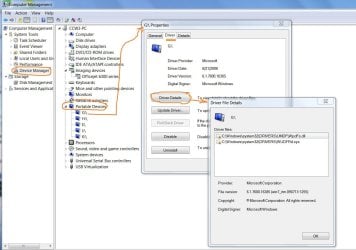
Go to Device Manager and report what you get under Portable Devices.
 

Attachments

  • Device-USB Card Reader.JPG
    Device-USB Card Reader.JPG
    118.9 KB · Views: 611

My Computer My Computer

Computer type
PC/Desktop
Computer Manufacturer/Model Number
Built 2/11/2011
OS
Windows 7 Pro-x64
CPU
i7-2600 3.4GHz - 3.8GHz Turbo
Motherboard
Intel DH67BL-B3
Memory
8Gb - 2x4GB, Muskin 991770 PC3-1333
Graphics Card(s)
Integrated Intel HD 2000
Sound Card
Integrated Intel 10.1 HD, RealTek ALC892
Monitor(s) Displays
Asus LCD VH222H, Haier HL24XSL2a
Screen Resolution
1920x1080, 1920x1080
Hard Drives
Crucial SSD C300-128Gb,
Western Digital WD5002AALX - 500Gb,
Western Digital WD7501AALS - 750Gb
PSU
Seasonic 650W 80+ Gold Modular
Case
Rosewill Defender
Cooling
Stock CPU, Four 120mm case fans, PCH fan added
Keyboard
Logitech EX100 Y-RBH94 Wireless
Mouse
Logitech EX100 M-RCE95 Wireless
Internet Speed
3.0/1.5 Mbs
Antivirus
Microsoft Security Essentials
Browser
Microsoft Internet Explorer 11
Other Info
Antec Veris Premier-Multimedia IR Station,
Cyber Accoustics-3602 Speakers,
AFT XM-5U Card Reader,
Hauppauge TV-HVR-2250,
Sony LX300 USB Turntable
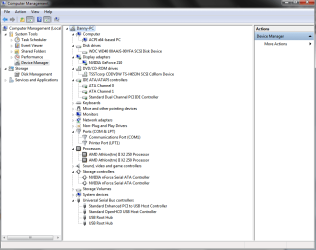
Go to Device Manager and report what you get under Portable Devices.
I don't think I have it. (I made sure no devices were hidden)
 

Attachments

  • management.png
    management.png
    24.6 KB · Views: 174

My Computer My Computer

OS
Windows 7 Home Premium 64bit
Expand "Storage controllers" and "Univeral Serial Bus controllers" and lets have a look there. GigoBites may do it differently.
 

My Computer My Computer

Computer type
PC/Desktop
Computer Manufacturer/Model Number
Built 2/11/2011
OS
Windows 7 Pro-x64
CPU
i7-2600 3.4GHz - 3.8GHz Turbo
Motherboard
Intel DH67BL-B3
Memory
8Gb - 2x4GB, Muskin 991770 PC3-1333
Graphics Card(s)
Integrated Intel HD 2000
Sound Card
Integrated Intel 10.1 HD, RealTek ALC892
Monitor(s) Displays
Asus LCD VH222H, Haier HL24XSL2a
Screen Resolution
1920x1080, 1920x1080
Hard Drives
Crucial SSD C300-128Gb,
Western Digital WD5002AALX - 500Gb,
Western Digital WD7501AALS - 750Gb
PSU
Seasonic 650W 80+ Gold Modular
Case
Rosewill Defender
Cooling
Stock CPU, Four 120mm case fans, PCH fan added
Keyboard
Logitech EX100 Y-RBH94 Wireless
Mouse
Logitech EX100 M-RCE95 Wireless
Internet Speed
3.0/1.5 Mbs
Antivirus
Microsoft Security Essentials
Browser
Microsoft Internet Explorer 11
Other Info
Antec Veris Premier-Multimedia IR Station,
Cyber Accoustics-3602 Speakers,
AFT XM-5U Card Reader,
Hauppauge TV-HVR-2250,
Sony LX300 USB Turntable
Expand "Storage controllers" and "Univeral Serial Bus controllers" and lets have a look there. GigoBites may do it differently.
Here you go.
 

Attachments

  • management2.png
    management2.png
    31.7 KB · Views: 310

My Computer My Computer

OS
Windows 7 Home Premium 64bit
Looks like it may be a hardware compatibility issue--Old hardware. Make sure your BIOS is up to date. You could also try and unplug the card reader from the USB header, reboot, shutdown then plug it back in. See if Windows will recognize new hardware after a reboot. Other than that, about all I can suggest is to try and identify the card reader then see if the manufacturer has drivers for Windows 7 (but I doubt it). Last and probably the best, a newer card reader can be had for less than $30.

One other thing, do you have a USB port on the card reader? if you plug a USB thumb drive into it, does Windows recognize that?
 

My Computer My Computer

Computer type
PC/Desktop
Computer Manufacturer/Model Number
Built 2/11/2011
OS
Windows 7 Pro-x64
CPU
i7-2600 3.4GHz - 3.8GHz Turbo
Motherboard
Intel DH67BL-B3
Memory
8Gb - 2x4GB, Muskin 991770 PC3-1333
Graphics Card(s)
Integrated Intel HD 2000
Sound Card
Integrated Intel 10.1 HD, RealTek ALC892
Monitor(s) Displays
Asus LCD VH222H, Haier HL24XSL2a
Screen Resolution
1920x1080, 1920x1080
Hard Drives
Crucial SSD C300-128Gb,
Western Digital WD5002AALX - 500Gb,
Western Digital WD7501AALS - 750Gb
PSU
Seasonic 650W 80+ Gold Modular
Case
Rosewill Defender
Cooling
Stock CPU, Four 120mm case fans, PCH fan added
Keyboard
Logitech EX100 Y-RBH94 Wireless
Mouse
Logitech EX100 M-RCE95 Wireless
Internet Speed
3.0/1.5 Mbs
Antivirus
Microsoft Security Essentials
Browser
Microsoft Internet Explorer 11
Other Info
Antec Veris Premier-Multimedia IR Station,
Cyber Accoustics-3602 Speakers,
AFT XM-5U Card Reader,
Hauppauge TV-HVR-2250,
Sony LX300 USB Turntable
Looks like it may be a hardware compatibility issue--Old hardware. Make sure your BIOS is up to date. You could also try and unplug the card reader from the USB header, reboot, shutdown then plug it back in. See if Windows will recognize new hardware after a reboot. Other than that, about all I can suggest is to try and identify the card reader then see if the manufacturer has drivers for Windows 7 (but I doubt it). Last and probably the best, a newer card reader can be had for less than $30.

One other thing, do you have a USB port on the card reader? if you plug a USB thumb drive into it, does Windows recognize that?
Alright btw, if I upgrade to Windows 7 Ultimate will that do anything?
 

My Computer My Computer

OS
Windows 7 Home Premium 64bit
What type of SD card are you using? Not all preinstalled card reader can read all type of SD card.
 

My Computer My Computer

Computer type
Laptop
Computer Manufacturer/Model Number
Acer Aspire 5750G
OS
Windows 7 Home Premium x64, Windows 8 Pro
CPU
i5-2430M
Motherboard
Acer JE50_HR
Memory
8 Gb
Graphics Card(s)
nVidia GeForce 610M
Sound Card
Realtek High Definition Audio
Antivirus
Avast
Browser
Chrome
Alright btw, if I upgrade to Windows 7 Ultimate will that do anything?

Unlikely ... but you never know.

I've gone through two different memory card readers on my Win7 32-bit Pro version, and sometimes they work, sometimes they don't -- using the same SD cards.

When they don't work, either they won't read the card (the open folder dialog just hangs) or they will read the card but then won't write to it -- claiming the card is write-protected. I've pulled the card out and checked it, and it is NOT write-protected.

Then, I bought a cheap little USB-based card reader -- and it works ALL THE TIME!

I've tried several cards in it and have not had a problem with any of them.

It's kludgy having this card reader plugged into a USB cable but hey, it works!

 

My Computer My Computer

Computer type
PC/Desktop
Computer Manufacturer/Model Number
Custom
OS
Win7 Pro 32-bit, Win8 Pro 32-bit
CPU
AMD Phenom II X6 1090T
Motherboard
Gigabyte
Memory
4GB ddr3 1300
Graphics Card(s)
AMD HD 4290 onboard
Sound Card
Builtin Realtek HD Audio
Monitor(s) Displays
Samsung 24" widescreen, LG 23" widescreen
Screen Resolution
1920x1200/1920x1080
Hard Drives
Kingston 256GB SSD
Keyboard
Logitech Illuminated Keyboard
Mouse
Logitech M705 wireless mouse
Antivirus
Norton Av 2013
Browser
IE v10
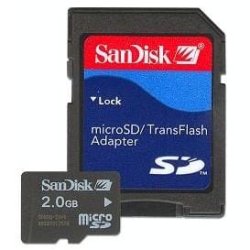
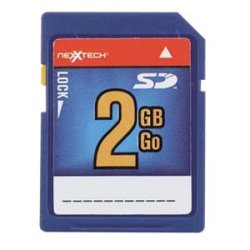
What type of SD card are you using? Not all preinstalled card reader can read all type of SD card.
I have both of these but my sandisk one is only 1GB
 

Attachments

  • WGnu.jpg
    WGnu.jpg
    11.4 KB · Views: 1,471
  • 4419287l.jpg
    4419287l.jpg
    38.8 KB · Views: 1,468

My Computer My Computer

OS
Windows 7 Home Premium 64bit
Alright btw, if I upgrade to Windows 7 Ultimate will that do anything?

Unlikely ... but you never know.

I've gone through two different memory card readers on my Win7 32-bit Pro version, and sometimes they work, sometimes they don't -- using the same SD cards.

When they don't work, either they won't read the card (the open folder dialog just hangs) or they will read the card but then won't write to it -- claiming the card is write-protected. I've pulled the card out and checked it, and it is NOT write-protected.

Then, I bought a cheap little USB-based card reader -- and it works ALL THE TIME!

I've tried several cards in it and have not had a problem with any of them.

It's kludgy having this card reader plugged into a USB cable but hey, it works!
Should I get this?:
NEXXTECH USB FOLDING SD/MMC CARD READER
NexxTech USB folding SD/MMC card reader | Memory card readers | Ratings & Reviews | TheSource.ca
 

My Computer My Computer

OS
Windows 7 Home Premium 64bit
These are the common types of SD cards and it should be supported by your hard drive.
I guess its either your cards or the card reader in your pc that is not functioning well.

Can you test these cards in another pc to see its contents, or use some friends SD cards that have already some data on it in your pc's card reader.

You need to find out whether its the card or the card reader that is not functioning.
 

My Computer My Computer

Computer type
Laptop
Computer Manufacturer/Model Number
Acer Aspire 5750G
OS
Windows 7 Home Premium x64, Windows 8 Pro
CPU
i5-2430M
Motherboard
Acer JE50_HR
Memory
8 Gb
Graphics Card(s)
nVidia GeForce 610M
Sound Card
Realtek High Definition Audio
Antivirus
Avast
Browser
Chrome

My Computer My Computer

Computer type
PC/Desktop
Computer Manufacturer/Model Number
Custom
OS
Win7 Pro 32-bit, Win8 Pro 32-bit
CPU
AMD Phenom II X6 1090T
Motherboard
Gigabyte
Memory
4GB ddr3 1300
Graphics Card(s)
AMD HD 4290 onboard
Sound Card
Builtin Realtek HD Audio
Monitor(s) Displays
Samsung 24" widescreen, LG 23" widescreen
Screen Resolution
1920x1200/1920x1080
Hard Drives
Kingston 256GB SSD
Keyboard
Logitech Illuminated Keyboard
Mouse
Logitech M705 wireless mouse
Antivirus
Norton Av 2013
Browser
IE v10
These are the common types of SD cards and it should be supported by your hard drive.
I guess its either your cards or the card reader in your pc that is not functioning well.

Can you test these cards in another pc to see its contents, or use some friends SD cards that have already some data on it in your pc's card reader.

You need to find out whether its the card or the card reader that is not functioning.
Yea I tried mines on my friends laptop and it worked, and he tried his SD card on my computer but it didn't work
 

My Computer My Computer

OS
Windows 7 Home Premium 64bit
since you have moved from 32bit to 64bit, the hardware now requires the updated 64bit driver.

go to the hardware vendor site to download and install their latest driver update.
 

My Computer My Computer

OS
Win 64 bit
Back
Top