Computer not seeing external HDD?

JohnnyScience

New member
Power User
Local time
8:12 PM
Messages
889
Haven't had this issue before, it's a WD Passport 1TB HDD.

Usually these things plug right in & show up under my computer.

But even after several unplugs, trying to update the drivers (which were already up to date) and restarting the computer, my external HDD is still not showing up under my computer?
 

My Computer

Computer Manufacturer/Model Number
Built it myself
OS
Windows 7 64 & Ubuntu 64
CPU
Intel Quad Core Q6600 2.40GHz
Motherboard
Asus
Memory
8g
Graphics Card(s)
Nvidia 9600 GT & 9800 GT
Sound Card
Turtle Beach 5.1
Monitor(s) Displays
Three 19" Dell's & one 46" Samsung 750
Plug it into another 2.0 usb port and see if it works. You could also put something else in that port and see if it works.
Look in device manager Universal Serial Port and see if you have a problem.
 

My Computer

Computer type
PC/Desktop
Computer Manufacturer/Model Number
Home made Desktop
OS
Windows 10 Pro. 64/ version 1709 Windows 7 Pro/64
CPU
Intel i7-6800K @ 4.3
Motherboard
ASUS X-99 Deluxe II
Memory
Corsair Platinum 16 gig @2400
Graphics Card(s)
EVGA GTX 1070 OC
Monitor(s) Displays
Asus 27" LED LCD/VE278Q
Screen Resolution
1920-1080 or 1280-720 HDMI
Hard Drives
INTEL SSD 730-240 Gb Sata 3.0/
PSU
EVGA Platium 1200W
Case
Phanteks Luxe Tempered Glass 8 fans/ one radiator
Cooling
XSPC/ Water Cooled CPU
Keyboard
Das 4 Professional
Mouse
Logitech M705/MX Anywhere 2-S
Internet Speed
100 mbits
Antivirus
Microsoft Security Essentials/ Malwarebytes Premium 3.0/ SAS
Browser
I.E. 11 default/Firefox/ ISP Time Warner Cable/Spectrum
Other Info
LG BluRay Burner/
Sound system-KLipsch-THX/
Icy Dock ssd Hot Swap bays.
Still nothing. No errors in device manager either.

Just for the record, this HDD has truecrypt installed on it, but the HDD should still be showing up under my computer with the true crypt file.
 

My Computer

Computer Manufacturer/Model Number
Built it myself
OS
Windows 7 64 & Ubuntu 64
CPU
Intel Quad Core Q6600 2.40GHz
Motherboard
Asus
Memory
8g
Graphics Card(s)
Nvidia 9600 GT & 9800 GT
Sound Card
Turtle Beach 5.1
Monitor(s) Displays
Three 19" Dell's & one 46" Samsung 750

My Computer

Computer type
Laptop
Computer Manufacturer/Model Number
Sony Vaio VPCEB47GM Laptop
OS
Win 7 Pro 64-bit
CPU
Intel i5 2.4 Ghz
Memory
8GB DDR3
Graphics Card(s)
Intel HD 3000
Sound Card
IDT High Definition
Monitor(s) Displays
15.6 WGXA Anti-Glare LED
Screen Resolution
1280x800
Hard Drives
640Gb 7200rpm
Antivirus
MSE
Browser
Opera (primary) with IE9 backup
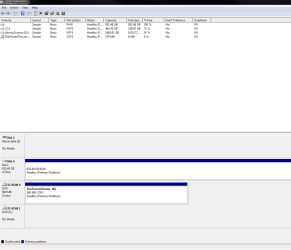
Hmm, so it's showing up under Disk Management, but it says that it's RAW & when I try to assign a letter to the drive it wants to format it - which I do not want to do since there is already data on this HDD & not sure why it isn't showing up properly?
 

Attachments

  • Untitled.png
    Untitled.png
    17.2 KB · Views: 22

My Computer

Computer Manufacturer/Model Number
Built it myself
OS
Windows 7 64 & Ubuntu 64
CPU
Intel Quad Core Q6600 2.40GHz
Motherboard
Asus
Memory
8g
Graphics Card(s)
Nvidia 9600 GT & 9800 GT
Sound Card
Turtle Beach 5.1
Monitor(s) Displays
Three 19" Dell's & one 46" Samsung 750
I don't know why the WD changed from NTFS to RAW. I know that some viruses can do that to a drive. Since you don't want to format and lose the data on this drive, the only other thing I can suggest is to use some kind of file recovery software, save the recovered data to another hard drive, then go ahead and do the format and assign a new drive letter to the WD. EaseUS is one company that offers data recovey software. The free version will recover up to 1 GB while the paid version has unlimited data recovery. Perhaps other Forum mebers will jump in with other suggestions.

Recover files from RAW external hard drive with data recovery software

How can I get Windows 7 to read RAW hard drives without having to - Microsoft Community
 

My Computer

Computer type
Laptop
Computer Manufacturer/Model Number
Sony Vaio VPCEB47GM Laptop
OS
Win 7 Pro 64-bit
CPU
Intel i5 2.4 Ghz
Memory
8GB DDR3
Graphics Card(s)
Intel HD 3000
Sound Card
IDT High Definition
Monitor(s) Displays
15.6 WGXA Anti-Glare LED
Screen Resolution
1280x800
Hard Drives
640Gb 7200rpm
Antivirus
MSE
Browser
Opera (primary) with IE9 backup
Well that really doesn't make sense because this HDD has been locked away in a safe far from viruses since the last time it was plugged in, loaded with Truecrypt & backed up my entire computer.

It's virtually impossible for it to have a virus.

There is no other way to fix this?

Luckily my main computer HDD hasn't crashed & I'm not relying on this backup at this time, I was just trying to update it. But if I was relying on my back up and this happened... after all of the precautions I took I would burn something down.
 

My Computer

Computer Manufacturer/Model Number
Built it myself
OS
Windows 7 64 & Ubuntu 64
CPU
Intel Quad Core Q6600 2.40GHz
Motherboard
Asus
Memory
8g
Graphics Card(s)
Nvidia 9600 GT & 9800 GT
Sound Card
Turtle Beach 5.1
Monitor(s) Displays
Three 19" Dell's & one 46" Samsung 750
have you tried plugging it into a different computer yet?
 

My Computer

Computer Manufacturer/Model Number
Hewlett packard/p6512uk
OS
Microsoft Windows 7 Home Premium 64-bit 7600
CPU
IIx4 amd athelon 635 processor
Motherboard
FOXCONN 2AA9
Memory
2x2gb
Graphics Card(s)
ati radeon HD 5450
Sound Card
(1) Realtek High Definition Audio (2) AMD High Definition
Monitor(s) Displays
samsung lcd tv 32"
Screen Resolution
1360x 768
Hard Drives
(1) WDC WD10 01FAES-60Z2A0 SATA Disk Device (2) Maxtor OneTouch USB Device (3) ST310003 33AS USB Device (4) WD My Book 1111 USB Device
PSU
?
Cooling
air!
Keyboard
wireless hp
Mouse
wireless Hp,optical
Internet Speed
1.10mb/s
Antivirus
MSE
Browser
Firefox
No only 1 computer at my disposal sadly...
 

My Computer

Computer Manufacturer/Model Number
Built it myself
OS
Windows 7 64 & Ubuntu 64
CPU
Intel Quad Core Q6600 2.40GHz
Motherboard
Asus
Memory
8g
Graphics Card(s)
Nvidia 9600 GT & 9800 GT
Sound Card
Turtle Beach 5.1
Monitor(s) Displays
Three 19" Dell's & one 46" Samsung 750
RAW generally indicates it's been removed prematurely at least once or twice from the PC...
I'm afraid it should be data recovery apps you should be researching...
 

My Computer

Computer Manufacturer/Model Number
Self-Built
OS
Vista Ultimate X64/ Windows 7 Dual-boot
CPU
Q6600
Motherboard
ASUS P5K
Memory
4G OCZ PC2 8500 Platinum
Graphics Card(s)
EVGA 8800GTS Vid Card
Hard Drives
500G Seagate SATA
200G Seagate SATA
100G WD Caviar SATA
80G WD Caviar IDE
PSU
OCZ Elite 800W PSU
Case
RaidMax Smilodon Case
Did you decrypt the drive?
 

My Computer

Computer type
PC/Desktop
Computer Manufacturer/Model Number
Home Built Desktop By DataTech
OS
Windows 7 Ultimate X64 SP1
CPU
Intel i5-2550K, Differing ~4.4-4.8GHz No built in GPU
Motherboard
ASUS P8Z68-V PRO/GEN3
Memory
16GB G.Skill Sniper 1866MHz @ 2133MHz 2x8GB
Graphics Card(s)
ASUS GTX650TIB-DC2OC-2GD5, (650TI Boost)
Sound Card
Onboard Realtek 5-1
Monitor(s) Displays
Samsung P2570HD
Screen Resolution
1920x1080
Hard Drives
Samsung 840 Pro 256GB SSD for OS, 500GB Seagate Constellation (Enterprise drive) for Data
PSU
Corsair HX650W
Case
Inwin Dragon Rider
Cooling
Hyper 212 EVO w/two Noctua fans, push-pull, @1300 RPM
Keyboard
E-Z Eyes, bright yellow keys with large characters
Mouse
steelseries SENSEI Laser Pro Gaming
Internet Speed
48-51Mbs Mbs down, 11 Mbs up Xfinity Cable
Antivirus
Norton Internet Security 2013
Browser
IE 10, Opera, Pale Moon if needed
Other Info
4 case fans, LG BluRay-RE, ASUS DVD-RW, Mr. Fusion power supply, 1.21 gigawatts.
No I can't decrypt it because the computer doesn't even see the drive in order to access the file to decrypt. It's odd that it shows up under my USB drives, but it's not showing up under my computer.

I'm going to re-format this & re-copy everything with Truecrypt - I just really hope that I don't have this problem if & when I actually need the backup because my original crashes. Damn it.
 

My Computer

Computer Manufacturer/Model Number
Built it myself
OS
Windows 7 64 & Ubuntu 64
CPU
Intel Quad Core Q6600 2.40GHz
Motherboard
Asus
Memory
8g
Graphics Card(s)
Nvidia 9600 GT & 9800 GT
Sound Card
Turtle Beach 5.1
Monitor(s) Displays
Three 19" Dell's & one 46" Samsung 750
Just curious, but what does the SMART values say about the health of the drive? I would make sure the hardware itself is reliable before you use it for backups again.

I've had an internal HDD turn from NTFS into RAW before completely out of the blue and the drive had iffy SMART values showing up (I no longer use said drive for anything crucial).
 

My Computer

Computer type
PC/Desktop
Computer Manufacturer/Model Number
N/A (custom-built)
OS
Windows 7 Ultimate x64 SP1
CPU
Intel Core i7 2700K @ 3.5GHz (TurboBoost disabled)
Motherboard
ASUS P8Z68-V/GEN3
Memory
16GB (4x4GB) Kingston HyperX DDR3 1600MHz @ 1333MHz
Graphics Card(s)
Nvidia EVGA GeForce GTX 1060 6GB
Sound Card
Realtek High Definition Audio (motherboard integrated)
Monitor(s) Displays
NEC Multisync EX231W
Screen Resolution
1920x1080 @ 60Hz via DVI-D
Hard Drives
2x Western Digital 1TB SATA3 Caviar Black Internal HDD // 1x WD 500GB USB 3.0 "My Passport Essential" External HDD // 1x WD 1TB USB 3.0 "My Passport Essential" External HDD // 2x WD 2TB USB 3.0 "My Passport Essential" External HDD
PSU
Corsair Professional Series Gold AX850
Case
Antec 300
Cooling
Air-cooling
Keyboard
Steelseries 6Gv2
Mouse
Steelseries Sensei RAW Glossy, Logitech M500
Internet Speed
DSL (AT&T)
Antivirus
Microsoft Security Essentials
Browser
Pale Moon, Mozilla Firefox 12, Opera 12, Chromium, IE9
Other Info
Virtual Machines (VirtualBox):
* Japanese Windows XP Professional SP3
* Japanese Windows 7 Professional SP1
Not sure as I'm not familiar with this SMART value system. Can you provide a link for the program?

I do want to check it's reliability before making it a true backup. The thing is virtually brand new, maybe a year old & has just been in the safe for storage. I don't even keep it plugged in on a regular basis, just do my backups & store it away again.
 

My Computer

Computer Manufacturer/Model Number
Built it myself
OS
Windows 7 64 & Ubuntu 64
CPU
Intel Quad Core Q6600 2.40GHz
Motherboard
Asus
Memory
8g
Graphics Card(s)
Nvidia 9600 GT & 9800 GT
Sound Card
Turtle Beach 5.1
Monitor(s) Displays
Three 19" Dell's & one 46" Samsung 750
I personally use CrystalDiskInfo to read SMART data on my HDDs, the program supports both internal and external HDDs.

Just download the .zip version, you can safely and easily delete the program after using it if you don't want to keep it.

Also, just in case you're wondering what the "Shizuku" edition is, that's just something that people who like anime (like me!) might be interested in; good ol' Japanese humor. For your purposes here just download the standard version. :P

EDIT: SMART data you should be checking in particular are "Reallocated Sector Count", "Reallocation Event Count", "Current Pending Sector Count", Uncorrectable Sector Count", "UltraDMA CRC Error Count", and "Write Error Count". If any of their raw values are not zero, they indicate that your HDD encountered some problems during its operation and that it might be dying.
 
Last edited:

My Computer

Computer type
PC/Desktop
Computer Manufacturer/Model Number
N/A (custom-built)
OS
Windows 7 Ultimate x64 SP1
CPU
Intel Core i7 2700K @ 3.5GHz (TurboBoost disabled)
Motherboard
ASUS P8Z68-V/GEN3
Memory
16GB (4x4GB) Kingston HyperX DDR3 1600MHz @ 1333MHz
Graphics Card(s)
Nvidia EVGA GeForce GTX 1060 6GB
Sound Card
Realtek High Definition Audio (motherboard integrated)
Monitor(s) Displays
NEC Multisync EX231W
Screen Resolution
1920x1080 @ 60Hz via DVI-D
Hard Drives
2x Western Digital 1TB SATA3 Caviar Black Internal HDD // 1x WD 500GB USB 3.0 "My Passport Essential" External HDD // 1x WD 1TB USB 3.0 "My Passport Essential" External HDD // 2x WD 2TB USB 3.0 "My Passport Essential" External HDD
PSU
Corsair Professional Series Gold AX850
Case
Antec 300
Cooling
Air-cooling
Keyboard
Steelseries 6Gv2
Mouse
Steelseries Sensei RAW Glossy, Logitech M500
Internet Speed
DSL (AT&T)
Antivirus
Microsoft Security Essentials
Browser
Pale Moon, Mozilla Firefox 12, Opera 12, Chromium, IE9
Other Info
Virtual Machines (VirtualBox):
* Japanese Windows XP Professional SP3
* Japanese Windows 7 Professional SP1
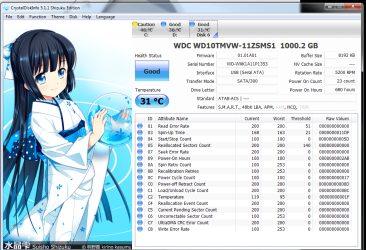
I've attached the screen shots of the 2 drives, the first I believe is the WD 1tb backup that is in question of having issues.

So it should be good to go right? No issues seem to be with the drive itself. I'm going to re-run True-Crypt on it and hopefully have a successful backup.

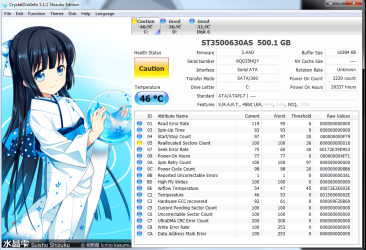
The 2nd is my C: drive, it seems to have a caution rating to it, is this something I can fix?
 

Attachments

  • Untitled.png
    Untitled.png
    131.6 KB · Views: 9
  • Untitled2.png
    Untitled2.png
    130.6 KB · Views: 15

My Computer

Computer Manufacturer/Model Number
Built it myself
OS
Windows 7 64 & Ubuntu 64
CPU
Intel Quad Core Q6600 2.40GHz
Motherboard
Asus
Memory
8g
Graphics Card(s)
Nvidia 9600 GT & 9800 GT
Sound Card
Turtle Beach 5.1
Monitor(s) Displays
Three 19" Dell's & one 46" Samsung 750
Just a thought. If you conceder your backup is important enough to encrypt and lock in a safe I would not use a drive that I had a doubt of any kind.
 

My Computer

Computer type
PC/Desktop
Computer Manufacturer/Model Number
Home made Desktop
OS
Windows 10 Pro. 64/ version 1709 Windows 7 Pro/64
CPU
Intel i7-6800K @ 4.3
Motherboard
ASUS X-99 Deluxe II
Memory
Corsair Platinum 16 gig @2400
Graphics Card(s)
EVGA GTX 1070 OC
Monitor(s) Displays
Asus 27" LED LCD/VE278Q
Screen Resolution
1920-1080 or 1280-720 HDMI
Hard Drives
INTEL SSD 730-240 Gb Sata 3.0/
PSU
EVGA Platium 1200W
Case
Phanteks Luxe Tempered Glass 8 fans/ one radiator
Cooling
XSPC/ Water Cooled CPU
Keyboard
Das 4 Professional
Mouse
Logitech M705/MX Anywhere 2-S
Internet Speed
100 mbits
Antivirus
Microsoft Security Essentials/ Malwarebytes Premium 3.0/ SAS
Browser
I.E. 11 default/Firefox/ ISP Time Warner Cable/Spectrum
Other Info
LG BluRay Burner/
Sound system-KLipsch-THX/
Icy Dock ssd Hot Swap bays.
Regarding your WD external HDD:
SMART isn't showing any signs of problems or potential failure with the drive, that's good; by SMART itself, you probably won't have any issues with reformatting and re-using the HDD. However, the fact remains that you've experienced file system corruption resulting in data loss on this HDD, so I would recommend replacing with a new HDD if you have doubts about this HDD.

Overall: External HDD will probably function without issue once reformatted, but since the backups you've been taking on the drive appear to be crucial I advise replacing the drive at your earliest convenience if you have any doubts whatsoever about the drive.

Regarding your internal C: drive:
Now this is something you should be worried about; much moreso than your external HDD. SMART is showing that your HDD had to reallocate some sectors, this means that your HDD had trouble writing data into the sectors while the drive was in operation and had to remap and move data from the bad sectors into special redundant sectors specially reserved for cases like this.

This means one of two things:
A: Your HDD experienced a minor fluke while in operation and tagged the sectors as bad. While not required, problems of this kind can sometimes be fixed by reformatting or running some kind of disk scan on the drive.
B: Your HDD could be experiencing physical wear such as a degradation in the magnetic material coating the HDD platters. This is an actual physical problem with your HDD and your drive will eventually fail.

It's impossible to tell which of the two it is just from SMART, combined with the fact that the number of remapped sectors is low. However, SMART is showing one way or the other that your HDD is experiencing a problem that could eventually result in a complete failure of the drive.

I would backup your C: drive ASAP and then check regularly to see if the reallocated sector count keeps increasing. If it doesn't increase any further, I would think about possibly replacing the drive at your earliest convenience while taking routine backups on a more regular basis. If the reallocated sector count increases any further however, immediately replace the drive before it completely fails or you might experience data loss.

I'd say this was overall a good checkup. While we didn't find any apparent problems on your external HDD, we did find something to worry about on your internal C: drive. :shock:

 

My Computer

Computer type
PC/Desktop
Computer Manufacturer/Model Number
N/A (custom-built)
OS
Windows 7 Ultimate x64 SP1
CPU
Intel Core i7 2700K @ 3.5GHz (TurboBoost disabled)
Motherboard
ASUS P8Z68-V/GEN3
Memory
16GB (4x4GB) Kingston HyperX DDR3 1600MHz @ 1333MHz
Graphics Card(s)
Nvidia EVGA GeForce GTX 1060 6GB
Sound Card
Realtek High Definition Audio (motherboard integrated)
Monitor(s) Displays
NEC Multisync EX231W
Screen Resolution
1920x1080 @ 60Hz via DVI-D
Hard Drives
2x Western Digital 1TB SATA3 Caviar Black Internal HDD // 1x WD 500GB USB 3.0 "My Passport Essential" External HDD // 1x WD 1TB USB 3.0 "My Passport Essential" External HDD // 2x WD 2TB USB 3.0 "My Passport Essential" External HDD
PSU
Corsair Professional Series Gold AX850
Case
Antec 300
Cooling
Air-cooling
Keyboard
Steelseries 6Gv2
Mouse
Steelseries Sensei RAW Glossy, Logitech M500
Internet Speed
DSL (AT&T)
Antivirus
Microsoft Security Essentials
Browser
Pale Moon, Mozilla Firefox 12, Opera 12, Chromium, IE9
Other Info
Virtual Machines (VirtualBox):
* Japanese Windows XP Professional SP3
* Japanese Windows 7 Professional SP1
Ok so I contacted WD to check on the warranty & it's covered until June 2013, so I started the RMA process for a replacement drive.

I asked the guy if it was a brand new drive or a refurb, he stated it was basically a re-certified drive that is as good as a brand new one.

What do you guys think, should I be worried getting a refurb as a replacement for my main backup files?

As mentioned earlier, I only plug the drive in to perform the backup & then disable properly & store in a safe place.

In regards to the c: drive, I use Paragon backup to back up my OS.

Won't performing this backup copy the bad sectors as well?

It's an older HDD that I only use for my C: OS & keep all data on a separate HDD that I then backup both on the WD Passport that is now in question.

I will try to get a new HDD for the C: as soon as I can, probably after the holidays.
 

My Computer

Computer Manufacturer/Model Number
Built it myself
OS
Windows 7 64 & Ubuntu 64
CPU
Intel Quad Core Q6600 2.40GHz
Motherboard
Asus
Memory
8g
Graphics Card(s)
Nvidia 9600 GT & 9800 GT
Sound Card
Turtle Beach 5.1
Monitor(s) Displays
Three 19" Dell's & one 46" Samsung 750

My Computer

Computer type
PC/Desktop
Computer Manufacturer/Model Number
Home Built Desktop By DataTech
OS
Windows 7 Ultimate X64 SP1
CPU
Intel i5-2550K, Differing ~4.4-4.8GHz No built in GPU
Motherboard
ASUS P8Z68-V PRO/GEN3
Memory
16GB G.Skill Sniper 1866MHz @ 2133MHz 2x8GB
Graphics Card(s)
ASUS GTX650TIB-DC2OC-2GD5, (650TI Boost)
Sound Card
Onboard Realtek 5-1
Monitor(s) Displays
Samsung P2570HD
Screen Resolution
1920x1080
Hard Drives
Samsung 840 Pro 256GB SSD for OS, 500GB Seagate Constellation (Enterprise drive) for Data
PSU
Corsair HX650W
Case
Inwin Dragon Rider
Cooling
Hyper 212 EVO w/two Noctua fans, push-pull, @1300 RPM
Keyboard
E-Z Eyes, bright yellow keys with large characters
Mouse
steelseries SENSEI Laser Pro Gaming
Internet Speed
48-51Mbs Mbs down, 11 Mbs up Xfinity Cable
Antivirus
Norton Internet Security 2013
Browser
IE 10, Opera, Pale Moon if needed
Other Info
4 case fans, LG BluRay-RE, ASUS DVD-RW, Mr. Fusion power supply, 1.21 gigawatts.
Back
Top