Dear everyone,
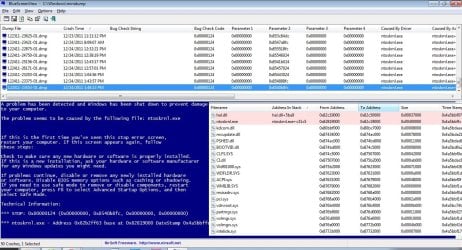
I have a serious problem with my dad's computer. My dad's computer often not responding (crash) after using some programs. I think that the graphic card driver should be the source of this problem.
My computer specification are:
- Processor: Intel Pentium 4 2,40GHz
- RAM: 256 MB + 1 GB DDR1
- Hard Disk: 500GB + 40GB
- Video Graphic: NVIDIA GeForce MX440 with AGP8x (64MB)
- Operating System: Windows 7 Professional 32bit
I have tried to downgrade the graphic card driver (a.k.a NVIDIA Forceware) from version 93.71 (this version always makes my dad's computer crash), and then version 81.85 (still same), and finally version 71.90 and it still makes my dad's computer crash.... By the way, the graphic card driver is not avaiable for Windows 7 version, so I install the graphic card driver using Compatibility Mode and Run as Administrator.
I also have tried to lower the "Hardware acceleration" (Control Panel > Display > Adjust Resolution > Advanced settings > tab Troubleshot > Change Settings) slider to None. It helped, but I want smooth graphic. Sorry for my bad english, and thank you for the assistance.
I have a serious problem with my dad's computer.
My dad's computer often not responding (crash) after using some programs. I think that the graphic card driver should be the source of this problem. My computer specification are:
- Processor: Intel Pentium 4 2,40GHz
- RAM: 256 MB + 1 GB DDR1
- Hard Disk: 500GB + 40GB
- Video Graphic: NVIDIA GeForce MX440 with AGP8x (64MB)
- Operating System: Windows 7 Professional 32bit
I have tried to downgrade the graphic card driver (a.k.a NVIDIA Forceware) from version 93.71 (this version always makes my dad's computer crash), and then version 81.85 (still same), and finally version 71.90 and it still makes my dad's computer crash.... By the way, the graphic card driver is not avaiable for Windows 7 version, so I install the graphic card driver using Compatibility Mode and Run as Administrator.
I also have tried to lower the "Hardware acceleration" (Control Panel > Display > Adjust Resolution > Advanced settings > tab Troubleshot > Change Settings) slider to None. It helped, but I want smooth graphic. Sorry for my bad english, and thank you for the assistance.
My Computer
At a glance
Windows 7 Professional 32bitIntel Pentium 4 2,40GHz256MB + 1GB DDR1NVIDIA GeForce MX440 with AGP8x
- OS
- Windows 7 Professional 32bit
- CPU
- Intel Pentium 4 2,40GHz
- Motherboard
- ASUS P4P800S
- Memory
- 256MB + 1GB DDR1
- Graphics Card(s)
- NVIDIA GeForce MX440 with AGP8x
- Sound Card
- SoundMAX Integrated Digital Audio
- Monitor(s) Displays
- SAMSUNG B1930 18,5"
- Screen Resolution
- 1360 x 768 pixels
- Hard Drives
- - 40GB (Maxtor)
- 500GB (Seagate)
- Internet Speed
- HSDPA