
I had to do a clean install of Windows 7, because while trying to fix dual boot with Windows 8 problem, after I no longer wanted dual boot with Windows 8. My main HDD failed, I had to install another HDD, tested it, checked good, I then installed Windows 7 on it, also I used other software and erased everything from the drive that had Windows 8 installed on it.
After installing Windows 7, found that my computer won't bnoot with out Windows 7 install DVD in my dvd drive. The boot order is (1-dvdrooom, (2-First HDD), the first HDD has Windows 7 installed on it. When I try to boot computer with out install dvd in drive, it displays this at bottom of screen,
INTEL UNDI, PXE-2.1 (Build 082)
Copyright (C) 1997-2000 Intell Corporation
For Realtek RTL8139(X)/8130/810X PCI Fast Ethernet Controller v2.16 (041224)
Client Mac ADDR: 00 1E 90 3D 43 F7 Guid: FEFEFEFE-FEFE-FEFE-FEFE-FEFEFEFEFEFE
PXE-E53:No Boot filename received
PXE-M0F:Exiting PXE-Rom
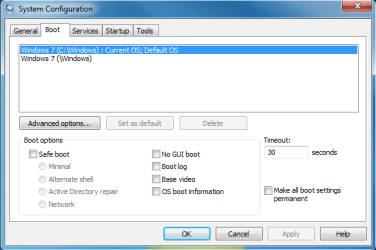
I shut down my computer, restart it insert dvd into drive and let it boot into windows, and then everything is ok. After Windows 7 finished booting I went into MsConfig, then clicked the Boot Tab and this it what is there, I am including a screen shot of MsConfig.
This is the first time this has happened, and first time I have ever encountered this. I am not sure how to proceed to fix this problem. Please help, as this has really gotten me frustrated. Thank you.
After installing Windows 7, found that my computer won't bnoot with out Windows 7 install DVD in my dvd drive. The boot order is (1-dvdrooom, (2-First HDD), the first HDD has Windows 7 installed on it. When I try to boot computer with out install dvd in drive, it displays this at bottom of screen,
INTEL UNDI, PXE-2.1 (Build 082)
Copyright (C) 1997-2000 Intell Corporation
For Realtek RTL8139(X)/8130/810X PCI Fast Ethernet Controller v2.16 (041224)
Client Mac ADDR: 00 1E 90 3D 43 F7 Guid: FEFEFEFE-FEFE-FEFE-FEFE-FEFEFEFEFEFE
PXE-E53:No Boot filename received
PXE-M0F:Exiting PXE-Rom
I shut down my computer, restart it insert dvd into drive and let it boot into windows, and then everything is ok. After Windows 7 finished booting I went into MsConfig, then clicked the Boot Tab and this it what is there, I am including a screen shot of MsConfig.
This is the first time this has happened, and first time I have ever encountered this. I am not sure how to proceed to fix this problem. Please help, as this has really gotten me frustrated. Thank you.
Attachments
My Computer
- OS
- Windows 7 pro

