Solved Computer randomly doesn't start

Grendaable

New member
Local time
10:06 PM
Messages
4
Hello !

I'm from Poland so there might be problems with my english, please, forgive me ! :)

I had some problems with my PC, had a few BSOD(unfortunately i do not have them), now my PC randomly reboots. For example when i play CS:GO, Unturned, Guild Wars 2, or when i'm watching YouTube. Just reboot, no warning, no high temp., sometimes the sound freezes.

What's more interesting - sometimes after that reboot or after the night (i turn off PC, nothing wrong happens, go to sleep, when i wake up and turn on PC it happens) my PC just doesn't turn on. I press the POWER button, CPU starts, but BIOS sends 4 long beeps, break, 4 long beeps. I checked it, on my motherboard and BIOS (Award) it means problems with graphic card.

What's more - i had a few times colorful stripes, then blue screen (not BSOD) then reboot.

So, the problem is - i have random reboots and sometimes my PC does not starts.

Thanks in advance for help ! :)
 

My Computer

Computer type
PC/Desktop
Computer Manufacturer/Model Number
Custom
OS
Windows 7 Ultimate 64
CPU
AMD Phenom II X4 840
Motherboard
Gigabyte MA770T-UD3
Memory
Kingston HyperX 2x2GB + Kingston 2x2GB
Graphics Card(s)
Radeon 6850 Gigabyte Twin Force
Hard Drives
WD 1TB
Antivirus
Avast
Browser
Chrome
Hi
Do you have another graphics card that you could try? What's make and model of power supply and wattage?
 

My Computer

Computer type
PC/Desktop
Computer Manufacturer/Model Number
dell xps 9000
OS
win 10
Damn, im in hurry and wanted to post it before i leave and forgot. I have no graphic, no power supply to change. It is corsair 500 w kinda cant find exactly what model it is, im away from home i Just remember it says Corsair CX500.

Edit - my PC is cleaned from dust with compressed air, and the problem with 4beeps sometimes goes off when i push cables from power supply in and out from the power supply (i Just push them in and out from power supply so they move inside it, i think they might get a better connection then) and it sometimes helps.
 

My Computer

Computer type
PC/Desktop
Computer Manufacturer/Model Number
Custom
OS
Windows 7 Ultimate 64
CPU
AMD Phenom II X4 840
Motherboard
Gigabyte MA770T-UD3
Memory
Kingston HyperX 2x2GB + Kingston 2x2GB
Graphics Card(s)
Radeon 6850 Gigabyte Twin Force
Hard Drives
WD 1TB
Antivirus
Avast
Browser
Chrome
The minimum for that graphics card is 500 watts but you have other things in the computer that uses power I would want a 650 watt power supply seasonic or xfx supplies are top quality. I don't think your motherboard has on board graphics maybe you could barrow a card and power supply from a friend.
 

My Computer

Computer type
PC/Desktop
Computer Manufacturer/Model Number
dell xps 9000
OS
win 10
I bought this PC 3 years ago and have problems for 1-1,5 year. I never thought my power supply is too weak. There is a problem - i asked and no one wants to borrow me their graphics or power supply. So, right now it is only thing i can do? I must go now, will try to borrow something.

EDIT: Luckily managed to get spare graphic card - Gigabyte GTX 970 G1 Gaming - and... the same problem, every fan is working, system does not starts, 4 long beeps, break, 4 long beeps. So... power supply is damaged ?
 
Last edited:

My Computer

Computer type
PC/Desktop
Computer Manufacturer/Model Number
Custom
OS
Windows 7 Ultimate 64
CPU
AMD Phenom II X4 840
Motherboard
Gigabyte MA770T-UD3
Memory
Kingston HyperX 2x2GB + Kingston 2x2GB
Graphics Card(s)
Radeon 6850 Gigabyte Twin Force
Hard Drives
WD 1TB
Antivirus
Avast
Browser
Chrome
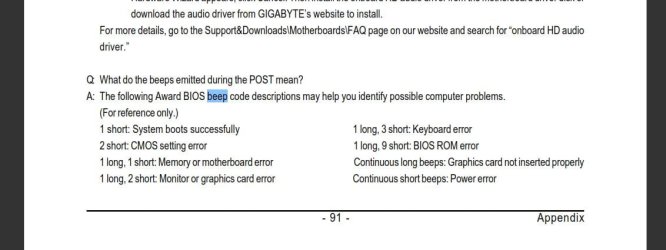
Where did you get the information that a 4-beep code equals graphics card? And are you sure that is the pattern (4 beeps).

The reason I ask is that the Award BIOS is very difficult to pin down when it comes to beep codes. This is because the codes can be customized by the motherboard manufacturer:

Beep2.JPG

_
Here is what they give you in the manual for the MA770T-UD3 motherboard:
_
Beep1.JPG

_
So if you truly have a 4 beep code going on then neither Gigabyte or Award/Phoenix is being any help. You may be just stabbing in the dark if you are assuming that a 4 beep code applies to your board.

You might try re-seating your RAM, or running with just one stick (switch them to try each one) just as a quick test for memory errors.

When video card companies say that a minimum watt power supply is recommended, they mean that is the minimum wattage for a typical system with their graphics card, not that you need that amount of wattage for the graphics card. Graphics cards can use about 150-200 watts at full load, some high end cards more. Using a power supply calculator is the best way to determine the best size.

If you have or can borrow a multimeter you could do a basic test on the power supply to see if there is an obvious problem.
 

My Computer

Computer type
PC/Desktop
Computer Manufacturer/Model Number
Home Built - Jan 2013
OS
Windows 7 64 Bit Home Premium SP1
CPU
i7-3820
Motherboard
Asus P9X79-PRO - Bios 4608
Memory
GSkill F3-14900CL9Q - 16GB
Graphics Card(s)
EVGA GeForce GTX660 - Driver 352.86
Sound Card
On board Realtek ALC898
Monitor(s) Displays
Acer S271HL
Screen Resolution
1920 x 1080
Hard Drives
#1- Samsung 840 Pro Series
#2- Western Digital WD1002FAEX Sata3 Black
#3- Western Digital WD1002FAEX Sata3 Black
PSU
Corsair CMPSU-850TX-V2 - 850 watt (by Seasonic)
Case
Corsair Obsidian 550D
Cooling
Standard 3 120mm case fans, Cooler Master Hyper 212 EVO
Keyboard
MS KC-0405
Mouse
Intellimouse 5-button
Internet Speed
56 Mbits/Sec (on a good day)
Antivirus
Avast & Malwarebytes
Browser
Firefox
Other Info
Asus DVD - DRW-24B1ST 24X
When I have run into the 4 long beeps on power on with the Award MB its the CPU fan check failing.
 

My Computer

Computer type
PC/Desktop
OS
Windows 7 Ultimate 64
Okay, the problem was with motherboard. I do not know exactly where was the problem but i know my motherboard was broken :) Thanks guys ; >
 

My Computer

Computer type
PC/Desktop
Computer Manufacturer/Model Number
Custom
OS
Windows 7 Ultimate 64
CPU
AMD Phenom II X4 840
Motherboard
Gigabyte MA770T-UD3
Memory
Kingston HyperX 2x2GB + Kingston 2x2GB
Graphics Card(s)
Radeon 6850 Gigabyte Twin Force
Hard Drives
WD 1TB
Antivirus
Avast
Browser
Chrome
Back
Top